> ## Documentation Index
> Fetch the complete documentation index at: https://dragonwingdocs.qualcomm.com/llms.txt
> Use this file to discover all available pages before exploring further.
# 使用 Qualcomm AI Runtime SDK 优化 AI 模型
> 使用 Qualcomm AI Runtime(QAIRT)SDK 转换、量化和运行 AI 模型。
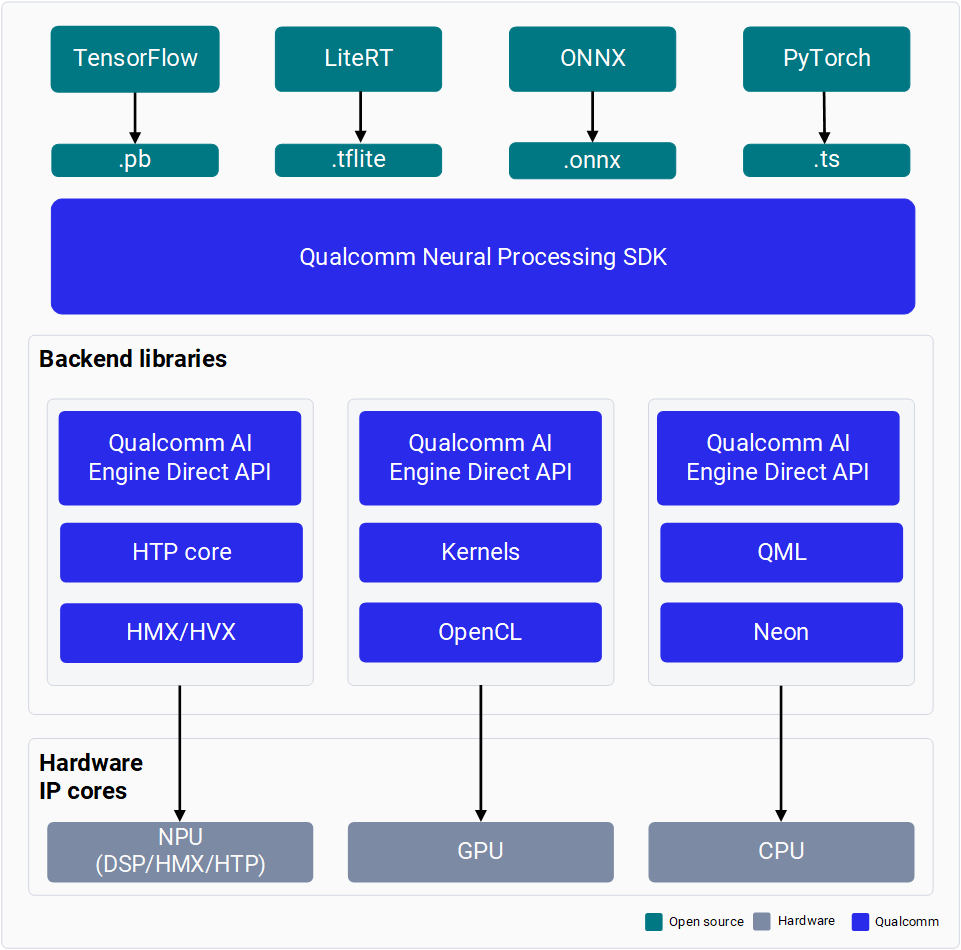
Qualcomm AI Runtime SDK 是一个一体化 SDK,用于将 ML 模型移植到
Qualcomm 硬件加速器上运行。该 SDK 包含
Qualcomm 神经处理引擎(也称为 SNPE)和
AI Engine Direct(也称为 QNN),它们提供转换
和量化在 PyTorch 和 TensorFlow 中训练的模型的工具,以及在
CPU、GPU 和 HTP 上运行这些模型的运行时。了解有关
[SNPE](https://docs.qualcomm.com/doc/80-63442-10/topic/index_SNPE.html)
和
[QNN](https://docs.qualcomm.com/doc/80-63442-10/topic/index_QNN.html) 的更多信息。
 ## 设置
下载并安装 Qualcomm AI Runtime SDK。
为模型优化配置 SDK 环境。
## 转换和量化模型
转换来自 PyTorch、TensorFlow、ONNX 或 LiteRT 的模型,并使用 SNPE 或 QNN 对其进行量化以便部署。
## 运行推理
使用 SNPE 或 QNN 在 CPU、GPU 或 HTP 上对转换后的模型运行推理。
## API 参考
SNPE C/C++ API 参考文档。
QNN C/C++ API 参考文档。
## 设置
下载并安装 Qualcomm AI Runtime SDK。
为模型优化配置 SDK 环境。
## 转换和量化模型
转换来自 PyTorch、TensorFlow、ONNX 或 LiteRT 的模型,并使用 SNPE 或 QNN 对其进行量化以便部署。
## 运行推理
使用 SNPE 或 QNN 在 CPU、GPU 或 HTP 上对转换后的模型运行推理。
## API 参考
SNPE C/C++ API 参考文档。
QNN C/C++ API 参考文档。