> ## Documentation Index
> Fetch the complete documentation index at: https://dragonwingdocs.qualcomm.com/llms.txt
> Use this file to discover all available pages before exploring further.
# 使用 simulation_sample_amr_simple_motion 在模拟器中控制 AMR
> 此示例应用演示如何在模拟器中控制 AMR。
`simulation_sample_amr_simple_motion` 是一个模拟示例应用,它使用基于 Python 的 ROS 节点在模拟器中控制 QRB 自主移动机器人(AMR)的运动。
[QRB ROS Simulation](https://github.com/qualcomm-qrb-ros/qrb_ros_simulation) 软件包提供了模拟环境。它允许您通过向 `/qrb_robot_base/cmd_vel` 话题发布 ROS 消息来控制 QRB AMR 的运动。
**注意**
更多信息请参阅 GitHub 上的 [simulation\_sample\_amr\_simple\_motion](https://github.com/qualcomm-qrb-ros/qrb_ros_samples/tree/main/robotics/simulation_sample_amr_simple_motion)。
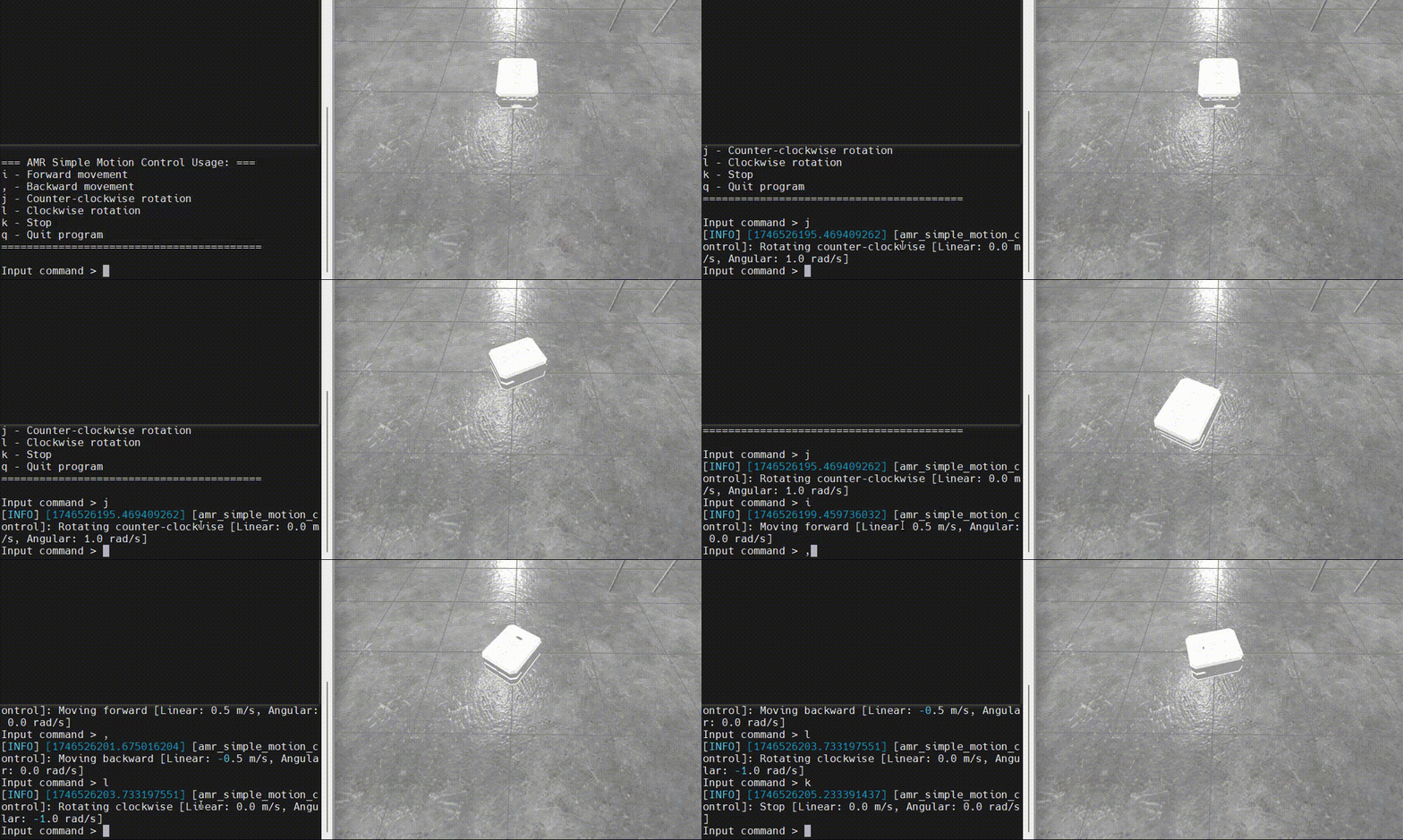
图:在模拟器中控制 AMR 的示例效果
## `simulation_sample_amr_simple_motion` 的管道流程

图:`simulation_sample_amr_simple_motion` 的管道流程
## `simulation_sample_amr_simple_motion `**管道**中使用的 ROS 节点
| ROS 节点 |
描述 |
| `qrb_ros_simulation` |
`qrb ros simulation` 是一个用于搭建 Qualcomm 机器人模拟环境的 ROS 软件包。详情请参阅 [QRB ROS Simulation](https://github.com/qualcomm-qrb-ros/qrb_ros_simulation)。 |
## `simulation_sample_amr_simple_motion `管道中使用的 ROS 话题
| ROS 话题 |
类型 |
发布者 |
描述 |
| `/qrb_robot_base/cmd_vel` |
`geometry_msgs::msg::Twist` |
`simulation_sample_amr_simple_motion` |
表示机器人运动的速度指令。 |
## 前提条件
您已完成 [为运行示例应用设置环境](./set-up-env-for-sample-app) 中的以下设置(跳过 **Set up host docker** 的设置)。
* 设置设备
* 设置主机
### **设置模拟环境**
1. 在主机上,按照 [QRB ROS Simulation](https://github.com/qualcomm-qrb-ros/qrb_ros_simulation) 的 **README** 完成以下操作,搭建 Qualcomm 机器人模拟环境。确保设备和主机位于同一本地网络中,并且能够通过 ROS 通信相互通信。
1. 在 Ubuntu24.04 主机或 Docker 上设置开发环境。
2. 从源码构建。
2. 在主机上运行 QRB Robot Base AMR。
```cpp theme={null}
# Set the ROS_DOMAIN_ID
export ROS_DOMAIN_ID=123
ros2 launch qrb_ros_sim_gazebo gazebo_robot_base.launch.py namespace:=qrb_robot_base enable_laser:=false
```
## 开箱即用运行 `simulation_sample_amr_simple_motion`
在开发套件上,运行以下命令:
```cpp theme={null}
# setup runtime environment
(ssh) source /usr/share/qirp-setup.sh
# Set the ROS_DOMAIN_ID
(ssh) export ROS_DOMAIN_ID=123
ros2 run simulation_sample_amr_simple_motion simple_motion
```
**结果**
如果 ROS 节点启动成功,会出现以 `=== AMR Simple Motion Control Usage: ===` 开头的日志。
然后,您可以输入运动控制命令,并在主机上的模拟器中查看 QRB AMR 的运动状态。
## **构建并运行** `simulation_sample_amr_simple_motion`
1. 在主机的终端中,运行以下命令:
**注意**
* ``:QIR SDK 的版本,请参阅 [QIR SDK 2.0 发行说明](../../Key-Documents/QIR-SDK-Release-Notes/robotics-sdk-qli2.0-062026)。
* ``:QIR SDK 解压后的路径。
1. 构建示例应用项目。
```powershell theme={null}
# Set up the QIR SDK environment
cd /images/iq-9075-evk/qirpsdk_artifacts/iq-9075-evk
tar -zxf qirp-sdk_.tar.gz
cd /qirp-sdk
source setup.sh
# build sample
cd /qirp-sdk/qirp-samples/robotics/simulation_sample_amr_simple_motion
colcon build
```
2. 打包示例应用并推送到设备。
```powershell theme={null}
# package and push build result of sample
cd /qirp-sdk/qirp-samples/robotics/simulation_sample_amr_simple_motion/install/simulation_sample_amr_simple_motion
tar -czf simulation_sample_amr_simple_motion.tar.gz lib share
scp simulation_sample_amr_simple_motion.tar.gz root@[ip-addr]:/opt/
```
2. 在开发套件上,运行以下命令:
1. 安装示例应用。
```shell theme={null}
# Install sample package
(ssh) tar --no-overwrite-dir --no-same-owner -zxf /opt/simulation_sample_amr_simple_motion.tar.gz -C /usr/ros/jazzy/
```
2. 按照 [开箱即用运行 simulation\_sample\_amr\_simple\_motion](#run-out-of-the-box-simulation_sample_amr_simple_motion) 中的步骤运行示例应用。