> ## Documentation Index
> Fetch the complete documentation index at: https://dragonwingdocs.qualcomm.com/llms.txt
> Use this file to discover all available pages before exploring further.

# 参考资料

export const tdA = {
  border: "1px solid #ddd",
  padding: "10px 14px",
  textAlign: "left",
  verticalAlign: "top"
};
export const thA1 = {
  border: "1px solid #ddd",
  padding: "10px 14px",
  textAlign: "center",
  backgroundColor: "#f5f5f5",
  fontWeight: "600",
  color: "#333",
  width: "30%"
};
export const thA2 = {
  border: "1px solid #ddd",
  padding: "10px 14px",
  textAlign: "center",
  backgroundColor: "#f5f5f5",
  fontWeight: "600",
  color: "#333",
  width: "70%"
};
export const thAeq = {
  border: "1px solid #ddd",
  padding: "10px 14px",
  textAlign: "center",
  backgroundColor: "#f5f5f5",
  fontWeight: "600",
  color: "#333"
};
export const tblA = {
  borderCollapse: "collapse",
  width: "100%",
  fontSize: "14px",
  tableLayout: "fixed"
};

## QUP v3 概述

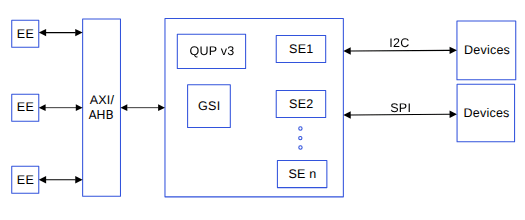
QUP v3 是一种高度灵活且可编程的硬件，可支持多种串行接口。单个 QUP v3 串行引擎硬件核心最多可提供八个串行接口。两个 QUP v3 硬件核心如下：

* 16 串行引擎核心
* SSC QUP v3 硬件核心，在 SSC\_I/O 中提供五个串行引擎

QUP v3 支持系统中多个硬件实体的访问。每个实体拥有自己的执行环境（EE）、独立的地址空间和一条中断线。有关 QUP v3 中可配置的各种传输模式的信息，请参阅[QUP v3 支持的传输模式](#supported-transfer-modes-in-qup-v3)。

下图显示了一个 GSI 核心/引擎连接最多八个串行引擎（SE）。您可以根据用例或串行引擎的协议灵活地自定义配置。有关如何自定义配置的信息，请参阅 [QUP v3 访问控制自定义](#qup-v3-access-control-customization)。要验证 QUP v3 固件是否已正确烧写，请参阅 [QUP v3 固件状态验证](#qup-v3-firmware-status-verification)。

<Frame>
  <img src="https://mintcdn.com/qualcomm-prod/rpHTx_a6zriKQll9/System/Interfaces/images/QUPv3_block_diagram.png?fit=max&auto=format&n=rpHTx_a6zriKQll9&q=85&s=1b2dffb69cc008817c1c7902d095b7c2" alt="QUPv3 框图" width="525" height="220" data-path="System/Interfaces/images/QUPv3_block_diagram.png" />
</Frame>

<p align="center"><strong>图：QUP v3 框图</strong></p>

## QUP v3 支持的传输模式

QUP v3 串行引擎可配置为以下模式。

* FIFO 模式：简单可靠，但 CPU 占用高。最适合低流量控制操作和基本启动（bring-up）。
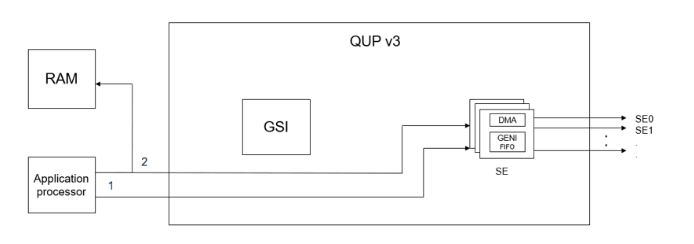
* CPU DMA（SE DMA 模式）：将数据搬移工作卸载，但仍依赖 CPU 协调。可带来中等程度的性能提升。
* 通用软件接口（GSI）DMA 模式（首选）：完全由硬件驱动的传输，CPU 参与度极低。针对高性能、可扩展性和功耗效率进行了优化。

**表：用户层面对比摘要**

<table style={tblA}>
  <thead>
    <tr>
      <th style={thAeq}>方面</th>
      <th style={thAeq}>FIFO</th>
      <th style={thAeq}>CPU DMA</th>
      <th style={thAeq}>GSI DMA</th>
    </tr>
  </thead>

  <tbody>
    <tr>
      <td style={tdA}>CPU 参与度</td>
      <td style={tdA}>高</td>
      <td style={tdA}>中</td>
      <td style={tdA}>极低</td>
    </tr>

    <tr>
      <td style={tdA}>中断频率</td>
      <td style={tdA}>高</td>
      <td style={tdA}>中</td>
      <td style={tdA}>非常低</td>
    </tr>

    <tr>
      <td style={tdA}>功耗效率</td>
      <td style={tdA}>低</td>
      <td style={tdA}>中</td>
      <td style={tdA}>高</td>
    </tr>

    <tr>
      <td style={tdA}>性能可扩展性</td>
      <td style={tdA}>差</td>
      <td style={tdA}>中等</td>
      <td style={tdA}>优秀</td>
    </tr>

    <tr>
      <td style={tdA}>最适合</td>
      <td style={tdA}>简单控制</td>
      <td style={tdA}>中等传输</td>
      <td style={tdA}>高性能系统</td>
    </tr>
  </tbody>
</table>

QUPv3 GENI 支持多种数据搬移机制。传统上，传输可以使用 FIFO（基于 PIO）或 CPU 管理的 DMA 模式执行。虽然这些方式对于低吞吐量或不频繁的传输已经足够，但在高流量条件下，它们会给 CPU 带来持续负载并产生较高的中断率。

### QUPv3 GENI 传输模式

QUPv3 GENI 支持多种数据搬移机制。传统上，传输可以使用 FIFO（基于 PIO）或 CPU 管理的 DMA 模式执行。虽然这些方式对于低吞吐量或不频繁的传输已经足够，但在高流量条件下，它们会给 CPU 带来持续负载并产生较高的中断率。

**FIFO 模式**

<Frame>
  <img src="https://mintcdn.com/qualcomm-prod/rpHTx_a6zriKQll9/System/Interfaces/images/Fifo_mode.png?fit=max&auto=format&n=rpHTx_a6zriKQll9&q=85&s=e214b6def139e58108b555bc1e36485c" alt="Fifo 模式" width="694" height="244" data-path="System/Interfaces/images/Fifo_mode.png" />
</Frame>

<p align="center"><strong>图：FIFO 模式</strong></p>

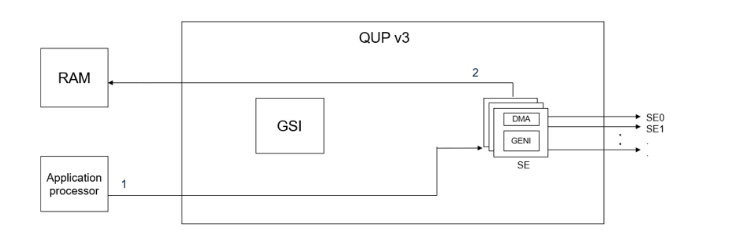
1. ①：应用处理器配置通用接口（GENI）。
2. ②：应用处理器处理 Rx/Tx 数据。数据在 GENI 和内存之间传输。

**DMA 模式**
<Frame>
  <img src="https://mintcdn.com/qualcomm-prod/rpHTx_a6zriKQll9/System/Interfaces/images/DMA_mode.png?fit=max&auto=format&n=rpHTx_a6zriKQll9&q=85&s=d1f2a4ca9aee0773ff420a997faf0ca0" alt="DMA 模式" width="733" height="243" data-path="System/Interfaces/images/DMA_mode.png" />
</Frame>

<p align="center"><strong>图：DMA 模式</strong></p>

1. ①：应用处理器初始化 DMA。
2. ②：串行引擎配置 GENI，并启动传输过程。

**GSI 模式**

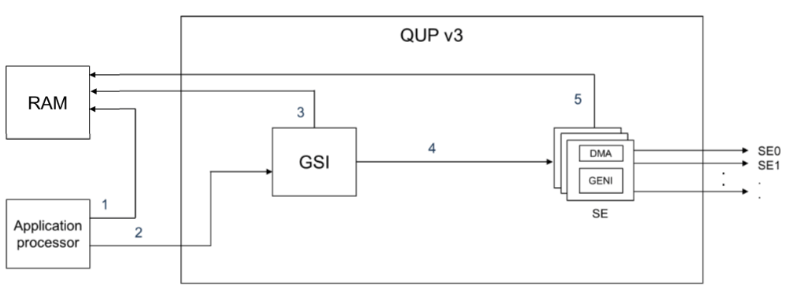
GSI 模式引入了一种基于描述符的硬件辅助 DMA 机制，使用 Qualcomm 的 GPI DMA 引擎。在此模式下，CPU 编写一组事务描述符——称为事务环元素（Transaction Ring Elements，TRE）——它们完整描述一次 I/O 操作。一旦提交，GPI 硬件即自主执行传输，在系统内存和 GENI 串行引擎之间搬移数据，无需 CPU 进一步干预。GSI 模式最适合以下用例：

* 高速 I3C 设备
* 摄像头和以太网子系统
* 通过 I2C 的 PCIe 交换机

使用 GSI 模式的系统级优势如下：

* 大幅减轻 CPU 负载
* 更少的中断
* 负载下更好的可扩展性
* 性能提升
  * 大传输量下性能稳定
  * 每次传输的中断率更低
  * 延迟可预测
  * 高速下吞吐量稳定
  * 大数据负载下不会急剧劣化
<Frame>
  <img src="https://mintcdn.com/qualcomm-prod/rpHTx_a6zriKQll9/System/Interfaces/images/GSI_mode.png?fit=max&auto=format&n=rpHTx_a6zriKQll9&q=85&s=957e6ee44cf0b873f2ff3b5e7b827021" alt="GSI 模式" width="790" height="289" data-path="System/Interfaces/images/GSI_mode.png" />
</Frame>

<p align="center"><strong>图：GSI 模式</strong></p>

1. ①：应用处理器准备 TRE。
2. ②：应用处理器通知 QUP（GSI）。
3. ③：GSI 处理 TRE。
4. ④：TRE 处理完成后，发送给 GENI。
5. ⑤：串行引擎处理 Rx/Tx 数据。

<Note>
  **注意**

  QUP v3 UART 串行引擎不支持 GSI 模式。
</Note>

## QUP v3 访问控制自定义

QUP v3 用户访问文件 `QUPAC_Access.c` 指定串行引擎资源的所有者。它最初根据系统 I/O GPIO 分配进行填充。所有串行引擎都必须列出才能访问子系统。它足够灵活，可以只列出特定设备上可用的串行引擎。

要为所需的串行引擎协议自定义访问控制，请在 `QUPAC_Access.c` 文件中配置参数。`QUPAC_Access.c` 文件的 Qualcomm TEE 镜像位于 `/firmware/qualcomm-linux-spf-1-0_ap_standard_oem_nomodem/TZ.XF.5.0/trustzone_images/core/settings/buses/qup_accesscontrol/qupv3/config/<chipset>/QUPAC_Access.c`。

要指定串行引擎资源的所有者，请修改 `QUPAC_Access.c` 文件以适配板卡设计。

以下用例指定了在已启用的串行引擎上运行的默认协议。您可以根据自己的板卡设计修改代码。

**QUP v3 串行引擎中的非安全模式用例**

QUP v3 串行引擎支持以下非安全模式用例。

```c theme={null}
const QUPv3_se_security_permissions_type qupv3_perms_iot_rb3[] =
{
    /*  PeriphID,      ProtocolID,              Mode,      NsOwner,
        bAllowFifo,   bLoad,   bModExcl */
    { QUPV3_0_SE0, QUPV3_PROTOCOL_I2C,     QUPV3_MODE_FIFO, AC_HLOS,
      TRUE, TRUE, FALSE }, // LT9611 and QPS615 I2C
    { QUPV3_0_SE1, QUPV3_PROTOCOL_I2C,     QUPV3_MODE_FIFO, AC_HLOS,
      TRUE, TRUE, FALSE }, // APPS I2C - PCIE/ USB Type C
    { QUPV3_0_SE2, QUPV3_PROTOCOL_I2C,     QUPV3_MODE_FIFO, AC_HLOS,
      TRUE, TRUE, FALSE }, // SMB / LS1 I2C
    { QUPV3_0_SE3, QUPV3_PROTOCOL_SPI,     QUPV3_MODE_FIFO, AC_HLOS,
      TRUE, TRUE, FALSE }, // CAN SPI
    { QUPV3_0_SE4, QUPV3_PROTOCOL_UART_4W, QUPV3_MODE_FIFO, AC_HLOS,
      TRUE, TRUE, FALSE }, // LS1 UART
    { QUPV3_0_SE5, QUPV3_PROTOCOL_UART_2W, QUPV3_MODE_FIFO, AC_HLOS,
      TRUE, FALSE, FALSE }, // Debug UART
    { QUPV3_0_SE6, QUPV3_PROTOCOL_UART_2W, QUPV3_MODE_FIFO, AC_HLOS,
      TRUE, TRUE, FALSE }, // WLAN UART
    { QUPV3_0_SE7, QUPV3_PROTOCOL_UART_4W, QUPV3_MODE_FIFO, AC_HLOS,
      TRUE, TRUE, FALSE }, // Hastings BT
    { QUPV3_1_SE0, QUPV3_PROTOCOL_SPMI,    QUPV3_MODE_FIFO, AC_ADSP_Q6_ELF,
      TRUE, TRUE, FALSE }, // QuP SPMI
    { QUPV3_1_SE1, QUPV3_PROTOCOL_I2C,     QUPV3_MODE_FIFO, AC_HLOS,
      TRUE, TRUE, FALSE }, // NFC I2C
    { QUPV3_1_SE2, QUPV3_PROTOCOL_I2C,     QUPV3_MODE_FIFO, AC_HLOS,
      TRUE, TRUE, FALSE }, // HDMI OUT for VIDEOIOBoard
    { QUPV3_1_SE3, QUPV3_PROTOCOL_SPI,     QUPV3_MODE_FIFO, AC_HLOS,
      FALSE, TRUE, FALSE }, // LS1 SPI
    { QUPV3_1_SE4, QUPV3_PROTOCOL_SPI,     QUPV3_MODE_GSI,  AC_TZ,
      FALSE, TRUE, FALSE }, // SPI -NFC ESE
    { QUPV3_1_SE5, QUPV3_PROTOCOL_I2C,     QUPV3_MODE_GSI,  AC_HLOS,
      FALSE, TRUE, FALSE}, // Legacy Touch
    { QUPV3_1_SE6, QUPV3_PROTOCOL_SPI,     QUPV3_MODE_GSI,  AC_HLOS,
      FALSE, TRUE, FALSE}, // FP
    /*QUPV3_1_SE7*/
};
```

### QUP v3 串行引擎访问列表说明

以下变量会传入 `QUPv3_se_security_permissions_type` 结构体。

**表：QUP v3 的安全权限变量**

<table style={tblA}>
  <thead>
    <tr>
      <th style={thA1}>变量</th>
      <th style={thA2}>说明</th>
    </tr>
  </thead>

  <tbody>
    <tr><td style={tdA}>PeriphID</td><td style={tdA}>要配置和分配的串行引擎外设。</td></tr>
    <tr><td style={tdA}>ProtocolID</td><td style={tdA}>所需协议的宏。</td></tr>
    <tr><td style={tdA}>Mode</td><td style={tdA}>FIFO/GSI/DMA 模式的宏。</td></tr>
    <tr><td style={tdA}>NsOwner</td><td style={tdA}>存放需要访问权限的镜像的宏。</td></tr>
    <tr><td style={tdA}>bAllowFifo</td><td style={tdA}>如果模式为 FIFO，则该布尔标志设为 True，否则设为 False。</td></tr>
    <tr><td style={tdA}>bLoad</td><td style={tdA}>该布尔标志值设为 True 以加载协议固件。</td></tr>
    <tr><td style={tdA}>bModExcl</td><td style={tdA}>此标志专用于 Qualcomm TEE。当 NsOwner 为 AC\_TZ 时设为 True。</td></tr>
  </tbody>
</table>

有关此宏的更多信息，请参阅 `settings/buses/qup_accesscontrol/qupv3/interface/QupACCommonIds.h`。

## QUP v3 固件状态验证

要使串行引擎正常工作，必须正确烧写 QUP 固件。固件通过 metabuild 提供，位于 `common/core_qupv3fw/<chipset>/qupv3fw.elf`。您可以通过检查 `GENI_FW_REVISION_RO`（`0xa8c068`）来验证固件状态。例如，在内核日志中查找该寄存器的 `0x0000ffff` 值。在以下日志中，`0000ffff` 错误表示固件未正确烧写。

```
0a8c068: 0000ffff //Invalid firmware or firmware not loaded
00a80069: 00000126 //SPI
00a80068: 00000338 //I2C
```

仅当您打算使用与默认配置不同的协议时，才修改 `QUPAC_Access.c` 文件配置。

当加载后配置不匹配时，会显示以下示例日志。

```
msm_geni_serial 898000.qcom,qup_uart:msm_geni_serial_startup: Invalid FW 255 loaded
```

## 相关文档

<table style={tblA}>
  <thead>
    <tr>
      <th style={thA1}>标题</th>
      <th style={thA2}>资源</th>
    </tr>
  </thead>

  <tbody>
    <tr><td style={{ ...tdA, fontWeight: "600" }} colSpan="2">Qualcomm Technologies, Inc.</td></tr>
    <tr><td style={tdA}>安全外壳（SSH）</td><td style={tdA}>[https://docs.qualcomm.com/bundle/publicresource/topics/80-80022-254/how\_to.html](https://docs.qualcomm.com/bundle/publicresource/topics/80-80022-254/how_to.html)</td></tr>
    <tr><td style={tdA}>QDTE</td><td style={tdA}>[https://docs.qualcomm.com/bundle/publicresource/topics/80-80022-4/tools.html#qdte](https://docs.qualcomm.com/bundle/publicresource/topics/80-80022-4/tools.html#qdte)</td></tr>
    <tr><td style={{ ...tdA, fontWeight: "600" }} colSpan="2">资源</td></tr>
    <tr><td style={tdA}>PCI 总线子系统</td><td style={tdA}>[https://www.kernel.org/doc/html/latest/PCI/index.html](https://www.kernel.org/doc/html/latest/PCI/index.html)</td></tr>
    <tr><td style={tdA}>Linux 用户空间示例</td><td style={tdA}>[https://github.com/DigilientLinux-userspace-examples/tree/master/uart\_example\_linux/src](https://github.com/DigilientLinux-userspace-examples/tree/master/uart_example_linux/src)</td></tr>
    <tr><td style={tdA}>DTSI 配置示例</td><td style={tdA}>[https://github.com/torvalds/linux/blob/master/arch/arm64/boot/dts/qcom/qcs6490-rb3gen2.dts](https://github.com/torvalds/linux/blob/master/arch/arm64/boot/dts/qcom/qcs6490-rb3gen2.dts)</td></tr>
    <tr><td style={tdA}>UART 串行接口驱动的测试工具和方法</td><td style={tdA}>[https://docs.kernel.org/admin-guide/serial-console.html](https://docs.kernel.org/admin-guide/serial-console.html)</td></tr>
    <tr><td style={tdA}>UART Linux API</td><td style={tdA}>[https://github.com/torvalds/linux/blob/master/include/linux/tty.h](https://github.com/torvalds/linux/blob/master/include/linux/tty.h)</td></tr>
    <tr><td style={tdA}>UART 上游设备树参考</td><td style={tdA}>[https://git.linaro.org/kernel-org/linux-next.git/tree/arch/arm64/boot/dts/qcom/sc7280.dtsi](https://git.linaro.org/kernel-org/linux-next.git/tree/arch/arm64/boot/dts/qcom/sc7280.dtsi)</td></tr>
    <tr><td style={tdA}>Qualcomm Dragonwing RB3 Gen 2 开发套件设备树节点</td><td style={tdA}>[https://git.linaro.org/kernel-org/linux-next.git/tree/arch/arm64/boot/dts/qcom/qcs6490-rb3gen2.dts](https://git.linaro.org/kernel-org/linux-next.git/tree/arch/arm64/boot/dts/qcom/qcs6490-rb3gen2.dts)</td></tr>
    <tr><td style={tdA}>SPI 内核工具</td><td style={tdA}>[https://git.kernel.org/pub/scm/linux/kernel/git/stable/linux.git/tree/tools/spi](https://git.kernel.org/pub/scm/linux/kernel/git/stable/linux.git/tree/tools/spi)</td></tr>
    <tr><td style={tdA}>SPI 上游设备树参考</td><td style={tdA}>[https://git.linaro.org/kernel-org/linux-next.git/tree/arch/arm64/boot/dts/qcom/sc7280.dtsi](https://git.linaro.org/kernel-org/linux-next.git/tree/arch/arm64/boot/dts/qcom/sc7280.dtsi)</td></tr>
    <tr><td style={tdA}>I2C 示例</td><td style={tdA}><ul><li>[https://manpages.debian.org/testing/i2c-tools/index.html](https://manpages.debian.org/testing/i2c-tools/index.html)</li><li>[https://linuxhint.com/i2c-linux-utilities/](https://linuxhint.com/i2c-linux-utilities/)</li></ul></td></tr>
    <tr><td style={tdA}>I2C Linux API</td><td style={tdA}><ul><li>[https://github.com/torvalds/linux/blob/master/include/linux/i2c.h](https://github.com/torvalds/linux/blob/master/include/linux/i2c.h)</li><li>[https://github.com/torvalds/linux/blob/master/include/linux/i2c-dev.h](https://github.com/torvalds/linux/blob/master/include/linux/i2c-dev.h)</li></ul></td></tr>
    <tr><td style={tdA}>I2C 上游内核测试应用和 I2C 工具</td><td style={tdA}>[https://layers.openembedded.org/layerindex/recipe/27859/](https://layers.openembedded.org/layerindex/recipe/27859/)</td></tr>
    <tr><td style={tdA}>I2C 上游设备树参考</td><td style={tdA}>[https://git.linaro.org/kernel-org/linux-next.git/tree/arch/arm64/boot/dts/qcom/sc7280.dtsi](https://git.linaro.org/kernel-org/linux-next.git/tree/arch/arm64/boot/dts/qcom/sc7280.dtsi)</td></tr>
    <tr><td style={tdA}>PCIe 设备初始化和枚举流程</td><td style={tdA}>[https://www.kernel.org/doc/html/latest/PCI/index.html](https://www.kernel.org/doc/html/latest/PCI/index.html)</td></tr>
    <tr><td style={tdA}>PCIe 框架和客户端驱动的 PCIe 注册</td><td style={tdA}>[https://www.kernel.org/doc/html/latest/PCI/index.html](https://www.kernel.org/doc/html/latest/PCI/index.html)</td></tr>
    <tr><td style={tdA}>为 PCIe 实例添加受支持的 MSI 组</td><td style={tdA}>[https://lore.kernel.org/linux-arm-msm/f1168212-bc6e-4570-869c-2870d6f248ad@linaro.org/T/](https://lore.kernel.org/linux-arm-msm/f1168212-bc6e-4570-869c-2870d6f248ad@linaro.org/T/)</td></tr>
    <tr><td style={tdA}>PCIe 调试</td><td style={tdA}>[https://pcisig.com/specifications](https://pcisig.com/specifications)</td></tr>
    <tr><td style={tdA}>PCIe 上游设备树参考</td><td style={tdA}><ul><li>[https://git.linaro.org/kernel-org/linux-next.git/tree/arch/arm64/boot/dts/qcom/sc7280.dtsi](https://git.linaro.org/kernel-org/linux-next.git/tree/arch/arm64/boot/dts/qcom/sc7280.dtsi)</li><li>[https://git.kernel.org/pub/scm/linux/kernel/git/torvalds/linux.git/tree/drivers/pci/controller/dwc/pcie-qcom.c?h=v6.8-rc6#n1634](https://git.kernel.org/pub/scm/linux/kernel/git/torvalds/linux.git/tree/drivers/pci/controller/dwc/pcie-qcom.c?h=v6.8-rc6#n1634)</li></ul></td></tr>
    <tr><td style={tdA}>USB `Qscratch` 封装驱动</td><td style={tdA}>[https://github.com/torvalds/linux/blob/master/drivers/usb/dwc3/dwc3-qcom.c](https://github.com/torvalds/linux/blob/master/drivers/usb/dwc3/dwc3-qcom.c)</td></tr>
    <tr><td style={tdA}>控制器核心驱动</td><td style={tdA}>[https://github.com/torvalds/linux/blob/master/drivers/usb/dwc3/core.c](https://github.com/torvalds/linux/blob/master/drivers/usb/dwc3/core.c)</td></tr>
    <tr><td style={tdA}>Type-C 连接器的 USB 软件接口驱动</td><td style={tdA}><ul><li>[https://git.kernel.org/pub/scm/linux/kernel/git/stable/linux.git/tree/drivers/usb/typec/ucsi/ucsi.h?h=v6.6.2](https://git.kernel.org/pub/scm/linux/kernel/git/stable/linux.git/tree/drivers/usb/typec/ucsi/ucsi.h?h=v6.6.2)</li><li>[https://git.kernel.org/pub/scm/linux/kernel/git/stable/linux.git/tree/drivers/usb/typec/ucsi/ucsi\_glink.c?h=v6.6.2](https://git.kernel.org/pub/scm/linux/kernel/git/stable/linux.git/tree/drivers/usb/typec/ucsi/ucsi_glink.c?h=v6.6.2)</li><li>[https://git.kernel.org/pub/scm/linux/kernel/git/stable/linux.git/tree/drivers/usb/typec/ucsi/displayport.c?h=v6.6.2](https://git.kernel.org/pub/scm/linux/kernel/git/stable/linux.git/tree/drivers/usb/typec/ucsi/displayport.c?h=v6.6.2)</li><li>[https://git.kernel.org/pub/scm/linux/kernel/git/stable/linux.git/tree/drivers/phy/qualcomm/phy-qcom-qmp-combo.c?h=v6.6.2](https://git.kernel.org/pub/scm/linux/kernel/git/stable/linux.git/tree/drivers/phy/qualcomm/phy-qcom-qmp-combo.c?h=v6.6.2)</li><li>[https://git.kernel.org/pub/scm/linux/kernel/git/stable/linux.git/tree/drivers/usb/dwc3/dwc3-qcom.c?h=v6.6.2](https://git.kernel.org/pub/scm/linux/kernel/git/stable/linux.git/tree/drivers/usb/dwc3/dwc3-qcom.c?h=v6.6.2)</li><li>[https://git.kernel.org/pub/scm/linux/kernel/git/stable/linux.git/tree/drivers/soc/qualcomm/pmic\_glink.c?h=v6.6.2](https://git.kernel.org/pub/scm/linux/kernel/git/stable/linux.git/tree/drivers/soc/qualcomm/pmic_glink.c?h=v6.6.2)</li><li>[https://git.kernel.org/pub/scm/linux/kernel/git/stable/linux.git/tree/drivers/soc/qualcomm/pmic\_glink\_altmode.c?h=v6.6.2](https://git.kernel.org/pub/scm/linux/kernel/git/stable/linux.git/tree/drivers/soc/qualcomm/pmic_glink_altmode.c?h=v6.6.2)</li></ul></td></tr>
    <tr><td style={tdA}>LPM 支持</td><td style={tdA}>[https://lore.kernel.org/20231017131851.8299-1-quic\_kriskura@quicinc.com/](https://lore.kernel.org/20231017131851.8299-1-quic_kriskura@quicinc.com/)</td></tr>
    <tr><td style={tdA}>USB DWC3 驱动</td><td style={tdA}>[https://git.kernel.org/pub/scm/linux/kernel/git/stable/linux.git/tree/drivers/usb/dwc3/dwc3-qcom.c?h=v6.6.2](https://git.kernel.org/pub/scm/linux/kernel/git/stable/linux.git/tree/drivers/usb/dwc3/dwc3-qcom.c?h=v6.6.2)</td></tr>
    <tr><td style={tdA}>Qualcomm Synopsys femto PHY</td><td style={tdA}>[https://git.kernel.org/pub/scm/linux/kernel/git/stable/linux.git/tree/drivers/phy/qualcomm/phy-qcom-snps-femto-v2.c?h=v6.6.2](https://git.kernel.org/pub/scm/linux/kernel/git/stable/linux.git/tree/drivers/phy/qualcomm/phy-qcom-snps-femto-v2.c?h=v6.6.2)</td></tr>
    <tr><td style={tdA}>QMP DisplayPort 组合 PHY</td><td style={tdA}>[https://git.kernel.org/pub/scm/linux/kernel/git/stable/linux.git/tree/drivers/phy/qualcomm/phy-qcom-qmp-combo.c?h=v6.6.2](https://git.kernel.org/pub/scm/linux/kernel/git/stable/linux.git/tree/drivers/phy/qualcomm/phy-qcom-qmp-combo.c?h=v6.6.2)</td></tr>
    <tr><td style={tdA}>USB ADB</td><td style={tdA}>[https://developer.android.com/tools/adb](https://developer.android.com/tools/adb)</td></tr>
    <tr><td style={tdA}>`f_fs.c`</td><td style={tdA}>[https://git.kernel.org/pub/scm/linux/kernel/git/stable/linux.git/tree/drivers/usb/gadget/function/f\_fs.c?h=v6.6.2](https://git.kernel.org/pub/scm/linux/kernel/git/stable/linux.git/tree/drivers/usb/gadget/function/f_fs.c?h=v6.6.2)</td></tr>
    <tr><td style={tdA}>大容量存储</td><td style={tdA}>[https://git.kernel.org/pub/scm/linux/kernel/git/stable/linux.git/tree/drivers/usb/gadget/function/f\_mass\_storage.c?h=v6.6.2](https://git.kernel.org/pub/scm/linux/kernel/git/stable/linux.git/tree/drivers/usb/gadget/function/f_mass_storage.c?h=v6.6.2)</td></tr>
    <tr><td style={tdA}>平台工具（adb/fastboot）</td><td style={tdA}>[https://developer.android.com/tools/releases/platform-tools](https://developer.android.com/tools/releases/platform-tools)</td></tr>
    <tr><td style={tdA}>平台 LibUVC</td><td style={tdA}><ul><li>[https://github.com/libuvc/libuvc](https://github.com/libuvc/libuvc)</li><li>[https://libuvc.github.io/libuvc/](https://libuvc.github.io/libuvc/)</li></ul></td></tr>
    <tr><td style={tdA}>UVC gadget</td><td style={tdA}>[https://github.com/wlhe/uvc-gadget](https://github.com/wlhe/uvc-gadget)</td></tr>
    <tr><td style={tdA}>UVC streamer</td><td style={tdA}>[https://github.com/bsapundzhiev/uvc-streamer](https://github.com/bsapundzhiev/uvc-streamer)</td></tr>
    <tr><td style={tdA}>UVC Video4Linux (v4l2-utils)</td><td style={tdA}>[https://linuxtv.org/downloads/v4l-dvb-apis/driver-api/v4l2-core.html](https://linuxtv.org/downloads/v4l-dvb-apis/driver-api/v4l2-core.html)</td></tr>
    <tr><td style={tdA}>USB 上游设备树参考</td><td style={tdA}>[https://git.linaro.org/kernel-org/linux-next.git/tree/arch/arm64/boot/dts/qcom/sc7280.dtsi](https://git.linaro.org/kernel-org/linux-next.git/tree/arch/arm64/boot/dts/qcom/sc7280.dtsi)</td></tr>
    <tr><td style={tdA}>Qualcomm Linux 硬件 SoC 设备树节点</td><td style={tdA}>[https://git.linaro.org/kernel-org/linux-next.git/tree/arch/arm64/boot/dts/qcom/qcs6490-rb3gen2.dts](https://git.linaro.org/kernel-org/linux-next.git/tree/arch/arm64/boot/dts/qcom/qcs6490-rb3gen2.dts)</td></tr>
    <tr><td style={tdA}>USB 驱动中的 RPM 更改及其他示例</td><td style={tdA}>[https://patchwork.kernel.org/project/linux-usb/list/?series=793939\&archive=both](https://patchwork.kernel.org/project/linux-usb/list/?series=793939\&archive=both)</td></tr>
    <tr><td style={tdA}>扁平化设备树</td><td style={tdA}><ul><li>[https://lore.kernel.org/all/af60c05b-4a0f-51b8-486a-1fc601602515@quicinc.com/](https://lore.kernel.org/all/af60c05b-4a0f-51b8-486a-1fc601602515@quicinc.com/)</li><li>[https://lore.kernel.org/all/20231016-dwc3-refactor-v1-0-ab4a84165470@quicinc.com/](https://lore.kernel.org/all/20231016-dwc3-refactor-v1-0-ab4a84165470@quicinc.com/)</li></ul></td></tr>
  </tbody>
</table>

## 缩略语和术语

<table style={tblA}>
  <thead>
    <tr>
      <th style={thA1}>缩略语或术语</th>
      <th style={thA2}>定义</th>
    </tr>
  </thead>

  <tbody>
    <tr><td style={tdA}>aDSP</td><td style={tdA}>应用数字信号处理器</td></tr>
    <tr><td style={tdA}>ADB</td><td style={tdA}>Android 调试桥</td></tr>
    <tr><td style={tdA}>ASPM</td><td style={tdA}>活动状态电源管理</td></tr>
    <tr><td style={tdA}>BDF</td><td style={tdA}>总线设备功能</td></tr>
    <tr><td style={tdA}>CAN</td><td style={tdA}>控制器局域网</td></tr>
    <tr><td style={tdA}>CRC</td><td style={tdA}>循环冗余校验</td></tr>
    <tr><td style={tdA}>CTS</td><td style={tdA}>清除发送</td></tr>
    <tr><td style={tdA}>DLLP</td><td style={tdA}>数据链路层数据包</td></tr>
    <tr><td style={tdA}>DTS</td><td style={tdA}>设备树源文件</td></tr>
    <tr><td style={tdA}>ECRC</td><td style={tdA}>端到端 CRC</td></tr>
    <tr><td style={tdA}>EE</td><td style={tdA}>执行环境</td></tr>
    <tr><td style={tdA}>ESE</td><td style={tdA}>执行安全环境</td></tr>
    <tr><td style={tdA}>FP</td><td style={tdA}>指纹</td></tr>
    <tr><td style={tdA}>GPIO</td><td style={tdA}>通用输入/输出</td></tr>
    <tr><td style={tdA}>GSI</td><td style={tdA}>通用软件接口</td></tr>
    <tr><td style={tdA}>HID</td><td style={tdA}>人机接口设备</td></tr>
    <tr><td style={tdA}>I/O</td><td style={tdA}>输入/输出</td></tr>
    <tr><td style={tdA}>IOMMU</td><td style={tdA}>输入/输出内存管理单元</td></tr>
    <tr><td style={tdA}>I2C</td><td style={tdA}>集成电路间总线</td></tr>
    <tr><td style={tdA}>I3C</td><td style={tdA}>改进型集成电路间总线</td></tr>
    <tr><td style={tdA}>LSP</td><td style={tdA}>列表处理器</td></tr>
    <tr><td style={tdA}>MS</td><td style={tdA}>大容量存储</td></tr>
    <tr><td style={tdA}>MSI</td><td style={tdA}>消息信号中断</td></tr>
    <tr><td style={tdA}>NCM</td><td style={tdA}>网络控制调制解调器</td></tr>
    <tr><td style={tdA}>NFC</td><td style={tdA}>近场通信</td></tr>
    <tr><td style={tdA}>NIC</td><td style={tdA}>网络接口卡</td></tr>
    <tr><td style={tdA}>PCIe</td><td style={tdA}>外设组件互连高速总线</td></tr>
    <tr><td style={tdA}>QoS</td><td style={tdA}>服务质量</td></tr>
    <tr><td style={tdA}>QIM</td><td style={tdA}>Qualcomm 智能多媒体</td></tr>
    <tr><td style={tdA}>RTS</td><td style={tdA}>请求发送</td></tr>
    <tr><td style={tdA}>SCL</td><td style={tdA}>串行时钟线</td></tr>
    <tr><td style={tdA}>SDK</td><td style={tdA}>软件开发套件</td></tr>
    <tr><td style={tdA}>SDL</td><td style={tdA}>串行数据线</td></tr>
    <tr><td style={tdA}>SE</td><td style={tdA}>串行引擎</td></tr>
    <tr><td style={tdA}>SLPI</td><td style={tdA}>传感器低功耗岛</td></tr>
    <tr><td style={tdA}>SPI</td><td style={tdA}>串行外设接口</td></tr>
    <tr><td style={tdA}>SPMI</td><td style={tdA}>系统电源管理接口</td></tr>
    <tr><td style={tdA}>SR-IOV</td><td style={tdA}>单根 I/O 虚拟化</td></tr>
    <tr><td style={tdA}>SSC</td><td style={tdA}>Snapdragon 传感器核心</td></tr>
    <tr><td style={tdA}>TC</td><td style={tdA}>流量类别</td></tr>
    <tr><td style={tdA}>TEE</td><td style={tdA}>可信执行环境</td></tr>
    <tr><td style={tdA}>TLP</td><td style={tdA}>事务层数据包</td></tr>
    <tr><td style={tdA}>UEFI</td><td style={tdA}>统一可扩展固件接口</td></tr>
    <tr><td style={tdA}>UAC</td><td style={tdA}>USB 音频类</td></tr>
    <tr><td style={tdA}>UART</td><td style={tdA}>通用异步收发器</td></tr>
    <tr><td style={tdA}>UCSI</td><td style={tdA}>USB Type-C 连接器系统软件接口</td></tr>
    <tr><td style={tdA}>V4L2</td><td style={tdA}>Video4Linux2</td></tr>
    <tr><td style={tdA}>VC</td><td style={tdA}>虚拟通道</td></tr>
    <tr><td style={tdA}>Yavta</td><td style={tdA}>又一个 V4L2 测试应用</td></tr>
  </tbody>
</table>