> ## Documentation Index
> Fetch the complete documentation index at: https://dragonwingdocs.qualcomm.com/llms.txt
> Use this file to discover all available pages before exploring further.
# 安装或升级 SoftSKU 功能包
当前版本未启用此功能。
你可以使用 Qualcomm® 无线边缘服务(WES)许可证升级 QCS5430 软库存单元(SKU)功能包。有关功能包的更多信息,请参阅 [QCS5430:功能包](https://docs.qualcomm.com/bundle/publicresource/topics/80-75285-1/qcs5430-collection-landing-page.html#feature-packs)。
**重要提示**
此功能适用于 QCS5430。
## **下载评估许可证**
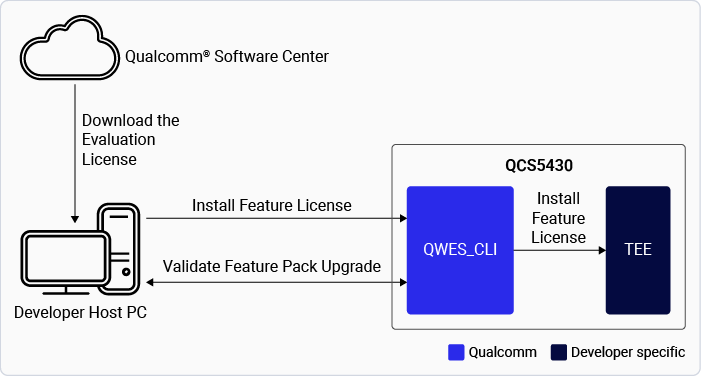
下图展示了下载和升级 QCS5430 SoftSKU 功能包的过程。
**图:升级 QCS5430 SoftSKU 功能包**
 下表列出了功能包及其评估许可证的对应下载链接。
**表:下载评估许可证**
| **功能包** | **许可证文件下载链接** |
| :-----: | :------------------------------------------------------------------------------------------------------------------: |
| FP2 | [QCM5430 FP2.0](https://softwarecenter.qualcomm.com/api/download/software/licenses/feature_packs/QCM5430-FP-2.0.zip) |
| FP2.5 | [QCM5430 FP2.5](https://softwarecenter.qualcomm.com/api/download/software/licenses/feature_packs/QCM5430-FP-2.5.zip) |
| FP3 | [QCM5430 FP3.0](https://softwarecenter.qualcomm.com/api/download/software/licenses/feature_packs/QCM5430-FP-3.0.zip) |
## **准备设备**
1. 在设备上设置 Wi-Fi 并获取 `device-ip-address`。
2. 使用 SSH 连接到设备:
`ssh root@device-ip-address`
有关说明,请参阅 [Qualcomm Linux 构建指南](https://docs.qualcomm.com/bundle/publicresource/topics/80-80021-254/how_to.html#use-ssh)。
3. 以读/写权限重新挂载文件系统:
```text theme={null}
mount -o rw,remount /usr
```
4. 将许可证推送到设备:
```text theme={null}
scp /path/to/.pfm root@device-ip-address:/data/
```
## **安装评估许可证**
1. 确保满足以下前提条件:
> * RPMB 已配置。
> > 要验证 RPMB 是否已配置,请参阅[验证 RPMB 配置状态](./verify-the-security-configurations-of-qualcomm-linux#verify-rpmb-provisioning-status)。
> * 设备中提供 `qwes_cli` 工具。
2. 安装 Qualcomm WES 命令行界面工具:
* 帮助:`qwes_cli –help`。
* 随 Qualcomm Linux 软件产品一起提供的默认工具。
3. 安装评估许可证:
```text theme={null}
ssh root@device-ip-address
qwes_cli -f /data/.pfm install
```
4. 验证许可证安装:
```text theme={null}
qwes_cli list
```
| **命令** | **输出** |
| :----: | :----: |
| 检查序列号: | |
> `qwes_cli list`
> \| `# qwes_cli list` `Running GetAllSerialNumber test with multithread Disabled` `Success. Len = 25` `Parsing 2 serial numbers` `Serial Number: 15b3` `Serial Number: 3e52b512f2f47851a40fa5b30000018c86261aa1` |
> \| :-- |
5. 请务必重启设备,以使许可证生效。
## **验证功能包升级**
验证功能包的两种方法是:
* 使用以下命令验证功能包升级:
> ```text theme={null}
> ssh root@device-ip-address
> cat /proc/device-tree/model
> ```
>
> 输出中会显示功能包 ID 型号:
>
> * `FP2: Qualcomm Technologies, Inc. qcs5430 fp2 addons rb3gen2 platforms`
> * `FP2.5: Qualcomm Technologies, Inc. qcs5430 fp2p5 addons rb3gen2 platform`
> * `FP3: Qualcomm Technologies, Inc. qcs5430 fp3 addons rb3gen2 platform`
>
> **注意**
>
> 功能包与型号 ID 的映射为 `{Feature Pack2: fp2 ; Feature pack2.5: fp2.5; Feature pack 3: fp3}`。
* 从以下 UEFI 日志验证功能包 ID:
> | FP1 | `SoftSKU ID is disabled. The default setting is 1.` |
> | :---- | :-------------------------------------------------- |
> | FP2 | `SoftSKU ID is enabled. updated here: 2` |
> | FP2.5 | `SoftSKU ID enabled. updated here: 8` |
> | FP3 | `SoftSKU ID enabled. updated here: 3` |
## **管理设备许可证**
你可以执行以下操作来管理设备许可证:
* 升级功能包或应用新许可证。
> * 你可以根据需要升级或降级功能包许可证。
> * 要应用新许可证(无论是升级还是降级),必须先移除现有许可证。
> * 移除旧许可证后,为所需的功能包应用许可证。
> * 此过程确保强制执行正确的功能包。
* 移除评估许可证。
> * 获取许可证序列号:
> > ```text theme={null}
> > qwes_cli list
> > Running GetAllSerialNumber test with multithread Disabled
> > Success. Len = 25
> > Parsing 2 serial numbers
> > Serial Number: 15b3
> > Serial Number: 3e52b512f2f47851a40fa5b30000018c86261aa1
> > ```
> * 移除许可证:
> > ```text theme={null}
> > ssh root@device-ip-address
> > qwes_cli -s 3e52b512f2f47851a40fa5b30000018c86261aa1 remove
> > Serial number length 20
> > Remove License is successful.
> > ```
> * 验证已移除的许可证序列号是否不再出现在许可证列表中:
> > ```text theme={null}
> > qwes_cli list
> > Running GetAllSerialNumber test with multithread Disabled
> > Success. Len = 4
> > Parsing 1 serial numbers
> > Serial Number: 15b3
> > ```
> * 请务必重启设备,以使许可证移除生效。
## **功能包许可证 - 软件升级后的持久性**
* 许可证安装在持久性安全存储 RPMB 中。
* 许可证安装成功后,其元数据存储在 RPMB 中,并在 data 分区中保留一份副本。
* 即使用户数据被擦除,许可证仍保留在 RPMB 中,确保设备功能不受影响。
**注意**
此功能仅面向具有授权访问权限的许可用户,用于管理功能包许可证。如果你拥有访问权限,请参阅 [Qualcomm Linux Wireless Edge Services Guide](https://docs.qualcomm.com/bundle/resource/topics/80-80021-11B/overview.html)。
## **后续步骤**
* 要了解 Qualcomm WES,请参阅 [Qualcomm WES](./security-features#qualcomm-wireless-edge-services)。
* 要开发提供基于硬件的认证、零接触设备配置和芯片组功能管理的应用程序,请参阅:[Qualcomm Linux Wireless Edge Services Guide](https://docs.qualcomm.com/bundle/resource/topics/80-80021-11B/overview.html)。此功能仅面向具有授权访问权限的许可用户。
下表列出了功能包及其评估许可证的对应下载链接。
**表:下载评估许可证**
| **功能包** | **许可证文件下载链接** |
| :-----: | :------------------------------------------------------------------------------------------------------------------: |
| FP2 | [QCM5430 FP2.0](https://softwarecenter.qualcomm.com/api/download/software/licenses/feature_packs/QCM5430-FP-2.0.zip) |
| FP2.5 | [QCM5430 FP2.5](https://softwarecenter.qualcomm.com/api/download/software/licenses/feature_packs/QCM5430-FP-2.5.zip) |
| FP3 | [QCM5430 FP3.0](https://softwarecenter.qualcomm.com/api/download/software/licenses/feature_packs/QCM5430-FP-3.0.zip) |
## **准备设备**
1. 在设备上设置 Wi-Fi 并获取 `device-ip-address`。
2. 使用 SSH 连接到设备:
`ssh root@device-ip-address`
有关说明,请参阅 [Qualcomm Linux 构建指南](https://docs.qualcomm.com/bundle/publicresource/topics/80-80021-254/how_to.html#use-ssh)。
3. 以读/写权限重新挂载文件系统:
```text theme={null}
mount -o rw,remount /usr
```
4. 将许可证推送到设备:
```text theme={null}
scp /path/to/.pfm root@device-ip-address:/data/
```
## **安装评估许可证**
1. 确保满足以下前提条件:
> * RPMB 已配置。
> > 要验证 RPMB 是否已配置,请参阅[验证 RPMB 配置状态](./verify-the-security-configurations-of-qualcomm-linux#verify-rpmb-provisioning-status)。
> * 设备中提供 `qwes_cli` 工具。
2. 安装 Qualcomm WES 命令行界面工具:
* 帮助:`qwes_cli –help`。
* 随 Qualcomm Linux 软件产品一起提供的默认工具。
3. 安装评估许可证:
```text theme={null}
ssh root@device-ip-address
qwes_cli -f /data/.pfm install
```
4. 验证许可证安装:
```text theme={null}
qwes_cli list
```
| **命令** | **输出** |
| :----: | :----: |
| 检查序列号: | |
> `qwes_cli list`
> \| `# qwes_cli list` `Running GetAllSerialNumber test with multithread Disabled` `Success. Len = 25` `Parsing 2 serial numbers` `Serial Number: 15b3` `Serial Number: 3e52b512f2f47851a40fa5b30000018c86261aa1` |
> \| :-- |
5. 请务必重启设备,以使许可证生效。
## **验证功能包升级**
验证功能包的两种方法是:
* 使用以下命令验证功能包升级:
> ```text theme={null}
> ssh root@device-ip-address
> cat /proc/device-tree/model
> ```
>
> 输出中会显示功能包 ID 型号:
>
> * `FP2: Qualcomm Technologies, Inc. qcs5430 fp2 addons rb3gen2 platforms`
> * `FP2.5: Qualcomm Technologies, Inc. qcs5430 fp2p5 addons rb3gen2 platform`
> * `FP3: Qualcomm Technologies, Inc. qcs5430 fp3 addons rb3gen2 platform`
>
> **注意**
>
> 功能包与型号 ID 的映射为 `{Feature Pack2: fp2 ; Feature pack2.5: fp2.5; Feature pack 3: fp3}`。
* 从以下 UEFI 日志验证功能包 ID:
> | FP1 | `SoftSKU ID is disabled. The default setting is 1.` |
> | :---- | :-------------------------------------------------- |
> | FP2 | `SoftSKU ID is enabled. updated here: 2` |
> | FP2.5 | `SoftSKU ID enabled. updated here: 8` |
> | FP3 | `SoftSKU ID enabled. updated here: 3` |
## **管理设备许可证**
你可以执行以下操作来管理设备许可证:
* 升级功能包或应用新许可证。
> * 你可以根据需要升级或降级功能包许可证。
> * 要应用新许可证(无论是升级还是降级),必须先移除现有许可证。
> * 移除旧许可证后,为所需的功能包应用许可证。
> * 此过程确保强制执行正确的功能包。
* 移除评估许可证。
> * 获取许可证序列号:
> > ```text theme={null}
> > qwes_cli list
> > Running GetAllSerialNumber test with multithread Disabled
> > Success. Len = 25
> > Parsing 2 serial numbers
> > Serial Number: 15b3
> > Serial Number: 3e52b512f2f47851a40fa5b30000018c86261aa1
> > ```
> * 移除许可证:
> > ```text theme={null}
> > ssh root@device-ip-address
> > qwes_cli -s 3e52b512f2f47851a40fa5b30000018c86261aa1 remove
> > Serial number length 20
> > Remove License is successful.
> > ```
> * 验证已移除的许可证序列号是否不再出现在许可证列表中:
> > ```text theme={null}
> > qwes_cli list
> > Running GetAllSerialNumber test with multithread Disabled
> > Success. Len = 4
> > Parsing 1 serial numbers
> > Serial Number: 15b3
> > ```
> * 请务必重启设备,以使许可证移除生效。
## **功能包许可证 - 软件升级后的持久性**
* 许可证安装在持久性安全存储 RPMB 中。
* 许可证安装成功后,其元数据存储在 RPMB 中,并在 data 分区中保留一份副本。
* 即使用户数据被擦除,许可证仍保留在 RPMB 中,确保设备功能不受影响。
**注意**
此功能仅面向具有授权访问权限的许可用户,用于管理功能包许可证。如果你拥有访问权限,请参阅 [Qualcomm Linux Wireless Edge Services Guide](https://docs.qualcomm.com/bundle/resource/topics/80-80021-11B/overview.html)。
## **后续步骤**
* 要了解 Qualcomm WES,请参阅 [Qualcomm WES](./security-features#qualcomm-wireless-edge-services)。
* 要开发提供基于硬件的认证、零接触设备配置和芯片组功能管理的应用程序,请参阅:[Qualcomm Linux Wireless Edge Services Guide](https://docs.qualcomm.com/bundle/resource/topics/80-80021-11B/overview.html)。此功能仅面向具有授权访问权限的许可用户。