> ## Documentation Index
> Fetch the complete documentation index at: https://dragonwingdocs.qualcomm.com/llms.txt
> Use this file to discover all available pages before exploring further.
# 执行蓝牙 MAP 服务器功能
> 您可以使用 ``obexctl`` 主菜单中提供的命令验证蓝牙 MAP 服务器功能。蓝牙 MAP 服务器功能允许您获取并读取服务器上的消息。
## 拉取并读取消息
开始之前,请执行以下操作:
* 配对 DUT 和远程设备。有关说明,请参阅 与远程蓝牙设备配对。
* 在服务器上创建 MAP 目录。
在 BlueZ 协议栈中,由于设备无法发送或接收蜂窝消息,因此无法直接测试或验证 MAP 服务器功能。因此,您必须在 DUT 上创建 MAP 目录。有关创建 MAP 目录的更多信息,请参阅 示例 MAP 目录。
要从服务器拉取并读取消息,请执行以下操作:
1. 从远程设备发起到 DUT 的连接。
2. 按如下方式在 DUT 上接受连接请求:
a. 在 DUT 上运行 SSH。
b. 运行以下命令打开 `bluetoothctl` 应用程序:
```text theme={null}
bluetoothctl
```
c. 对连接请求进行认证。
3. 将目标消息从服务器拉取到客户端。
4. 在客户端上打开并验证检索到的消息。
## 示例 MAP 目录
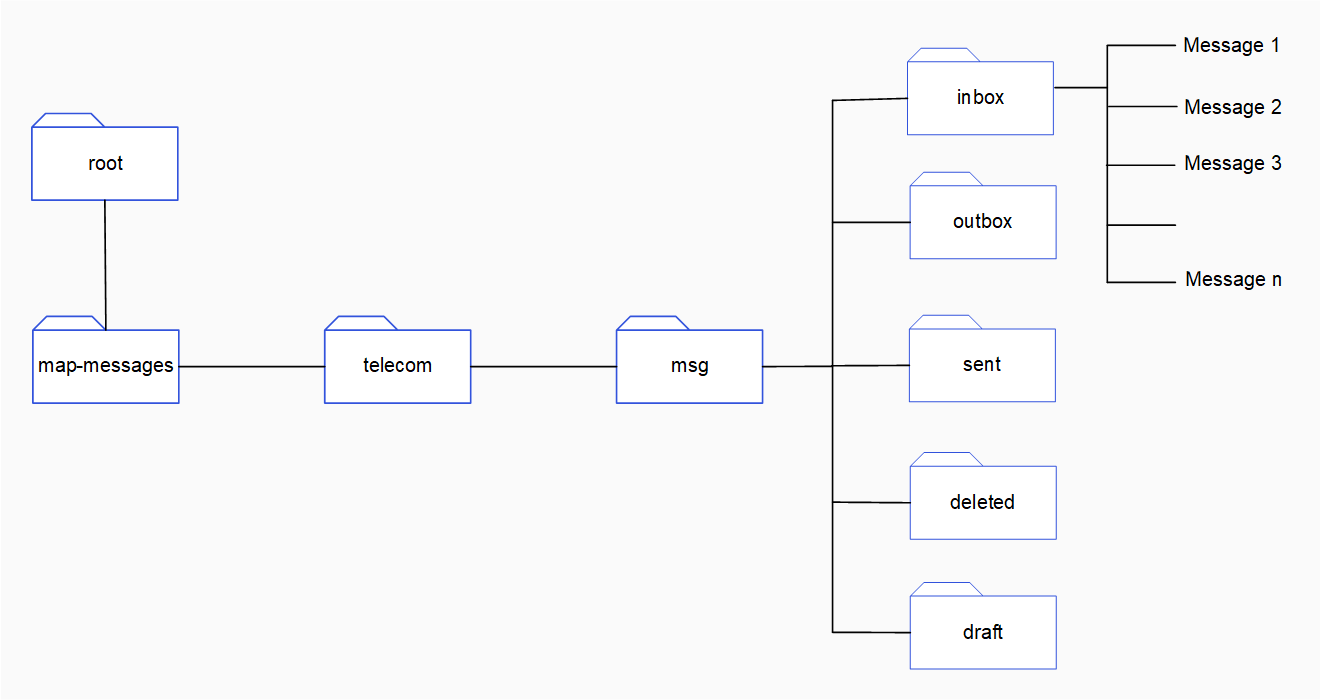
您可以按如下方式创建示例 MAP 目录来验证 MAP 服务器功能:
1. 在 DUT 上运行 SSH。
2. 依次运行以下命令创建消息目录 `map-messages/telecom/msg`:
a. 创建 `map-messages` 目录:
```text theme={null}
mkdir map-messages
```
b. 进入 `map-messages` 目录:
```text theme={null}
cd map-messages
```
c. 创建 `telecom` 目录:
```text theme={null}
mkdir telecom
```
d. 进入 `telecom` 目录:
```text theme={null}
cd map-messages/telecom
```
e. 创建 `msg` 目录:
```text theme={null}
mkdir msg
```
f. 进入 `telecom/msg` 目录:
```text theme={null}
cd telecom/msg
```
3. 在 `msg` 目录中,创建以下子文件夹:
* `inbox`
* `outbox`
* `sent`
* `deleted`
* `draft`
要在 `msg` 中创建子文件夹,请运行以下命令:
```text theme={null}
mkdir
```
`` 是子文件夹的名称。例如 `inbox`。
4. 在每个子文件夹中创建消息文件。
下图展示了一个示例 MAP 目录。在 `/map-messages/telecom/msg/` 目录中,有针对不同类型消息的子文件夹。这些子文件夹中包含消息。