> ## Documentation Index
> Fetch the complete documentation index at: https://dragonwingdocs.qualcomm.com/llms.txt
> Use this file to discover all available pages before exploring further.
# 多摄像头 Offline IFE
> 在 IQ-9075-EVK 和 IQ-8275-EVK 上使用 Offline IFE 功能,通过 DDR 路由帧数据,使单个 IFE 硬件实例可支持多达 4 个 bayer 摄像头的并发流。
IQ-9075-EVK
IQ-8275-EVK
稳定
摄像头(IQ-9075-EVK)
摄像头(IQ-8275-EVK)
使用的 IFE 硬件
总线取数引擎
**平台适用范围:**
此功能仅适用于 **IQ-9075-EVK** 和 **IQ-8275-EVK**。
这两个平台均配备两个 IFE,可原生支持对 bayer 摄像头图像进行实时去 bayer 处理。
***
## 01 · 它是什么?
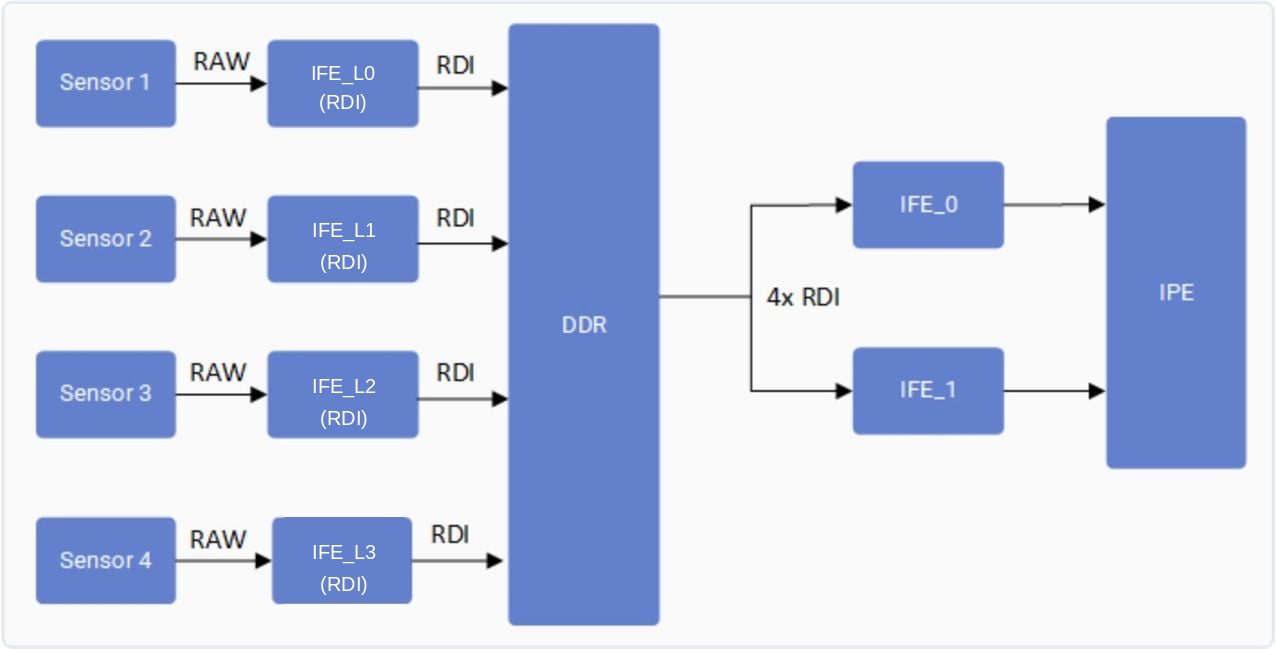
Offline IFE 功能允许单个 IFE 硬件实例以**离线模式**运行,处理来自**多个摄像头**的 bayer 图像。帧数据不再进行实时去 bayer 处理,而是先通过 IFE-Lite 的 RDI 端口存储到 DDR,然后由 IFE 使用 SFE Lite 总线引擎取回,进行 bayer 到 YUV 的转换。
```
Real-Time Path: Sensor → IFE-Lite (RDI) → DDR
Offline Path: DDR → SFE Lite (Fetch) → IFE Offline → YUV Output
```
 ***
## 02 · 它控制什么?
通过在离线模式下复用单个 IFE 而非为每个摄像头分配专用 IFE 实例,控制可同时进行流传输的并发 bayer 摄像头数量。
| 能力 | 无 Offline IFE | 有 Offline IFE |
| ----------------- | ------------- | -------------------------- |
| 并发 bayer 摄像头 | 最多 2 个摄像头 | 4 个摄像头(IQ-9075-EVK) |
| 所需 IFE 实例 | 每 2 个摄像头需 1 个 | 1 个共享(离线) |
| 帧路由 | 传感器直连 → IFE | 传感器 → IFE-Lite → DDR → IFE |
| SFE Lite 使用 | 不使用 | 用作总线取数引擎 |
| IQ-8275-EVK 摄像头数量 | 最多 2 个摄像头 | 3 个摄像头 |
***
## 03 · 功能验证
使用 SSH 连接到设备控制台。相关说明请参阅 [How To SSH?](https://dragonwingdocs.qualcomm.com/Linux/devices/iq9075-evk/set-up-the-device#connect-over-ssh)。
### 平台参考配置
请确保已连接以下任一摄像头配置:
* **IQ-9075-EVK**:四个 OV9282 MIPI 摄像头连接到四个 MIPI CSI 插槽(0、1、2 和 3)。
* **IQ-8275-EVK**:三个 OV9282 MIPI 摄像头连接到三个 MIPI CSI 插槽(0、1 和 2)。
| 项目 | 值 |
| ----------- | ------------- |
| 摄像头数量 | 4 |
| 传感器 | OV9282 MIPI |
| MIPI CSI 插槽 | 0, 1, 2, 3 |
| 格式 | NV12 1280×720 |
| 项目 | 值 |
| ----------- | ------------- |
| 摄像头数量 | 3 |
| 传感器 | OV9282 MIPI |
| MIPI CSI 插槽 | 0, 1, 2 |
| 格式 | NV12 1280×720 |
```text Collect User Log theme={null}
# On device console
journalctl -f > /opt/user_log.txt
```
```text Collect Kernel Log theme={null}
dmesg -w > /opt/kernel_log.txt
```
针对**每个摄像头**运行以下命令(相应地将 `camera=0` 改为 `1`、`2`、`3`):
```bash GStreamer Pipeline theme={null}
gst-launch-1.0 -e qtiqmmfsrc name=camsrc camera=0 multicamera-hint=true ! \
video/x-raw,format=NV12,width=1280,height=720,framerate=30/1,\
interlace-mode=progressive,colorimetry=bt601 ! v4l2h264enc \
capture-io-mode=4 output-io-mode=5 extra-controls="controls,video_bitrate=6000000,\
video_bitrate_mode=0;" ! h264parse ! mp4mux ! filesink location=/opt/mux_avc.mp4
```
**对每个摄像头重复执行**\
对 `camera=1`、`camera=2` 和 `camera=3`(IQ-9075-EVK)或最多到 `camera=2`(IQ-8275-EVK)同样运行,并在每个命令中设置 `multicamera-hint=true`。
运行流水线后,通过检查以下确切的日志条目确认功能已激活:
**用户日志 — CamX 流水线状态:**
```text User Log Trace theme={null}
CamX: [CORE_CFG]3509 3556 [CORE ] camxpipeline.h:4222 SetPipelineStatus() RealTimeFeatureZSLPreviewRawOfflineIFE_0_cam_0 status is now PipelineStatus::STREAM_ON
```
**内核日志 — IFE 获取确认:**
```text Kernel Log Trace theme={null}
CAM_INFO: CAM-ISP: cam_ife_hw_mgr_print_acquire_info: 1733: 0:4:11.835 Acquired Single IFE[0] SFE[0] OFFLINE: Y with [9 pix] [0 pd] [0 rdi] ports for ctx:1
```
内核日志中的 `OFFLINE: Y` 确认 IFE 正在离线模式下运行。用户日志中的 `STREAM_ON` 确认 CamX 流水线已启动。
***
## 🛠️ 故障排除
| 问题 | 原因 | 解决方法 |
| --------------------- | -------------------------------- | ----------------------------------------------- |
| 仅 2 个摄像头出流;第 3/4 个被丢弃 | 未在所有流上设置 `multicamera-hint=true` | 确保每个 `gst-launch` 调用都包含 `multicamera-hint=true` |
| 内核日志中出现 `OFFLINE: N` | 未获取到 Offline IFE — 可能存在资源冲突 | 重启摄像头服务;确认没有其他流水线占用 IFE |
| 流水线卡顿或丢帧 | 4 摄像头负载下 DDR 带宽饱和 | 将帧率降至 24fps 或将分辨率降至 720p |
***
## 02 · 它控制什么?
通过在离线模式下复用单个 IFE 而非为每个摄像头分配专用 IFE 实例,控制可同时进行流传输的并发 bayer 摄像头数量。
| 能力 | 无 Offline IFE | 有 Offline IFE |
| ----------------- | ------------- | -------------------------- |
| 并发 bayer 摄像头 | 最多 2 个摄像头 | 4 个摄像头(IQ-9075-EVK) |
| 所需 IFE 实例 | 每 2 个摄像头需 1 个 | 1 个共享(离线) |
| 帧路由 | 传感器直连 → IFE | 传感器 → IFE-Lite → DDR → IFE |
| SFE Lite 使用 | 不使用 | 用作总线取数引擎 |
| IQ-8275-EVK 摄像头数量 | 最多 2 个摄像头 | 3 个摄像头 |
***
## 03 · 功能验证
使用 SSH 连接到设备控制台。相关说明请参阅 [How To SSH?](https://dragonwingdocs.qualcomm.com/Linux/devices/iq9075-evk/set-up-the-device#connect-over-ssh)。
### 平台参考配置
请确保已连接以下任一摄像头配置:
* **IQ-9075-EVK**:四个 OV9282 MIPI 摄像头连接到四个 MIPI CSI 插槽(0、1、2 和 3)。
* **IQ-8275-EVK**:三个 OV9282 MIPI 摄像头连接到三个 MIPI CSI 插槽(0、1 和 2)。
| 项目 | 值 |
| ----------- | ------------- |
| 摄像头数量 | 4 |
| 传感器 | OV9282 MIPI |
| MIPI CSI 插槽 | 0, 1, 2, 3 |
| 格式 | NV12 1280×720 |
| 项目 | 值 |
| ----------- | ------------- |
| 摄像头数量 | 3 |
| 传感器 | OV9282 MIPI |
| MIPI CSI 插槽 | 0, 1, 2 |
| 格式 | NV12 1280×720 |
```text Collect User Log theme={null}
# On device console
journalctl -f > /opt/user_log.txt
```
```text Collect Kernel Log theme={null}
dmesg -w > /opt/kernel_log.txt
```
针对**每个摄像头**运行以下命令(相应地将 `camera=0` 改为 `1`、`2`、`3`):
```bash GStreamer Pipeline theme={null}
gst-launch-1.0 -e qtiqmmfsrc name=camsrc camera=0 multicamera-hint=true ! \
video/x-raw,format=NV12,width=1280,height=720,framerate=30/1,\
interlace-mode=progressive,colorimetry=bt601 ! v4l2h264enc \
capture-io-mode=4 output-io-mode=5 extra-controls="controls,video_bitrate=6000000,\
video_bitrate_mode=0;" ! h264parse ! mp4mux ! filesink location=/opt/mux_avc.mp4
```
**对每个摄像头重复执行**\
对 `camera=1`、`camera=2` 和 `camera=3`(IQ-9075-EVK)或最多到 `camera=2`(IQ-8275-EVK)同样运行,并在每个命令中设置 `multicamera-hint=true`。
运行流水线后,通过检查以下确切的日志条目确认功能已激活:
**用户日志 — CamX 流水线状态:**
```text User Log Trace theme={null}
CamX: [CORE_CFG]3509 3556 [CORE ] camxpipeline.h:4222 SetPipelineStatus() RealTimeFeatureZSLPreviewRawOfflineIFE_0_cam_0 status is now PipelineStatus::STREAM_ON
```
**内核日志 — IFE 获取确认:**
```text Kernel Log Trace theme={null}
CAM_INFO: CAM-ISP: cam_ife_hw_mgr_print_acquire_info: 1733: 0:4:11.835 Acquired Single IFE[0] SFE[0] OFFLINE: Y with [9 pix] [0 pd] [0 rdi] ports for ctx:1
```
内核日志中的 `OFFLINE: Y` 确认 IFE 正在离线模式下运行。用户日志中的 `STREAM_ON` 确认 CamX 流水线已启动。
***
## 🛠️ 故障排除
| 问题 | 原因 | 解决方法 |
| --------------------- | -------------------------------- | ----------------------------------------------- |
| 仅 2 个摄像头出流;第 3/4 个被丢弃 | 未在所有流上设置 `multicamera-hint=true` | 确保每个 `gst-launch` 调用都包含 `multicamera-hint=true` |
| 内核日志中出现 `OFFLINE: N` | 未获取到 Offline IFE — 可能存在资源冲突 | 重启摄像头服务;确认没有其他流水线占用 IFE |
| 流水线卡顿或丢帧 | 4 摄像头负载下 DDR 带宽饱和 | 将帧率降至 24fps 或将分辨率降至 720p |