> ## Documentation Index
> Fetch the complete documentation index at: https://dragonwingdocs.qualcomm.com/llms.txt
> Use this file to discover all available pages before exploring further.

# 高级视频规格

有关视频解码和编码能力的更多信息，例如支持的配置文件、级别、分辨率、帧率、比特率和限制，请选择以下选项卡：

<Tabs>
  <Tab title="QCS6490">
    <div
      style={{
  border: '2px solid #0050D8', borderRadius: '16px', padding: '24px', marginTop: '15px',
  backgroundColor: '#FFFFFF', boxShadow: '0 0 25px rgba(0, 80, 216, 0.15)'
}}
    >
      <div style={{ borderRadius: '12px', overflow: 'hidden', border: '2px solid #0050D8', marginBottom: '30px' }}>
        <div style={{ background: 'linear-gradient(90deg, #0050D8 0%, #0037A5 100%)', color: 'white', padding: '14px', textAlign: 'center', fontWeight: 'bold' }}>
          表：QCS6490 的 Adreno VPU 功能描述
        </div>

        <table style={{ width: '100%', borderCollapse: 'collapse', backgroundColor: '#ffffff', fontSize: '14px' }}>
          <thead>
            <tr style={{ backgroundColor: '#F1F5F9' }}>
              <th style={{ border: '1px solid #E5E7EB', padding: '10px', textAlign: 'center' }}>功能</th>
              <th style={{ border: '1px solid #E5E7EB', padding: '10px', textAlign: 'center' }}>描述</th>
              <th style={{ border: '1px solid #E5E7EB', padding: '10px', textAlign: 'center' }}>编解码器</th>
              <th style={{ border: '1px solid #E5E7EB', padding: '10px', textAlign: 'center' }}>备注</th>
            </tr>
          </thead>

          <tbody>
            <tr>
              <td style={{ border: '1px solid #E5E7EB', padding: '10px', fontWeight: '600', verticalAlign: 'top' }}>
                编码器输入颜色格式
              </td>

              <td style={{ border: '1px solid #E5E7EB', padding: '10px', lineHeight: '1.6', verticalAlign: 'top' }}>
                NV12 和 QC08C
              </td>

              <td style={{ border: '1px solid #E5E7EB', padding: '10px', lineHeight: '1.6', verticalAlign: 'top' }}>
                H.264 和 HEVC
              </td>

              <td style={{ border: '1px solid #E5E7EB', padding: '10px', lineHeight: '1.6', verticalAlign: 'top', wordBreak: 'break-word' }}>
                无
              </td>
            </tr>

            <tr>
              <td style={{ border: '1px solid #E5E7EB', padding: '10px', fontWeight: '600', verticalAlign: 'top' }}>
                解码器输出颜色格式
              </td>

              <td style={{ border: '1px solid #E5E7EB', padding: '10px', lineHeight: '1.6', verticalAlign: 'top' }}>
                NV12、QC08C 和 QC10C
              </td>

              <td style={{ border: '1px solid #E5E7EB', padding: '10px', lineHeight: '1.6', verticalAlign: 'top' }}>
                H.264、HEVC 和 VP9
              </td>

              <td style={{ border: '1px solid #E5E7EB', padding: '10px', lineHeight: '1.6', verticalAlign: 'top', wordBreak: 'break-word' }}>
                QC10C 仅在 <code>qcom-multimedia-proprietary-image</code> 上受支持
              </td>
            </tr>

            <tr>
              <td style={{ border: '1px solid #E5E7EB', padding: '10px', fontWeight: '600', verticalAlign: 'top' }}>
                旋转
              </td>

              <td style={{ border: '1px solid #E5E7EB', padding: '10px', lineHeight: '1.6', verticalAlign: 'top' }}>
                支持在编码帧之前进行 90、180 和 270 度旋转
              </td>

              <td style={{ border: '1px solid #E5E7EB', padding: '10px', lineHeight: '1.6', verticalAlign: 'top' }}>
                H.264 和 HEVC
              </td>

              <td style={{ border: '1px solid #E5E7EB', padding: '10px', lineHeight: '1.6', verticalAlign: 'top' }}>
                仅支持静态旋转
              </td>
            </tr>

            <tr>
              <td style={{ border: '1px solid #E5E7EB', padding: '10px', fontWeight: '600', verticalAlign: 'top' }}>
                翻转
              </td>

              <td style={{ border: '1px solid #E5E7EB', padding: '10px', lineHeight: '1.6', verticalAlign: 'top' }}>
                支持在编码帧之前进行水平和垂直翻转
              </td>

              <td style={{ border: '1px solid #E5E7EB', padding: '10px', lineHeight: '1.6', verticalAlign: 'top' }}>
                H.264 和 HEVC
              </td>

              <td style={{ border: '1px solid #E5E7EB', padding: '10px', lineHeight: '1.6', verticalAlign: 'top', wordBreak: 'break-word' }}>
                支持静态和动态翻转。翻转仅在 <code>qcom-multimedia-proprietary-image</code> 上受支持
              </td>
            </tr>

            <tr>
              <td style={{ border: '1px solid #E5E7EB', padding: '10px', fontWeight: '600', verticalAlign: 'top' }}>
                B 帧编码
              </td>

              <td style={{ border: '1px solid #E5E7EB', padding: '10px', lineHeight: '1.6', verticalAlign: 'top' }}>
                最高支持 1920 × 1088、60 fps 编码
              </td>

              <td style={{ border: '1px solid #E5E7EB', padding: '10px', lineHeight: '1.6', verticalAlign: 'top' }}>
                H.264 和 HEVC
              </td>

              <td style={{ border: '1px solid #E5E7EB', padding: '10px', lineHeight: '1.6', verticalAlign: 'top', wordBreak: 'break-word' }}>
                两个 P 帧之间最多支持一个 B 帧，且仅在 <code>qcom-multimedia-proprietary-image</code> 上受支持
              </td>
            </tr>

            <tr>
              <td style={{ border: '1px solid #E5E7EB', padding: '10px', fontWeight: '600', verticalAlign: 'top' }}>
                Hierarchical-P 编码
              </td>

              <td style={{ border: '1px solid #E5E7EB', padding: '10px', lineHeight: '1.6', verticalAlign: 'top' }}>
                最多 5 层
              </td>

              <td style={{ border: '1px solid #E5E7EB', padding: '10px', lineHeight: '1.6', verticalAlign: 'top' }}>
                H.264 和 HEVC
              </td>

              <td style={{ border: '1px solid #E5E7EB', padding: '10px', lineHeight: '1.6', verticalAlign: 'top', wordBreak: 'break-word' }}>
                Hierarchical-P 编码仅在 <code>qcom-multimedia-proprietary-image</code> 上受支持
              </td>
            </tr>

            <tr>
              <td style={{ border: '1px solid #E5E7EB', padding: '10px', fontWeight: '600', verticalAlign: 'top' }}>
                初始 QP 覆盖
              </td>

              <td style={{ border: '1px solid #E5E7EB', padding: '10px', lineHeight: '1.6', verticalAlign: 'top' }}>
                支持 I 帧、P 帧和 B 帧
              </td>

              <td style={{ border: '1px solid #E5E7EB', padding: '10px', lineHeight: '1.6', verticalAlign: 'top' }}>
                H.264 和 HEVC
              </td>

              <td style={{ border: '1px solid #E5E7EB', padding: '10px', lineHeight: '1.6', verticalAlign: 'top', wordBreak: 'break-word' }}>
                初始 QP 覆盖仅在 <code>qcom-multimedia-proprietary-image</code> 上受支持
              </td>
            </tr>

            <tr>
              <td style={{ border: '1px solid #E5E7EB', padding: '10px', fontWeight: '600', verticalAlign: 'top' }}>
                切片编码
              </td>

              <td style={{ border: '1px solid #E5E7EB', padding: '10px', lineHeight: '1.6', verticalAlign: 'top' }}>
                是
              </td>

              <td style={{ border: '1px solid #E5E7EB', padding: '10px', lineHeight: '1.6', verticalAlign: 'top' }}>
                H.264 和 HEVC
              </td>

              <td style={{ border: '1px solid #E5E7EB', padding: '10px', lineHeight: '1.6', verticalAlign: 'top', wordBreak: 'break-word' }}>
                每个切片的比特数或每个切片的宏块数决定了切片边界支持。切片仅在 <code>qcom-multimedia-proprietary-image</code> 上受支持
              </td>
            </tr>

            <tr>
              <td style={{ border: '1px solid #E5E7EB', padding: '10px', fontWeight: '600', verticalAlign: 'top' }}>
                帧内刷新
              </td>

              <td style={{ border: '1px solid #E5E7EB', padding: '10px', lineHeight: '1.6', verticalAlign: 'top' }}>
                随机刷新模式
              </td>

              <td style={{ border: '1px solid #E5E7EB', padding: '10px', lineHeight: '1.6', verticalAlign: 'top' }}>
                H.264 和 HEVC
              </td>

              <td style={{ border: '1px solid #E5E7EB', padding: '10px', lineHeight: '1.6', verticalAlign: 'top', wordBreak: 'break-word' }}>
                <ul style={{ margin: '0', paddingLeft: '18px' }}>
                  <li>仅在 8 位编码中受支持</li>
                  <li>仅在 CBR RC 模式下受支持</li>
                  <li>帧内刷新仅在 <code>qcom-multimedia-proprietary-image</code> 上受支持</li>
                </ul>
              </td>
            </tr>

            <tr>
              <td style={{ border: '1px solid #E5E7EB', padding: '10px', fontWeight: '600', verticalAlign: 'top' }}>
                速率控制
              </td>

              <td style={{ border: '1px solid #E5E7EB', padding: '10px', lineHeight: '1.6', verticalAlign: 'top' }}>
                CBR、VBR 和 MBR
              </td>

              <td style={{ border: '1px solid #E5E7EB', padding: '10px', lineHeight: '1.6', verticalAlign: 'top' }}>
                H.264 和 HEVC
              </td>

              <td style={{ border: '1px solid #E5E7EB', padding: '10px', lineHeight: '1.6', verticalAlign: 'top', wordBreak: 'break-word' }}>
                速率控制仅在 <code>qcom-multimedia-proprietary-image</code> 上受支持
              </td>
            </tr>

            <tr>
              <td style={{ border: '1px solid #E5E7EB', padding: '10px', fontWeight: '600', verticalAlign: 'top' }}>
                LTR
              </td>

              <td style={{ border: '1px solid #E5E7EB', padding: '10px', lineHeight: '1.6', verticalAlign: 'top' }}>
                2 帧
              </td>

              <td style={{ border: '1px solid #E5E7EB', padding: '10px', lineHeight: '1.6', verticalAlign: 'top' }}>
                H.264 和 HEVC
              </td>

              <td style={{ border: '1px solid #E5E7EB', padding: '10px', lineHeight: '1.6', verticalAlign: 'top', wordBreak: 'break-word' }}>
                在 CBR RC 模式下受支持，且仅在 <code>qcom-multimedia-proprietary-image</code> 上受支持
              </td>
            </tr>

            <tr>
              <td style={{ border: '1px solid #E5E7EB', padding: '10px', fontWeight: '600', verticalAlign: 'top' }}>
                编码器动态属性
              </td>

              <td style={{ border: '1px solid #E5E7EB', padding: '10px', lineHeight: '1.6', verticalAlign: 'top' }}>
                同步帧、比特率和 fps
              </td>

              <td style={{ border: '1px solid #E5E7EB', padding: '10px', lineHeight: '1.6', verticalAlign: 'top' }}>
                H.264 和 HEVC
              </td>

              <td style={{ border: '1px solid #E5E7EB', padding: '10px', lineHeight: '1.6', verticalAlign: 'top', wordBreak: 'break-word' }}>
                在 CBR 和 VBR RC 模式下受支持，且仅在 <code>qcom-multimedia-proprietary-image</code> 上受支持
              </td>
            </tr>
          </tbody>
        </table>
      </div>

      <div style={{ padding: '12px', backgroundColor: '#F3F4F6', borderRadius: '8px', borderLeft: '4px solid #0050D8', marginBottom: '30px', fontSize: '13px' }}>
        <strong>注意：</strong>使用 [Qualcomm IM SDK](https://dragonwingdocs.qualcomm.com/SDKs/IMSDK) 的端到端功能已验证至 3840 × 2160 分辨率。
      </div>

      <div style={{ borderRadius: '12px', overflow: 'hidden', border: '2px solid #0050D8', marginBottom: '30px' }}>
        <div style={{ background: 'linear-gradient(90deg, #0050D8 0%, #0037A5 100%)', color: 'white', padding: '14px', textAlign: 'center', fontWeight: 'bold' }}>
          表：QCS6490 的 Adreno VPU 解码器能力
        </div>

        <table style={{ width: '100%', borderCollapse: 'collapse', backgroundColor: '#ffffff', fontSize: '14px' }}>
          <thead>
            <tr style={{ backgroundColor: '#F1F5F9' }}>
              <th style={{ border: '1px solid #E5E7EB', padding: '10px', textAlign: 'center' }}>解码器标准</th>
              <th style={{ border: '1px solid #E5E7EB', padding: '10px', textAlign: 'center' }}>支持的配置文件和级别</th>
              <th style={{ border: '1px solid #E5E7EB', padding: '10px', textAlign: 'center' }}>最小/最大分辨率、最大帧率和比特率</th>
              <th style={{ border: '1px solid #E5E7EB', padding: '10px', textAlign: 'center' }}>支持的最大分辨率、帧率和比特率</th>
              <th style={{ border: '1px solid #E5E7EB', padding: '10px', textAlign: 'center' }}>限制</th>
            </tr>
          </thead>

          <tbody>
            <tr>
              <td style={{ border: '1px solid #E5E7EB', padding: '10px', fontWeight: '600' }}>HEVC</td>

              <td style={{ border: '1px solid #E5E7EB', padding: '10px', lineHeight: '1.6' }}>
                <ul>
                  <li>Main profile 8 位，最高至 level 5.1</li>
                  <li>Main profile 10 位，最高至 level 5.1，HLG 方案</li>
                </ul>
              </td>

              <td style={{ border: '1px solid #E5E7EB', padding: '10px', lineHeight: '1.6' }}>
                <ul>
                  <li>最小分辨率：<br />96 x 96</li>
                  <li>最大分辨率：<br /> 4096 x 2160 或 2160x4096</li>
                  <li>最大帧率：<br /> 480 fps</li>
                  <li>最大比特率：<br /> 100 Mbps</li>
                </ul>
              </td>

              <td style={{ border: '1px solid #E5E7EB', padding: '10px', lineHeight: '1.6' }}>
                <ul>
                  <li>1280 x 720，480 fps，100 Mbps</li>
                  <li>1920 x 1088，240 fps，100 Mbps</li>
                  <li>3840 x 2160，60 fps，100 Mbps</li>
                  <li>4096 x 2169，60 fps，100 Mbps</li>
                </ul>
              </td>

              <td style={{ border: '1px solid #E5E7EB', padding: '10px', lineHeight: '1.6' }}>
                <ul>
                  <li>每帧最多 128 个切片</li>
                  <li>基于单个切片的解码</li>
                </ul>
              </td>
            </tr>

            <tr>
              <td style={{ border: '1px solid #E5E7EB', padding: '10px', fontWeight: '600' }}>H.264</td>

              <td style={{ border: '1px solid #E5E7EB', padding: '10px', lineHeight: '1.6' }}>
                Constrained baseline、baseline、main、high、constrained high profile；最高至 level 5.2
              </td>

              <td style={{ border: '1px solid #E5E7EB', padding: '10px', lineHeight: '1.6' }}>
                <ul>
                  <li>最小分辨率：96 × 96</li>
                  <li>最大分辨率：4096 × 2160 或 2160 × 4096</li>
                  <li>最大帧率：480 fps</li>
                  <li>最大比特率：100 Mbps</li>
                </ul>
              </td>

              <td style={{ border: '1px solid #E5E7EB', padding: '10px', lineHeight: '1.6' }}>
                <ul>
                  <li>1280 × 720，480 fps，100 Mbps</li>
                  <li>1920 × 1088，240 fps，100 Mbps</li>
                  <li>3840 × 2160，60 fps，100 Mbps</li>
                  <li>4096 × 2160，60 fps，100 Mbps</li>
                </ul>
              </td>

              <td style={{ border: '1px solid #E5E7EB', padding: '10px', lineHeight: '1.6' }}>
                <ul>
                  <li>灵活宏块排序（FMO）</li>
                  <li>任意切片排序（ASO）</li>
                  <li>冗余切片（RS）</li>
                  <li>数据分区</li>
                  <li>每帧最多 10 个切片</li>
                  <li>不支持隔行扫描内容</li>
                </ul>
              </td>
            </tr>

            <tr>
              <td style={{ border: '1px solid #E5E7EB', padding: '10px', fontWeight: '600' }}>VP9</td>

              <td style={{ border: '1px solid #E5E7EB', padding: '10px', lineHeight: '1.6' }}>
                <ul>
                  <li>Profile 0；8 位，最高至 level 5.1</li>
                  <li>Profile 2；10 位，最高至 level 5.1，HLG/PQ 方案</li>
                </ul>
              </td>

              <td style={{ border: '1px solid #E5E7EB', padding: '10px', lineHeight: '1.6' }}>
                <ul>
                  <li>最小分辨率：96 × 96</li>
                  <li>最大分辨率：4096 × 2160 或 2160 × 4096</li>
                  <li>最大帧率：480 fps</li>
                  <li>最大比特率：100 Mbps</li>
                </ul>
              </td>

              <td style={{ border: '1px solid #E5E7EB', padding: '10px', lineHeight: '1.6' }}>
                <ul>
                  <li>1280 × 720，480 fps，100 Mbps</li>
                  <li>1920 × 1088，240 fps，100 Mbps</li>
                  <li>3840 × 2160，60 fps，100 Mbps</li>
                  <li>4096 × 2160，60 fps，100 Mbps</li>
                </ul>
              </td>

              <td style={{ border: '1px solid #E5E7EB', padding: '10px', lineHeight: '1.6' }}>
                不支持 Profile 2 的 12 位
              </td>
            </tr>
          </tbody>
        </table>
      </div>

      <div style={{ borderRadius: '12px', overflow: 'hidden', border: '2px solid #0050D8' }}>
        <div style={{ background: 'linear-gradient(90deg, #0050D8 0%, #0037A5 100%)', color: 'white', padding: '14px', textAlign: 'center', fontWeight: 'bold' }}>
          表：QCS6490 的 Adreno VPU 编码器能力
        </div>

        <table style={{ width: '100%', borderCollapse: 'collapse', backgroundColor: '#ffffff', fontSize: '14px' }}>
          <thead>
            <tr style={{ backgroundColor: '#F1F5F9' }}>
              <th style={{ border: '1px solid #E5E7EB', padding: '10px', textAlign: 'center' }}>编码器标准</th>
              <th style={{ border: '1px solid #E5E7EB', padding: '10px', textAlign: 'center' }}>支持的配置文件、级别和 RC 模式</th>
              <th style={{ border: '1px solid #E5E7EB', padding: '10px', textAlign: 'center' }}>最小/最大分辨率、最大帧率和最大比特率</th>
              <th style={{ border: '1px solid #E5E7EB', padding: '10px', textAlign: 'center' }}>支持的分辨率、帧率、比特率</th>
              <th style={{ border: '1px solid #E5E7EB', padding: '10px', textAlign: 'center' }}>限制</th>
            </tr>
          </thead>

          <tbody>
            <tr>
              <td style={{ border: '1px solid #E5E7EB', padding: '10px', fontWeight: '600' }}>H.264</td>

              <td style={{ border: '1px solid #E5E7EB', padding: '10px', lineHeight: '1.6' }}>
                <ul>
                  <li>Constrained baseline、baseline、main、high、constrained high profile；最高至 level 5</li>
                  <li>VBR、CBR、MBR</li>
                </ul>
              </td>

              <td style={{ border: '1px solid #E5E7EB', padding: '10px', lineHeight: '1.6' }}>
                <ul>
                  <li>最小分辨率：128 × 128</li>
                  <li>最大分辨率：4096 × 2160 或 2160 × 4096</li>
                  <li>最大帧率：240 fps</li>
                  <li>最大比特率：100 Mbps</li>
                </ul>
              </td>

              <td style={{ border: '1px solid #E5E7EB', padding: '10px', lineHeight: '1.6' }}>
                <ul>
                  <li>1280 × 720，240 fps，100 Mbps</li>
                  <li>1920 × 1088，120 fps，100 Mbps</li>
                  <li>3840 × 2160，30 fps，100 Mbps</li>
                  <li>4096 × 2160，30 fps，100 Mbps</li>
                </ul>
              </td>

              <td style={{ border: '1px solid #E5E7EB', padding: '10px', lineHeight: '1.6' }}>无</td>
            </tr>

            <tr>
              <td style={{ border: '1px solid #E5E7EB', padding: '10px', fontWeight: '600' }}>HEVC</td>

              <td style={{ border: '1px solid #E5E7EB', padding: '10px', lineHeight: '1.6' }}>
                <ul>
                  <li>Main profile 8 位，最高至 level 5.0</li>
                  <li>Main/High tier VBR、CBR、MBR</li>
                </ul>
              </td>

              <td style={{ border: '1px solid #E5E7EB', padding: '10px', lineHeight: '1.6' }}>
                <ul>
                  <li>最小分辨率：128 × 128</li>
                  <li>最大分辨率：4096 × 2160 或 2160 × 4096</li>
                  <li>最大帧率：240 fps</li>
                  <li>最大比特率：100 Mbps</li>
                </ul>
              </td>

              <td style={{ border: '1px solid #E5E7EB', padding: '10px', lineHeight: '1.6' }}>
                <ul>
                  <li>1280 × 720，240 fps，100 Mbps</li>
                  <li>1920 × 1088，120 fps，100 Mbps</li>
                  <li>3840 × 2160，30 fps，100 Mbps</li>
                  <li>4096 × 2160，30 fps，100 Mbps</li>
                </ul>
              </td>

              <td style={{ border: '1px solid #E5E7EB', padding: '10px', lineHeight: '1.6' }}>
                仅对帧宽度 960 启用垂直分块
              </td>
            </tr>
          </tbody>
        </table>
      </div>
    </div>
  </Tab>

  <Tab title="IQ-8275">
    <div
      style={{
  border: '2px solid #0050D8', borderRadius: '16px', padding: '24px', marginTop: '15px',
  backgroundColor: '#FFFFFF', boxShadow: '0 0 25px rgba(0, 80, 216, 0.15)'
}}
    >
      <div style={{ borderRadius: '12px', overflow: 'hidden', border: '2px solid #0050D8', marginBottom: '30px' }}>
        <div style={{ background: 'linear-gradient(90deg, #0050D8 0%, #0037A5 100%)', color: 'white', padding: '14px', textAlign: 'center', fontWeight: 'bold' }}>
          表：Dragonwing IQ-8275 的 Adreno VPU 功能描述
        </div>

        <table style={{ width: '100%', borderCollapse: 'collapse', backgroundColor: '#ffffff', fontSize: '14px' }}>
          <thead>
            <tr style={{ backgroundColor: '#F1F5F9' }}>
              <th style={{ border: '1px solid #E5E7EB', padding: '10px', textAlign: 'center' }}>功能</th>
              <th style={{ border: '1px solid #E5E7EB', padding: '10px', textAlign: 'center' }}>描述</th>
              <th style={{ border: '1px solid #E5E7EB', padding: '10px', textAlign: 'center' }}>编解码器</th>
              <th style={{ border: '1px solid #E5E7EB', padding: '10px', textAlign: 'center' }}>限制</th>
            </tr>
          </thead>

          <tbody>
            <tr>
              <td style={{ border: '1px solid #E5E7EB', padding: '10px', fontWeight: '600', verticalAlign: 'top' }}>
                编码器输入颜色格式
              </td>

              <td style={{ border: '1px solid #E5E7EB', padding: '10px', lineHeight: '1.6', verticalAlign: 'top' }}>
                NV12 和 QC08C
              </td>

              <td style={{ border: '1px solid #E5E7EB', padding: '10px', lineHeight: '1.6', verticalAlign: 'top' }}>
                H.264 和 HEVC
              </td>

              <td style={{ border: '1px solid #E5E7EB', padding: '10px', lineHeight: '1.6', verticalAlign: 'top' }}>
                无
              </td>
            </tr>

            <tr>
              <td style={{ border: '1px solid #E5E7EB', padding: '10px', fontWeight: '600', verticalAlign: 'top' }}>
                解码器输出颜色格式
              </td>

              <td style={{ border: '1px solid #E5E7EB', padding: '10px', lineHeight: '1.6', verticalAlign: 'top' }}>
                NV12、QC08C 和 QC10C
              </td>

              <td style={{ border: '1px solid #E5E7EB', padding: '10px', lineHeight: '1.6', verticalAlign: 'top' }}>
                H.264、HEVC、VP9 和 AV1
              </td>

              <td style={{ border: '1px solid #E5E7EB', padding: '10px', lineHeight: '1.6', verticalAlign: 'top', wordBreak: 'break-word' }}>
                QC10C 仅在 <code>qcom-multimedia-proprietary-image</code> 上受支持
              </td>
            </tr>

            <tr>
              <td style={{ border: '1px solid #E5E7EB', padding: '10px', fontWeight: '600', verticalAlign: 'top' }}>
                B 帧编码
              </td>

              <td style={{ border: '1px solid #E5E7EB', padding: '10px', lineHeight: '1.6', verticalAlign: 'top' }}>
                最高支持 1920 × 1088、120 fps 编码
              </td>

              <td style={{ border: '1px solid #E5E7EB', padding: '10px', lineHeight: '1.6', verticalAlign: 'top' }}>
                H.264 和 HEVC
              </td>

              <td style={{ border: '1px solid #E5E7EB', padding: '10px', lineHeight: '1.6', verticalAlign: 'top', wordBreak: 'break-word' }}>
                两个 P 帧之间最多支持一个 B 帧。B 帧仅在 <code>qcom-multimedia-proprietary-image</code> 上受支持
              </td>
            </tr>

            <tr>
              <td style={{ border: '1px solid #E5E7EB', padding: '10px', fontWeight: '600', verticalAlign: 'top' }}>
                初始 QP 覆盖
              </td>

              <td style={{ border: '1px solid #E5E7EB', padding: '10px', lineHeight: '1.6', verticalAlign: 'top' }}>
                支持 I 帧、P 帧和 B 帧
              </td>

              <td style={{ border: '1px solid #E5E7EB', padding: '10px', lineHeight: '1.6', verticalAlign: 'top' }}>
                H.264 和 HEVC
              </td>

              <td style={{ border: '1px solid #E5E7EB', padding: '10px', lineHeight: '1.6', verticalAlign: 'top' }}>
                无
              </td>
            </tr>

            <tr>
              <td style={{ border: '1px solid #E5E7EB', padding: '10px', fontWeight: '600', verticalAlign: 'top' }}>
                速率控制
              </td>

              <td style={{ border: '1px solid #E5E7EB', padding: '10px', lineHeight: '1.6', verticalAlign: 'top' }}>
                CBR 和 VBR
              </td>

              <td style={{ border: '1px solid #E5E7EB', padding: '10px', lineHeight: '1.6', verticalAlign: 'top' }}>
                H.264 和 HEVC
              </td>

              <td style={{ border: '1px solid #E5E7EB', padding: '10px', lineHeight: '1.6', verticalAlign: 'top' }}>
                无
              </td>
            </tr>

            <tr>
              <td style={{ border: '1px solid #E5E7EB', padding: '10px', fontWeight: '600', verticalAlign: 'top' }}>
                编码器动态属性
              </td>

              <td style={{ border: '1px solid #E5E7EB', padding: '10px', lineHeight: '1.6', verticalAlign: 'top' }}>
                同步帧、比特率和 fps
              </td>

              <td style={{ border: '1px solid #E5E7EB', padding: '10px', lineHeight: '1.6', verticalAlign: 'top' }}>
                H.264 和 HEVC
              </td>

              <td style={{ border: '1px solid #E5E7EB', padding: '10px', lineHeight: '1.6', verticalAlign: 'top', wordBreak: 'break-word' }}>
                在 CBR 和 VBR RC 模式下受支持。动态属性仅在 <code>qcom-multimedia-proprietary-image</code> 上受支持
              </td>
            </tr>
          </tbody>
        </table>
      </div>

      <div style={{ padding: '12px', backgroundColor: '#F3F4F6', borderRadius: '8px', borderLeft: '4px solid #0050D8', marginBottom: '30px', fontSize: '13px' }}>
        <strong>注意：</strong>使用 [Qualcomm IM SDK](https://dragonwingdocs.qualcomm.com/SDKs/IMSDK) 的端到端功能已验证至 3840 × 2160 分辨率。
      </div>

      <div style={{ borderRadius: '12px', overflow: 'hidden', border: '2px solid #0050D8', marginBottom: '30px' }}>
        <div style={{ background: 'linear-gradient(90deg, #0050D8 0%, #0037A5 100%)', color: 'white', padding: '14px', textAlign: 'center', fontWeight: 'bold' }}>
          表：Dragonwing IQ-8275 的 Adreno VPU 解码器能力
        </div>

        <table style={{ width: '100%', borderCollapse: 'collapse', backgroundColor: '#ffffff', fontSize: '14px' }}>
          <thead>
            <tr style={{ backgroundColor: '#F1F5F9' }}>
              <th style={{ border: '1px solid #E5E7EB', padding: '10px', textAlign: 'center', verticalAlign: 'top' }}>
                解码器标准
              </th>

              <th style={{ border: '1px solid #E5E7EB', padding: '10px', textAlign: 'center', verticalAlign: 'top' }}>
                支持的配置文件和级别
              </th>

              <th style={{ border: '1px solid #E5E7EB', padding: '10px', textAlign: 'center', verticalAlign: 'top' }}>
                最小/最大分辨率、最大帧率和最大比特率
              </th>

              <th style={{ border: '1px solid #E5E7EB', padding: '10px', textAlign: 'center', verticalAlign: 'top' }}>
                支持的最大分辨率、帧率和比特率
              </th>

              <th style={{ border: '1px solid #E5E7EB', padding: '10px', textAlign: 'center', verticalAlign: 'top' }}>
                限制
              </th>
            </tr>
          </thead>

          <tbody>
            <tr>
              <td style={{ border: '1px solid #E5E7EB', padding: '10px', fontWeight: '600', verticalAlign: 'top' }}>
                HEVC
              </td>

              <td style={{ border: '1px solid #E5E7EB', padding: '10px', lineHeight: '1.6', verticalAlign: 'top' }}>
                <ul style={{ margin: '0', paddingLeft: '18px' }}>
                  <li>Main profile 8 位，最高至 level 5.1 Main tier、high tier</li>
                  <li>Main10 profile，最高至 level 5.1 Main/High tier，HLG 方案</li>
                </ul>
              </td>

              <td style={{ border: '1px solid #E5E7EB', padding: '10px', lineHeight: '1.6', verticalAlign: 'top' }}>
                <ul style={{ margin: '0', paddingLeft: '18px' }}>
                  <li>最小分辨率：96 × 96</li>
                  <li>最大分辨率：4096 × 2160 或 2160 × 4096</li>
                  <li>最大帧率：480 fps</li>
                  <li>最大比特率：160 Mbps</li>
                </ul>
              </td>

              <td style={{ border: '1px solid #E5E7EB', padding: '10px', lineHeight: '1.6', verticalAlign: 'top' }}>
                <ul style={{ margin: '0', paddingLeft: '18px' }}>
                  <li>1280 × 720，480 fps，160 Mbps（IBP/IPP）</li>
                  <li>1920 × 1088，480 fps，160 Mbps（IBP/IPP）</li>
                  <li>3840 × 2160，120 fps，160 Mbps（IBP/IPP）</li>
                  <li>4096 × 2160，60 fps，120 Mbps（IBP/IPP）</li>
                </ul>
              </td>

              <td style={{ border: '1px solid #E5E7EB', padding: '10px', lineHeight: '1.6', verticalAlign: 'top' }}>
                基于单个切片的解码
              </td>
            </tr>

            <tr>
              <td style={{ border: '1px solid #E5E7EB', padding: '10px', fontWeight: '600', verticalAlign: 'top' }}>
                H.264
              </td>

              <td style={{ border: '1px solid #E5E7EB', padding: '10px', lineHeight: '1.6', verticalAlign: 'top' }}>
                Constrained baseline、Baseline、main、high、constrained high profile；最高至 level 5.2
              </td>

              <td style={{ border: '1px solid #E5E7EB', padding: '10px', lineHeight: '1.6', verticalAlign: 'top' }}>
                <ul style={{ margin: '0', paddingLeft: '18px' }}>
                  <li>最小分辨率：96 × 96</li>
                  <li>最大分辨率：4096 × 2160 或 2160 × 4096</li>
                  <li>最大帧率：480 fps</li>
                  <li>最大比特率：160 Mbps</li>
                </ul>
              </td>

              <td style={{ border: '1px solid #E5E7EB', padding: '10px', lineHeight: '1.6', verticalAlign: 'top' }}>
                <ul style={{ margin: '0', paddingLeft: '18px' }}>
                  <li>1280 × 720，480 fps，160 Mbps（IBP/IPP）</li>
                  <li>1920 × 1088，480 fps，160 Mbps（IBP/IPP）</li>
                  <li>3840 × 2160，120 fps，160 Mbps（IBP/IPP）</li>
                  <li>4096 × 2160，60 fps，120 Mbps（IBP/IPP）</li>
                </ul>
              </td>

              <td style={{ border: '1px solid #E5E7EB', padding: '10px', lineHeight: '1.6', verticalAlign: 'top' }}>
                <ul style={{ margin: '0', paddingLeft: '18px' }}>
                  <li>灵活宏块排序（FMO）</li>
                  <li>任意切片排序（ASO）</li>
                  <li>冗余切片（RS）</li>
                  <li>数据分区</li>
                  <li>基于单个切片的解码</li>
                  <li>非逐行扫描内容最高支持 1920 × 1088</li>
                  <li>尽力而为的 B 帧解码为：3840 × 2160，120 fps</li>
                </ul>
              </td>
            </tr>

            <tr>
              <td style={{ border: '1px solid #E5E7EB', padding: '10px', fontWeight: '600', verticalAlign: 'top' }}>
                VP9
              </td>

              <td style={{ border: '1px solid #E5E7EB', padding: '10px', lineHeight: '1.6', verticalAlign: 'top' }}>
                <ul style={{ margin: '0', paddingLeft: '18px' }}>
                  <li>Profile 0；8 位，最高至 level 5.1</li>
                  <li>Profile2，10 位，最高至 level 5.1，HLG/PQ 方案</li>
                </ul>
              </td>

              <td style={{ border: '1px solid #E5E7EB', padding: '10px', lineHeight: '1.6', verticalAlign: 'top' }}>
                <ul style={{ margin: '0', paddingLeft: '18px' }}>
                  <li>最小分辨率：96 × 96</li>
                  <li>最大分辨率：4096 × 2160 或 2160 × 4096</li>
                  <li>最大帧率：120 fps</li>
                  <li>最大比特率：50 Mbps</li>
                </ul>
              </td>

              <td style={{ border: '1px solid #E5E7EB', padding: '10px', lineHeight: '1.6', verticalAlign: 'top' }}>
                <ul style={{ margin: '0', paddingLeft: '18px' }}>
                  <li>1280 × 720，120 fps，50 Mbps</li>
                  <li>1920 × 1088，120 fps，50 Mbps</li>
                  <li>3840 × 2160，120 fps，50 Mbps</li>
                  <li>4096 × 2160，60 fps，50 Mbps</li>
                </ul>
              </td>

              <td style={{ border: '1px solid #E5E7EB', padding: '10px', lineHeight: '1.6', verticalAlign: 'top' }}>
                <ul style={{ margin: '0', paddingLeft: '18px' }}>
                  <li>不支持 Profile 2 的 12 位</li>
                  <li>基于单个切片的解码</li>
                </ul>
              </td>
            </tr>

            <tr>
              <td style={{ border: '1px solid #E5E7EB', padding: '10px', fontWeight: '600', verticalAlign: 'top' }}>
                AV1
              </td>

              <td style={{ border: '1px solid #E5E7EB', padding: '10px', lineHeight: '1.6', verticalAlign: 'top' }}>
                <ul style={{ margin: '0', paddingLeft: '18px' }}>
                  <li>Main（Profile-0）</li>
                  <li>最大 level：5.1</li>
                  <li>HLG/PQ 方案</li>
                </ul>
              </td>

              <td style={{ border: '1px solid #E5E7EB', padding: '10px', lineHeight: '1.6', verticalAlign: 'top' }}>
                <ul style={{ margin: '0', paddingLeft: '18px' }}>
                  <li>最小分辨率：96 × 96</li>
                  <li>最大分辨率：4096 × 2160 或 2160 × 4096</li>
                  <li>最大帧率：240 fps</li>
                  <li>最大比特率：120 Mbps</li>
                </ul>
              </td>

              <td style={{ border: '1px solid #E5E7EB', padding: '10px', lineHeight: '1.6', verticalAlign: 'top' }}>
                <ul style={{ margin: '0', paddingLeft: '18px' }}>
                  <li>1280 × 720，240 fps，120 Mbps</li>
                  <li>1920 × 1088，240 fps，120 Mbps</li>
                  <li>3840 × 2160，60 fps，120 Mbps</li>
                  <li>4096 × 2160，60 fps，120 Mbps</li>
                </ul>
              </td>

              <td style={{ border: '1px solid #E5E7EB', padding: '10px', lineHeight: '1.6', verticalAlign: 'top' }}>
                基于单个切片的解码
              </td>
            </tr>
          </tbody>
        </table>
      </div>

      <div style={{ borderRadius: '12px', overflow: 'hidden', border: '2px solid #0050D8' }}>
        <div style={{ background: 'linear-gradient(90deg, #0050D8 0%, #0037A5 100%)', color: 'white', padding: '14px', textAlign: 'center', fontWeight: 'bold' }}>
          表：Dragonwing IQ-8275 的 Adreno VPU 编码器能力
        </div>

        <table style={{ width: '100%', borderCollapse: 'collapse', backgroundColor: '#ffffff', fontSize: '14px' }}>
          <thead>
            <tr style={{ backgroundColor: '#F1F5F9' }}>
              <th style={{ border: '1px solid #E5E7EB', padding: '10px', textAlign: 'center', verticalAlign: 'top' }}>
                编码器标准
              </th>

              <th style={{ border: '1px solid #E5E7EB', padding: '10px', textAlign: 'center', verticalAlign: 'top' }}>
                支持的配置文件、级别和 RC 模式
              </th>

              <th style={{ border: '1px solid #E5E7EB', padding: '10px', textAlign: 'center', verticalAlign: 'top' }}>
                最小/最大分辨率、最大帧率和最大比特率
              </th>

              <th style={{ border: '1px solid #E5E7EB', padding: '10px', textAlign: 'center', verticalAlign: 'top' }}>
                支持的最大分辨率、帧率和比特率
              </th>

              <th style={{ border: '1px solid #E5E7EB', padding: '10px', textAlign: 'center', verticalAlign: 'top' }}>
                限制
              </th>
            </tr>
          </thead>

          <tbody>
            <tr>
              <td style={{ border: '1px solid #E5E7EB', padding: '10px', fontWeight: '600', verticalAlign: 'top' }}>
                H.264
              </td>

              <td style={{ border: '1px solid #E5E7EB', padding: '10px', lineHeight: '1.6', verticalAlign: 'top' }}>
                <ul style={{ margin: '0', paddingLeft: '18px' }}>
                  <li>Constrained baseline、baseline、main、high、constrained high profile；最高至 level 5.2</li>
                  <li>VBR 和 CBR</li>
                </ul>
              </td>

              <td style={{ border: '1px solid #E5E7EB', padding: '10px', lineHeight: '1.6', verticalAlign: 'top' }}>
                <ul style={{ margin: '0', paddingLeft: '18px' }}>
                  <li>最小分辨率：128 × 128</li>
                  <li>最大分辨率：4096 × 2160 或 2160 × 4096</li>
                  <li>最大帧率：480 fps</li>
                  <li>最大比特率：160 Mbps</li>
                  <li>最大运行速率：480</li>
                </ul>
              </td>

              <td style={{ border: '1px solid #E5E7EB', padding: '10px', lineHeight: '1.6', verticalAlign: 'top' }}>
                <ul style={{ margin: '0', paddingLeft: '18px' }}>
                  <li>1280 × 720，480 fps，88 Mbps</li>
                  <li>1920 × 1088，240 fps，128 Mbps</li>
                  <li>3840 × 2160，60 fps，80 Mbps</li>
                  <li>4096 × 2160，60 fps，92 Mbps</li>
                </ul>
              </td>

              <td style={{ border: '1px solid #E5E7EB', padding: '10px', lineHeight: '1.6', verticalAlign: 'top' }}>
                无
              </td>
            </tr>

            <tr>
              <td style={{ border: '1px solid #E5E7EB', padding: '10px', fontWeight: '600', verticalAlign: 'top' }}>
                HEVC
              </td>

              <td style={{ border: '1px solid #E5E7EB', padding: '10px', lineHeight: '1.6', verticalAlign: 'top' }}>
                Main profile 8 位，最高至 level 5.1 Main/High tier，VBR 和 CBR
              </td>

              <td style={{ border: '1px solid #E5E7EB', padding: '10px', lineHeight: '1.6', verticalAlign: 'top' }}>
                <ul style={{ margin: '0', paddingLeft: '18px' }}>
                  <li>最小分辨率：96 × 96</li>
                  <li>最大分辨率：4096 × 2160 或 2160 × 4096</li>
                  <li>最大帧率：480 fps</li>
                  <li>最大比特率：160 Mbps</li>
                  <li>最大运行速率：480</li>
                  <li>最大帧率：480 fps</li>
                  <li>最大比特率：160 Mbps</li>
                </ul>
              </td>

              <td style={{ border: '1px solid #E5E7EB', padding: '10px', lineHeight: '1.6', verticalAlign: 'top' }}>
                <ul style={{ margin: '0', paddingLeft: '18px' }}>
                  <li>1280 × 720，480 fps，62 Mbps</li>
                  <li>1920 × 1088，240 fps，90 Mbps</li>
                  <li>3840 × 2160，60 fps，56 Mbps</li>
                  <li>4096 × 2160，60 fps，64 Mbps</li>
                </ul>
              </td>

              <td style={{ border: '1px solid #E5E7EB', padding: '10px', lineHeight: '1.6', verticalAlign: 'top' }}>
                <ul style={{ margin: '0', paddingLeft: '18px' }}>
                  <li>已启用多切片</li>
                </ul>
              </td>
            </tr>
          </tbody>
        </table>
      </div>
    </div>
  </Tab>

  <Tab title="IQ-9075">
    <div
      style={{
  border: '2px solid #0050D8', borderRadius: '16px', padding: '24px', marginTop: '15px',
  backgroundColor: '#FFFFFF', boxShadow: '0 0 25px rgba(0, 80, 216, 0.15)'
}}
    >
      <div style={{ borderRadius: '12px', overflow: 'hidden', border: '2px solid #0050D8', marginBottom: '30px' }}>
        <div style={{ background: 'linear-gradient(90deg, #0050D8 0%, #0037A5 100%)', color: 'white', padding: '14px', textAlign: 'center', fontWeight: 'bold' }}>
          表：Dragonwing IQ-9075 的 Adreno VPU 功能描述
        </div>

        <table style={{ width: '100%', borderCollapse: 'collapse', backgroundColor: '#ffffff', fontSize: '14px' }}>
          <thead>
            <tr style={{ backgroundColor: '#F1F5F9' }}>
              <th style={{ border: '1px solid #E5E7EB', padding: '10px', textAlign: 'center' }}>功能</th>
              <th style={{ border: '1px solid #E5E7EB', padding: '10px', textAlign: 'center' }}>描述</th>
              <th style={{ border: '1px solid #E5E7EB', padding: '10px', textAlign: 'center' }}>编解码器</th>
              <th style={{ border: '1px solid #E5E7EB', padding: '10px', textAlign: 'center' }}>限制</th>
            </tr>
          </thead>

          <tbody>
            <tr>
              <td style={{ border: '1px solid #E5E7EB', padding: '10px', fontWeight: '600', verticalAlign: 'top' }}>
                编码器输入颜色格式
              </td>

              <td style={{ border: '1px solid #E5E7EB', padding: '10px', lineHeight: '1.6', verticalAlign: 'top' }}>
                NV12 和 QC08C
              </td>

              <td style={{ border: '1px solid #E5E7EB', padding: '10px', lineHeight: '1.6', verticalAlign: 'top' }}>
                H.264 和 HEVC
              </td>

              <td style={{ border: '1px solid #E5E7EB', padding: '10px', lineHeight: '1.6', verticalAlign: 'top' }}>
                无
              </td>
            </tr>

            <tr>
              <td style={{ border: '1px solid #E5E7EB', padding: '10px', fontWeight: '600', verticalAlign: 'top' }}>
                解码器输出颜色格式
              </td>

              <td style={{ border: '1px solid #E5E7EB', padding: '10px', lineHeight: '1.6', verticalAlign: 'top' }}>
                NV12、QC08C 和 QC10C
              </td>

              <td style={{ border: '1px solid #E5E7EB', padding: '10px', lineHeight: '1.6', verticalAlign: 'top' }}>
                H.264、HEVC、VP9 和 AV1
              </td>

              <td style={{ border: '1px solid #E5E7EB', padding: '10px', lineHeight: '1.6', verticalAlign: 'top', wordBreak: 'break-word' }}>
                QC10C 仅在 <code>qcom-multimedia-proprietary-image</code> 上受支持
              </td>
            </tr>

            <tr>
              <td style={{ border: '1px solid #E5E7EB', padding: '10px', fontWeight: '600', verticalAlign: 'top' }}>
                B 帧编码
              </td>

              <td style={{ border: '1px solid #E5E7EB', padding: '10px', lineHeight: '1.6', verticalAlign: 'top' }}>
                最高支持 3840 × 2160、60 fps 编码
              </td>

              <td style={{ border: '1px solid #E5E7EB', padding: '10px', lineHeight: '1.6', verticalAlign: 'top' }}>
                H.264 和 HEVC
              </td>

              <td style={{ border: '1px solid #E5E7EB', padding: '10px', lineHeight: '1.6', verticalAlign: 'top', wordBreak: 'break-word' }}>
                两个 P 帧之间最多支持一个 B 帧。B 帧编码仅在 <code>qcom-multimedia-proprietary-image</code> 上受支持
              </td>
            </tr>

            <tr>
              <td style={{ border: '1px solid #E5E7EB', padding: '10px', fontWeight: '600', verticalAlign: 'top' }}>
                初始 QP 覆盖
              </td>

              <td style={{ border: '1px solid #E5E7EB', padding: '10px', lineHeight: '1.6', verticalAlign: 'top' }}>
                支持 I 帧、P 帧和 B 帧
              </td>

              <td style={{ border: '1px solid #E5E7EB', padding: '10px', lineHeight: '1.6', verticalAlign: 'top' }}>
                H.264 和 HEVC
              </td>

              <td style={{ border: '1px solid #E5E7EB', padding: '10px', lineHeight: '1.6', verticalAlign: 'top' }}>
                无
              </td>
            </tr>

            <tr>
              <td style={{ border: '1px solid #E5E7EB', padding: '10px', fontWeight: '600', verticalAlign: 'top' }}>
                速率控制
              </td>

              <td style={{ border: '1px solid #E5E7EB', padding: '10px', lineHeight: '1.6', verticalAlign: 'top' }}>
                CBR 和 VBR
              </td>

              <td style={{ border: '1px solid #E5E7EB', padding: '10px', lineHeight: '1.6', verticalAlign: 'top' }}>
                H.264 和 HEVC
              </td>

              <td style={{ border: '1px solid #E5E7EB', padding: '10px', lineHeight: '1.6', verticalAlign: 'top' }}>
                无
              </td>
            </tr>

            <tr>
              <td style={{ border: '1px solid #E5E7EB', padding: '10px', fontWeight: '600', verticalAlign: 'top' }}>
                编码器动态属性
              </td>

              <td style={{ border: '1px solid #E5E7EB', padding: '10px', lineHeight: '1.6', verticalAlign: 'top' }}>
                同步帧、比特率和 fps
              </td>

              <td style={{ border: '1px solid #E5E7EB', padding: '10px', lineHeight: '1.6', verticalAlign: 'top' }}>
                H.264 和 HEVC
              </td>

              <td style={{ border: '1px solid #E5E7EB', padding: '10px', lineHeight: '1.6', verticalAlign: 'top', wordBreak: 'break-word' }}>
                在 CBR 和 VBR RC 模式下受支持。动态属性仅在 <code>qcom-multimedia-proprietary-image</code> 上受支持
              </td>
            </tr>
          </tbody>
        </table>
      </div>

      <div style={{ backgroundColor: '#F3F4F6', padding: '12px', borderRadius: '8px', borderLeft: '4px solid #0050D8', marginBottom: '30px' }}>
        <strong>注意：</strong>使用 [Qualcomm IM SDK](https://dragonwingdocs.qualcomm.com/SDKs/IMSDK) 的端到端功能已验证至 3840 × 2160 分辨率。
      </div>

      <div style={{ borderRadius: '12px', overflow: 'hidden', border: '2px solid #0050D8', marginBottom: '30px' }}>
        <div style={{ background: 'linear-gradient(90deg, #0050D8 0%, #0037A5 100%)', color: 'white', padding: '14px', textAlign: 'center', fontWeight: 'bold' }}>
          表：Dragonwing IQ-9075 的 Adreno VPU 解码器能力
        </div>

        <table style={{ width: '100%', borderCollapse: 'collapse', backgroundColor: '#ffffff', fontSize: '14px' }}>
          <thead>
            <tr style={{ backgroundColor: '#F1F5F9' }}>
              <th style={{ border: '1px solid #E5E7EB', padding: '10px', textAlign: 'center', verticalAlign: 'top' }}>
                解码器标准
              </th>

              <th style={{ border: '1px solid #E5E7EB', padding: '10px', textAlign: 'center', verticalAlign: 'top' }}>
                支持的配置文件和级别
              </th>

              <th style={{ border: '1px solid #E5E7EB', padding: '10px', textAlign: 'center', verticalAlign: 'top' }}>
                最小/最大分辨率、最大帧率和比特率
              </th>

              <th style={{ border: '1px solid #E5E7EB', padding: '10px', textAlign: 'center', verticalAlign: 'top' }}>
                支持的最大分辨率、帧率和比特率
              </th>

              <th style={{ border: '1px solid #E5E7EB', padding: '10px', textAlign: 'center', verticalAlign: 'top' }}>
                限制
              </th>
            </tr>
          </thead>

          <tbody>
            <tr>
              <td style={{ border: '1px solid #E5E7EB', padding: '10px', fontWeight: '600', verticalAlign: 'top' }}>
                HEVC
              </td>

              <td style={{ border: '1px solid #E5E7EB', padding: '10px', lineHeight: '1.6', verticalAlign: 'top' }}>
                <ul style={{ margin: '0', paddingLeft: '18px' }}>
                  <li>Main profile 8 位，最高至 level 6.2，main tier、high tier</li>
                  <li>Main10 profile，最高至 level 6.2 Main/High tier，HLG 方案</li>
                </ul>
              </td>

              <td style={{ border: '1px solid #E5E7EB', padding: '10px', lineHeight: '1.6', verticalAlign: 'top' }}>
                <ul style={{ margin: '0', paddingLeft: '18px' }}>
                  <li>最小分辨率：96 × 96</li>
                  <li>最大分辨率：8192 × 4320 或 4320 × 8192</li>
                  <li>最大帧率：480 fps</li>
                  <li>最大比特率：160 Mbps</li>
                </ul>
              </td>

              <td style={{ border: '1px solid #E5E7EB', padding: '10px', lineHeight: '1.6', verticalAlign: 'top' }}>
                <ul style={{ margin: '0', paddingLeft: '18px' }}>
                  <li>1280 × 720，480 fps，160 Mbps（IBP/IPP）</li>
                  <li>1920 × 1088，480 fps，160 Mbps（IBP/IPP）</li>
                  <li>3840 × 2160，240 fps，80 Mbps（IBP/IPP）</li>
                  <li>3840 × 2160，120 fps，160 Mbps（IBP/IPP）</li>
                  <li>4096 × 2160，120 fps，80 Mbps（IBP/IPP）</li>
                  <li>7680 × 4320，30 fps，120 Mbps（IBP/IPP）</li>
                  <li>7680 × 4320，60 fps，80 Mbps（IBP/IPP）</li>
                  <li>8192 × 4320，30 fps，120 Mbps（IBP/IPP）</li>
                  <li>8192 × 4320，48 fps，80 Mbps（IBP/IPP）</li>
                </ul>
              </td>

              <td style={{ border: '1px solid #E5E7EB', padding: '10px', lineHeight: '1.6', verticalAlign: 'top' }}>
                基于单个切片的解码
              </td>
            </tr>

            <tr>
              <td style={{ border: '1px solid #E5E7EB', padding: '10px', fontWeight: '600', verticalAlign: 'top' }}>
                H.264
              </td>

              <td style={{ border: '1px solid #E5E7EB', padding: '10px', lineHeight: '1.6', verticalAlign: 'top' }}>
                Constrained baseline、baseline、main、high、constrained high profile；最高至 level 6.1
              </td>

              <td style={{ border: '1px solid #E5E7EB', padding: '10px', lineHeight: '1.6', verticalAlign: 'top' }}>
                <ul style={{ margin: '0', paddingLeft: '18px' }}>
                  <li>最小分辨率：96 × 96</li>
                  <li>最大分辨率：8192 × 4320 或 4320 × 8192</li>
                  <li>最大帧率：480 fps</li>
                  <li>最大比特率：220 Mbps（CAVLC）、160 Mbps（CABAC）</li>
                </ul>
              </td>

              <td style={{ border: '1px solid #E5E7EB', padding: '10px', lineHeight: '1.6', verticalAlign: 'top' }}>
                <ul style={{ margin: '0', paddingLeft: '18px' }}>
                  <li>1280 × 720，480 fps，160 Mbps（IBP/IPP）</li>
                  <li>1920 × 1088，480 fps，160 Mbps（IBP/IPP）</li>
                  <li>3840 × 2160，240 fps，80 Mbps（IPP）</li>
                  <li>3840 × 2160，120 fps，160 Mbps（IBP/IPP）</li>
                  <li>4096 × 2160，120 fps，80 Mbps（IPP）</li>
                  <li>7680 × 4320，60 fps，80 Mbps（IPP）</li>
                  <li>7680 × 4320，30 fps，120 Mbps（IBP/IPP）</li>
                  <li>8192 × 4320，30 fps，120 Mbps（IPP）</li>
                  <li>8192 × 4320，48 fps，80 Mbps（IPP）</li>
                </ul>
              </td>

              <td style={{ border: '1px solid #E5E7EB', padding: '10px', lineHeight: '1.6', verticalAlign: 'top' }}>
                <ul style={{ margin: '0', paddingLeft: '18px' }}>
                  <li>灵活宏块排序（FMO）</li>
                  <li>任意切片排序（ASO）</li>
                  <li>冗余切片（RS）</li>
                  <li>数据分区</li>
                  <li>基于单个切片的解码</li>
                  <li>非逐行扫描内容最高支持 1920 × 1088</li>

                  <li>
                    尽力而为的 B 帧解码为：

                    <ul style={{ marginTop: '4px', paddingLeft: '18px' }}>
                      <li>3840 × 2160，240 fps</li>
                      <li>4096 × 2160，120 fps</li>
                      <li>7680 × 4320，60 fps</li>
                      <li>8192 × 4320，30/48 fps</li>
                    </ul>
                  </li>
                </ul>
              </td>
            </tr>

            <tr>
              <td style={{ border: '1px solid #E5E7EB', padding: '10px', fontWeight: '600', verticalAlign: 'top' }}>
                VP9
              </td>

              <td style={{ border: '1px solid #E5E7EB', padding: '10px', lineHeight: '1.6', verticalAlign: 'top' }}>
                <ul style={{ margin: '0', paddingLeft: '18px' }}>
                  <li>Profile 0；8 位，最高至 level 5.1</li>
                  <li>Profile2，10 位，最高至 level 5.1，HLG/PQ 方案</li>
                </ul>
              </td>

              <td style={{ border: '1px solid #E5E7EB', padding: '10px', lineHeight: '1.6', verticalAlign: 'top' }}>
                <ul style={{ margin: '0', paddingLeft: '18px' }}>
                  <li>最小分辨率：96 × 96</li>
                  <li>最大分辨率：4096 × 2304 或 2304 × 4096</li>
                  <li>最大帧率：120 fps</li>
                  <li>最大比特率：100 Mbps</li>
                </ul>
              </td>

              <td style={{ border: '1px solid #E5E7EB', padding: '10px', lineHeight: '1.6', verticalAlign: 'top' }}>
                <ul style={{ margin: '0', paddingLeft: '18px' }}>
                  <li>1280 × 720，120 fps，100 Mbps</li>
                  <li>1920 × 1088，120 fps，100 Mbps</li>
                  <li>3840 × 2160，60 fps，100 Mbps</li>
                  <li>3840 × 2160，240 fps，30 Mbps</li>
                  <li>4096 × 2160，60 fps，100 Mbps</li>
                  <li>4096 × 2304，60 fps，100 Mbps</li>
                </ul>
              </td>

              <td style={{ border: '1px solid #E5E7EB', padding: '10px', lineHeight: '1.6', verticalAlign: 'top' }}>
                不支持 Profile 2 的 12 位
              </td>
            </tr>

            <tr>
              <td style={{ border: '1px solid #E5E7EB', padding: '10px', fontWeight: '600', verticalAlign: 'top' }}>
                AV1
              </td>

              <td style={{ border: '1px solid #E5E7EB', padding: '10px', lineHeight: '1.6', verticalAlign: 'top' }}>
                <ul style={{ margin: '0', paddingLeft: '18px' }}>
                  <li>Main（Profile-0），8 位和 10 位</li>
                  <li>最大 level：6.1</li>
                  <li>HLG/PQ 方案</li>
                </ul>
              </td>

              <td style={{ border: '1px solid #E5E7EB', padding: '10px', lineHeight: '1.6', verticalAlign: 'top' }}>
                <ul style={{ margin: '0', paddingLeft: '18px' }}>
                  <li>最小分辨率：96 × 96</li>
                  <li>最大分辨率：8192 × 4320 或 4320 × 8192</li>
                  <li>最大帧率：480 fps</li>
                  <li>最大比特率：120 Mbps</li>
                </ul>
              </td>

              <td style={{ border: '1px solid #E5E7EB', padding: '10px', lineHeight: '1.6', verticalAlign: 'top' }}>
                <ul style={{ margin: '0', paddingLeft: '18px' }}>
                  <li>1280 × 720，480 fps，120 Mbps</li>
                  <li>1920 × 1088，480 fps，120 Mbps</li>
                  <li>3840 × 2160，240 fps，120 Mbps</li>
                  <li>3840 × 2160，120 fps，120 Mbps</li>
                  <li>4096 × 2160，120 fps，120 Mbps</li>
                  <li>7680 × 4320，30 fps，120 Mbps</li>
                  <li>7680 × 4320，60 fps，120 Mbps</li>
                  <li>8192 × 4320，30 fps，120 Mbps</li>
                  <li>8192 × 4320，48 fps，120 Mbps</li>
                </ul>
              </td>

              <td style={{ border: '1px solid #E5E7EB', padding: '10px', lineHeight: '1.6', verticalAlign: 'top' }}>
                基于单个切片的解码
              </td>
            </tr>
          </tbody>
        </table>
      </div>

      <div style={{ borderRadius: '12px', overflow: 'hidden', border: '2px solid #0050D8', marginBottom: '30px' }}>
        <div style={{ background: 'linear-gradient(90deg, #0050D8 0%, #0037A5 100%)', color: 'white', padding: '14px', textAlign: 'center', fontWeight: 'bold' }}>
          表：Dragonwing IQ-9075 的 Adreno VPU 解码器能力
        </div>

        <table style={{ width: '100%', borderCollapse: 'collapse', backgroundColor: '#ffffff', fontSize: '14px' }}>
          <thead>
            <tr style={{ backgroundColor: '#F1F5F9' }}>
              <th style={{ border: '1px solid #E5E7EB', padding: '10px', textAlign: 'center', verticalAlign: 'top' }}>
                编码器标准
              </th>

              <th style={{ border: '1px solid #E5E7EB', padding: '10px', textAlign: 'center', verticalAlign: 'top' }}>
                支持的配置文件、级别和 RC 模式
              </th>

              <th style={{ border: '1px solid #E5E7EB', padding: '10px', textAlign: 'center', verticalAlign: 'top' }}>
                最小/最大分辨率、最大帧率和最大比特率
              </th>

              <th style={{ border: '1px solid #E5E7EB', padding: '10px', textAlign: 'center', verticalAlign: 'top' }}>
                支持的分辨率、帧率、比特率
              </th>

              <th style={{ border: '1px solid #E5E7EB', padding: '10px', textAlign: 'center', verticalAlign: 'top' }}>
                限制
              </th>
            </tr>
          </thead>

          <tbody>
            <tr>
              <td style={{ border: '1px solid #E5E7EB', padding: '10px', fontWeight: '600', verticalAlign: 'top' }}>
                H.264
              </td>

              <td style={{ border: '1px solid #E5E7EB', padding: '10px', lineHeight: '1.6', verticalAlign: 'top' }}>
                <ul style={{ margin: '0', paddingLeft: '18px' }}>
                  <li>Constrained baseline、baseline、main、high、constrained high profile；最高至 level 6.0</li>
                  <li>VBR 和 CBR</li>
                </ul>
              </td>

              <td style={{ border: '1px solid #E5E7EB', padding: '10px', lineHeight: '1.6', verticalAlign: 'top' }}>
                <ul style={{ margin: '0', paddingLeft: '18px' }}>
                  <li>最小分辨率：128 × 128</li>
                  <li>最大分辨率：8192 × 4320 或 4320 × 8192</li>
                  <li>最大帧率：480 fps</li>
                  <li>最大比特率：220 Mbps（CAVLC）、160 Mbps（CABAC）</li>
                </ul>
              </td>

              <td style={{ border: '1px solid #E5E7EB', padding: '10px', lineHeight: '1.6', verticalAlign: 'top' }}>
                <ul style={{ margin: '0', paddingLeft: '18px' }}>
                  <li>1280 × 720，480 fps，160 Mbps</li>
                  <li>1920 × 1088，480 fps，160 Mbps</li>
                  <li>3840 × 2160，120 fps，160 Mbps</li>
                  <li>7680 × 4320，30 fps，160 Mbps</li>
                </ul>
              </td>

              <td style={{ border: '1px solid #E5E7EB', padding: '10px', lineHeight: '1.6', verticalAlign: 'top' }}>
                每个缓冲区单独传递编码切片
              </td>
            </tr>

            <tr>
              <td style={{ border: '1px solid #E5E7EB', padding: '10px', fontWeight: '600', verticalAlign: 'top' }}>
                HEVC
              </td>

              <td style={{ border: '1px solid #E5E7EB', padding: '10px', lineHeight: '1.6', verticalAlign: 'top' }}>
                <ul style={{ margin: '0', paddingLeft: '18px' }}>
                  <li>Main profile 8 位，最高至 level 6.0、6.1，Main/High tier</li>
                  <li>VBR 和 CBR</li>
                </ul>
              </td>

              <td style={{ border: '1px solid #E5E7EB', padding: '10px', lineHeight: '1.6', verticalAlign: 'top' }}>
                <ul style={{ margin: '0', paddingLeft: '18px' }}>
                  <li>最小分辨率：96 × 96</li>
                  <li>最大分辨率：8192 × 4320 或 4320 × 8192</li>
                  <li>最大帧率：480 fps</li>
                  <li>最大比特率：160 Mbps</li>
                </ul>
              </td>

              <td style={{ border: '1px solid #E5E7EB', padding: '10px', lineHeight: '1.6', verticalAlign: 'top' }}>
                <ul style={{ margin: '0', paddingLeft: '18px' }}>
                  <li>1280 × 720，480 fps，160 Mbps</li>
                  <li>1920 × 1088，480 fps，160 Mbps</li>
                  <li>3840 × 2160，120 fps，160 Mbps</li>
                  <li>7680 × 4320，30 fps，160 Mbps</li>
                </ul>
              </td>

              <td style={{ border: '1px solid #E5E7EB', padding: '10px', lineHeight: '1.6', verticalAlign: 'top' }}>
                <ul style={{ margin: '0', paddingLeft: '18px' }}>
                  <li>每个缓冲区单独传递编码切片</li>
                  <li>已启用多切片</li>
                </ul>
              </td>
            </tr>
          </tbody>
        </table>
      </div>
    </div>
  </Tab>

  <Tab title="QCS615">
    <div
      style={{
  border: '2px solid #0050D8', borderRadius: '16px', padding: '24px', marginTop: '15px',
  backgroundColor: '#FFFFFF', boxShadow: '0 0 25px rgba(0, 80, 216, 0.15)'
}}
    >
      <div style={{ borderRadius: '12px', overflow: 'hidden', border: '2px solid #0050D8', marginBottom: '30px' }}>
        <div style={{ background: 'linear-gradient(90deg, #0050D8 0%, #0037A5 100%)', color: 'white', padding: '14px', textAlign: 'center', fontWeight: 'bold' }}>
          表：QCS615 的 Adreno VPU 功能描述
        </div>

        <table style={{ width: '100%', borderCollapse: 'collapse', backgroundColor: '#ffffff', fontSize: '14px' }}>
          <thead>
            <tr style={{ backgroundColor: '#F1F5F9' }}>
              <th style={{ border: '1px solid #E5E7EB', padding: '10px', textAlign: 'center', verticalAlign: 'top' }}>
                功能
              </th>

              <th style={{ border: '1px solid #E5E7EB', padding: '10px', textAlign: 'center', verticalAlign: 'top' }}>
                描述
              </th>

              <th style={{ border: '1px solid #E5E7EB', padding: '10px', textAlign: 'center', verticalAlign: 'top' }}>
                编解码器
              </th>

              <th style={{ border: '1px solid #E5E7EB', padding: '10px', textAlign: 'center', verticalAlign: 'top' }}>
                限制
              </th>
            </tr>
          </thead>

          <tbody>
            <tr>
              <td style={{ border: '1px solid #E5E7EB', padding: '10px', fontWeight: '600', verticalAlign: 'top' }}>
                编码器输入颜色格式
              </td>

              <td style={{ border: '1px solid #E5E7EB', padding: '10px', lineHeight: '1.6', verticalAlign: 'top' }}>
                NV12
              </td>

              <td style={{ border: '1px solid #E5E7EB', padding: '10px', lineHeight: '1.6', verticalAlign: 'top' }}>
                H.264 和 HEVC
              </td>

              <td style={{ border: '1px solid #E5E7EB', padding: '10px', lineHeight: '1.6', verticalAlign: 'top' }}>
                无
              </td>
            </tr>

            <tr>
              <td style={{ border: '1px solid #E5E7EB', padding: '10px', fontWeight: '600', verticalAlign: 'top' }}>
                解码器输出颜色格式
              </td>

              <td style={{ border: '1px solid #E5E7EB', padding: '10px', lineHeight: '1.6', verticalAlign: 'top' }}>
                NV12 和 QC08C
              </td>

              <td style={{ border: '1px solid #E5E7EB', padding: '10px', lineHeight: '1.6', verticalAlign: 'top' }}>
                H.264、HEVC 和 VP9
              </td>

              <td style={{ border: '1px solid #E5E7EB', padding: '10px', lineHeight: '1.6', verticalAlign: 'top' }}>
                无
              </td>
            </tr>

            <tr>
              <td style={{ border: '1px solid #E5E7EB', padding: '10px', fontWeight: '600', verticalAlign: 'top' }}>
                Hierarchical-P 编码
              </td>

              <td style={{ border: '1px solid #E5E7EB', padding: '10px', lineHeight: '1.6', verticalAlign: 'top' }}>
                最多 5 层
              </td>

              <td style={{ border: '1px solid #E5E7EB', padding: '10px', lineHeight: '1.6', verticalAlign: 'top' }}>
                H.264 和 HEVC
              </td>

              <td style={{ border: '1px solid #E5E7EB', padding: '10px', lineHeight: '1.6', verticalAlign: 'top' }}>
                无
              </td>
            </tr>

            <tr>
              <td style={{ border: '1px solid #E5E7EB', padding: '10px', fontWeight: '600', verticalAlign: 'top' }}>
                初始 QP 覆盖
              </td>

              <td style={{ border: '1px solid #E5E7EB', padding: '10px', lineHeight: '1.6', verticalAlign: 'top' }}>
                支持 I 帧、P 帧和 B 帧
              </td>

              <td style={{ border: '1px solid #E5E7EB', padding: '10px', lineHeight: '1.6', verticalAlign: 'top' }}>
                H.264 和 HEVC
              </td>

              <td style={{ border: '1px solid #E5E7EB', padding: '10px', lineHeight: '1.6', verticalAlign: 'top' }}>
                无
              </td>
            </tr>

            <tr>
              <td style={{ border: '1px solid #E5E7EB', padding: '10px', fontWeight: '600', verticalAlign: 'top' }}>
                速率控制
              </td>

              <td style={{ border: '1px solid #E5E7EB', padding: '10px', lineHeight: '1.6', verticalAlign: 'top' }}>
                CBR 和 VBR
              </td>

              <td style={{ border: '1px solid #E5E7EB', padding: '10px', lineHeight: '1.6', verticalAlign: 'top' }}>
                H.264 和 HEVC
              </td>

              <td style={{ border: '1px solid #E5E7EB', padding: '10px', lineHeight: '1.6', verticalAlign: 'top' }}>
                无
              </td>
            </tr>

            <tr>
              <td style={{ border: '1px solid #E5E7EB', padding: '10px', fontWeight: '600', verticalAlign: 'top' }}>
                编码器动态属性
              </td>

              <td style={{ border: '1px solid #E5E7EB', padding: '10px', lineHeight: '1.6', verticalAlign: 'top' }}>
                同步帧
              </td>

              <td style={{ border: '1px solid #E5E7EB', padding: '10px', lineHeight: '1.6', verticalAlign: 'top' }}>
                H.264 和 HEVC
              </td>

              <td style={{ border: '1px solid #E5E7EB', padding: '10px', lineHeight: '1.6', verticalAlign: 'top' }}>
                无
              </td>
            </tr>
          </tbody>
        </table>
      </div>

      <div style={{ borderRadius: '12px', overflow: 'hidden', border: '2px solid #0050D8', marginBottom: '30px' }}>
        <div style={{ background: 'linear-gradient(90deg, #0050D8 0%, #0037A5 100%)', color: 'white', padding: '14px', textAlign: 'center', fontWeight: 'bold' }}>
          表：QCS615 的 Adreno VPU 解码器能力
        </div>

        <table style={{ width: '100%', borderCollapse: 'collapse', backgroundColor: '#ffffff', fontSize: '14px' }}>
          <thead>
            <tr style={{ backgroundColor: '#F1F5F9' }}>
              <th style={{ border: '1px solid #E5E7EB', padding: '10px', textAlign: 'center', verticalAlign: 'top' }}>
                解码器标准
              </th>

              <th style={{ border: '1px solid #E5E7EB', padding: '10px', textAlign: 'center', verticalAlign: 'top' }}>
                支持的配置文件和级别
              </th>

              <th style={{ border: '1px solid #E5E7EB', padding: '10px', textAlign: 'center', verticalAlign: 'top' }}>
                最小/最大分辨率、最大帧率和最大比特率
              </th>

              <th style={{ border: '1px solid #E5E7EB', padding: '10px', textAlign: 'center', verticalAlign: 'top' }}>
                支持的最大分辨率、帧率和比特率
              </th>

              <th style={{ border: '1px solid #E5E7EB', padding: '10px', textAlign: 'center', verticalAlign: 'top' }}>
                限制
              </th>
            </tr>
          </thead>

          <tbody>
            <tr>
              <td style={{ border: '1px solid #E5E7EB', padding: '10px', fontWeight: '600', verticalAlign: 'top' }}>
                HEVC
              </td>

              <td style={{ border: '1px solid #E5E7EB', padding: '10px', lineHeight: '1.6', verticalAlign: 'top' }}>
                Main profile 8 位，最高至 level 6
              </td>

              <td style={{ border: '1px solid #E5E7EB', padding: '10px', lineHeight: '1.6', verticalAlign: 'top' }}>
                <ul style={{ margin: '0', paddingLeft: '18px' }}>
                  <li>最小分辨率：96 × 96</li>
                  <li>最大分辨率：3840 × 2160 或 2160 × 3840</li>
                  <li>最大帧率：240 fps</li>
                  <li>最大比特率：100 Mbps</li>
                </ul>
              </td>

              <td style={{ border: '1px solid #E5E7EB', padding: '10px', lineHeight: '1.6', verticalAlign: 'top' }}>
                <ul style={{ margin: '0', paddingLeft: '18px' }}>
                  <li>1280 × 720，240 fps，100 Mbps</li>
                  <li>1920 × 1088，120 fps，100 Mbps</li>
                  <li>3840 × 2160，30 fps，100 Mbps</li>
                </ul>
              </td>

              <td style={{ border: '1px solid #E5E7EB', padding: '10px', lineHeight: '1.6', verticalAlign: 'top' }}>
                基于单个切片的解码
              </td>
            </tr>

            <tr>
              <td style={{ border: '1px solid #E5E7EB', padding: '10px', fontWeight: '600', verticalAlign: 'top' }}>
                H.264
              </td>

              <td style={{ border: '1px solid #E5E7EB', padding: '10px', lineHeight: '1.6', verticalAlign: 'top' }}>
                <ul style={{ margin: '0', paddingLeft: '18px' }}>
                  <li>Constrained baseline、baseline、main、high</li>
                  <li>Constrained high profile；最高至 level 5.2</li>
                </ul>
              </td>

              <td style={{ border: '1px solid #E5E7EB', padding: '10px', lineHeight: '1.6', verticalAlign: 'top' }}>
                <ul style={{ margin: '0', paddingLeft: '18px' }}>
                  <li>最小分辨率：96 × 96</li>
                  <li>最大分辨率：3840 × 2160 或 2160 × 3840</li>
                  <li>最大帧率：240 fps</li>
                  <li>最大比特率：100 Mbps</li>
                </ul>
              </td>

              <td style={{ border: '1px solid #E5E7EB', padding: '10px', lineHeight: '1.6', verticalAlign: 'top' }}>
                <ul style={{ margin: '0', paddingLeft: '18px' }}>
                  <li>1280 × 720，240 fps，100 Mbps</li>
                  <li>1920 × 1088，120 fps，100 Mbps</li>
                  <li>3840 × 2160，30 fps，100 Mbps</li>
                </ul>
              </td>

              <td style={{ border: '1px solid #E5E7EB', padding: '10px', lineHeight: '1.6', verticalAlign: 'top' }}>
                <ul style={{ margin: '0', paddingLeft: '18px' }}>
                  <li>灵活宏块排序（FMO）</li>
                  <li>任意切片排序（ASO）</li>
                  <li>冗余切片（RS）</li>
                  <li>数据分区</li>
                  <li>基于单个切片的解码</li>
                  <li>不支持隔行扫描内容</li>
                </ul>
              </td>
            </tr>

            <tr>
              <td style={{ border: '1px solid #E5E7EB', padding: '10px', fontWeight: '600', verticalAlign: 'top' }}>
                VP9
              </td>

              <td style={{ border: '1px solid #E5E7EB', padding: '10px', lineHeight: '1.6', verticalAlign: 'top' }}>
                Profile 0；8 位，最高至 level 5.1
              </td>

              <td style={{ border: '1px solid #E5E7EB', padding: '10px', lineHeight: '1.6', verticalAlign: 'top' }}>
                <ul style={{ margin: '0', paddingLeft: '18px' }}>
                  <li>最小分辨率：96 × 96</li>
                  <li>最大分辨率：3840 × 2160 或 2160 × 3840</li>
                  <li>最大帧率：240 fps</li>
                  <li>最大比特率：100 Mbps</li>
                </ul>
              </td>

              <td style={{ border: '1px solid #E5E7EB', padding: '10px', lineHeight: '1.6', verticalAlign: 'top' }}>
                <ul style={{ margin: '0', paddingLeft: '18px' }}>
                  <li>1280 × 720，240 fps，100 Mbps</li>
                  <li>1920 × 1088，120 fps，100 Mbps</li>
                  <li>3840 × 2160，30 fps，100 Mbps</li>
                </ul>
              </td>

              <td style={{ border: '1px solid #E5E7EB', padding: '10px', lineHeight: '1.6', verticalAlign: 'top' }}>
                无
              </td>
            </tr>
          </tbody>
        </table>
      </div>

      <div style={{ borderRadius: '12px', overflow: 'hidden', border: '2px solid #0050D8' }}>
        <div style={{ background: 'linear-gradient(90deg, #0050D8 0%, #0037A5 100%)', color: 'white', padding: '14px', textAlign: 'center', fontWeight: 'bold' }}>
          表：QCS615 的 Adreno VPU 编码器能力
        </div>

        <table style={{ width: '100%', borderCollapse: 'collapse', backgroundColor: '#ffffff', fontSize: '14px' }}>
          <thead>
            <tr style={{ backgroundColor: '#F1F5F9' }}>
              <th style={{ border: '1px solid #E5E7EB', padding: '10px', textAlign: 'center', verticalAlign: 'top' }}>
                编码器标准
              </th>

              <th style={{ border: '1px solid #E5E7EB', padding: '10px', textAlign: 'center', verticalAlign: 'top' }}>
                支持的配置文件、级别和 RC 模式
              </th>

              <th style={{ border: '1px solid #E5E7EB', padding: '10px', textAlign: 'center', verticalAlign: 'top' }}>
                最小/最大分辨率、最大帧率和最大比特率
              </th>

              <th style={{ border: '1px solid #E5E7EB', padding: '10px', textAlign: 'center', verticalAlign: 'top' }}>
                支持的分辨率、帧率、比特率
              </th>

              <th style={{ border: '1px solid #E5E7EB', padding: '10px', textAlign: 'center', verticalAlign: 'top' }}>
                限制
              </th>
            </tr>
          </thead>

          <tbody>
            <tr>
              <td style={{ border: '1px solid #E5E7EB', padding: '10px', fontWeight: '600', verticalAlign: 'top' }}>
                H.264
              </td>

              <td style={{ border: '1px solid #E5E7EB', padding: '10px', lineHeight: '1.6', verticalAlign: 'top' }}>
                <ul style={{ margin: '0', paddingLeft: '18px' }}>
                  <li>Constrained baseline、baseline、main、high、constrained high profile；最高至 level 5.2</li>
                  <li>VBR 和 CBR</li>
                </ul>
              </td>

              <td style={{ border: '1px solid #E5E7EB', padding: '10px', lineHeight: '1.6', verticalAlign: 'top' }}>
                <ul style={{ margin: '0', paddingLeft: '18px' }}>
                  <li>最小分辨率：96 × 96</li>
                  <li>最大分辨率：3840 × 2160 或 2160 × 3840</li>
                  <li>最大帧率：240 fps</li>
                  <li>最大比特率：100 Mbps</li>
                </ul>
              </td>

              <td style={{ border: '1px solid #E5E7EB', padding: '10px', lineHeight: '1.6', verticalAlign: 'top' }}>
                <ul style={{ margin: '0', paddingLeft: '18px' }}>
                  <li>1280 × 720，240 fps，100 Mbps</li>
                  <li>1920 × 1088，120 fps，100 Mbps</li>
                  <li>3840 × 2160，30 fps，100 Mbps</li>
                </ul>
              </td>

              <td style={{ border: '1px solid #E5E7EB', padding: '10px', lineHeight: '1.6', verticalAlign: 'top' }}>
                无
              </td>
            </tr>

            <tr>
              <td style={{ border: '1px solid #E5E7EB', padding: '10px', fontWeight: '600', verticalAlign: 'top' }}>
                HEVC
              </td>

              <td style={{ border: '1px solid #E5E7EB', padding: '10px', lineHeight: '1.6', verticalAlign: 'top' }}>
                <ul style={{ margin: '0', paddingLeft: '18px' }}>
                  <li>Main profile 8 位，最高至 level 6.0，Main/High tier</li>
                  <li>VBR 和 CBR</li>
                </ul>
              </td>

              <td style={{ border: '1px solid #E5E7EB', padding: '10px', lineHeight: '1.6', verticalAlign: 'top' }}>
                <ul style={{ margin: '0', paddingLeft: '18px' }}>
                  <li>最小分辨率：96 × 96</li>
                  <li>最大分辨率：3840 × 2160 或 2160 × 3840</li>
                  <li>最大帧率：240 fps</li>
                  <li>最大比特率：100 Mbps</li>
                </ul>
              </td>

              <td style={{ border: '1px solid #E5E7EB', padding: '10px', lineHeight: '1.6', verticalAlign: 'top' }}>
                <ul style={{ margin: '0', paddingLeft: '18px' }}>
                  <li>1280 × 720，240 fps，100 Mbps</li>
                  <li>1920 × 1088，120 fps，100 Mbps</li>
                  <li>3840 × 2160，30 fps，100 Mbps</li>
                </ul>
              </td>

              <td style={{ border: '1px solid #E5E7EB', padding: '10px', lineHeight: '1.6', verticalAlign: 'top' }}>
                无
              </td>
            </tr>
          </tbody>
        </table>
      </div>
    </div>
  </Tab>
</Tabs>

## **功能描述**

支持的编码器功能描述如下：

**B 帧编码**

B 帧同时使用之前和未来的帧作为参考数据，以获得最高的数据压缩率。Adreno VPU 使用自适应 B 类型对帧进行编码，在不影响视频质量的前提下获得尽可能高的压缩率。

**编码器初始 QP 覆盖**

视频编码通过将信号电平映射到离散值来进行压缩。量化是一个有损过程，量化级别决定了质量与压缩之间的权衡。编码器在开始时使用默认的量化参数（QP）。基于配置的比特率和场景复杂度，编码器通过持续监测帧间的复杂度和冗余度来确定合适的 QP 值。编码器需要几秒钟才能达到稳定状态并预测出与目标比特率相匹配的正确 QP 值，这也称为速率收敛。

**Hierarchical-P 编码**

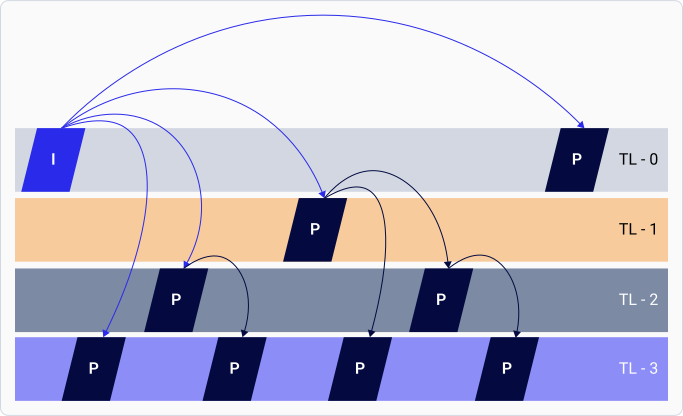
在 Hierarchical-P（Hier-P）功能中，编码器将帧组织为多个层，其中一层的帧仅参考较低层的帧。最低层（也称为层 0 或基础层）是唯一的例外。

下图显示了分层编码模式：

<div className="flex flex-col items-center gap-2">
  <img src="https://mintcdn.com/qualcomm-prod/h7j64QujhJHkLxyj/Technologies/Video/media/qli-video-technology/Layer-encoding.svg?fit=max&auto=format&n=h7j64QujhJHkLxyj&q=85&s=da3d6450c79edd7cd1c9420cdabb1b72" alt="图：Hier-P 分层编码模式" width="683" height="416" data-path="Technologies/Video/media/qli-video-technology/Layer-encoding.svg" />

  <p className="text-sm text-gray-700">
    图：Hier-P 分层编码模式
  </p>
</div>

在图中，TL-0 表示基础层，其余各层表示增强层。Hier-P 提升了抗错误能力和时间可扩展性。Hier-P 功能适用于涉及信道错误的视频电话（VT）或视频会议应用。Hier-P 允许您通过有选择地丢弃增强层来控制错误传播。

**切片编码**

编码器可以使用可独立解码的块组（GOB，也称为切片）来压缩帧。如果发生数据丢失或损坏，每个切片可独立解码，并作为恢复的单元。在编码帧中引入切片的优势包括：

* 编码器忽略损坏的切片并跳到下一个切片，从而将损坏限制在帧的一部分而不是整帧。
* 编码器调整切片大小以使其适配网络数据包，从而有助于传输。
* 编码器重传出错的切片，而不是发送整帧。
* 应用程序使用切片来降低实时通信中的延迟。应用程序并行传输和解码切片，无需等待整帧完成编码。

切片还可以充当重新同步标记，因为当出现比特错误时，解码器可以从下一个切片（标记）恢复。H.264 和 HEVC 编码器在 Qualcomm Linux 上支持切片。每个切片的比特数或每个切片的宏块数即为切片边界。

**帧内刷新**

帧内刷新功能可减少偏好恒定比特率的流媒体和投屏应用中的信道损耗。Adreno VPU 支持随机帧内刷新模式。

**视频编码器预处理**

应用程序可以使用 Adreno VPU 在编码之前对 YUV 帧进行旋转或翻转。Adreno VPU 在旋转或翻转 YUV 帧时不会消耗额外的功率。

**速率控制**

下表列出了支持的速率控制算法：

**表：支持的速率控制算法**

<div
  style={{
border: '2px solid #0050D8',
borderRadius: '16px',
padding: '24px',
marginTop: '25px',
backgroundColor: '#FFFFFF',
boxShadow: '0 0 25px rgba(0, 80, 216, 0.15)'
}}
>
  <div style={{ borderRadius: '12px', overflow: 'hidden', border: '2px solid #0050D8' }}>
    <div
      style={{
  background: 'linear-gradient(90deg, #0050D8 0%, #0037A5 100%)',
  color: 'white',
  padding: '14px',
  textAlign: 'center',
  fontWeight: 'bold',
  fontSize: '15px'
}}
    >
      表：支持的速率控制算法
    </div>

    <table style={{ width: '100%', borderCollapse: 'collapse', backgroundColor: 'white' }}>
      <thead>
        <tr style={{ backgroundColor: '#F8FAFC' }}>
          <th style={{ border: '1px solid #E5E7EB', padding: '16px', textAlign: 'center', width: '30%' }}>
            <span style={{ backgroundColor: '#0050D8', color: 'white', padding: '6px 16px', borderRadius: '20px', fontSize: '12px', fontWeight: 'bold', textTransform: 'uppercase', display: 'inline-block' }}>速率控制模式</span>
          </th>

          <th style={{ border: '1px solid #E5E7EB', padding: '16px', textAlign: 'center' }}>
            <span style={{ backgroundColor: '#0050D8', color: 'white', padding: '6px 16px', borderRadius: '20px', fontSize: '12px', fontWeight: 'bold', textTransform: 'uppercase', display: 'inline-block' }}>描述</span>
          </th>
        </tr>
      </thead>

      <tbody>
        <tr>
          <td style={{ border: '1px solid #E5E7EB', padding: '14px 16px', color: '#111827', fontWeight: '600', verticalAlign: 'top' }}>
            可变比特率（VBR）
          </td>

          <td style={{ border: '1px solid #E5E7EB', padding: '14px 16px', color: '#374151', lineHeight: '1.5' }}>
            <ul style={{ margin: '0', paddingLeft: '1.2rem' }}>
              <li>最大限度减少逐帧视频质量波动</li>
              <li>摄像机和 Wi-Fi 显示是典型用例</li>
            </ul>
          </td>
        </tr>

        <tr>
          <td style={{ border: '1px solid #E5E7EB', padding: '14px 16px', color: '#111827', fontWeight: '600', verticalAlign: 'top' }}>
            恒定比特率（CBR）
          </td>

          <td style={{ border: '1px solid #E5E7EB', padding: '14px 16px', color: '#374151', lineHeight: '1.5' }}>
            <ul style={{ margin: '0', paddingLeft: '1.2rem' }}>
              <li>减少比特率波动</li>
              <li>用于信道带宽受限的实时通信</li>
              <li>视频电话和流媒体是典型用例</li>
            </ul>
          </td>
        </tr>

        <tr>
          <td style={{ border: '1px solid #E5E7EB', padding: '14px 16px', color: '#111827', fontWeight: '600', verticalAlign: 'top' }}>
            最大比特率（MBR）
          </td>

          <td style={{ border: '1px solid #E5E7EB', padding: '14px 16px', color: '#374151', lineHeight: '1.5' }}>
            <ul style={{ margin: '0', paddingLeft: '1.2rem' }}>
              <li>在保持灵活性的同时限制比特率，可在设定目标范围内上下波动</li>
              <li>当场景中的活动增加时，比特率在最大限制内增加</li>
              <li>与智能比特分配（SBA）功能集成，以更低的比特率实现更好的质量</li>
            </ul>
          </td>
        </tr>
      </tbody>
    </table>
  </div>
</div>

**长期参考（LTR）支持**

视频压缩通过消除帧内（intra-frame）和帧间（inter-frame）的冗余来实现。以前，用于推导未来帧的已编码帧被称为参考帧。

以下参考帧允许高级编码应用控制参考帧的存储和引用方式：

* **短期参考（STR）**：编码器在参考缓冲区列表中按从最新到最旧的顺序维护最近的帧。编码器自动管理使用 STR 作为参考的帧，并在不再使用时将其从存储列表中删除。
* **长期参考（LTR）**：应用程序可以保存、使用和移除的帧。LTR 帧有助于提高视频通信的质量并确保抗错误能力。可标记为 LTR 帧的最大帧数取决于设备能力。

LTR 帧在易出错的信道中非常有用。在易出错的信道中引用 LTR 可减少因信道丢失导致漂移错误的可能性。接收方必须确认已成功接收 LTR，并且可以在发生错误时请求新的 LTR。网络协议具有校验和，可以与解码器损坏标志一起确认此行为。发送方会持续生成新的 LTR 帧，直到接收方确认成功接收到 LTR。

LTR 帧在有场景切换的视频中也很有用，其中保留了包含先前场景的 LTR。如果该场景再次出现，则可以有效地使用该 LTR。

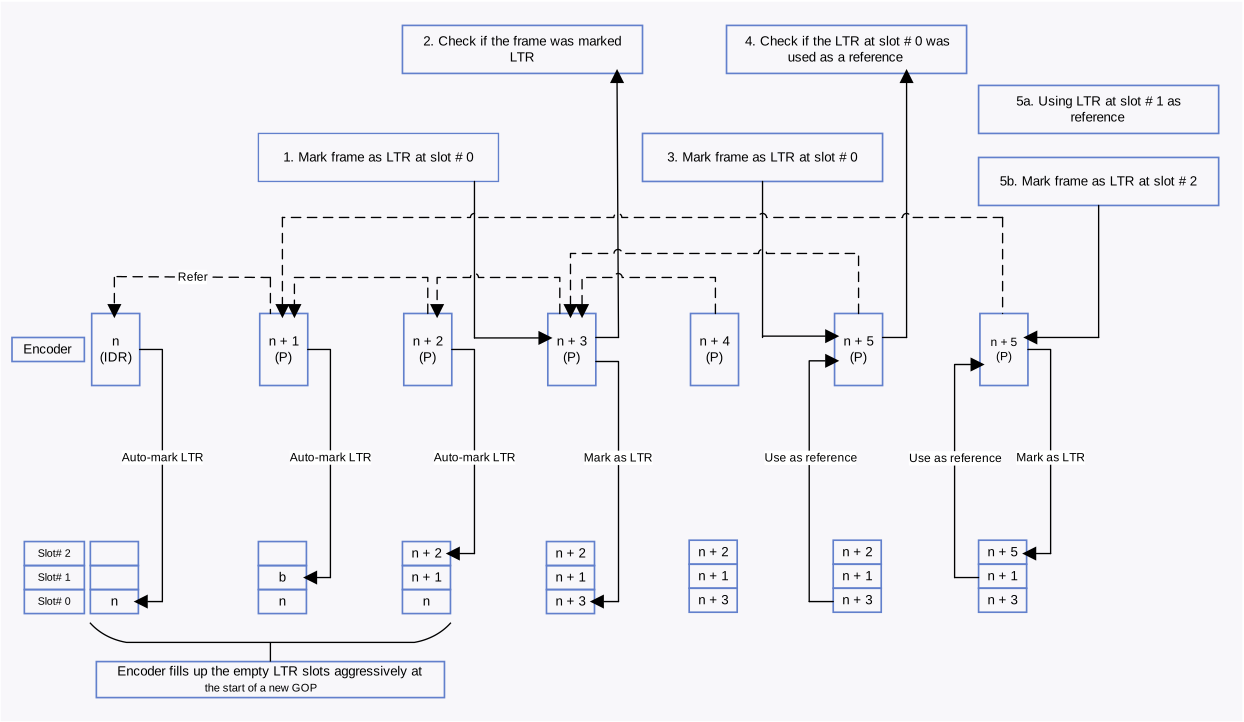
在新的图像组（GOP）开始时，编码器会自动填充 LTR 插槽，其中第一个插槽（插槽编号 0）包含一个 IDR 帧。应用程序可以显式发送 LTR 标记请求，以在相应的插槽中标记 LTR 帧。

以下流程图显示了 LTR 的使用方式，以及如何在 H.264 或 HEVC 编码器上标记和使用 LTR 帧：

<div className="flex flex-col items-center gap-2">
  <img src="https://mintcdn.com/qualcomm-prod/h7j64QujhJHkLxyj/Technologies/Video/media/qli-video-technology/LTR-support-feature.svg?fit=max&auto=format&n=h7j64QujhJHkLxyj&q=85&s=27ac08de2331e32336434ab68bd70bd1" alt="图：LTR 编码" width="1244" height="722" data-path="Technologies/Video/media/qli-video-technology/LTR-support-feature.svg" />

  <p className="text-sm text-gray-700">
    图：LTR 编码
  </p>
</div>

**编码器动态属性**

Adreno VPU 编码器支持动态更改比特率、帧率和同步帧等属性。此支持允许应用程序更改属性，有助于改善视觉体验、使视频数据适应网络状况，并最大限度减少传输过程中的数据丢失。