> ## Documentation Index
> Fetch the complete documentation index at: https://dragonwingdocs.qualcomm.com/llms.txt
> Use this file to discover all available pages before exploring further.

# 视频架构

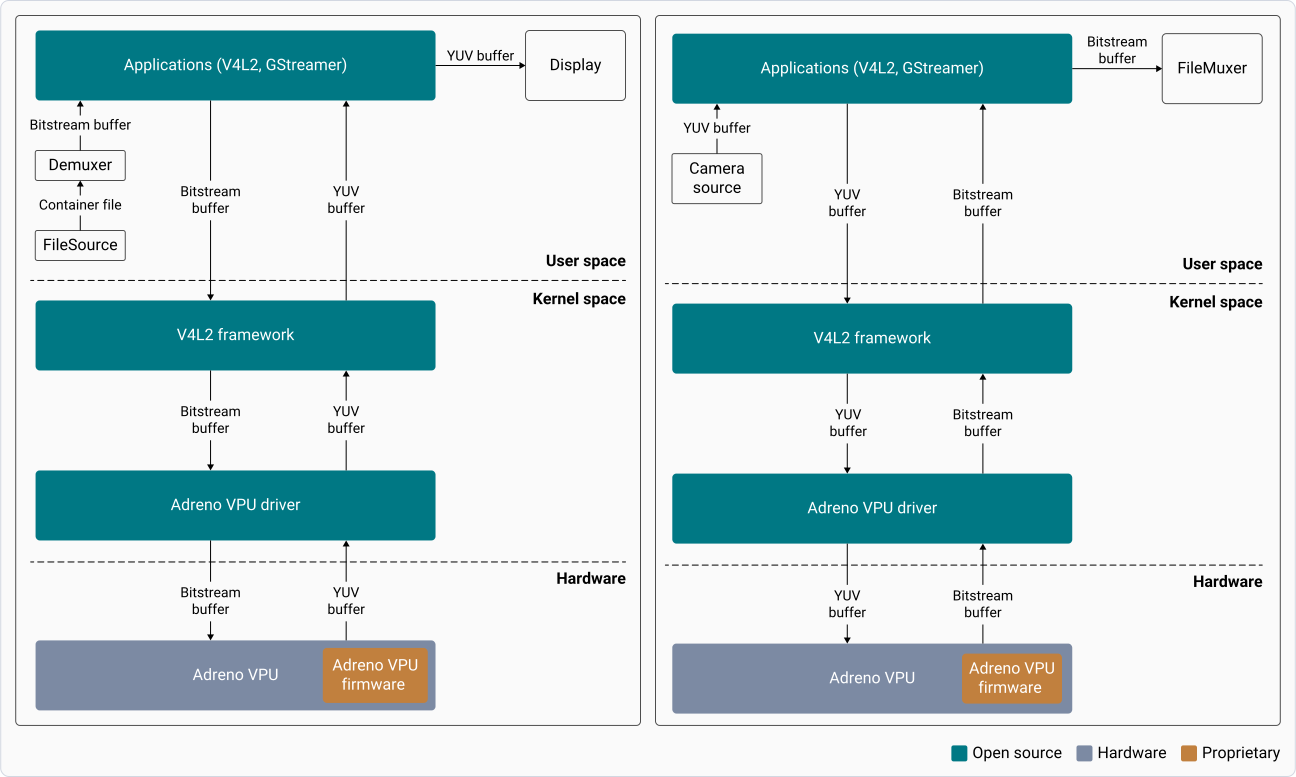
视频软件栈由一个客户端应用组成，该应用使用 V4L2 框架与 Adreno VPU 交互。

下图展示了解码器和编码器的视频软件架构。左侧图为解码器架构，右侧图为编码器架构。

<div className="flex flex-col items-center gap-2">
  <img src="https://mintcdn.com/qualcomm-prod/h7j64QujhJHkLxyj/Technologies/Video/media/qli-video-technology/Video-decoder-encoder-architecture.svg?fit=max&auto=format&n=h7j64QujhJHkLxyj&q=85&s=de3dde09083693132dac1d0fc5ad4df6" alt="图：视频解码器和编码器软件架构" width="1296" height="777" data-path="Technologies/Video/media/qli-video-technology/Video-decoder-encoder-architecture.svg" />

  <p className="text-sm text-gray-700">
    **图：视频解码器和编码器软件架构**
  </p>
</div>

下表列出了视频软件架构的组件：

<div
  style={{
border: '2px solid #0050D8',
borderRadius: '16px',
padding: '24px',
marginTop: '25px',
backgroundColor: '#FFFFFF',
boxShadow: '0 0 25px rgba(0, 80, 216, 0.15)'
}}
>
  <div style={{ borderRadius: '12px', overflow: 'hidden', border: '2px solid #0050D8' }}>
    <div
      style={{
  background: 'linear-gradient(90deg, #0050D8 0%, #0037A5 100%)',
  color: 'white',
  padding: '14px',
  textAlign: 'center',
  fontWeight: 'bold'
}}
    >
      表：视频软件架构的组件
    </div>

    <table style={{ width: '100%', borderCollapse: 'collapse', backgroundColor: 'white' }}>
      <thead>
        <tr style={{ backgroundColor: '#F8FAFC' }}>
          <th style={{ border: '1px solid #E5E7EB', padding: '16px', textAlign: 'center', width: '30%' }}>
            <span style={{ backgroundColor: '#0050D8', color: 'white', padding: '6px 16px', borderRadius: '20px', fontSize: '12px', fontWeight: 'bold', display: 'inline-block' }}>组件</span>
          </th>

          <th style={{ border: '1px solid #E5E7EB', padding: '16px', textAlign: 'center' }}>
            <span style={{ backgroundColor: '#0050D8', color: 'white', padding: '6px 16px', borderRadius: '20px', fontSize: '12px', fontWeight: 'bold', display: 'inline-block' }}>描述</span>
          </th>
        </tr>
      </thead>

      <tbody>
        <tr>
          <td style={{ border: '1px solid #E5E7EB', padding: '14px 16px', color: '#111827', fontWeight: '600' }}>用户应用</td>
          <td style={{ border: '1px solid #E5E7EB', padding: '14px 16px' }}>基于 GStreamer/V4L2，解码时与 FileSource 交互，编码时与 Camera Source 交互</td>
        </tr>

        <tr>
          <td style={{ border: '1px solid #E5E7EB', padding: '14px 16px', color: '#111827', fontWeight: '600' }}>V4L2 框架</td>

          <td style={{ border: '1px solid #E5E7EB', padding: '14px 16px' }}>
            <ul style={{ margin: 0, paddingLeft: '20px' }}>
              <li>与用户应用和 Adreno VPU 驱动交互</li>
              <li>处理事件、回调和缓冲区管理</li>
            </ul>
          </td>
        </tr>

        <tr>
          <td style={{ border: '1px solid #E5E7EB', padding: '14px 16px', color: '#111827', fontWeight: '600' }}>Adreno VPU 驱动</td>

          <td style={{ border: '1px solid #E5E7EB', padding: '14px 16px' }}>
            <ul style={{ margin: 0, paddingLeft: '20px' }}>
              <li>作为视频内核态驱动（KMD）的入口点</li>
              <li>编码器和解码器的通用驱动，用于控制 Adreno VPU</li>
              <li>管理视频驱动状态机、缓冲区分配、时钟/总线管理，并通过主机固件接口（HFI）与 Adreno VPU 通信</li>
            </ul>
          </td>
        </tr>

        <tr>
          <td style={{ border: '1px solid #E5E7EB', padding: '14px 16px', color: '#111827', fontWeight: '600' }}>Adreno VPU</td>
          <td style={{ border: '1px solid #E5E7EB', padding: '14px 16px' }}>作为硬件加速引擎，以最小功耗进行视频解码和编码</td>
        </tr>
      </tbody>
    </table>
  </div>
</div>

## **视频能力**

<Tabs>
  <Tab title="QCS6490">
    <div
      style={{
  border: '2px solid #0050D8',
  borderRadius: '16px',
  padding: '24px',
  marginTop: '15px',
  backgroundColor: '#FFFFFF',
  boxShadow: '0 0 25px rgba(0, 80, 216, 0.15)'
}}
    >
      <p style={{ color: '#4B5563', marginBottom: '20px' }}>QCS6490 上的 Adreno VPU 是第六代视频处理单元，具备以下能力：</p>

      <div style={{ borderRadius: '12px', overflow: 'hidden', border: '2px solid #0050D8' }}>
        <div style={{ background: 'linear-gradient(90deg, #0050D8 0%, #0037A5 100%)', color: 'white', padding: '14px', textAlign: 'center', fontWeight: 'bold' }}>
          表：QCS6490 的 Adreno VPU 特性和能力
        </div>

        <table style={{ width: '100%', borderCollapse: 'collapse', backgroundColor: 'white' }}>
          <thead>
            <tr style={{ backgroundColor: '#F8FAFC' }}>
              <th style={{ border: '1px solid #E5E7EB', padding: '16px', textAlign: 'center', width: '35%' }}>
                <span style={{ backgroundColor: '#0050D8', color: 'white', padding: '6px 16px', borderRadius: '20px', fontSize: '12px', fontWeight: 'bold', display: 'inline-block' }}>特性</span>
              </th>

              <th style={{ border: '1px solid #E5E7EB', padding: '16px', textAlign: 'center' }}>
                <span style={{ backgroundColor: '#0050D8', color: 'white', padding: '6px 16px', borderRadius: '20px', fontSize: '12px', fontWeight: 'bold', display: 'inline-block' }}>能力</span>
              </th>
            </tr>
          </thead>

          <tbody>
            <tr>
              <td style={{ border: '1px solid #E5E7EB', padding: '14px 16px', color: '#111827', fontWeight: '600' }}>视频解码</td>
              <td style={{ border: '1px solid #E5E7EB', padding: '14px 16px' }}>H.264/HEVC/VP9 最高支持 4096 × 2160、60 fps</td>
            </tr>

            <tr>
              <td style={{ border: '1px solid #E5E7EB', padding: '14px 16px', color: '#111827', fontWeight: '600' }}>视频编码</td>
              <td style={{ border: '1px solid #E5E7EB', padding: '14px 16px' }}>H.264/HEVC 最高支持 4096 × 2160、30 fps</td>
            </tr>

            <tr>
              <td style={{ border: '1px solid #E5E7EB', padding: '14px 16px', color: '#111827', fontWeight: '600' }}>多通道能力</td>

              <td style={{ border: '1px solid #E5E7EB', padding: '0' }}>
                <table style={{ width: '100%', borderCollapse: 'collapse', margin: '0' }}>
                  <tbody>
                    <tr>
                      <td style={{ borderBottom: '1px solid #E5E7EB', borderRight: '1px solid #E5E7EB', padding: '8px', textAlign: 'center', fontWeight: '600', width: '50%', backgroundColor: '#F8FAFC' }}>配置#1</td>
                      <td style={{ borderBottom: '1px solid #E5E7EB', padding: '8px', textAlign: 'center', fontWeight: '600', width: '50%', backgroundColor: '#F8FAFC' }}>配置#2</td>
                    </tr>

                    <tr>
                      <td style={{ borderRight: '1px solid #E5E7EB', padding: '14px 16px', verticalAlign: 'top' }}>
                        <div><ul><li>8 路 1920 × 1088、30 fps</li>
                        <li>16 路 1280 × 720、30 fps</li>
                        <li>16 路 720 × 480、30 fps</li></ul></div>
                      </td>

                      <td style={{ padding: '14px 16px', verticalAlign: 'top' }}>
                        <div><ul><li>8 路 1920 × 1088、30 fps</li>
                        <li>16 路 1280 × 720、30 fps</li>
                        <li>16 路 720 × 480、30 fps</li></ul></div>
                      </td>
                    </tr>
                  </tbody>
                </table>
              </td>
            </tr>

            <tr>
              <td style={{ border: '1px solid #E5E7EB', padding: '14px 16px', color: '#111827', fontWeight: '600' }}>高帧率采集</td>
              <td style={{ border: '1px solid #E5E7EB', padding: '14px 16px' }}>1280 × 720、480 fps 或 1920 × 1088、240 fps</td>
            </tr>

            <tr>
              <td style={{ border: '1px solid #E5E7EB', padding: '14px 16px', color: '#111827', fontWeight: '600' }}>每秒最大宏块数</td>

              <td style={{ border: '1px solid #E5E7EB', padding: '14px 16px' }}>
                <strong style={{ color: '#0050D8' }}>2088960</strong><br />每秒最大宏块数使用以下公式计算：<br />
                $(aligned \ width \times aligned \ height \times fps) / (macroblock \ size)$<br />
                示例：(4096 × 2176 × 60) / 256 = 2,088,960
              </td>
            </tr>
          </tbody>
        </table>
      </div>

      <p style={{ marginTop: '20px' }}>有关 QCS6490 解码和编码能力的更多信息，请参阅 [高级视频规格](https://dragonwingdocs.qualcomm.com/Technologies/Video/advanced-video-specifications#qcs6490)。</p>
    </div>
  </Tab>

  <Tab title="IQ-8275">
    <div style={{ border: '2px solid #0050D8', borderRadius: '16px', padding: '24px', marginTop: '15px', backgroundColor: '#FFFFFF', boxShadow: '0 0 25px rgba(0, 80, 216, 0.15)' }}>
      <p style={{ color: '#4B5563', marginBottom: '20px' }}>Dragonwing IQ-8275 上的 Adreno VPU 是第七代视频处理单元，具备以下能力：</p>

      <div style={{ borderRadius: '12px', overflow: 'hidden', border: '2px solid #0050D8' }}>
        <div style={{ background: 'linear-gradient(90deg, #0050D8 0%, #0037A5 100%)', color: 'white', padding: '14px', textAlign: 'center', fontWeight: 'bold' }}>表：IQ-8275 的 Adreno VPU 特性和能力</div>

        <table style={{ width: '100%', borderCollapse: 'collapse', backgroundColor: 'white' }}>
          <thead>
            <tr style={{ backgroundColor: '#F8FAFC' }}>
              <th style={{ border: '1px solid #E5E7EB', padding: '16px', textAlign: 'center', width: '35%' }}>
                <span style={{ backgroundColor: '#0050D8', color: 'white', padding: '6px 16px', borderRadius: '20px', fontSize: '12px', fontWeight: 'bold', display: 'inline-block' }}>特性</span>
              </th>

              <th style={{ border: '1px solid #E5E7EB', padding: '16px', textAlign: 'center' }}>
                <span style={{ backgroundColor: '#0050D8', color: 'white', padding: '6px 16px', borderRadius: '20px', fontSize: '12px', fontWeight: 'bold', display: 'inline-block' }}>能力</span>
              </th>
            </tr>
          </thead>

          <tbody>
            <tr>
              <td style={{ border: '1px solid #E5E7EB', padding: '14px 16px', color: '#111827', fontWeight: '600' }}>视频解码</td>

              <td style={{ border: '1px solid #E5E7EB', padding: '14px 16px' }}>
                <ul style={{ margin: 0, paddingLeft: '20px' }}>
                  <li>H.264/HEVC/VP9 最高支持 3840 × 2160、120 fps</li>
                  <li>AV1 最高支持 3840 × 2160、60 fps</li>
                </ul>
              </td>
            </tr>

            <tr>
              <td style={{ border: '1px solid #E5E7EB', padding: '14px 16px', color: '#111827', fontWeight: '600' }}>视频编码</td>
              <td style={{ border: '1px solid #E5E7EB', padding: '14px 16px' }}>H.264/HEVC 最高支持 4096 × 2160、60 fps</td>
            </tr>

            <tr>
              <td style={{ border: '1px solid #E5E7EB', padding: '14px 16px', color: '#111827', fontWeight: '600' }}>多通道能力</td>

              <td style={{ border: '1px solid #E5E7EB', padding: '0' }}>
                <table style={{ width: '100%', borderCollapse: 'collapse', margin: '0' }}>
                  <tbody>
                    <tr>
                      <td style={{ borderBottom: '1px solid #E5E7EB', borderRight: '1px solid #E5E7EB', padding: '8px', textAlign: 'center', fontWeight: '600', width: '50%', backgroundColor: '#F8FAFC' }}>配置#1</td>
                      <td style={{ borderBottom: '1px solid #E5E7EB', padding: '8px', textAlign: 'center', fontWeight: '600', width: '50%', backgroundColor: '#F8FAFC' }}>配置#2</td>
                    </tr>

                    <tr>
                      <td style={{ borderRight: '1px solid #E5E7EB', padding: '14px 16px', verticalAlign: 'top' }}>
                        <div><ul><li>16 路 1920 × 1088、30 fps</li>
                        <li>16 路 1280 × 720、30 fps</li>
                        <li>16 路 720 × 480、30 fps</li></ul></div>
                      </td>

                      <td style={{ padding: '14px 16px', verticalAlign: 'top' }}>
                        <div><ul><li>16 路 1920 × 1088、30 fps</li>
                        <li>24 路 1280 × 720、30 fps</li>
                        <li>24 路 720 × 480、30 fps</li></ul></div>
                      </td>
                    </tr>
                  </tbody>
                </table>
              </td>
            </tr>

            <tr>
              <td style={{ border: '1px solid #E5E7EB', padding: '14px 16px', color: '#111827', fontWeight: '600' }}>高帧率采集</td>
              <td style={{ border: '1px solid #E5E7EB', padding: '14px 16px' }}>1920 × 1088、240 fps 或 3840 × 2160、60 fps</td>
            </tr>

            <tr>
              <td style={{ border: '1px solid #E5E7EB', padding: '14px 16px', color: '#111827', fontWeight: '600' }}>每秒最大宏块数</td>

              <td style={{ border: '1px solid #E5E7EB', padding: '14px 16px' }}>
                <strong style={{ color: '#0050D8' }}>3916800</strong><br />每秒最大宏块数使用以下公式计算：<br /> $(aligned width × aligned height × fps)/(macroblock size)$ <br />例如，(3840 × 2176 × 120)/256 = 3916800
              </td>
            </tr>
          </tbody>
        </table>
      </div>

      <p style={{ marginTop: '20px' }}>有关 Dragonwing IQ-8275 解码和编码能力的更多信息，请参阅 [高级视频规格](https://dragonwingdocs.qualcomm.com/Technologies/Video/advanced-video-specifications#iq-8275)。</p>
    </div>
  </Tab>

  <Tab title="IQ-9075">
    <div style={{ border: '2px solid #0050D8', borderRadius: '16px', padding: '24px', marginTop: '15px', backgroundColor: '#FFFFFF', boxShadow: '0 0 25px rgba(0, 80, 216, 0.15)' }}>
      <p style={{ color: '#4B5563', marginBottom: '20px' }}>Dragonwing IQ-9075 上的 Adreno VPU 是第七代视频处理单元，具备以下能力：</p>

      <div style={{ borderRadius: '12px', overflow: 'hidden', border: '2px solid #0050D8' }}>
        <div style={{ background: 'linear-gradient(90deg, #0050D8 0%, #0037A5 100%)', color: 'white', padding: '14px', textAlign: 'center', fontWeight: 'bold' }}>表：IQ-9075 的 Adreno VPU 特性和能力</div>

        <table style={{ width: '100%', borderCollapse: 'collapse', backgroundColor: 'white' }}>
          <thead>
            <tr style={{ backgroundColor: '#F8FAFC' }}>
              <th style={{ border: '1px solid #E5E7EB', padding: '16px', textAlign: 'center', width: '35%' }}>
                <span style={{ backgroundColor: '#0050D8', color: 'white', padding: '6px 16px', borderRadius: '20px', fontSize: '12px', fontWeight: 'bold', display: 'inline-block' }}>特性</span>
              </th>

              <th style={{ border: '1px solid #E5E7EB', padding: '16px', textAlign: 'center' }}>
                <span style={{ backgroundColor: '#0050D8', color: 'white', padding: '6px 16px', borderRadius: '20px', fontSize: '12px', fontWeight: 'bold', display: 'inline-block' }}>能力</span>
              </th>
            </tr>
          </thead>

          <tbody>
            <tr>
              <td style={{ border: '1px solid #E5E7EB', padding: '14px 16px', color: '#111827', fontWeight: '600' }}>视频解码</td>

              <td style={{ border: '1px solid #E5E7EB', padding: '14px 16px' }}>
                <ul style={{ margin: 0, paddingLeft: '20px' }}>
                  <li>H.264/HEVC/AV1 最高支持 7680 × 4320、60 fps 或 3840 × 2160、240 fps</li>
                  <li>VP9 最高支持 3840 × 2160、240 fps</li>
                </ul>
              </td>
            </tr>

            <tr>
              <td style={{ border: '1px solid #E5E7EB', padding: '14px 16px', color: '#111827', fontWeight: '600' }}>视频编码</td>
              <td style={{ border: '1px solid #E5E7EB', padding: '14px 16px' }}>H.264/HEVC 最高支持 7680 × 4320、30 fps</td>
            </tr>

            <tr>
              <td style={{ border: '1px solid #E5E7EB', padding: '14px 16px', color: '#111827', fontWeight: '600' }}>多通道能力</td>

              <td style={{ border: '1px solid #E5E7EB', padding: '0' }}>
                <table style={{ width: '100%', borderCollapse: 'collapse', margin: '0' }}>
                  <tbody>
                    <tr>
                      <td style={{ borderBottom: '1px solid #E5E7EB', borderRight: '1px solid #E5E7EB', padding: '8px', textAlign: 'center', fontWeight: '600', width: '50%', backgroundColor: '#F8FAFC' }}>配置#1</td>
                      <td style={{ borderBottom: '1px solid #E5E7EB', padding: '8px', textAlign: 'center', fontWeight: '600', width: '50%', backgroundColor: '#F8FAFC' }}>配置#2</td>
                    </tr>

                    <tr>
                      <td style={{ borderRight: '1px solid #E5E7EB', padding: '14px 16px', verticalAlign: 'top' }}>
                        <div><ul><li>16 路 1920 × 1088、30 fps</li>
                        <li>16 路 1280 × 720、30 fps</li>
                        <li>16 路 720 × 480、30 fps</li></ul></div>
                      </td>

                      <td style={{ padding: '14px 16px', verticalAlign: 'top' }}>
                        <div><ul><li>32 路 1920 × 1088、30 fps</li>
                        <li>32 路 1280 × 720、30 fps</li>
                        <li>32 路 720 × 480、30 fps</li></ul></div>
                      </td>
                    </tr>
                  </tbody>
                </table>
              </td>
            </tr>

            <tr>
              <td style={{ border: '1px solid #E5E7EB', padding: '14px 16px', color: '#111827', fontWeight: '600' }}>高帧率采集</td>
              <td style={{ border: '1px solid #E5E7EB', padding: '14px 16px' }}>1920 × 1088、480 fps 或 3840 × 2160、120 fps</td>
            </tr>

            <tr>
              <td style={{ border: '1px solid #E5E7EB', padding: '14px 16px', color: '#111827', fontWeight: '600' }}>每秒最大宏块数</td>

              <td style={{ border: '1px solid #E5E7EB', padding: '14px 16px' }}>
                <strong style={{ color: '#0050D8' }}>7833600</strong><br />每秒最大宏块数使用以下公式计算：<br /> $(aligned width × aligned height × fps)/(macroblock size)$ <br /> 例如，(3840 × 2176 × 240)/256 = 7833600
              </td>
            </tr>
          </tbody>
        </table>
      </div>

      <p style={{ marginTop: '20px' }}>有关 Dragonwing IQ-9075 解码和编码能力的更多信息，请参阅 [高级视频规格](https://dragonwingdocs.qualcomm.com/Technologies/Video/advanced-video-specifications#iq-9075)。</p>
    </div>
  </Tab>

  <Tab title="QCS615">
    <div style={{ border: '2px solid #0050D8', borderRadius: '16px', padding: '24px', marginTop: '15px', backgroundColor: '#FFFFFF', boxShadow: '0 0 25px rgba(0, 80, 216, 0.15)' }}>
      <p style={{ color: '#4B5563', marginBottom: '20px' }}>QCS615 上的 Adreno VPU 是第六代视频处理单元，具备以下能力：</p>

      <div style={{ borderRadius: '12px', overflow: 'hidden', border: '2px solid #0050D8' }}>
        <div style={{ background: 'linear-gradient(90deg, #0050D8 0%, #0037A5 100%)', color: 'white', padding: '14px', textAlign: 'center', fontWeight: 'bold' }}>表：QCS615 的 Adreno VPU 特性和能力</div>

        <table style={{ width: '100%', borderCollapse: 'collapse', backgroundColor: 'white' }}>
          <thead>
            <tr style={{ backgroundColor: '#F8FAFC' }}>
              <th style={{ border: '1px solid #E5E7EB', padding: '16px', textAlign: 'center', width: '35%' }}>
                <span style={{ backgroundColor: '#0050D8', color: 'white', padding: '6px 16px', borderRadius: '20px', fontSize: '12px', fontWeight: 'bold', display: 'inline-block' }}>特性</span>
              </th>

              <th style={{ border: '1px solid #E5E7EB', padding: '16px', textAlign: 'center' }}>
                <span style={{ backgroundColor: '#0050D8', color: 'white', padding: '6px 16px', borderRadius: '20px', fontSize: '12px', fontWeight: 'bold', display: 'inline-block' }}>能力</span>
              </th>
            </tr>
          </thead>

          <tbody>
            <tr>
              <td style={{ border: '1px solid #E5E7EB', padding: '14px 16px', color: '#111827', fontWeight: '600' }}>视频解码</td>
              <td style={{ border: '1px solid #E5E7EB', padding: '14px 16px' }}>H.264/HEVC/VP9 最高支持 3840 × 2160、30 fps</td>
            </tr>

            <tr>
              <td style={{ border: '1px solid #E5E7EB', padding: '14px 16px', color: '#111827', fontWeight: '600' }}>视频编码</td>
              <td style={{ border: '1px solid #E5E7EB', padding: '14px 16px' }}>H.264/HEVC 最高支持 3840 × 2160、30 fps</td>
            </tr>

            <tr>
              <td style={{ border: '1px solid #E5E7EB', padding: '14px 16px', color: '#111827', fontWeight: '600' }}>多通道能力</td>

              <td style={{ border: '1px solid #E5E7EB', padding: '0' }}>
                <table style={{ width: '100%', borderCollapse: 'collapse', margin: '0' }}>
                  <tbody>
                    <tr>
                      <td style={{ borderBottom: '1px solid #E5E7EB', padding: '8px', textAlign: 'center', fontWeight: '600', width: '100%', backgroundColor: '#F8FAFC' }}>配置#1</td>
                    </tr>

                    <tr>
                      <td style={{ padding: '14px 16px', verticalAlign: 'top' }}>
                        <div><ul><li>4 路 1920 × 1088、30 fps</li></ul></div>
                        <div><ul><li>8 路 1280 × 720、30 fps</li></ul></div>
                        <div><ul><li>16 路 720 × 480、30 fps</li></ul></div>
                      </td>
                    </tr>
                  </tbody>
                </table>
              </td>
            </tr>

            <tr>
              <td style={{ border: '1px solid #E5E7EB', padding: '14px 16px', color: '#111827', fontWeight: '600' }}>高帧率采集</td>
              <td style={{ border: '1px solid #E5E7EB', padding: '14px 16px' }}>1280 × 720、240 fps 或 1920 × 1080、120 fps</td>
            </tr>

            <tr>
              <td style={{ border: '1px solid #E5E7EB', padding: '14px 16px', color: '#111827', fontWeight: '600' }}>每秒最大宏块数</td>

              <td style={{ border: '1px solid #E5E7EB', padding: '14px 16px' }}>
                <strong style={{ color: '#0050D8' }}>976500</strong><br />每秒最大宏块数使用以下公式计算：<br />$(aligned width × aligned height × fps)/(macroblock size)$ <br />例如，(3840 × 2176 × 30)/256 = 976500
              </td>
            </tr>
          </tbody>
        </table>
      </div>

      <p style={{ marginTop: '20px' }}>有关 QCS615 解码和编码能力的更多信息，请参阅 [高级视频规格](https://dragonwingdocs.qualcomm.com/Technologies/Video/advanced-video-specifications#qcs615)。</p>
    </div>
  </Tab>
</Tabs>

## **后续步骤**

* [高级视频规格](https://dragonwingdocs.qualcomm.com/Technologies/Video/advanced-video-specifications)
