> ## Documentation Index
> Fetch the complete documentation index at: https://dragonwingdocs.qualcomm.com/llms.txt
> Use this file to discover all available pages before exploring further.
# PCIe
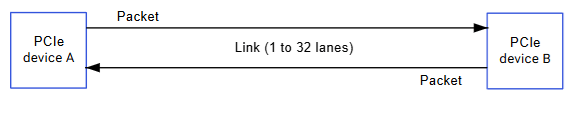
PCIe(外围组件互连高速总线)使用双向连接同时发送和接收信息。设备之间的路径称为**链路(Link)**,由一个或多个称为\*\*通道(Lane)\*\*的发送/接收对组成。
 ## 硬件规格
### IQ-9075 PCIe 控制器
| 参数 | PCIe RC1 | PCIe RC0 |
| ---------- | --------------------------------------------------------------------- | --------------------------------------------------------------------- |
| **速率** | Gen4 2 通道(8 GT/s) | Gen4 4 通道(8 GT/s) |
| **配置空间** | 0x40100000(1 MB) | 0x60100000(1 MB) |
| **I/O 空间** | 0x40200000(1 MB) | 0x60200000(1 MB) |
| **BAR 空间** | 0x40300000(509 MB) | 0x60300000(509 MB) |
| **电源轨** | vreg\_l5a(VDD\_A\_PCIE\_0\_CORE)、vreg\_l1c(VDD\_A\_PCIE\_0\_PLL\_1P2) | vreg\_l5a(VDD\_A\_PCIE\_1\_CORE)、vreg\_l1c(VDD\_A\_PCIE\_1\_PLL\_1P2) |
| **中断** | MSI 和 PCI 传统中断 | MSI 和 PCI 传统中断 |
| **电源管理** | ASPM(L1/L1ss、L0s) | ASPM(L1/L1ss、L0s) |
### EVK 硬件配置
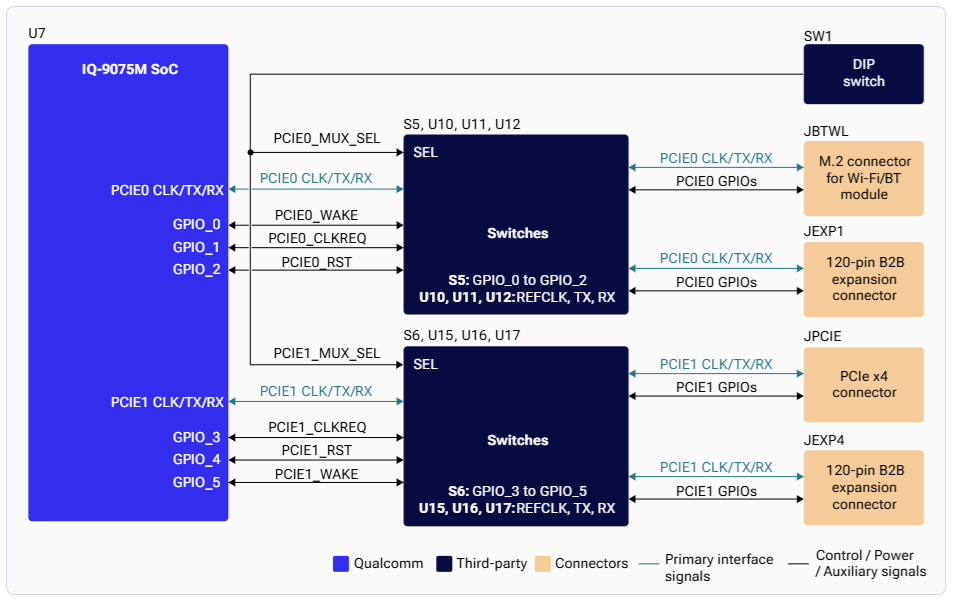
* **PCIe0**:Gen4 2 通道 — M.2 E key(Wi-Fi)或扩展(通过 SW1-1 开关选择)
* **PCIe1**:Gen4 4 通道 — PCIe x4 插槽或扩展(通过 SW1-2 开关选择)
* **JPCIE**:PCIe Express v4 插座连接器(PCIe1)
## 硬件规格
### IQ-9075 PCIe 控制器
| 参数 | PCIe RC1 | PCIe RC0 |
| ---------- | --------------------------------------------------------------------- | --------------------------------------------------------------------- |
| **速率** | Gen4 2 通道(8 GT/s) | Gen4 4 通道(8 GT/s) |
| **配置空间** | 0x40100000(1 MB) | 0x60100000(1 MB) |
| **I/O 空间** | 0x40200000(1 MB) | 0x60200000(1 MB) |
| **BAR 空间** | 0x40300000(509 MB) | 0x60300000(509 MB) |
| **电源轨** | vreg\_l5a(VDD\_A\_PCIE\_0\_CORE)、vreg\_l1c(VDD\_A\_PCIE\_0\_PLL\_1P2) | vreg\_l5a(VDD\_A\_PCIE\_1\_CORE)、vreg\_l1c(VDD\_A\_PCIE\_1\_PLL\_1P2) |
| **中断** | MSI 和 PCI 传统中断 | MSI 和 PCI 传统中断 |
| **电源管理** | ASPM(L1/L1ss、L0s) | ASPM(L1/L1ss、L0s) |
### EVK 硬件配置
* **PCIe0**:Gen4 2 通道 — M.2 E key(Wi-Fi)或扩展(通过 SW1-1 开关选择)
* **PCIe1**:Gen4 4 通道 — PCIe x4 插槽或扩展(通过 SW1-2 开关选择)
* **JPCIE**:PCIe Express v4 插座连接器(PCIe1)
 ## 架构
## 架构
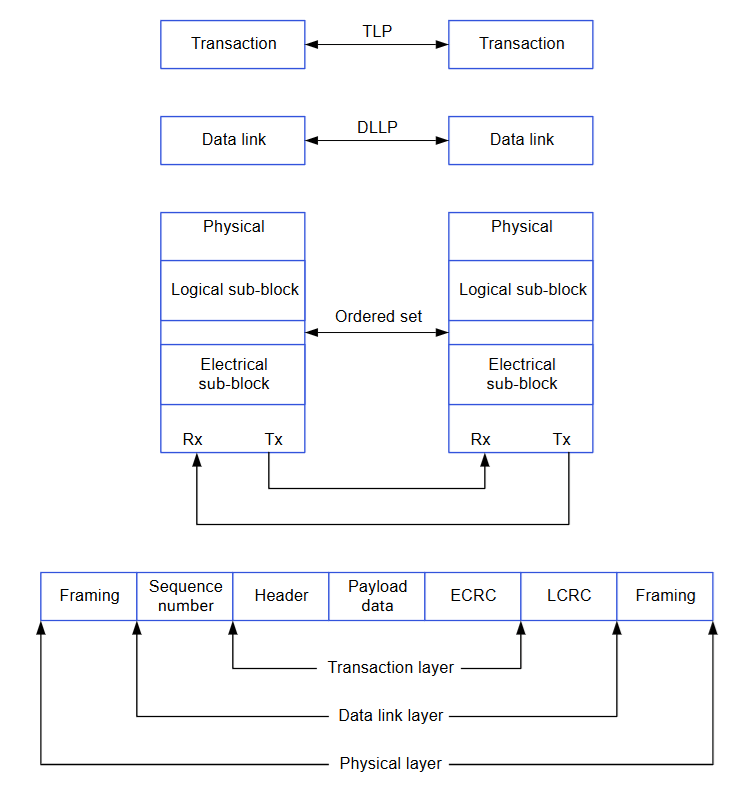 | 层 | 关键特性 |
| --------- | ------------------------------ |
| **物理层** | 链路训练、8b/10b 编码、串行转换 |
| **数据链路层** | DLLP 组装、LCRC 生成、ACK/NAK 重放 |
| **事务层** | TLP 组装、ECRC、流量控制、QoS(TC→VC 映射) |
### PCIe 连接类型
| 类型 | 描述 |
| --------------- | ----------------- |
| **根复合体(RC)** | 将 CPU 连接到 PCIe 拓扑 |
| **交换器(Switch)** | 在 2 个以上端口之间路由数据包 |
| **桥(Bridge)** | 连接不同的总线 |
| **端点(EP)** | 只有上行端口的叶子设备 |
## 软件驱动配置
### 内核配置
```
CONFIG_HOTPLUG_PCI=y
CONFIG_PCI_HOST_GENERIC=y
CONFIG_PCIE_DW_PLAT_HOST=y
CONFIG_PCIE_QCOM=y
CONFIG_PCI_ENDPOINT=y
CONFIG_PCIEASPM=y
CONFIG_PCIEASPM_POWER_SUPERSAVE=y
CONFIG_BLK_DEV_NVME=y
CONFIG_NVME_CORE=y
```
### 设备树源文件
| 平台 | 文件 |
| ------------------ | --------------------------------------- |
| Dragonwing IQ-9075 | `arch/arm64/boot/dts/qcom/sa8775p.dtsi` |
### 关键驱动文件
| 组件 | 路径 |
| ------------- | --------------------------------------------------- |
| PCIe 驱动 | `drivers/pci/controller/dwc/pcie-qcom.c` |
| DesignWare 主机 | `drivers/pci/controller/dwc/pcie-designware-host.c` |
| PHY 驱动 | `drivers/phy/qualcomm/phy-qcom-qmp-pcie.c` |
## 验证
### 列出 PCIe 设备
```bash theme={null}
lspci
```
**示例输出:**
```
0001:00:00.0 PCI bridge: Qualcomm Device 010b
0001:01:00.0 PCI bridge: Toshiba Corporation Device 0623
0001:05:00.0 Ethernet controller: Toshiba Corporation Device 0220
```
### 检查链路状态
```bash theme={null}
lspci -vv | grep -i "lnk"
cat /sys/bus/pci/devices/*/current_link_speed
cat /sys/bus/pci/devices/*/current_link_width
```
### USB over PCIe
| 层 | 关键特性 |
| --------- | ------------------------------ |
| **物理层** | 链路训练、8b/10b 编码、串行转换 |
| **数据链路层** | DLLP 组装、LCRC 生成、ACK/NAK 重放 |
| **事务层** | TLP 组装、ECRC、流量控制、QoS(TC→VC 映射) |
### PCIe 连接类型
| 类型 | 描述 |
| --------------- | ----------------- |
| **根复合体(RC)** | 将 CPU 连接到 PCIe 拓扑 |
| **交换器(Switch)** | 在 2 个以上端口之间路由数据包 |
| **桥(Bridge)** | 连接不同的总线 |
| **端点(EP)** | 只有上行端口的叶子设备 |
## 软件驱动配置
### 内核配置
```
CONFIG_HOTPLUG_PCI=y
CONFIG_PCI_HOST_GENERIC=y
CONFIG_PCIE_DW_PLAT_HOST=y
CONFIG_PCIE_QCOM=y
CONFIG_PCI_ENDPOINT=y
CONFIG_PCIEASPM=y
CONFIG_PCIEASPM_POWER_SUPERSAVE=y
CONFIG_BLK_DEV_NVME=y
CONFIG_NVME_CORE=y
```
### 设备树源文件
| 平台 | 文件 |
| ------------------ | --------------------------------------- |
| Dragonwing IQ-9075 | `arch/arm64/boot/dts/qcom/sa8775p.dtsi` |
### 关键驱动文件
| 组件 | 路径 |
| ------------- | --------------------------------------------------- |
| PCIe 驱动 | `drivers/pci/controller/dwc/pcie-qcom.c` |
| DesignWare 主机 | `drivers/pci/controller/dwc/pcie-designware-host.c` |
| PHY 驱动 | `drivers/phy/qualcomm/phy-qcom-qmp-pcie.c` |
## 验证
### 列出 PCIe 设备
```bash theme={null}
lspci
```
**示例输出:**
```
0001:00:00.0 PCI bridge: Qualcomm Device 010b
0001:01:00.0 PCI bridge: Toshiba Corporation Device 0623
0001:05:00.0 Ethernet controller: Toshiba Corporation Device 0220
```
### 检查链路状态
```bash theme={null}
lspci -vv | grep -i "lnk"
cat /sys/bus/pci/devices/*/current_link_speed
cat /sys/bus/pci/devices/*/current_link_width
```
### USB over PCIe
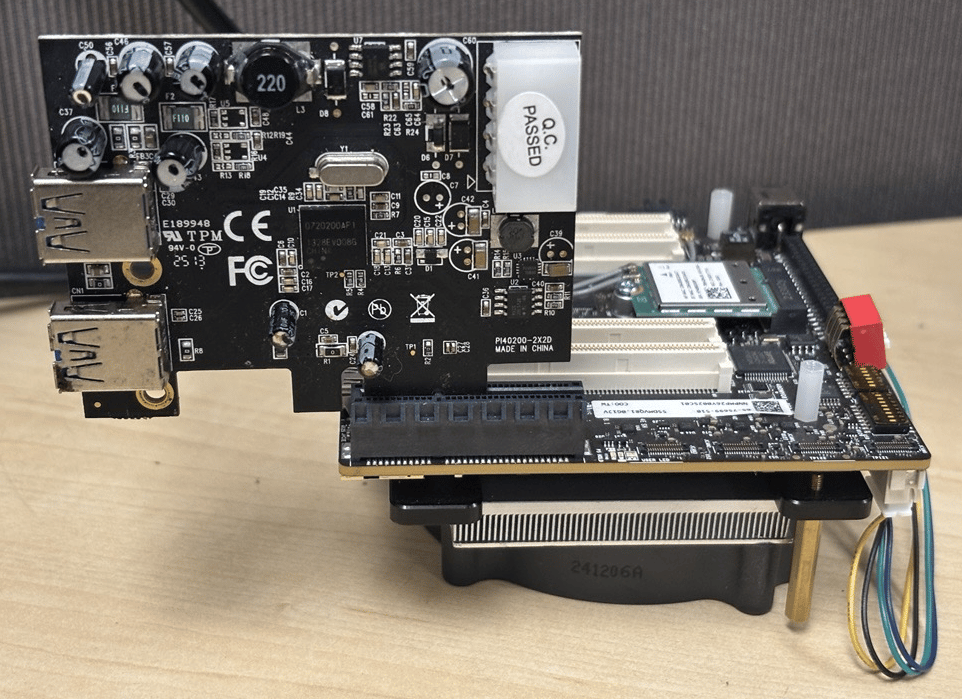 连接 USB-over-PCIe 卡后:
```bash theme={null}
lspci
# Expected: USB controller: NEC Corporation uPD720200 USB 3.0 Host Controller
lsusb
# Shows connected USB devices
```
### NVMe over PCIe
```bash theme={null}
lspci | grep -i nvme
ls /dev/nvme*
nvme list
```
## 调试
### 启用调试日志
```bash theme={null}
sudo su
echo 8 > /proc/sys/kernel/printk
echo "file pcie-qcom.c +p" > /sys/kernel/debug/dynamic_debug/control
echo "file pcie-designware-host.c +p" > /sys/kernel/debug/dynamic_debug/control
dmesg | grep -i pcie
```
## 故障排查
**可能原因:** PHY 未初始化、时钟/电源问题、设备树不正确。
```bash theme={null}
dmesg | grep -i phy | grep -i pcie
cat /sys/kernel/debug/regulator/regulator_summary | grep -i pcie
```
* 检查 PHY 电源轨和时钟配置
* 验证设备树设置
**可能原因:** 链路未建立、端点未上电、交换器配置错误。
```bash theme={null}
lspci -tv
dmesg | grep -i pcie
```
* 确认 DIP 开关位置(SW1-1、SW1-2)
* 检查端点电源供应
* 在设备树中启用 MSI
* 检查中断控制器配置
* 确认驱动中 `pci_enable_msi()` 返回成功
```bash theme={null}
lspci -vv | grep -i "lnk"
# Check Speed and Width fields
```
* 确认链路运行在预期的 Gen4 速率
* 如果 ASPM 设置过于激进,请进行调整
## 快速参考
### 常用命令
```bash theme={null}
lspci # List all PCIe devices
lspci -vv # Detailed device info
lspci -tv # Tree view
lspci -nn # With numeric IDs
dmesg | grep -i pcie # Kernel messages
cat /sys/bus/pci/devices/*/current_link_speed # Link speeds
cat /sys/bus/pci/devices/*/current_link_width # Link widths
```
## 资源
* [内核 PCIe 文档](https://www.kernel.org/doc/html/latest/PCI/index.html)
* [PCIe 规范](https://pcisig.com/specifications/pciexpress/technical_library/pciexpress_whitepaper.pdf)
* [设备树绑定](https://github.com/torvalds/linux/blob/master/Documentation/devicetree/bindings/pci/qcom%2Cpcie-sc8280xp.yaml)
* [Qualcomm PCIe 驱动](https://github.com/torvalds/linux/blob/master/drivers/pci/controller/dwc/pcie-qcom.c)
连接 USB-over-PCIe 卡后:
```bash theme={null}
lspci
# Expected: USB controller: NEC Corporation uPD720200 USB 3.0 Host Controller
lsusb
# Shows connected USB devices
```
### NVMe over PCIe
```bash theme={null}
lspci | grep -i nvme
ls /dev/nvme*
nvme list
```
## 调试
### 启用调试日志
```bash theme={null}
sudo su
echo 8 > /proc/sys/kernel/printk
echo "file pcie-qcom.c +p" > /sys/kernel/debug/dynamic_debug/control
echo "file pcie-designware-host.c +p" > /sys/kernel/debug/dynamic_debug/control
dmesg | grep -i pcie
```
## 故障排查
**可能原因:** PHY 未初始化、时钟/电源问题、设备树不正确。
```bash theme={null}
dmesg | grep -i phy | grep -i pcie
cat /sys/kernel/debug/regulator/regulator_summary | grep -i pcie
```
* 检查 PHY 电源轨和时钟配置
* 验证设备树设置
**可能原因:** 链路未建立、端点未上电、交换器配置错误。
```bash theme={null}
lspci -tv
dmesg | grep -i pcie
```
* 确认 DIP 开关位置(SW1-1、SW1-2)
* 检查端点电源供应
* 在设备树中启用 MSI
* 检查中断控制器配置
* 确认驱动中 `pci_enable_msi()` 返回成功
```bash theme={null}
lspci -vv | grep -i "lnk"
# Check Speed and Width fields
```
* 确认链路运行在预期的 Gen4 速率
* 如果 ASPM 设置过于激进,请进行调整
## 快速参考
### 常用命令
```bash theme={null}
lspci # List all PCIe devices
lspci -vv # Detailed device info
lspci -tv # Tree view
lspci -nn # With numeric IDs
dmesg | grep -i pcie # Kernel messages
cat /sys/bus/pci/devices/*/current_link_speed # Link speeds
cat /sys/bus/pci/devices/*/current_link_width # Link widths
```
## 资源
* [内核 PCIe 文档](https://www.kernel.org/doc/html/latest/PCI/index.html)
* [PCIe 规范](https://pcisig.com/specifications/pciexpress/technical_library/pciexpress_whitepaper.pdf)
* [设备树绑定](https://github.com/torvalds/linux/blob/master/Documentation/devicetree/bindings/pci/qcom%2Cpcie-sc8280xp.yaml)
* [Qualcomm PCIe 驱动](https://github.com/torvalds/linux/blob/master/drivers/pci/controller/dwc/pcie-qcom.c)