> ## Documentation Index
> Fetch the complete documentation index at: https://dragonwingdocs.qualcomm.com/llms.txt
> Use this file to discover all available pages before exploring further.
# SPI
串行外设接口(SPI)是一种同步、全双工的 4 线串行总线。
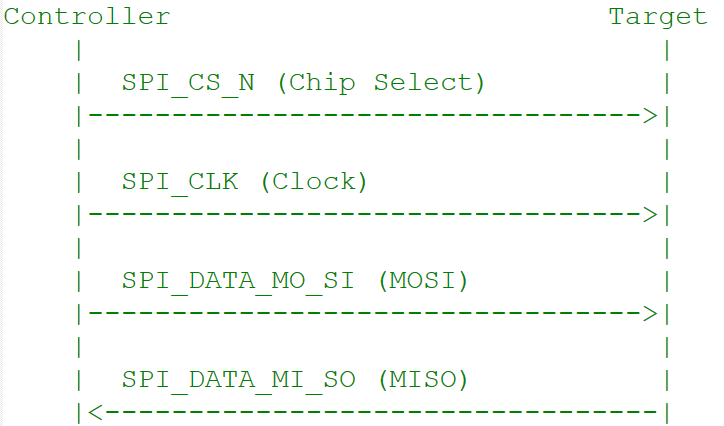 ## 信号
| 信号 | 描述 |
| -------- | ----------------------- |
| **MOSI** | 控制器数据输出,目标设备数据输入 |
| **MISO** | 控制器数据输入,目标设备数据输出 |
| **SCLK** | 由控制器产生的时钟 |
| **CS** | 片选(低电平有效);每条总线最多 4 条片选线 |
## 按子系统划分的传输模式
| 子系统 | 传输模式 | 最大速率 | 备注 |
| --------- | ---------------- | ------ | ------------------- |
| **Linux** | FIFO、CPU DMA、GSI | 50 MHz | 每字 4–32 位;最多 4 个 CS |
| **Boot** | 仅 FIFO | 50 MHz | 轮询模式;不支持 GSI |
| **aDSP** | 全/半双工,同步 | 50 MHz | 原始位级传输;无成帧或错误检查 |
## 接口组件
### 设备树源文件
| 平台 | 文件 |
| ------------------ | --------------------------------------- |
| Dragonwing IQ-9075 | `arch/arm64/boot/dts/qcom/sa8775p.dtsi` |
### API
| 子系统 | 头文件 |
| ----- | ----------------------------------------------------------- |
| Linux | `include/uapi/linux/spi/spidev.h`、`include/linux/spi/spi.h` |
| Boot | `boot_images/boot/QcomPkg/Include/SpiApi.h` |
| aDSP | `adsp_proc/core/api/buses/spi_api.h` |
## 软件配置
### Linux 设备树示例
```dts theme={null}
spi@a98000 {
compatible = "qcom,geni-spi";
reg = <0 0x00a98000 0 0x4000>;
clocks = <&gcc GCC_QUPV3_WRAP1_S6_CLK>;
clock-names = "se";
pinctrl-names = "default";
pinctrl-0 = <&qup_spi14_data_clk>, <&qup_spi14_cs>;
interrupts = ;
#address-cells = <1>;
#size-cells = <0>;
power-domains = <&rpmhpd SC7280_CX>;
interconnects = <&clk_virt MASTER_QUP_CORE_1 0 &clk_virt SLAVE_QUP_CORE_1 0>,
<&gem_noc MASTER_APPSS_PROC 0 &cnoc2 SLAVE_QUP_1 0>;
interconnect-names = "qup-core", "qup-config";
dmas = <&gpi_dma1 0 6 QCOM_GPI_SPI>,
<&gpi_dma1 1 6 QCOM_GPI_SPI>;
dma-names = "tx", "rx";
status = "disabled";
};
```
GPIO pinctrl:
```dts theme={null}
qup_spi14_data_clk: qup-spi14-data-clk-state {
pins = "gpio56", "gpio57", "gpio58";
function = "qup16";
};
qup_spi14_cs: qup-spi14-cs-state {
pins = "gpio59";
function = "qup16";
};
```
### QUPAC 访问控制
```c theme={null}
{ QUPV3_0_SE3, QUPV3_PROTOCOL_SPI, QUPV3_MODE_FIFO, AC_HLOS, TRUE, TRUE, FALSE }, // CAN SPI
{ QUPV3_1_SE3, QUPV3_PROTOCOL_SPI, QUPV3_MODE_FIFO, AC_HLOS, FALSE, TRUE, TRUE }, // LS1 SPI
{ QUPV3_1_SE4, QUPV3_PROTOCOL_SPI, QUPV3_MODE_GSI, AC_TZ, FALSE, TRUE, TRUE }, // NFC ESE
{ QUPV3_1_SE6, QUPV3_PROTOCOL_SPI, QUPV3_MODE_GSI, AC_HLOS, FALSE, TRUE, FALSE }, // FP
```
## 配置步骤
编辑 `kernel_platform/kernel/arch/arm64/configs/qcom_defconfig`:
```
CONFIG_QCOM_GENI_SE=y
CONFIG_SPI_QCOM_GENI=m
CONFIG_SPI_SPIDEV=m
CONFIG_QCOM_GPI_DMA=m
```
```dts theme={null}
&spi1 {
status = "okay";
};
```
编译内核和设备树变更,然后将镜像加载到设备。
## 验证
```bash theme={null}
scp spidev_test ubuntu@:/bin
chmod 777 /bin/spidev_test
```
```bash theme={null}
./spidev_test -D /dev/spidev1.0
./spidev_test -D /dev/spidev3.0
```
**预期输出:**
```
spi mode: 0x0
bits per word: 8
max speed: 500000 Hz (500 KHz)
```
## 调试
### 启用调试日志
```bash theme={null}
sudo su
mount -t debugfs none /sys/kernel/debug
echo -n "file spi-geni-qcom.c +p" > /sys/kernel/debug/dynamic_debug/control
echo -n "file qcom-geni-se.c +p" > /sys/kernel/debug/dynamic_debug/control
echo -n "file spidev.c +p" > /sys/kernel/debug/dynamic_debug/control
echo -n "file gpi.c +p" > /sys/kernel/debug/dynamic_debug/control
```
禁用方法:
```bash theme={null}
echo -n "file spi-geni-qcom.c -p" > /sys/kernel/debug/dynamic_debug/control
echo -n "file spidev.c -p" > /sys/kernel/debug/dynamic_debug/control
```
## 故障排查
```bash theme={null}
# Check kernel config
cat /boot/config-$(uname -r) | grep -i spi
# Expect: CONFIG_SPI_QCOM_GENI=m, CONFIG_SPI_SPIDEV=m
# Check kernel logs
dmesg | grep -i spi
dmesg | grep -i geni
```
* 确认设备树中 SPI 节点状态为 `"okay"`
* 确认 `QUPAC_Access.c` 中设置了 `QUPV3_PROTOCOL_SPI`、`AC_HLOS`、`bLoad=TRUE`
```bash theme={null}
# Test at lower speed
./spidev_test -D /dev/spidev1.0 -s 1000000
# Test different clock modes
./spidev_test -D /dev/spidev1.0 -H # CPHA
./spidev_test -D /dev/spidev1.0 -O # CPOL
```
* 检查 pinctrl 中 GPIO 的驱动强度和上下拉配置
* 确认时钟相位和极性与目标设备匹配
* 使用示波器检查信号完整性
```bash theme={null}
lsmod | grep gpi
echo -n "file gpi.c +p" > /sys/kernel/debug/dynamic_debug/control
```
* 确认已启用 `CONFIG_QCOM_GPI_DMA=m`
* 检查设备树中的 `dmas` 和 `dma-names` 属性
* 确认 `QUPAC_Access.c` 中设置了 `QUPV3_MODE_GSI` 且 `bAllowFifo=FALSE`
确认所有 CS 引脚均已在 pinctrl 中配置。检查设备树的 `reg` 属性:
```dts theme={null}
spidev@0 { reg = <0>; }; /* CS0 */
spidev@1 { reg = <1>; }; /* CS1 */
```
显式测试:
```bash theme={null}
./spidev_test -D /dev/spidev1.0 # CS0
./spidev_test -D /dev/spidev1.1 # CS1
```
* 确认 QUP wrapper 节点状态为 `"okay"` 且串行引擎节点为 `"disabled"`
* 确认 `FIFO_MODE = /bits/ 8 <1>`(boot 中不支持 GSI)
* 检查 `protocol_supported` 包含 `SPI_SUPPORTED`
* 确认 `QUPAC_Access.c` 设置符合 boot 要求
### 快速诊断命令
```bash theme={null}
ls /dev/spi* # Check SPI device nodes
dmesg | grep -i spi # Kernel SPI messages
dmesg | grep -i geni # GENI driver messages
lsmod | grep spi # Loaded SPI modules
lsmod | grep gpi # GPI DMA module
```
## 资源
* [SPI 驱动源码](https://github.com/torvalds/linux/blob/master/drivers/spi/spi-geni-qcom.c)
* [SPI 设备树绑定](https://github.com/torvalds/linux/blob/master/Documentation/devicetree/bindings/spi/qcom%2Cspi-geni-qcom.yaml)
* [SPI 用户 API](https://github.com/torvalds/linux/blob/master/include/uapi/linux/spi/spidev.h)
* [SPI 工具](https://git.kernel.org/pub/scm/linux/kernel/git/stable/linux.git/tree/tools/spi)
## 信号
| 信号 | 描述 |
| -------- | ----------------------- |
| **MOSI** | 控制器数据输出,目标设备数据输入 |
| **MISO** | 控制器数据输入,目标设备数据输出 |
| **SCLK** | 由控制器产生的时钟 |
| **CS** | 片选(低电平有效);每条总线最多 4 条片选线 |
## 按子系统划分的传输模式
| 子系统 | 传输模式 | 最大速率 | 备注 |
| --------- | ---------------- | ------ | ------------------- |
| **Linux** | FIFO、CPU DMA、GSI | 50 MHz | 每字 4–32 位;最多 4 个 CS |
| **Boot** | 仅 FIFO | 50 MHz | 轮询模式;不支持 GSI |
| **aDSP** | 全/半双工,同步 | 50 MHz | 原始位级传输;无成帧或错误检查 |
## 接口组件
### 设备树源文件
| 平台 | 文件 |
| ------------------ | --------------------------------------- |
| Dragonwing IQ-9075 | `arch/arm64/boot/dts/qcom/sa8775p.dtsi` |
### API
| 子系统 | 头文件 |
| ----- | ----------------------------------------------------------- |
| Linux | `include/uapi/linux/spi/spidev.h`、`include/linux/spi/spi.h` |
| Boot | `boot_images/boot/QcomPkg/Include/SpiApi.h` |
| aDSP | `adsp_proc/core/api/buses/spi_api.h` |
## 软件配置
### Linux 设备树示例
```dts theme={null}
spi@a98000 {
compatible = "qcom,geni-spi";
reg = <0 0x00a98000 0 0x4000>;
clocks = <&gcc GCC_QUPV3_WRAP1_S6_CLK>;
clock-names = "se";
pinctrl-names = "default";
pinctrl-0 = <&qup_spi14_data_clk>, <&qup_spi14_cs>;
interrupts = ;
#address-cells = <1>;
#size-cells = <0>;
power-domains = <&rpmhpd SC7280_CX>;
interconnects = <&clk_virt MASTER_QUP_CORE_1 0 &clk_virt SLAVE_QUP_CORE_1 0>,
<&gem_noc MASTER_APPSS_PROC 0 &cnoc2 SLAVE_QUP_1 0>;
interconnect-names = "qup-core", "qup-config";
dmas = <&gpi_dma1 0 6 QCOM_GPI_SPI>,
<&gpi_dma1 1 6 QCOM_GPI_SPI>;
dma-names = "tx", "rx";
status = "disabled";
};
```
GPIO pinctrl:
```dts theme={null}
qup_spi14_data_clk: qup-spi14-data-clk-state {
pins = "gpio56", "gpio57", "gpio58";
function = "qup16";
};
qup_spi14_cs: qup-spi14-cs-state {
pins = "gpio59";
function = "qup16";
};
```
### QUPAC 访问控制
```c theme={null}
{ QUPV3_0_SE3, QUPV3_PROTOCOL_SPI, QUPV3_MODE_FIFO, AC_HLOS, TRUE, TRUE, FALSE }, // CAN SPI
{ QUPV3_1_SE3, QUPV3_PROTOCOL_SPI, QUPV3_MODE_FIFO, AC_HLOS, FALSE, TRUE, TRUE }, // LS1 SPI
{ QUPV3_1_SE4, QUPV3_PROTOCOL_SPI, QUPV3_MODE_GSI, AC_TZ, FALSE, TRUE, TRUE }, // NFC ESE
{ QUPV3_1_SE6, QUPV3_PROTOCOL_SPI, QUPV3_MODE_GSI, AC_HLOS, FALSE, TRUE, FALSE }, // FP
```
## 配置步骤
编辑 `kernel_platform/kernel/arch/arm64/configs/qcom_defconfig`:
```
CONFIG_QCOM_GENI_SE=y
CONFIG_SPI_QCOM_GENI=m
CONFIG_SPI_SPIDEV=m
CONFIG_QCOM_GPI_DMA=m
```
```dts theme={null}
&spi1 {
status = "okay";
};
```
编译内核和设备树变更,然后将镜像加载到设备。
## 验证
```bash theme={null}
scp spidev_test ubuntu@:/bin
chmod 777 /bin/spidev_test
```
```bash theme={null}
./spidev_test -D /dev/spidev1.0
./spidev_test -D /dev/spidev3.0
```
**预期输出:**
```
spi mode: 0x0
bits per word: 8
max speed: 500000 Hz (500 KHz)
```
## 调试
### 启用调试日志
```bash theme={null}
sudo su
mount -t debugfs none /sys/kernel/debug
echo -n "file spi-geni-qcom.c +p" > /sys/kernel/debug/dynamic_debug/control
echo -n "file qcom-geni-se.c +p" > /sys/kernel/debug/dynamic_debug/control
echo -n "file spidev.c +p" > /sys/kernel/debug/dynamic_debug/control
echo -n "file gpi.c +p" > /sys/kernel/debug/dynamic_debug/control
```
禁用方法:
```bash theme={null}
echo -n "file spi-geni-qcom.c -p" > /sys/kernel/debug/dynamic_debug/control
echo -n "file spidev.c -p" > /sys/kernel/debug/dynamic_debug/control
```
## 故障排查
```bash theme={null}
# Check kernel config
cat /boot/config-$(uname -r) | grep -i spi
# Expect: CONFIG_SPI_QCOM_GENI=m, CONFIG_SPI_SPIDEV=m
# Check kernel logs
dmesg | grep -i spi
dmesg | grep -i geni
```
* 确认设备树中 SPI 节点状态为 `"okay"`
* 确认 `QUPAC_Access.c` 中设置了 `QUPV3_PROTOCOL_SPI`、`AC_HLOS`、`bLoad=TRUE`
```bash theme={null}
# Test at lower speed
./spidev_test -D /dev/spidev1.0 -s 1000000
# Test different clock modes
./spidev_test -D /dev/spidev1.0 -H # CPHA
./spidev_test -D /dev/spidev1.0 -O # CPOL
```
* 检查 pinctrl 中 GPIO 的驱动强度和上下拉配置
* 确认时钟相位和极性与目标设备匹配
* 使用示波器检查信号完整性
```bash theme={null}
lsmod | grep gpi
echo -n "file gpi.c +p" > /sys/kernel/debug/dynamic_debug/control
```
* 确认已启用 `CONFIG_QCOM_GPI_DMA=m`
* 检查设备树中的 `dmas` 和 `dma-names` 属性
* 确认 `QUPAC_Access.c` 中设置了 `QUPV3_MODE_GSI` 且 `bAllowFifo=FALSE`
确认所有 CS 引脚均已在 pinctrl 中配置。检查设备树的 `reg` 属性:
```dts theme={null}
spidev@0 { reg = <0>; }; /* CS0 */
spidev@1 { reg = <1>; }; /* CS1 */
```
显式测试:
```bash theme={null}
./spidev_test -D /dev/spidev1.0 # CS0
./spidev_test -D /dev/spidev1.1 # CS1
```
* 确认 QUP wrapper 节点状态为 `"okay"` 且串行引擎节点为 `"disabled"`
* 确认 `FIFO_MODE = /bits/ 8 <1>`(boot 中不支持 GSI)
* 检查 `protocol_supported` 包含 `SPI_SUPPORTED`
* 确认 `QUPAC_Access.c` 设置符合 boot 要求
### 快速诊断命令
```bash theme={null}
ls /dev/spi* # Check SPI device nodes
dmesg | grep -i spi # Kernel SPI messages
dmesg | grep -i geni # GENI driver messages
lsmod | grep spi # Loaded SPI modules
lsmod | grep gpi # GPI DMA module
```
## 资源
* [SPI 驱动源码](https://github.com/torvalds/linux/blob/master/drivers/spi/spi-geni-qcom.c)
* [SPI 设备树绑定](https://github.com/torvalds/linux/blob/master/Documentation/devicetree/bindings/spi/qcom%2Cspi-geni-qcom.yaml)
* [SPI 用户 API](https://github.com/torvalds/linux/blob/master/include/uapi/linux/spi/spidev.h)
* [SPI 工具](https://git.kernel.org/pub/scm/linux/kernel/git/stable/linux.git/tree/tools/spi)