

qtimlpostprocess reference and custom-plugin build details, see Discover SDKs → IM SDKs.- An overview of the AI IM SDK pipeline.
- An introduction to the qtimlpostprocess plugin.
- How to write a postprocessing module.
- How to compile your postprocessing module.
- How to deploy and test your postprocessing module.
qtimlpostprocess plugin.
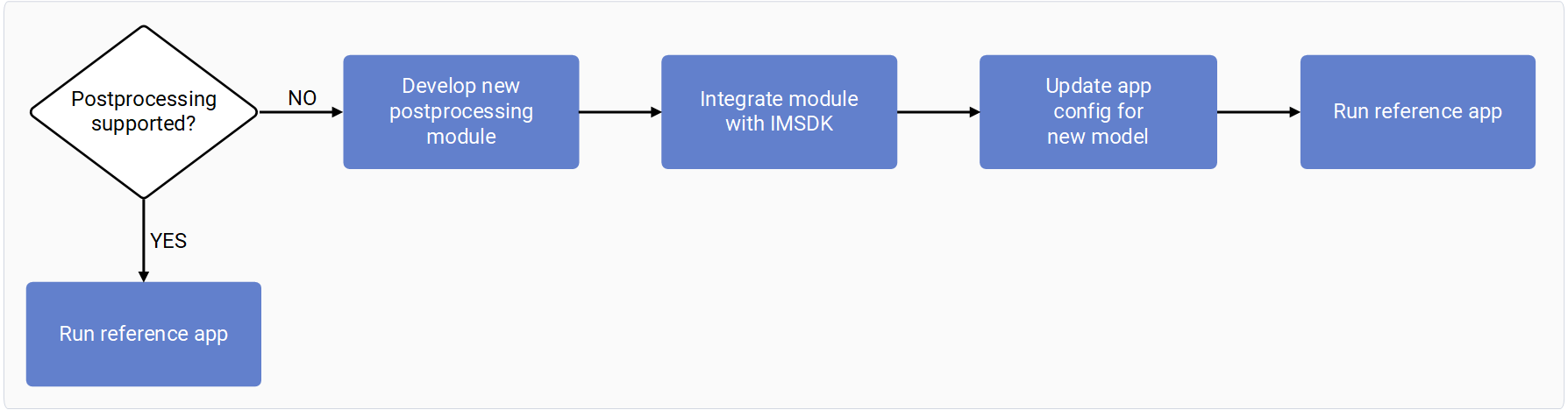
The following diagram shows the process to add your own postprocessing model, from
developing and integrating the model to running the reference app.
Overview of AI IM SDK pipeline
Qualcomm Intelligent Multimedia SDK (IM SDK) contains necessary building blocks to construct AI, multimedia, and computer vision pipelines to build applications. Building an AI workflow with IM SDK involves three key GStreamer plugins.- Preprocessing element: Converts the incoming data stream to a tensor format suitable for AI inferencing.
- Inferencing element: Executes inferencing using an AI model and applies dequantization to the output tensor. This element performs no preprocessing or postprocessing beyond dequantization.
- Postprocessing element: Parses the output tensors and generates a buffer containing machine learning metadata. This element outputs metadata in one of the following ways.
- By attaching it to the source stream using
qtimetamuxer - By streaming it directly to endpoints like RTSP, RTMP, or Redis.
- As an image mask to be overlaid on the source video frame using
qtivcomposer.

Example: Use ML metadata directly
In the following example the source stream isn’t propagated after the inference plugin.
Example: Attach ML metadata in the source video
In the following example the ML metadata is attached to the source video. The overlay uses the attached ML metadata to draw bounding boxes, text, and other visual elements. The result is either displayed on screen or streamed over a network.
Example: Convert ML metadata to an image mask
In the following example, the ML metadata is converted into an image mask and then blitted on top of the source stream.
Introduction to AI Post Processing plugin in IM SDK
qtimlpostprocess is a customizable plugin that provides a library interface for
postprocessing the tensor output of inference plugins. The postprocessing library
is responsible for tensor parsing and outputs a list of predictions.
The postprocessing (PP) module handles one type of machine learning (ML) model.
Each PP module handles a specific type of model and its variants, such as
all YOLOv8 detection model variants. The plugin manages the execution of the module,
output generation (ML metadata or image masks), batching, ML staging, and other related tasks.
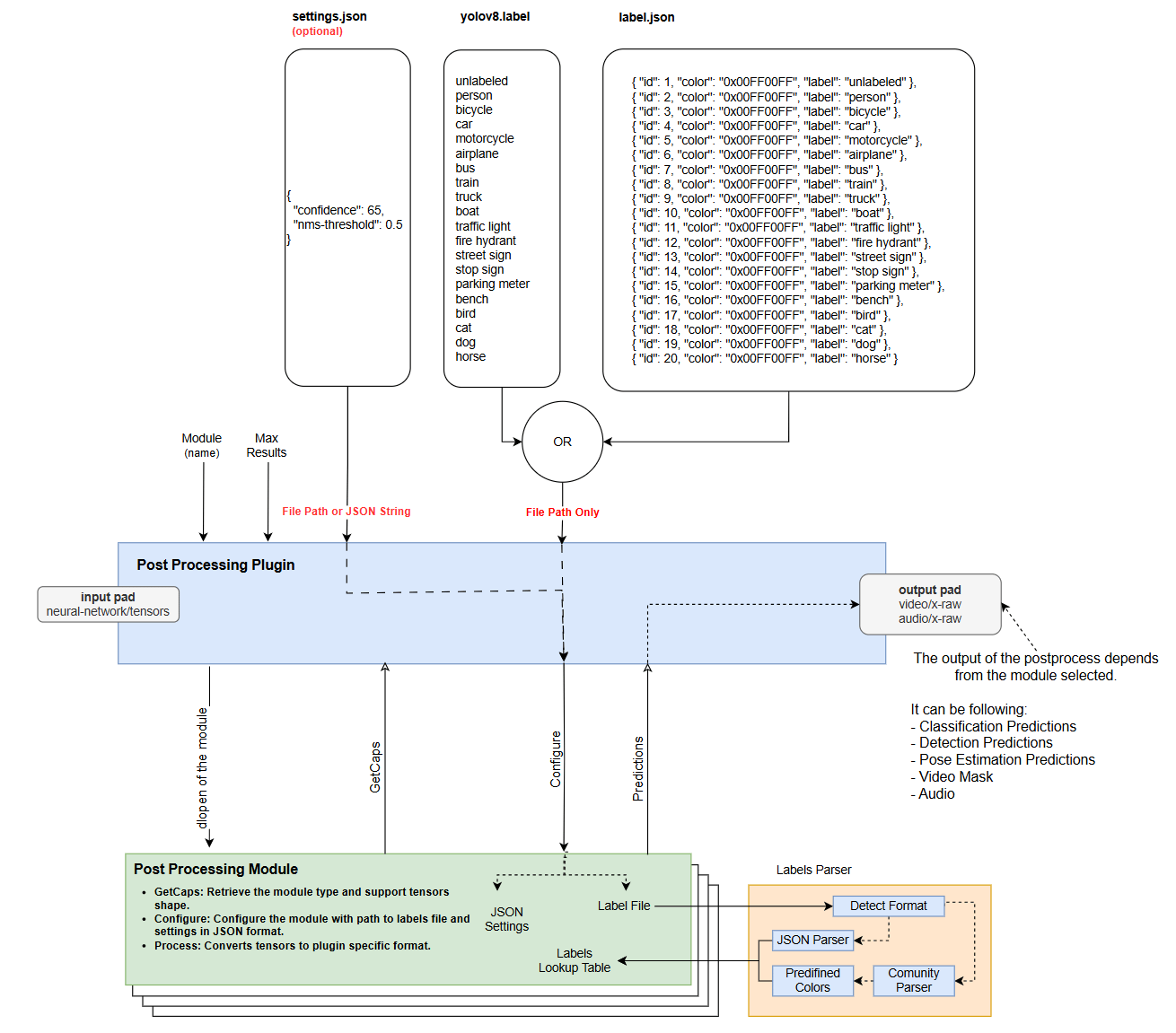
The following image shows the relationship between the inputs, outputs, postprocessing
module, and the postprocessing plugin.
- Object detection
- Image classification
- Image segmentation
- Super resolution
- Pose estimation
- Audio classification
-
Text: The postprocessing plugin serializes machine learning metadata to text. This
metadata can be used as-is by other plugins or attached to the source stream using
qtimetamuxer. -
Image mask: The postprocessing plugin can generate an image mask with overlaid text,
bounding boxes, dots, lines, and other visual elements. This is a transparent frame
that contains only machine learning results.
For example, if the postprocessing type is object detection, the plugin draws bounding
boxes with labels. The
qtivcomposerplugin can then blit the image mask onto the source video stream. - Tensor: The postprocessing plugin can generate tensors. Use this when the next inference stage requires the output tensor from the current inference stage, but the tensor shapes don’t match exactly. For example, the first stage produces four output tensors and the next stage requires three of them.
- Module: (mandatory) Postprocessing module name. This GStreamer property specifies how to parse the tensor. It doesn’t define the plugin output type. The output type is determined during pipeline caps negotiation.
- Settings: (optional) JSON string or path to the JSON file. This configuration only applies to the module and not to the plugin. It passes arbitrary configuration to the postprocessing module because each module has specific needs. For example, use it to pass confidence-threshold, key points, NMS thresholds, and tokens.
- Labels: (optional) Path to file with the labels. You can directly pass the path to the label file to the module, using a newline-separated list of labels, JSON-formatted labels, or a custom format. Parsers for the first two formats are available in the header files and you can implement your own parser within the postprocessing module for custom formats.
- Results: (optional) For example, if the model detects 7 results but allows a maximum of 4, it drops the 3 results with the lowest confidence scores. The plugin implements this feature, so module developers don’t need to handle it themselves.
Write a postprocessing module for a custom model
The postprocessing module is a shared library that parses tensor output from inference plugins. The post-postprocessing GST plugin (qtimlpostprocess) loads and runs the module. IM SDK
provides a wide variety of out-of-the-box postprocessing modules:
- image-detection (yolov5, yolov8, yolonas, ssd-mobilenet, qfd, qpd, east-textdt)
- classification (mobilnet, mobilenet-softmax)
- pose-estimation (hrnet, lite-3dmm, posenet)
- segmentation (deeplab-argmax, midas-v2)
- super-resolution (srnet)
gst-inspect-1.0 qtimlpostprocess to see the full list of supported modules on your device.
The following log shows an example output.
/usr/lib/aarch64-linux-gnu/imsdk/qtimlpostprocess/modules/ on the device.
The postprocessing plugin automatically detects it and users can select it in the GStreamer
pipeline.
Module and library naming
To avoid duplication of postprocessing module names, postprocessing module shared libraries must follow thelibml-postprocess-<module-name>.so naming convention.
For example, the shared library for the YoloV8 module must be named libml-postprocess-yolov8.so.
Use the same <module-name> when configuring the postprocessing plugin. For example, module=yolov8.
Run gstreamer pipeline
AI postprocessing module inference
AI postprocessing modules expose a C++ API. Since C++ APIs can’t be directly loaded from shared libraries, class instantiation is encapsulated in a C function. This mechanism is already implemented in the header file, so you don’t need to manually handle the instantiation of the C++ class. You only need to implement the following APIs in the module class, which derives from the IModule interface.- Constructor/Destructor: The constructor doesn’t take any parameters and serves as a general entry point for developers.
-
Caps(): Returns the module type and the supported tensor dimensions in JSON format. -
Configure(): Accepts a path to a label file and a JSON string containing module-specific settings. Users provide these settings through the settings property of the postprocessing GStreamer plugin. -
Process(): Parses input tensors and generates predictions based on the model output.
std::string Caps()
Returns the module type and the supported tensor shapes as a JSON string. The tensor shape isn’t fixed, but defined within a range, represented using square brackets. For example,[1, [21, 42840], 4] indicates that the second dimension can vary between 21 and 42840.
The following snippet is an example definition of postprocessing module capabilities. The example implements
object detection postprocessing, FLOAT32 as the tensor format, and supports one, two, or three tensor outputs.
Supported postprocessed module types
- object-detection
- image-classification
- image-segmentation
- super-resolution
- pose-estimation
- audio-classification
- tensor
Supported tensor types
- FLOAT32
- FLOAT16
- INT8
- UINT8
- INT16
- UINT16
- INT32
- UINT32
- INT64
- UINT64
bool Configure(const std::string& labels_file, const std::string& json_settings)
Parameterbool Process(const Tensors& tensors, Dictionary& mlparams, std::any& output)
ParametersUnderstanding postprocessing module input
Postprocessing module input is split into two fields:-
tensor: This field holds the inference output tensors and describes their structure. Vectors
represent each output tensor as an entry. For example, in the case of YOLOv8, which produces
three output tensors (boxes, scores, class indices), the vector contains four entries.
- Type: float, uint8, etc.
- Name: Tensor name, used for identification when two or more output tensors have the same shape. Tensor names are unique and guarantee that exact tensor is selected.
-
Dimensions: Describes the tensor shape.
For example, YoloV8 with three output tensors:
[1,8400,4], [1,8400], [1,8400] - Data: Pointer to the tensor.
-
mlparams: Additional parameters for tensor processing that may not be applicable to all submodules.
This field provides information about how the pipeline processes the input stream, to help in cases where
the resolution and aspect ratio of the stream don’t match the shape of the input tensor.
This field is a dictionary implemented using
std::any. You must know the expected key and its corresponding return type. Usingstd::anyensures that the returned value matches the type associated with the given key. Example usage:Supported keys- Key: “input-tensor-region” Type: video::Region Description: This parameter indicates which portion of the input tensor is filled with actual data from the stream. The remaining area is considered padding.
- Key: “input-tensor-dimensions” Type: video::Resolution Description: Specifies the size of the input tensor. Required to convert absolute coordinates to relative coordinates when the postprocessing algorithm produces output in absolute coordinates, since postprocessing modules must output relative coordinates.
Generating postprocessing module output
The output is an array of arrays of results. Arrays are nested to support the batching use case. Only the inner array is filled if there is no batching. The inner array size matches the number of found results. Results are always in relative dimensions and the result type depends on the module type.-
Image/audio classification
- Name: Class label; predicted category or class the image/audio belongs to.
- Confidence: Class probability or confidence score.
- Color: RGBA8888 color for visualization in overlay plugin.
- Xtraparams: (optional) Extra parameters in dictionary (key/value pairs) used to export arbitrary extra results from the module to pass downstream.
-
Object detection
- Left, top, right, bottom: Bounding box coordinates.
- Name: Class label; predicted category or class the image/audio belongs to.
- Landmarks: (optional) List of key points; for example, face detection models can output face points with bounding boxes.
- Confidence: Class probability or confidence score.
- Color: RGBA8888 color for visualization in overlay plugin.
- Xtraparams: (optional) Extra parameters in dictionary (key/value pairs) used to export arbitrary extra results from the module to pass downstream.
-
Pose estimation
- Name: Class label; predicted category or class the image/audio belongs to.
- Confidence: Class probability or confidence score.
- Keypoints: Vector of key points.
- Links: (optional) Vector of links between key points.
- Color: RGBA8888 color for visualization in overlay plugin.
- Xtraparams: (optional) Extra parameters in dictionary (key/value pairs) used to export arbitrary extra results from the module to pass downstream.
-
Image segmentation and super resolution
- Output is image frame/mask.
-
Tensor
- List of tensors.
Batching
The postprocessing plugin automatically splits tensor batches into single tensors. The plugin layer handles batching and you don’t need to handle batching use cases. For example, a module is automatically called 4 times for every batch if the batch size is four.Module helper tools
Label and JSON parsers are included in the interface header files. You don’t have to use them, but they’re provided for convenience. You can use any label or JSON parser, but the module must be statically linked with them.-
Label parser: This parser supports two formats, takes the path to a file with labels, and automatically detects formatting.
- New line separated format: The line number is the class ID.
- JSON format: You should set the class index, label, and visualization color in this format. This format is more flexible, because you can pass some classes and the rest of the classes are automatically filtered out.
- JSON parser: Settings are passed in a JSON string. This utility is used to parse settings and, in cases of JSON format, this implementation is used in the Qualcomm-provided label parser.
Logging
The postprocessing module can output logs to the GStreamer log system without having a direct dependency on GStreamer. The constructor passes a logging object to the module. This object, along with a LOG macros, can be used to output logs directly to the GStreamer log. Supported log levels include: Error, Warning, Info, Debug, Trace, and Log. LOG macro:Compile the postprocessing module on a host computer
Prerequisites- Ubuntu 22.04 or Ubuntu 24.04 host computer.
Install the required tools
Download the necessary .h and .cc files from CodeLinaro
Put the IM SDK headers and module source files in one folder
Create a CMakeLists.txt file
Create a toolchain file
aarch64-toolchain.cmake:Configure and build the module
Deploy and test the postprocessing module
Set the user environment variable on the host computer
Download the necessary scripts and artifacts
Deploy the module to the target device
Transfer the module to the target device
SSH into the target device
Enter the password when prompted
Remount / with write permissions
Copy the module to the GStreamer plugins directory
Run GST inspect on the target device
Download the models, labels, and media to run the GStreamer pipeline
Download yolox.json
Copy yolox.json to the target device
Download video1.mp4
Copy video1.mp4 to the target device
Download yolox_quantized.tflite
Copy yolox_quantized.tflite to the target device
Build a GStreamer pipeline with the postprocessing module
qtimlpostprocess plugin.If your module requires a label file or configuration, pass them using the label and settings properties.In the following example pipeline to run a YOLO-X model:- The pipeline uses an offline video as the source.
- The pipeline decodes the video to YUV format using the v4l2h264dec decoder.
- The
qtimlvconverterplugin preprocesses the YUV frames. - The
qtimltfliteplugin runs inference with the LiteRT YOLO-X model. - The postprocessing plugin loads the YOLO-X module and passes a label file in JSON format.
- The pipeline displays the results on Wayland.