

Overview
qtiobjtracker is a GStreamer plugin that provides real-time multi-object tracking by associating detected objects across consecutive video frames and assigning a persistent tracking ID to each object.
The plugin operates on object detection metadata produced by upstream inference or post-processing elements. For each detected object, it analyzes temporal continuity across frames and updates the metadata with tracking information, allowing the same object to be identified consistently over time.
Key Responsibilities
The primary purpose ofqtiobjtracker is to:
- maintain stable object identities across frames using persistent track IDs
- track object motion over time based on detection results
- improve the temporal consistency of object-level analytics
- enable downstream components to perform higher-level video analytics, event processing, and behavior analysis.
qtiobjtracker does not perform object detection itself. It depends on upstream pipeline elements to generate object detections and associated metadata. The tracker consumes that metadata, performs frame-to-frame association, and augments the object metadata with tracking IDs for downstream use.
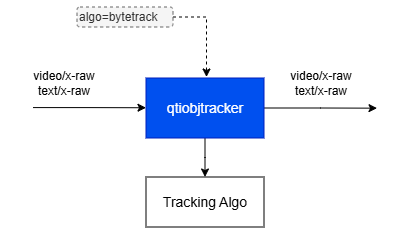
Example Pipeline
1
Download Required Files
If any downloaded file is a
.zip archive, extract it on your host machine before copying:
unzip filename.zip2
Copy files to device
3
Connect to device
4
Set environment variables
Run below command on your device
5
Run the pipeline
Hierarchy
GObjectGstObject
GstElement
qtiobjtracker
Pad Templates
sink
src
Element Properties
Internal Architecture Details
Pluggable Tracking Backend Architecture
qtiobjtracker is designed with a modular tracking architecture that separates the GStreamer plugin framework from the underlying tracking algorithm implementation. The plugin exposes a common tracking interface while allowing different tracking algorithms to be implemented, selected, and maintained independently of the core element.
Each tracking algorithm is packaged as a separate shared library, referred to as a tracking backend. The qtiobjtracker element is responsible for:
- managing the GStreamer element lifecycle
- integrating with the pipeline
- receiving and forwarding detection metadata
- loading and interfacing with the selected tracking backend
algo property. Based on the configured value, qtiobjtracker dynamically loads the corresponding backend library and initializes the selected implementation.
This design provides several benefits:
- runtime flexibility — tracking behavior can be selected per pipeline or use case
- separation of concerns — algorithm implementation remains independent of the plugin core
- maintainability — tracking backends can be developed and updated independently
- extensibility — new tracking algorithms can be added without changing the public plugin interface
- associating detections across consecutive frames
- creating, updating, and terminating tracks
- applying motion prediction and/or spatial matching
- maintaining internal tracking state
qtiobjtracker to support multiple tracking strategies within a consistent plugin interface. This makes it easier to tune tracking behavior for different workloads, evaluate alternative algorithms, and optimize implementations for specific hardware or application requirements.
Input and Output Formats
qtiobjtracker operates entirely on object detection metadata and associated coordinates. It does not inspect, analyze, or modify pixel data from video frames. Tracking decisions are based only on the detection metadata received from upstream elements.
For this reason, qtiobjtracker must be placed downstream of one or more elements that generate object detections and attach the corresponding metadata.
Supported Detection Metadata Formats
qtiobjtracker supports two input formats for detected objects. Both are commonly used in GStreamer-based AI pipelines.
1. Structured Text Metadata (text/x-raw)
In this mode, detection results are transmitted separately from video buffers as structured text data.
- buffer caps:
text/x-raw - detection results are stored in the buffer payload
- the payload contains a structured description of detected objects
- the text representation can be converted to and from a
GstStructure - bounding box coordinates are normalized in the range
[0.0, 1.0] - coordinates are resolution-independent
GstROIMeta)
In this mode, detection results are attached directly to video buffers as ROI metadata.
- detection results are carried as
GstROIMetametadata attached to the original video buffer - each ROI entry represents one detected object
- bounding box coordinates are expressed in the coordinate space of the video frame (absolute, resolution-dependent)
Tracking Behavior and Format Handling
qtiobjtracker is independent of the underlying video content and relies only on detection metadata for tracking. It supports both structured text metadata and ROI metadata without requiring conversion between the two formats.
The plugin preserves the input metadata representation throughout processing. The output format always matches the input format:
- if the input is
text/x-raw, the output remainstext/x-raw - if the input uses
GstROImetadata, the output remains ROI metadata attached to the same video buffer
qtiobjtracker does not convert between text-based metadata and ROI-based metadata.
Output Tracking Information
qtiobjtracker preserves all input detection metadata and adds a single tracking attribute to each detected object:
- Unique Track ID — a persistent identifier used to associate the same object across consecutive frames.
text/x-raw, the tracked results are emitted in the same format. If detections are provided as ROI metadata on video buffers, the updated tracking information is attached to the same metadata representation.
Usage
Attach Tracking ID to Each Detected Object
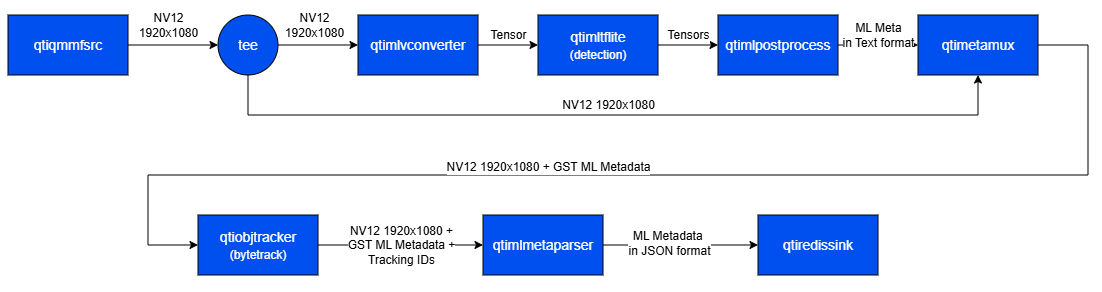
This example demonstrates real-time tracking of objects detected by an AI inference pipeline running on a live camera stream. The inference results are attached to eachGstBuffer as MLMeta, after which qtiobjtracker tracks the detected objects across frames and adds persistent tracking IDs to the metadata. The resulting AI metadata, including the tracking information, is then serialized into JSON using qtimlmetaparser and published to a Redis server through the qtiredissink plugin.
1
Download Required Files
If any downloaded file is a
.zip archive, extract it on your host machine before copying:
unzip filename.zip2
Copy files to device
3
Connect to device
4
Set environment variables
Run below command on your device
5
Run the pipeline
Run the pipeline
Attach Tracking ID and Propagate to Next Stage AI Inference
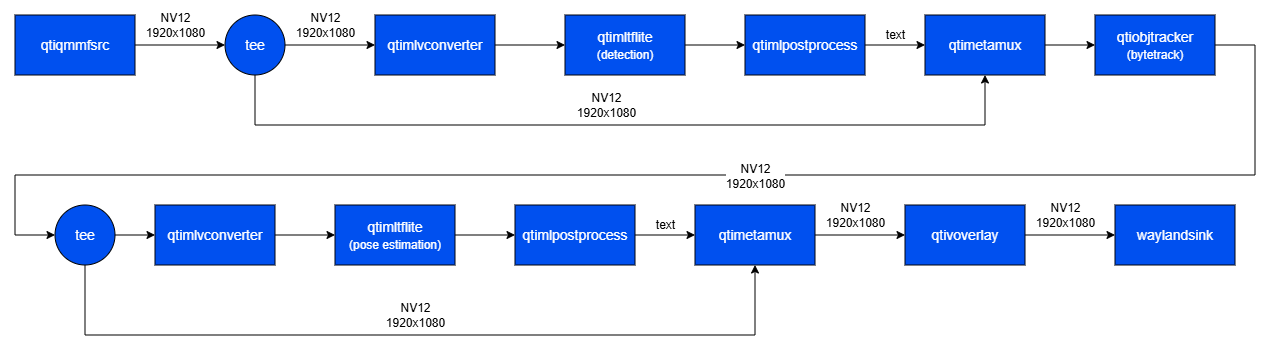
This example demonstrates a real-time, multi-stage AI pipeline running on a live camera stream. The first inference stage performs object detection and attaches the results to eachGstBuffer as MLMeta. qtiobjtracker then associates the detected objects across frames and adds persistent tracking IDs to the metadata. The video frames, together with the enriched metadata, are passed to a subsequent pose-estimation stage for further inference. Finally, qtimetamux merges the metadata from all stages, and the overlay stage renders the combined results — including bounding boxes, tracking IDs, and estimated poses — for live display.
1
Download Required Files
If any downloaded file is a
.zip archive, extract it on your host machine before copying:
unzip filename.zip2
Copy files to device
3
Connect to device
4
Set environment variables
Run below command on your device
5
Run the pipeline
Run the pipeline