

Overview
qtirtspbin is a GStreamer bin element that simplifies the construction and management of RTSP streaming pipelines for applications that need to publish media over a network. It operates as an RTSP server, exposing a local streaming endpoint that RTSP-compatible clients, such as VLC, can connect to in order to receive live or processed media streams.
Rather than functioning as a client that consumes an external RTSP source, qtirtspbin provides a server-side streaming interface that allows an application to distribute its output to one or more downstream consumers. This makes it well suited for use cases where media, analytics results, or other generated data must be shared across the network in real time.
The element supports a variety of payload types, including:
- Encoded video streams such as H.264 and H.265
- Audio streams
- Machine learning metadata
- Serialized custom data
qtirtspbin can handle multiple input types and automatically assembles the internal pipeline required for stream packetization, transport, and RTSP session handling. By managing these lower-level details internally, it reduces the amount of application-side logic needed to build a complete streaming solution.
In addition to basic RTSP transmission, qtirtspbin includes built-in mechanisms for:
- Session Management: supports multiple simultaneous client connections and manages each RTSP session
- Stream synchronization: preserves consistent timing across video, audio, and metadata streams
- Custom payload support: enables transmission of non-standard data types by encapsulating them in RTP payloads
qtirtspbin provides a flexible and developer-friendly abstraction for building RTSP-based streaming applications that need to deliver synchronized media and auxiliary data to network clients.
Example Pipeline

1
Download Required Files
2
Copy files to device
3
Connect to device
4
Set environment variables
Run below command on your device
5
Run the pipeline
Ensure that the device has to be connected to network to try out these example pipelines.
Hierarchy
GObjectGstObject
GstElement
GstBin
qtirtspbin
Pad Templates
sink
Element Properties
Internal Architecture and Streaming model:
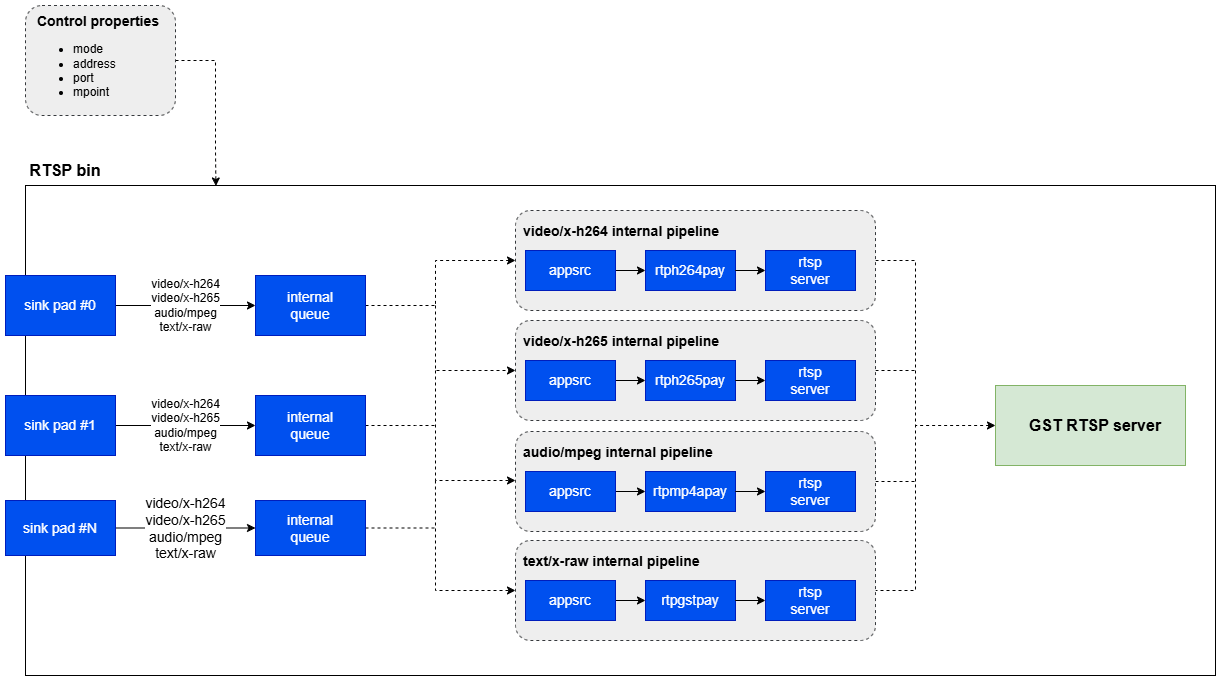
qtirtspbin is a GStreamer bin element that internally manages the components required to transmit media streams over RTSP. Unlike an RTSP client, it operates as an RTSP server and exposes a mount point that external clients can connect to for receiving the stream
Core components
Internally,qtirtspbin dynamically constructs a pipeline that includes the following elements:
Input pads
The plugin accepts multiple types of input through its pads, including:- Encoded video, such as H.264 and H.265
- Audio Streams
- ML metadata, such as JSON
- Custom serialized data
RTP Packetizer
Incoming media and data are converted into RTP packets using the appropriate payloaders, such as:rtph264payandrtph265payfor videortpmp4apayfor audiortpgstpayfor metadata or other structured custom data
RTSP Server Interface
qtirtspbin launches an internal RTSP server, typically on 127.0.0.1:8900, and registers one or more mount points such as /live or /stream. Through this interface, it manages:
- Client sessions
- Stream negotiation
- Reconnection behavior
Processing flow
-
Media Input
- External elements push encoded media or data into
qtirtspbinthrough request pads
- External elements push encoded media or data into
-
Stream Identification and Routing
- Each incoming stream is identified
- The stream is routed to the appropriate RTP payloader.
-
Packetization
- Media is packetized into RTP format.
- Synchronization across streams is handled internally.
-
Session Management
- The plugin registers the stream with the RTSP server.
- Clients connect using RTSP and receive the live stream.
-
Client Handling
- Multiple clients can connect at the same time.
- The plugin manages buffering, latency, and session state.
Custom payload support
In addition to standard media types such as video and audio,qtirtspbin can also transport custom data streams over RTSP by encapsulating them in RTP payloads.
This is useful for applications that need to deliver non-standard or structured information, such as:
- Machine learning inference results like bounding boxes, labels, and scores
- Sensor data such as telemetry or depth information
- Application-specific metadata such as JSON or other serialized formats
qtirtspbin through a request pad.
Payloading
The plugin uses rtpgstpay to encapsulate the incoming buffer into RTP packets.
Transmission
The RTP stream is published through the internal RTSP server on the configured mount point.
Client Consumption
Clients such as VLC, FFmpeg, or custom RTSP receivers can consume the stream and deserialize the payload based on the agreed format.
Usage
Ensure you have followed the prerequisites before continuing
Single stream from camera to the RTSP
Demonstrates real-time RTSP stream reception from live camera source.
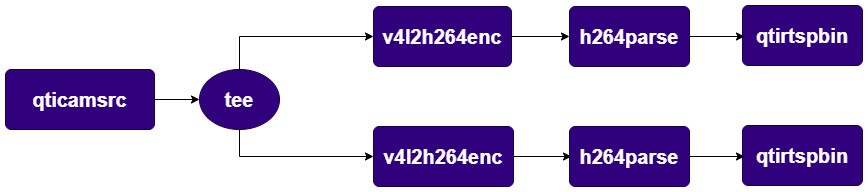
Two streams from camera to RTSP
Demonstrates usage of rtspbin to stream two different live feeds. Eachqtirtspbin has internal RTSP server and the client should connect to it. When creating an unique port should be set to each instance of the plugin.
Single stream from camera to the RTSP with ML detection
Demonstrates streaming of live camera stream and ML detection metadata on two request pads of theqtirtspbin. The video and ML metadata are received on the other pipeline and muxed together to overlay the objects detected and display the bounding boxes.
