Pull and read a message
Before you begin, do the following:- Pair the DUT and the remote device. For instructions, see Pair with a remote Bluetooth device.
-
Create a MAP directory on the server.
In the BlueZ stack, MAP server functionality can’t be tested or verified directly as you can’t send or receive cellular messages on the device. Hence, you must create a MAP directory on the DUT. For more information about creating a MAP directory, see Sample MAP directory.
- Initiate a connection from the remote device to the DUT.
-
Accept the connection request on the DUT as follows:
a. Run SSH on the DUT.
b. Open the
bluetoothctlapplication by running the following command:c. Authenticate the connection request. Whenbluetoothctlprompts to authorize the incoming session, enteryes. Sample output - Pull the intended message from the server to the client.
- Open and verify the retrieved message on the client.
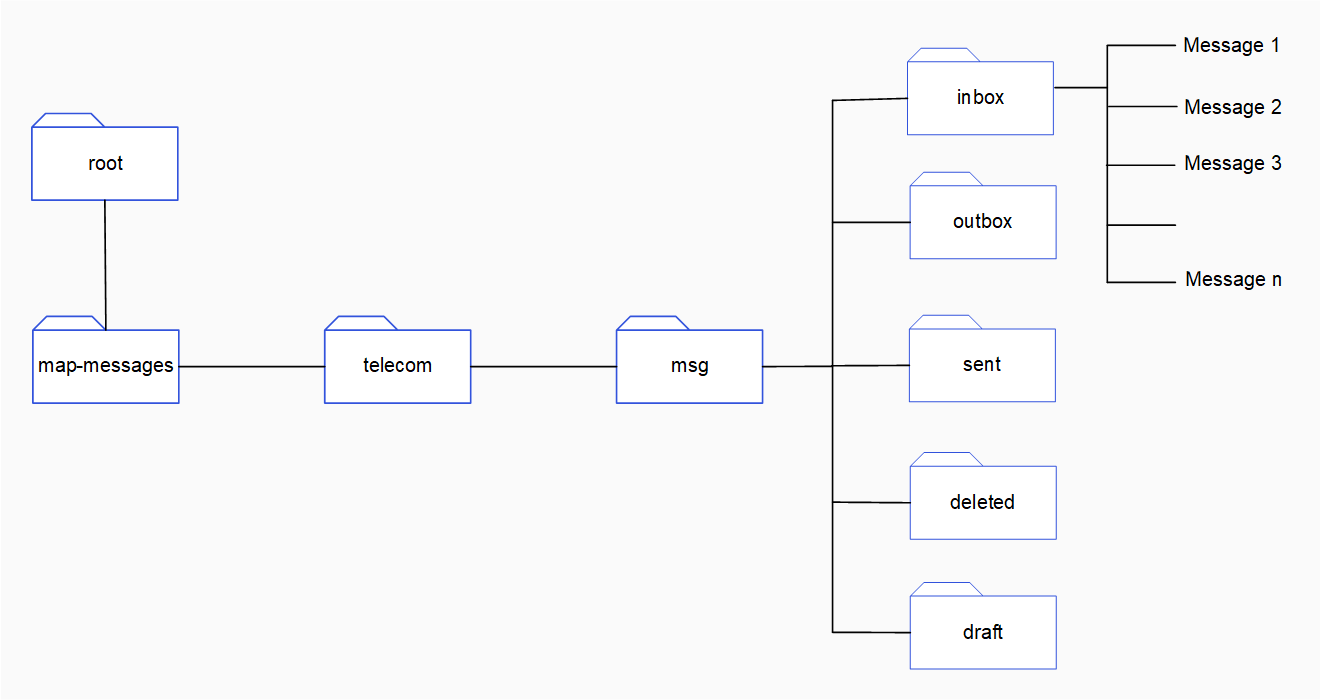
Sample MAP directory
You can create a sample MAP directory to verify MAP server functionality as follows:- Run SSH on the DUT.
-
Create a message directory
map-messages/telecom/msgby running the following commands in sequence: a. Create themap-messagesdirectory:b. Change into themap-messagesdirectory:c. Create thetelecomdirectory:d. Change into thetelecomdirectory:e. Create themsgdirectory:f. Change into thetelecom/msgdirectory: -
In the
msgdirectory, create the following subfolders:-
inbox -
outbox -
sent -
deleted -
draft
msg, run the following command:<subfolder>is the name of the subfolder. For example,inbox. -
- In each subfolder, create message files.
/map-messages/telecom/msg/ directory, there are subfolders for different types of messages. These subfolders contain messages.