

The SessionClient sample application shows the usage of QSH client API to develop applications. By default, this sample application is built in the /usr/bin directory on the device. For a complete code sample, see the <workspace>/build-qcom-wayland/workspace/sources/sensinghub/sensing-hub/examples/SessionClient/SessionClient.cpp file. The following figure shows the call flow for streaming the accelerometer sensor and the usage of the QSH client APIs.
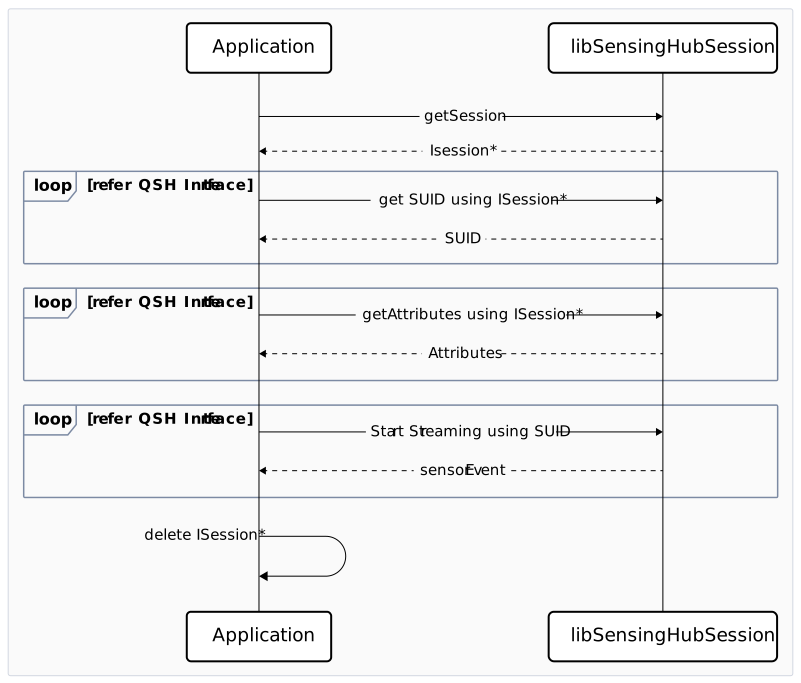
Figure : Call flow to stream a specified sensor

Figure: Call flow to stream a specified sensor

In this example, the client application can use different sensor sessions for the SUID query, attribute query, and streaming activity. It can also use the same session for all the activities; however, synchronization must be handled appropriately. The client application can send various requests to the aDSP as follows:
  1. The SUID query, retrieves SUIDs for the specified sensor: a. Create an interface for SUID by calling the getSession() API with the new sessionFactory() class. Requesting the SUID is the first and important request to get SUID of the requested data type for any use case.
    /* Create a new ISession for UID discovery */ 
      sessionFactory* factory = new sessionFactory(); 
      if(nullptr == factory){ 
          printf("failed to create factory instance"); 
          return false; 
      } 
      ISession* suidSession = factory->getSession(); 
      if(nullptr == suidSession){ 
          printf("failed to create uid session"); 
          return false; 
    }
    
    b. Open a created session interface by calling the open() API.
    /* Open the suidSession */ 
      int ret = suidSession->open(); 
      if(-1 == ret){ 
          printf("failed to open ISession for uid query"); 
          return false; 
    }
    
    c. Set callbacks by calling the setCallBacks() API and handling the response, event, or error for the SUID activity.
    /* Set callbacks for the session for 'uid' */ 
      ret = suidSession->setCallBacks(uid, suidResp, nullptr, suidEvent); 
      if(-1 == ret) 
          printf("all callbacks are null, no need to register it");
    
    d. Create and send a Pb-encoded request message for SUID of a specified data type by calling the sendRequest() API.
    /* 
       * Create SUID request message 
       * (Please refer sns_client.proto and sns_suid.proto for more details) 
       * */ 
       string pb_req_encoded = ""; 
       sns_suid_req pb_suid_req; 
       pb_suid_req.set_data_type(sensorName); 
       pb_suid_req.set_register_updates(true); 
       sns_client_request_msg pb_req_msg; 
       pb_req_msg.set_msg_id(SNS_SUID_MSGID_SNS_SUID_REQ); 
       string pb_req_msg_encoded; 
       pb_req_msg.SerializeToString(&pb_req_msg_encoded); 
       /* send proto encoded message to sensing-hub using the opened session */ 
       unique_lock<mutex> respLock(respMutex); 
       ret = suidSession->sendRequest(uid, pb_req_msg_encoded); 
       if(0 != ret){ 
          printf("Error in sending uid discovery request"); 
          return false; 
    }
    
    e. Close the session by calling the close() API and delete it after receiving the SUID events for the requested data type.
    /* Close and delete the session once SUIDs are received */ 
       suidSession->close(); 
       delete suidSession; 
       delete factory;
    
  2. The attribute request, retrieves attributes for the specified sensor: a. Create an interface session for an attribute by calling getSession() with the new sessionFactory() class. Requesting the attributes is important to get the capabilities of the requested data type for any use case.
    /* Create a new ISession for attribute query */ 
      sessionFactory* factory = new sessionFactory(); 
      if(nullptr == factory){ 
          printf("failed to create factory instance"); 
          return false; 
      }
    
       ISession* attributeSession = factory->getSession(); 
         if(nullptr == attributeSession){ 
             printf("failed to create attribute session"); 
             return false; 
       }
    
    b. Open a created session interface by calling the open() API.
    /* open the attributeSession session */ 
      int ret = attributeSession->open(); 
      if(-1 == ret){ 
          printf("failed to open ISession for attribute query"); 
          return false;
    
    c. Set callbacks by calling setCallBacks() and handling the response, event, or error for the attribute activity.
    for (const suid& uid : suidList) { 
       /* set callbacks for the session for 'uid' */ 
       int ret = attributeSession->setCallBacks(uid, attributeResp, nullptr, attributeEvent); 
       if(-1 == ret) 
          printf("all callbacks are null, no need to register it");
    
    d. Create and send a Pb-encoded configuration request for an attribute of a specified data type by calling the sendRequest() API.
    /* create pb-encoded config request message to be sent for attribute query */ 
       sns_client_request_msg pb_req_msg; 
       pb_req_msg.set_msg_id(SNS_STD_MSGID_SNS_STD_ATTR_REQ); 
       pb_req_msg.mutable_request()->clear_payload(); 
       pb_req_msg.mutable_suid()->set_suid_high(uid.high);  
    /* send proto encoded message to sensing-hub using the opened session */ 
       unique_lock<mutex> respLock(respMutex); 
       ret = attributeSession->sendRequest(uid, pb_req_msg_encoded);
    
    e. Close the session by calling the close() API after receiving the attribute events for the requested data type.
    /* close and delete the session once all attributes are received */ 
       attributeSession->close(); 
       delete attributeSession; 
       delete factory;
    
  3. The sensor streaming, streams the sensor and receives the data events: a. Create an interface session for streaming the sensor by calling getSession() with the new sessionFactory() class. Here, requesting sensor data is the final stage of a requested data type for any use case.
    ``sessionFactory()class.
    /* create a new ISession for streaming activity */ 
       sessionFactory* factory = new sessionFactory(); 
       if(nullptr == factory){ 
          printf("failed to create factory instance"); 
          return false; 
       } 
       ISession* streamingSession = factory->getSession(); 
       if(nullptr == streamingSession){ 
          printf("failed to create streaming session"); 
          return false; 
    }
    
    b. Open a created session interface by calling the open() API.
    /* open the streamingSession session */ 
       int ret = streamingSession->open(); 
       if(-1 == ret){ 
          printf("failed to open ISession for attribute query"); 
          return false;
    
    c. Set callbacks by calling setCallBacks() and handling the response, event, or error for streaming the activity.
    for (const suid& uid : suidList){ 
       /* set callbacks for the session for 'uid' */ 
       int ret = streamingSession->setCallBacks(uid, dataResp, dataError, dataEvent); 
       if(-1 == ret) 
          printf("all callbacks are null, no need to register it");
    
    d. Create and send a Pb-encoded configuration request for streaming the sensor of a specified data type by calling the sendRequest() API, which eventually allows the requested sensor.
    /* create pb-encoded config request message to be sent for streaming request */ 
       string pb_req_encoded = ""; 
       sns_std_sensor_config pb_stream_cfg; 
       pb_stream_cfg.set_sample_rate(sampleRate); 
       pb_stream_cfg.SerializeToString(&pb_req_encoded); 
       sns_client_request_msg pb_req_msg; 
       pb_req_msg.mutable_request()->mutable_batching()->set_batch_period(batchPeriod); 
       pb_req_msg.set_msg_id(SNS_STD_SENSOR_MSGID_SNS_STD_SENSOR_CONFIG); 
    /* send proto encoded message to sensing-hub using the opened session */ 
       unique_lock<mutex> respLock(respMutex); 
       ret = streamingSession->sendRequest(uid, pb_req_msg_encoded);
    
    e. Handle samples in the event callbacks and wait for the specified duration of the test.
       void handle_event_cb(const uint8_t *data, size_t size, uint64_t time_stamp){ 
       if(true == deletion_started){ 
          printf("\nEvent coming when deletion of qmi connection started"); 
          return; 
       } 
       sns_client_event_msg pb_event_msg; 
       /* Parse the pb encoded event */ 
       pb_event_msg.ParseFromArray(data, size); 
       /* Iterate over all events in the message */ 
       for (int i = 0; i < pb_event_msg.events_size(); i++) { 
          auto& pb_event = pb_event_msg.events(i);
       }
    
  4. The stop sensor streaming client, stops streaming by sending a request to disable: a. Call the sendRequest() API.
       pb_req_msg.set_msg_id(SNS_CLIENT_MSGID_SNS_CLIENT_DISABLE_REQ); 
       pb_req_msg.mutable_suid()->set_suid_high(uid.high); 
       pb_req_msg.mutable_suid()->set_suid_low(uid.low); 
    /* send disable request to sensing-hub */ 
       int ret = streamingSession->sendRequest(uid, pb_req_msg_encoded);
    
    b. Close the session by calling the close() API after receiving the streaming events for the requested data type.
    /* close and delete the streamingSession */ 
       streamingSession->close(); 
       delete streamingSession; 
       delete factory;
    
The following snippet shows the SessionClient sample application output. It allows an accelerometer sensor with 10 Hz sample rate and a 2-second batch period for 10 sec and prints the received sensor events.
root@qcm6490:~# SessionClient
      Streaming configuration is as follows :
         Sensor name : accel     Sample rate : 10 Hz     Batch period : 2 sec    Test duration : 10 sec

         SUID discovery response received.
         Received SUIDs for accel, number of SUIDs received = 1

         SUID received - suid_low=6360260105974108950 suid_high=7037810611998542250
         Sensor suid list created

         requesting attributes for - suid_low=6360260105974108950 suid_high=7037810611998542250

         Attribute query response received.
         Attributes for - suid_low=6360260105974108950 suid_high=7037810611998542250 are:
         attribute count 0        and values are: attr_id: 16     sint: 0
         attribute count 1        and values are: attr_id: 9      sint: 50sint: 240sint: 240
         attribute count 2        and values are: attr_id: 12     std: LPM std: NORMAL std: HIGH_PERF
         attribute count 3        and values are: attr_id: 5      std: sns_accel.proto
         attribute count 4        and values are: attr_id: 0      std: icm4x6xx
         attribute count 5        and values are: attr_id: 1      std: TDK-Invensense
         attribute count 6        and values are: attr_id: 26     boolean 1
         attribute count 7        and values are: attr_id: 17     boolean 0
         attribute count 8        and values are: attr_id: 10     sint: 6
         attribute count 9        and values are: attr_id: 15     sint: 16
         attribute count 10       and values are: attr_id: 21     boolean 1
         attribute count 11       and values are: attr_id: 22     sint: 3sint: 2sint: 1
         attribute count 12       and values are: attr_id: 2      std: accel
         attribute count 13       and values are: attr_id: 4      sint: 82179
         attribute count 14       and values are: attr_id: 13     boolean 1
         attribute count 15       and values are: attr_id: 14     boolean 0
         attribute count 16       and values are: attr_id: 18     sint: 0
         attribute count 17       and values are: attr_id: 20     flt: 0.000000  flt: 0.000000   flt: 0.000000   flt: 0.000000   flt: 0.000000   flt: 0.000000flt: 0.000000    flt: 0.000000   flt: 0.000000   flt: 0.000000   flt: 0.000000   flt: 0.000000
         attribute count 18       and values are: attr_id: 19     sint: 0
         attribute count 19       and values are: attr_id: 11
         attribute count 20       and values are: attr_id: 7      flt: 0.000019  flt: 0.000037   flt: 0.000075   flt: 0.000150   flt: 0.000299
         attribute count 21       and values are: attr_id: 24
         attribute count 22       and values are: attr_id: 23     flt: 0.000299
         attribute count 23       and values are: attr_id: 6      flt: 12.500000 flt: 25.000000  flt: 50.000000  flt: 100.000000 flt: 200.000000 flt: 500.000000
         attribute count 24       and values are: attr_id: 25     flt: 1000.000000       flt: 2000.000000
         attribute count 25       and values are: attr_id: 8      sint: 80
         attribute count 26       and values are: attr_id: 3      boolean 1

         Attributes for all SUIDs received

         Streaming started
         sending request for - suid_low=6360260105974108950 suid_high=7037810611998542250
         Data request response received.
         Received re-configuration event
         Cal event packet received
         Received Samples:       [0.347159],     [-0.181959],    [9.450213],
         Received Samples:       [0.102951],     [-0.183156],    [9.545981],
         Received Samples:       [0.096965],     [-0.189142],    [9.550770],
         Received Samples:       [0.092177],     [-0.192733],    [9.541193],
         Received Samples:       [0.090980],     [-0.183156],    [9.555558],
         Received Samples:       [0.093374],     [-0.185551],    [9.555558],
         Received Samples:       [0.108936],     [-0.184354],    [9.541193],
         Received Samples:       [0.098162],     [-0.185551],    [9.565135],
         Received Samples:       [0.095768],     [-0.185551],    [9.550770],
         Received Samples:       [0.100556],     [-0.193930],    [9.550770],
         Received Samples:       [0.092177],     [-0.186748],    [9.550770],
         Received Samples:       [0.094571],     [-0.199916],    [9.541193],
         Received Samples:       [0.105345],     [-0.199916],    [9.550770],
         Received Samples:       [0.098162],     [-0.185551],    [9.550770],
For troubleshooting common issues, see Debug. For more information, see QSH direct channel API workflow.