For more information on the video decode and encode capabilities such as the supported profiles, levels, resolutions, frame rates, bit rates, and limitations, select the following tabs:
QCS6490
IQ-8275
IQ-9075
QCS615
Table: Adreno VPU feature description for QCS6490
Feature
Description
Codecs
Remarks
Encoder input color formats
NV12 and QC08C
H.264 and HEVC
None
Decoder output color formats
NV12, QC08C, and QC10C
H.264, HEVC, and VP9
QC10C is supported only on qcom-multimedia-proprietary-image
Rotation
Supports 90, 180, and 270-degree rotation before encoding the frame
H.264 and HEVC
Supports static rotation only
Flip
Supports horizontal and vertical flip before encoding the frame
H.264 and HEVC
Supports static and dynamic flip. Flip is supported only on qcom-multimedia-proprietary-image
B-Frame encode
Up to 1920 × 1088 at 60 fps encode
H.264 and HEVC
The maximum number of B-Frames supported between two P-Frames is one and is supported only on qcom-multimedia-proprietary-image
Hierarchical-P encode
Up to 5 layers
H.264 and HEVC
Hierarchical-P encode is supported only on qcom-multimedia-proprietary-image
Initial QP override
Supports I-Frames, P-Frames, and B-Frames
H.264 and HEVC
Initial QP override is supported only on qcom-multimedia-proprietary-image
Slice encode
Yes
H.264 and HEVC
The number of bits per slice or the number of macroblocks per slice determines the slice boundary support. Slice is supported only on qcom-multimedia-proprietary-image
Intra-refresh
Random refresh mode
H.264 and HEVC
Supported only in 8-bit encoding
Supported only in the CBR RC mode
Intra-refresh is supported only on qcom-multimedia-proprietary-image
Rate control
CBR, VBR, and MBR
H.264 and HEVC
Rate control is supported only on qcom-multimedia-proprietary-image
LTR
2 frames
H.264 and HEVC
Supported in CBR RC mode and only on qcom-multimedia-proprietary-image
Dynamic properties for encoder
Sync frame, bit rate, and fps
H.264 and HEVC
Supported in CBR and VBR RC modes and only on qcom-multimedia-proprietary-image
Note: End-to-end functionality using Qualcomm IM SDK is validated up to 3840 × 2160 resolution.
Table: Adreno VPU decoder capabilities for QCS6490
Decoder Standard
Supported Profile and Level
Minimum/Maximum resolution, Maximum frame rate, and bit rate
Maximum supported resolution, frame rate, and bit rate
Limitations
HEVC
Main profile 8-bit up to level 5.1
Main profile 10-bit, up to level 5.1, HLG schemes
Minimum resolution: 96 x 96
Maximum resolution: 4096 x 2160 or 2160x4096
Maximum frame rate: 480 fps
Maximum bit rate: 100 Mbps
1280 x 720 at 480 fps, 100 Mbps
1920 x 1088 at 240 fps, 100 Mbps
3840 x 2160 at 60 fps, 100 Mbps
4096 x 2169 at 60 fps, 100 Mbps
Maximum 128 slices per frame
Individual slice-based decoding
H.264
Constrained baseline, baseline, main, high, constrained high profiles; up to level 5.2
Minimum resolution: 96 × 96
Maximum resolution: 4096 × 2160 or 2160 × 4096
Maximum framerate: 480 fps
Maximum bitrate: 100 Mbps
1280 × 720 at 480 fps, 100 Mbps
1920 × 1088 at 240 fps, 100 Mbps
3840 × 2160 at 60 fps, 100 Mbps
4096 × 2160 at 60 fps, 100 Mbps
Flexible macroblock order (FMO)
Arbitrary slice ordering (ASO)
Redundant slices (RS)
Data partition
Maximum 10 slices per frame
Interlaced content isn’t supported
VP9
Profile 0; 8-bit up to level 5.1
Profile 2; 10-bit up to level 5.1, HLG/PQ schemes
Minimum resolution: 96 × 96
Maximum resolution: 4096 × 2160 or 2160 × 4096
Maximum framerate: 480 fps
Maximum bitrate: 100 Mbps
1280 × 720 at 480 fps, 100 Mbps
1920 × 1088 at 240 fps, 100 Mbps
3840 × 2160 at 60 fps, 100 Mbps
4096 × 2160 at 60 fps, 100 Mbps
Profile 2; 12-bit isn’t supported
Table: Adreno VPU encoder capabilities for QCS6490
Encoder standard
Supported profile and level and RC modes
Minimum/Maximum resolution, maximum frame rate, and maximum bit rate
Supported resolution, frame rate, bit rate
Limitations
H.264
Constrained baseline, baseline, main, high, constrained high profiles; up to level 5
VBR, CBR, MBR
Minimum resolution: 128 × 128
Maximum resolution: 4096 × 2160 or 2160 × 4096
Maximum framerate: 240 fps
Maximum bitrate: 100 Mbps
1280 × 720 at 240 fps, 100 Mbps
1920 × 1088 at 120 fps, 100 Mbps
3840 × 2160 at 30 fps, 100 Mbps
4096 × 2160 at 30 fps, 100 Mbps
None
HEVC
Main profile 8-bit, up to level 5.0
Main/High tier VBR, CBR, MBR
Minimum resolution: 128 × 128
Maximum resolution: 4096 × 2160 or 2160 × 4096
Maximum framerate: 240 fps
Maximum bitrate: 100 Mbps
1280 × 720 at 240 fps, 100 Mbps
1920 × 1088 at 120 fps, 100 Mbps
3840 × 2160 at 30 fps, 100 Mbps
4096 × 2160 at 30 fps, 100 Mbps
Vertical tiling is only enabled for frame width 960
Table: Adreno VPU feature description for Dragonwing IQ-8275
Feature
Description
Codecs
Limitations
Encoder input color formats
NV12 and QC08C
H.264 and HEVC
None
Decoder output color formats
NV12, QC08C, and QC10C
H.264, HEVC, VP9 and AV1
QC10C is supported only on qcom-multimedia-proprietary-image
B-Frame encode
Up to 1920 × 1088 at 120 fps encode
H.264 and HEVC
The maximum number of B-Frames supported between two P-Frames is one. B-Frame is supported only on qcom-multimedia-proprietary-image
Initial QP override
Supports I-Frames, P-Frames, and B-Frames
H.264 and HEVC
None
Rate control
CBR and VBR
H.264 and HEVC
None
Dynamic properties for encoder
Sync frame, bit rate, and fps
H.264 and HEVC
Supported in CBR and VBR RC modes. Dynamic properties are supported only on qcom-multimedia-proprietary-image
Note: End-to-end functionality using Qualcomm IM SDK. is validated up to 3840 × 2160 resolution.
Table: Adreno VPU decoder capabilities for Dragonwing IQ-8275
Decoder standard
Supported profile and level
Minimum/Maximum resolution, maximum frame rate, and maximum bit rate
Maximum supported resolution, frame rate, and bit rate
Limitations
HEVC
Main profile 8-bit, up to level 5.1 Main tier, high tier
Main10, profile up to level 5.1 Main/High tier, HLG schemes
Minimum resolution: 96 × 96
Maximum resolution: 4096 × 2160 or 2160 × 4096
Maximum frame rate: 480 fps
Maximum bit rate: 160 Mbps
1280 × 720 at 480 fps, 160 Mbps (IBP/IPP)
1920 × 1088 at 480 fps, 160 Mbps (IBP/IPP)
3840 × 2160 at 120 fps, 160 Mbps (IBP/IPP)
4096 × 2160 at 60 fps, 120 Mbps (IBP/IPP)
Individual slice-based decoding
H.264
Constrained baseline, Baseline, main, high, constrained high profiles; up to level 5.2
Minimum resolution: 96 × 96
Maximum resolution: 4096 × 2160 or 2160 × 4096
Maximum frame rate: 480 fps
Maximum bit rate: 160 Mbps
1280 × 720 at 480 fps, 160 Mbps (IBP/IPP)
1920 × 1088 at 480 fps, 160 Mbps (IBP/IPP)
3840 × 2160 at 120 fps, 160 Mbps (IBP/IPP)
4096 × 2160 at 60 fps, 120 Mbps (IBP/IPP)
Flexible macroblock order (FMO)
Arbitrary slice ordering (ASO)
Redundant slices (RS)
Data partition
Individual slice-based decoding
Non-progressive-only content up to 1920 × 1088
Best effort B-Frame decode is: 3840 × 2160 at 120 fps
VP9
Profile 0; 8-bit, up to level 5.1
Profile2, 10-bit, up to level 5.1, HLG/PQ schemes
Minimum resolution: 96 × 96
Maximum resolution: 4096 × 2160 or 2160 × 4096
Maximum frame rate: 120 fps
Maximum bit rate: 50 Mbps
1280 × 720 at 120 fps, 50 Mbps
1920 × 1088 at 120 fps, 50 Mbps
3840 × 2160 at 120 fps, 50 Mbps
4096 × 2160 at 60 fps, 50 Mbps
Profile 2, 12-bit isn’t supported
Individual slice-based decoding
AV1
Main (Profile-0)
Maximum level: 5.1
HLG/PQ schemes
Minimum resolution: 96 × 96
Maximum resolution: 4096 × 2160 or 2160 × 4096
Maximum frame rate: 240 fps
Maximum bit rate: 120 Mbps
1280 × 720 at 240 fps, 120 Mbps
1920 × 1088 at 240 fps, 120 Mbps
3840 × 2160 at 60 fps, 120 Mbps
4096 × 2160 at 60 fps, 120 Mbps
Individual slice-based decoding
Table: Adreno VPU encoder capabilities for Dragonwing IQ-8275
Encoder standard
Supported profile, level, and RC mode
Minimum/Maximum resolution, maximum frame rate, and maximum bit rate
Maximum supported resolution, frame rate, and bit rate
Limitations
H.264
Constrained baseline, baseline, main, high, constrained high profiles; up to level 5.2
VBR and CBR
Minimum resolution: 128 × 128
Maximum resolution: 4096 × 2160 or 2160 × 4096
Maximum frame rate: 480 fps
Maximum bit rate: 160 Mbps
Maximum operating rate: 480
1280 × 720 at 480 fps, 88 Mbps
1920 × 1088 at 240 fps, 128 Mbps
3840 × 2160 at 60 fps, 80 Mbps
4096 × 2160 at 60 fps, 92 Mbps
None
HEVC
Main profile 8-bit, up to level 5.1 Main/High tier VBR and CBR
Minimum resolution: 96 × 96
Maximum resolution: 4096 × 2160 or 2160 × 4096
Maximum frame rate: 480 fps
Maximum bit rate: 160 Mbps
Maximum operating rate: 480
Maximum frame rate: 480 fps
Maximum bit rate: 160 Mbps
1280 × 720 at 480 fps, 62 Mbps
1920 × 1088 at 240 fps, 90 Mbps
3840 × 2160 at 60 fps, 56 Mbps
4096 × 2160 at 60 fps, 64 Mbps
Multislice is enabled
Table: Adreno VPU feature description for Dragonwing IQ-9075
Feature
Description
Codecs
Limitations
Encoder input color formats
NV12 and QC08C
H.264 and HEVC
None
Decoder output color formats
NV12, QC08C, and QC10C
H.264, HEVC, VP9 and AV1
QC10C is supported only on qcom-multimedia-proprietary-image
B-Frame encode
Up to 3840 × 2160 at 60 fps encode
H.264 and HEVC
The maximum number of B-Frames supported between two P-Frames is one. B-Frame encode is supported only on qcom-multimedia-proprietary-image
Initial QP override
Supports for I-Frames, P-Frames, and B-Frames
H.264 and HEVC
None
Rate control
CBR and VBR
H.264 and HEVC
None
Dynamic properties for encoder
Sync frame, bit rate, and fps
H.264 and HEVC
Supported in CBR and VBR RC modes. Dynamic properties are supported only on qcom-multimedia-proprietary-image
Note: End-to-end functionality using Qualcomm IM SDK is validated up to 3840 × 2160 resolution.
Table: Adreno VPU decoder capabilities for Dragonwing IQ-9075
Decoder standard
Supported profile and level
Minimum/maximum resolution, Maximum frame rate, and bit rate
Maximum supported resolution, frame rate, and bit rate
Limitations
HEVC
Main profile 8-bit, up to level 6.2, main tier, high tier
Main10 profile up to level 6.2 Main/High tier HLG schemes
Minimum resolution: 96 × 96
Maximum resolution: 8192 × 4320 or 4320 × 8192
Maximum frame rate: 480 fps
Maximum bit rate: 160 Mbps
1280 × 720 at 480 fps, 160 Mbps (IBP/IPP)
1920 × 1088 at 480 fps, 160 Mbps (IBP/IPP)
3840 × 2160 at 240 fps, 80 Mbps (IBP/IPP)
3840 × 2160 at 120 fps, 160 Mbps (IBP/IPP)
4096 × 2160 at 120 fps, 80 Mbps (IBP/IPP)
7680 × 4320 at 30 fps, 120 Mbps (IBP/IPP)
7680 × 4320 at 60 fps, 80 Mbps (IBP/IPP)
8192 × 4320 at 30 fps, 120 Mbps (IBP/IPP)
8192 × 4320 at 48 fps, 80 Mbps (IBP/IPP)
Individual slice-based decoding
H.264
Constrained baseline, baseline, main, high, constrained high profiles; up to level 6.1
Minimum resolution: 96 × 96
Maximum resolution: 8192 × 4320 or 4320 × 8192
Maximum frame rate: 480 fps
Maximum bit rate: 220 Mbps (CAVLC), 160 Mbps (CABAC)
1280 × 720 at 480 fps, 160 Mbps (IBP/IPP)
1920 × 1088 at 480 fps, 160 Mbps (IBP/IPP)
3840 × 2160 at 240 fps, 80 Mbps (IPP)
3840 × 2160 at 120 fps, 160 Mbps (IBP/IPP)
4096 × 2160 at 120 fps, 80 Mbps (IPP)
7680 × 4320 at 60 fps, 80 Mbps (IPP)
7680 × 4320 at 30 fps, 120 Mbps (IBP/IPP)
8192 × 4320 at 30 fps, 120 Mbps (IPP)
8192 × 4320 at 48 fps, 80 Mbps (IPP)
Flexible macroblock order (FMO)
Arbitrary slice ordering (ASO)
Redundant slices (RS)
Data partition
Individual slice-based decoding
Non-progressive-only content up to 1920 × 1088
Best effort B-Frame decodes are:
3840 × 2160 at 240 fps
4096 × 2160 at 120 fps
7680 × 4320 at 60 fps
8192 × 4320 at 30/48 fps
VP9
Profile 0; 8-bit up to level 5.1
Profile2, 10-bit, up to level 5.1, HLG/PQ schemes
Minimum resolution: 96 × 96
Maximum resolution: 4096 × 2304 or 2304 × 4096
Maximum frame rate: 120 fps
Maximum bit rate: 100 Mbps
1280 × 720 at 120 fps, 100 Mbps
1920 × 1088 at 120 fps, 100 Mbps
3840 × 2160 at 60 fps, 100 Mbps
3840 × 2160 at 240 fps, 30 Mbps
4096 × 2160 at 60 fps, 100 Mbps
4096 × 2304 at 60 fps, 100 Mbps
Profile 2, 12-bit isn’t supported
AV1
Main (Profile-0), 8-bit and 10-bit
Maximum level: 6.1
HLG/PQ schemes
Minimum resolution: 96 × 96
Maximum resolution: 8192 × 4320 or 4320 × 8192
Maximum frame rate: 480 fps
Maximum bit rate: 120 Mbps
1280 × 720 at 480 fps, 120 Mbps
1920 × 1088 at 480 fps, 120 Mbps
3840 × 2160 at 240 fps, 120 Mbps
3840 × 2160 at 120 fps, 120 Mbps
4096 × 2160 at 120 fps, 120 Mbps
7680 × 4320 at 30 fps, 120 Mbps
7680 × 4320 at 60 fps, 120 Mbps
8192 × 4320 at 30 fps, 120 Mbps
8192 × 4320 at 48 fps, 120 Mbps
Individual slice-based decoding
Table: Adreno VPU decoder capabilities for Dragonwing IQ-9075
Encoder standard
Supported profile, level, and RC modes
Minimum/Maximum resolution, maximum frame rate, and maximum bit rate
Supported resolution, frame rate, bit rate
Limitations
H.264
Constrained baseline, baseline, main, high, constrained high profiles; up to level 6.0
VBR and CBR
Minimum resolution: 128 × 128
Maximum resolution: 8192 × 4320 or 4320 × 8192
Maximum frame rate: 480 fps
Maximum bit rate: 220 Mbps (CAVLC), 160 Mbps (CABAC)
1280 × 720 at 480 fps, 160 Mbps
1920 × 1088 at 480 fps, 160 Mbps
3840 × 2160 at 120 fps, 160 Mbps
7680 × 4320 at 30 fps, 160 Mbps
Individual encoded slice delivery per buffer
HEVC
Main profile 8-bit, up to level 6.0, 6.1, Main/High tier
VBR and CBR
Minimum resolution: 96 × 96
Maximum resolution: 8192 × 4320 or 4320 × 8192
Maximum frame rate: 480 fps
Maximum bit rate: 160 Mbps
1280 × 720 at 480 fps, 160 Mbps
1920 × 1088 at 480 fps, 160 Mbps
3840 × 2160 at 120 fps, 160 Mbps
7680 × 4320 at 30 fps, 160 Mbps
Individual encoded slice delivery per buffer
Multislice is enabled
Table: Adreno VPU feature description for QCS615
Feature
Description
Codecs
Limitations
Encoder input color formats
NV12
H.264 and HEVC
None
Decoder output color formats
NV12 and QC08C
H.264, HEVC, and VP9
None
Hierarchical-P encode
Up to 5 layers
H.264 and HEVC
None
Initial QP override
Supports for I-Frames, P-Frames, and B-Frames
H.264 and HEVC
None
Rate control
CBR and VBR
H.264 and HEVC
None
Dynamic properties for encoder
Sync frame
H.264 and HEVC
None
Table: Adreno VPU decoder capabilities for QCS615
Decoder standard
Supported profile and level
Minimum/Maximum resolution, maximum frame rate, and maximum bit rate
Maximum supported resolution, frame rate, and bit rate
Limitations
HEVC
Main profile 8-bit, up to level 6
Minimum resolution: 96 × 96
Maximum resolution: 3840 × 2160 or 2160 × 3840
Maximum frame rate: 240 fps
Maximum bit rate: 100 Mbps
1280 × 720 at 240 fps, 100 Mbps
1920 × 1088 at 120 fps, 100 Mbps
3840 × 2160 at 30 fps, 100 Mbps
Individual slice-based decoding
H.264
Constrained baseline, baseline, main, high
Constrained high profiles; up to level 5.2
Minimum resolution: 96 × 96
Maximum resolution: 3840 × 2160 or 2160 × 3840
Maximum frame rate: 240 fps
Maximum bit rate: 100 Mbps
1280 × 720 at 240 fps, 100 Mbps
1920 × 1088 at 120 fps, 100 Mbps
3840 × 2160 at 30 fps, 100 Mbps
Flexible macroblock order (FMO)
Arbitrary slice ordering (ASO)
Redundant slices (RS)
Data partition
Individual slice-based decoding
Interlaced content is not supported
VP9
Profile 0; 8-bit up to level 5.1
Minimum resolution: 96 × 96
Maximum resolution: 3840 × 2160 or 2160 × 3840
Maximum frame rate: 240 fps
Maximum bit rate: 100 Mbps
1280 × 720 at 240 fps, 100 Mbps
1920 × 1088 at 120 fps, 100 Mbps
3840 × 2160 at 30 fps, 100 Mbps
None
Table: Adreno VPU encoder capabilities for QCS615
Encoder standard
Supported profile, level, and RC modes
Minimum/Maximum resolution, maximum frame rate, and maximum bit rate
Supported resolution, frame rate, bit rate
Limitations
H.264
Constrained baseline, baseline, main, high, constrained high profiles; up to level 5.2
VBR and CBR
Minimum resolution: 96 × 96
Maximum resolution: 3840 × 2160 or 2160 × 3840
Maximum frame rate: 240 fps
Maximum bit rate: 100 Mbps
1280 × 720 at 240 fps, 100 Mbps
1920 × 1088 at 120 fps, 100 Mbps
3840 × 2160 at 30 fps, 100 Mbps
None
HEVC
Main profile 8-bit, up to level 6.0, Main/High tier
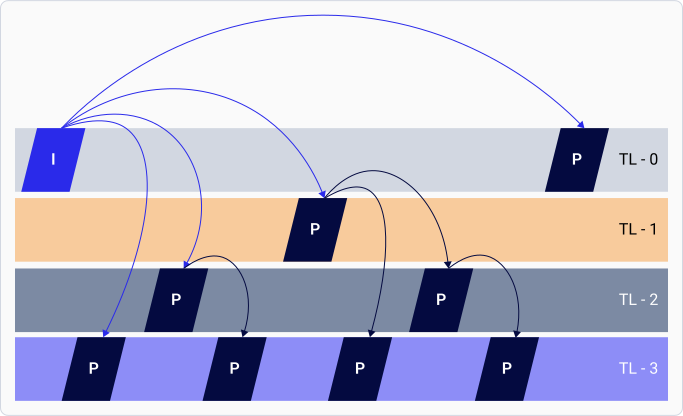
The supported encoder feature descriptions are as follows:B-Frame encodeB-Frame uses both the earlier and the future frames as reference data to obtain the highest amount of data compression. The Adreno VPU encodes frames with adaptive B type to obtain the highest possible compression without compromising video quality.Encoder initial QP overrideVideo encoding compresses signal levels by mapping them to discrete values. Quantization is a lossy process, and the levels of quantization govern the quality compared to compression. Encoders start with a default Quantization Parameter (QP) at the beginning. Based on the configured bit rate and scene complexity, encoders determine the right QP value by continuously monitoring the complexity and redundancy across frames. The encoder takes a few seconds to reach a steady state and predict the correct QP value that matches the target bit rate, also known as rate convergence.Hierarchical-P encodeIn the Hierarchical-P (Hier-P) feature, the encoder organizes the frames into many layers, with frames of one layer referencing frames only from the lower layers. The lowest layer, also known as layer 0 or the base layer, is the only exception.The following image shows the layer encoding pattern:
Figure: Hier-P layer encoding pattern
In the image, TL-0 represents the base layer, and the remaining layers represent the enhancement layers. Hier-P improves error resilience and temporal scalability. The Hier-P feature is useful for video telephony (VT) or videoconferencing applications that involve channel errors. Hier-P allows you to control error propagation by selectively dropping the enhancement layers.Slice encodeEncoders can compress a frame with an independently decodable Group-of-blocks (GOB), also known as slices. If there is a data loss or corruption, each slice is independently decodable and intends to be a unit of recovery. The advantages of introducing slices in an encoded frame are:
Encoder ignores a corrupt slice and skips to the next slice, thus restricting the corruption to a part of the frame instead of the entire frame.
Encoder sizes the slices to fit them within a network packet to help with transmission.
Encoder retransmits erroneous slices instead of sending the entire frame.
Applications use slices to reduce latency in real-time communication. Applications transmit and decode slices in parallel, eliminating the need to wait for the entire frame to encode.
Slices also work as resynchronization markers because the decoders can resume from the next slice (marker) when there are bit errors. The H.264 and HEVC encoders support slicing on Qualcomm Linux. The number of bits per slice or the number of macroblocks per slice is a slice boundary.Intra-refreshThe intra-refresh feature reduces the channel loss in streaming and casting applications that favor a constant bit rate. The Adreno VPU supports random intra-refresh mode.Video encoder preprocessingApplications can use the Adreno VPU to rotate or flip a YUV frame before encoding it. The Adreno VPU rotates or flips the YUV frame without consuming extra power.Rate controlThe following table lists the supported rate control algorithms:Table: Supported rate control algorithms
Table: Supported rate control algorithms
Rate control mode
Description
Variable bit rate (VBR)
Minimizes the frame-by-frame video quality fluctuation
Camcorder and Wi-Fi display are the example use cases
Constant bit rate (CBR)
Reduces bit rate fluctuation
Used for real-time communication with channel bandwidth limitation
Video telephony and streaming are the example use cases
Maximum bit rate (MBR)
Limits the bit rate while maintaining flexibility and may bounce up and down within the set target
Bit rate increases when the activity in a scene increases within a maximum limit
Integrated with a smart bit allocation (SBA) feature to achieve better quality at a lower bit rate
Long-term reference (LTR) supportVideo compression works by eliminating redundancies within the frame (intra-frame) and between the frames (inter-frame). Earlier, the encoded frames that used to serve as a basis to derive future frames were known as reference frames.The following reference frames allow advanced encoding applications to control the way a reference frame is stored and referred:
Short-term reference (STR): The encoder maintains the recent frames in a reference buffer list from the newest to the oldest. The encoder automatically manages frames using STRs for reference, and deletes them from a stored list when they’re no longer used.
Long-term reference (LTR): Frames that the application can save, use, and remove. The LTR frames help improve quality and ensure error resiliency in video communication. The maximum number of frames that can be marked with LTR frames depends on the device capability.
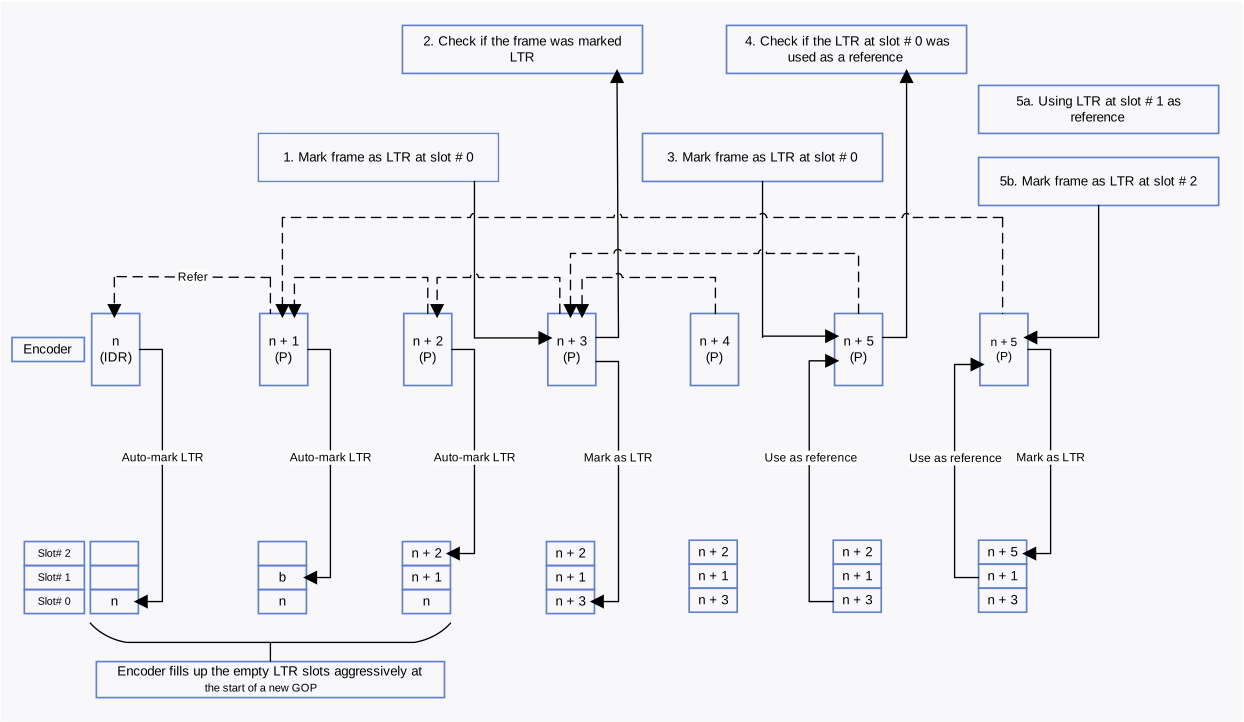
LTR frames are useful in error-prone channels. Referring to LTR in error-prone channels reduces the possibility of drift errors due to channel losses. The receiver must confirm that the LTR is received successfully and that it can request a new LTR when an error occurs. The network protocols have checksums that can confirm this behavior, along with the decoder corruption flags. New LTR frames are generated from the sender until the receiver confirms that a successful LTR is received.LTR frames are also useful in videos with scene changes where an LTR with the earlier scene is preserved. If that scene comes back, then the LTR can be used effectively.At the start of a new Group-of-pictures (GOP), the encoder automatically fills the LTR slots, with the first slot (slot number 0) containing an IDR frame. Applications can explicitly send an LTR mark request to mark the LTR frames in the appropriate slots.The following flow diagram shows LTR usage and how to mark and use LTR frames on an H.264 or HEVC encoder:
Figure: LTR encoding
Dynamic encoder propertiesThe Adreno VPU encoder supports dynamic change of properties such as bit rate, frame rate, and sync frame. This support allows the application to change the properties and helps in improved visual experience, video data adjusting to network conditions, and minimizing the loss of data during transmission.