

label_image sample application, the LiteRT C++ APIs, or the Qualcomm IM SDK gst-ai-classification pipeline.
Before deploying, ensure you have completed the prerequisites and model setup.
Deploy as a native application
Thelabel_image sample application is part of the TensorFlow repository and is cross-compiled with the LiteRT library and installed on the target device. It loads a classification LiteRT model and performs inference on an image using a delegate.
Run on CPU using the XNNPACK delegate:
Deploy as a C++ application
The following figure shows the steps involved in creating a C++ application to run a LiteRT model:
Workflow to create a C++ application and run a LiteRT model
Load a LiteRT model
A LiteRT model is a FlatBuffers file containing model operators, weights, and biases. Use the following API to load a model for inference:Create a LiteRT interpreter
The interpreter configures model execution on a chosen delegate and allocates memory for forward propagation:Prepare the model with a delegate
The following example creates the XNNPACK delegate for running a LiteRT model on the Arm® CPU:Prepare input/output buffers
Before running inference, preprocess the input data (such as camera frames) to match the model’s expected format. Common preprocessing steps include:- Resizing the input image to the resolution expected by the model
- Normalization
- Mean subtraction
Run inference
Use theInvoke() API to run inference. After completion, parse the output tensors from the interpreter:
Deploy with the Qualcomm IM SDK
Thegst-ai-classification sample application uses the Qualcomm IM SDK plugins to run a LiteRT classification model on Qualcomm development kits with hardware acceleration.
The pipeline receives a video stream from a camera, performs preprocessing, runs inference on the AI hardware, and displays the results:
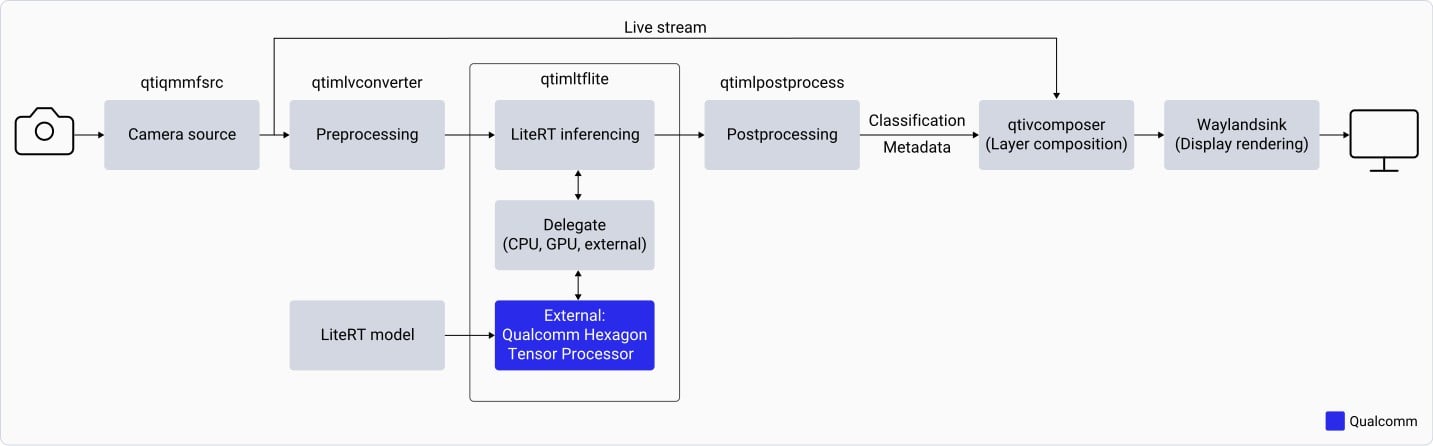
LiteRT model pipeline using the Qualcomm IM SDK
gst-ai-classification application:
1
Opens the IMX577 camera
Opens the IMX577 camera at a specified resolution and frame rate (for example, 1080p at 30 fps).
2
Preprocesses each camera frame
Preprocesses each camera frame — downscales to 224×224 and normalizes based on model requirements.
3
Loads the model and runs inference
Loads the LiteRT classification model and runs inference using the
qtimltflite plugin.4
Extracts the top predicted label
Extracts the label with the highest predicted probability from the output tensor.
5
Overlays and displays the result
Overlays the inference result on the original camera frame and displays it on the connected monitor.
Download the model and label files
1
Download the Inception-v3 quantized model
Go to Qualcomm AI Hub and download the Inception-v3 quantized model.
2
Download the label file
3
Create the required directories on the target device
4
Copy the model and label files to the device
Run the sample application
1
Sign in to the target device using SSH
2
Edit the config_classification.json configuration file
3
Download the video file and copy it to the device
Download video file and copy it to
/etc/media/video.mp4 on the device.4
Run the classification sample application
Ctrl+C.