Run LLMs with Genie
Once your large language model (LLM) has been prepared and optimized (using AI Hub or the Jupyter notebooks), Genie provides a streamlined way to execute it on Qualcomm platforms.Prerequisites
Before running a language model with Genie, confirm that the following prerequisites are met.- The model bundle is exported and prepared for the correct backend (CPU or NPU) and it includes AI Engine Direct (QNN) binaries, tokenizer files, and configuration files.
- QAIRT is installed on the target device and Genie tools and libraries are available as part of the SDK.
- The target hardware uses a Qualcomm platform with sufficient memory (RAM and storage to copy and execute model binaries).
genie-t2t-run.
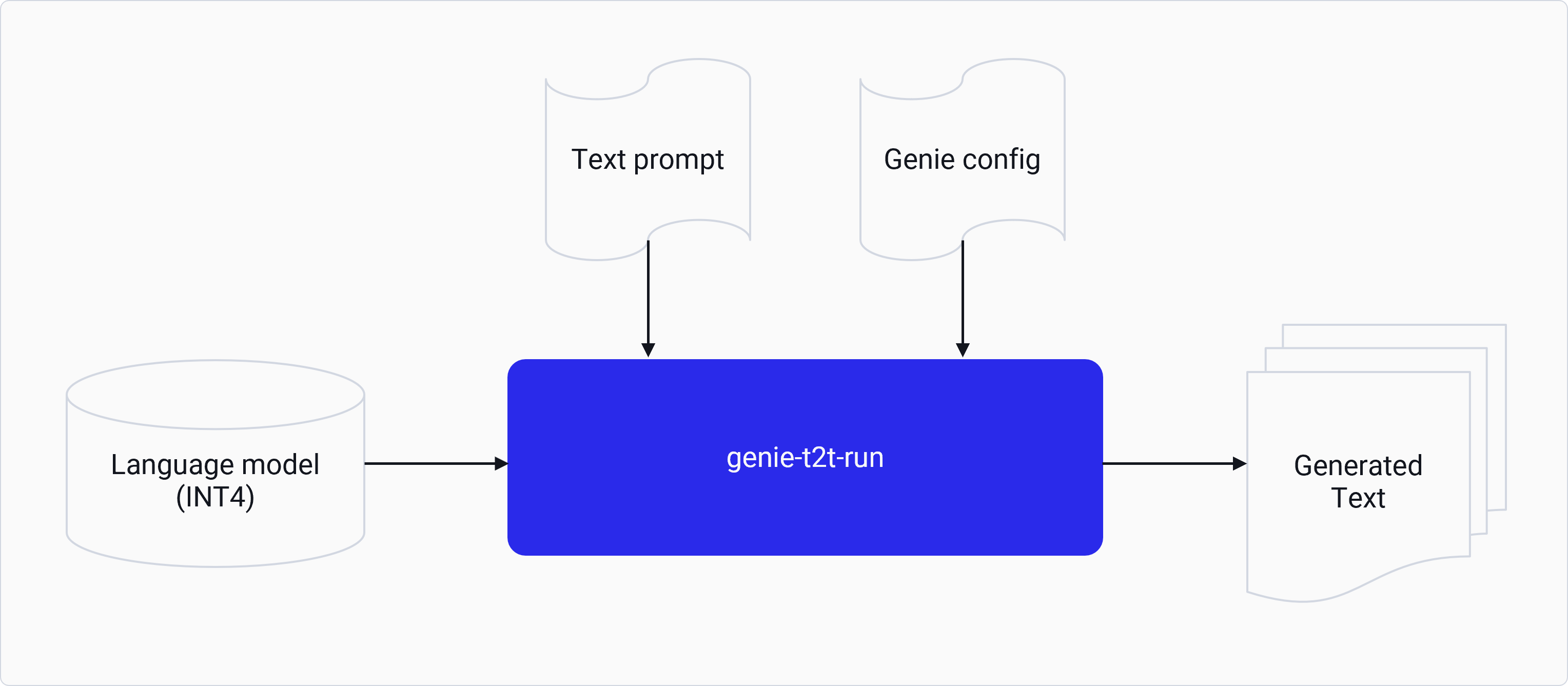
genie-t2t-run tool is a test application to do text-to-text inference on a provided LLM network.
It takes a user prompt in text format and outputs the result in the text format. It provides a ready-to-use
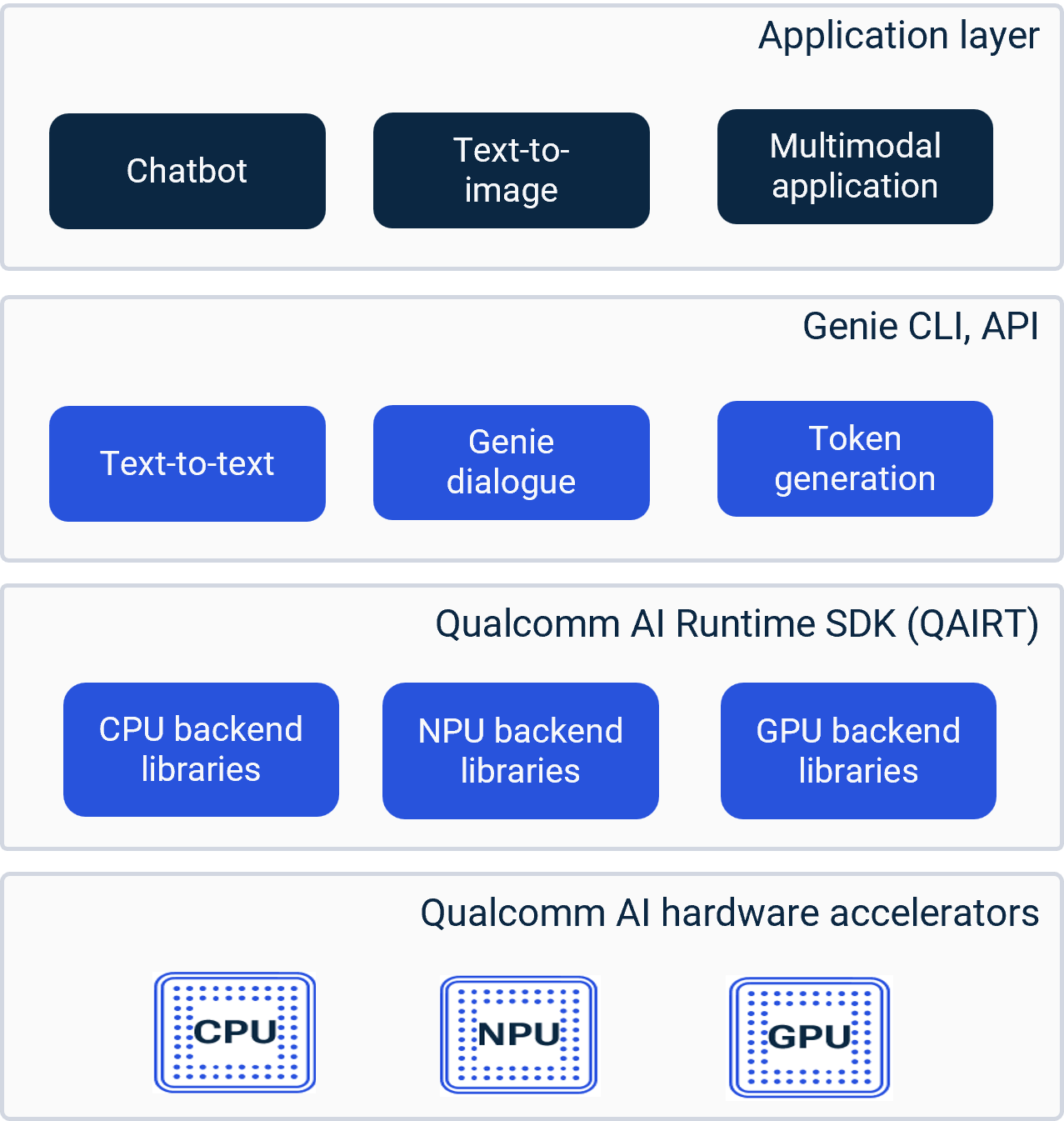
command line interface (CLI) to run LLM inference on supported Qualcomm devices using CPU, GPU, and Hexagon Tensor Processor (HTP) backends.
Genie streamlines multibinary LLM execution into a single job using pre-optimized model assets.
The following snippet shows a sample genie-t2t-run command.
genie-t2t-run command.
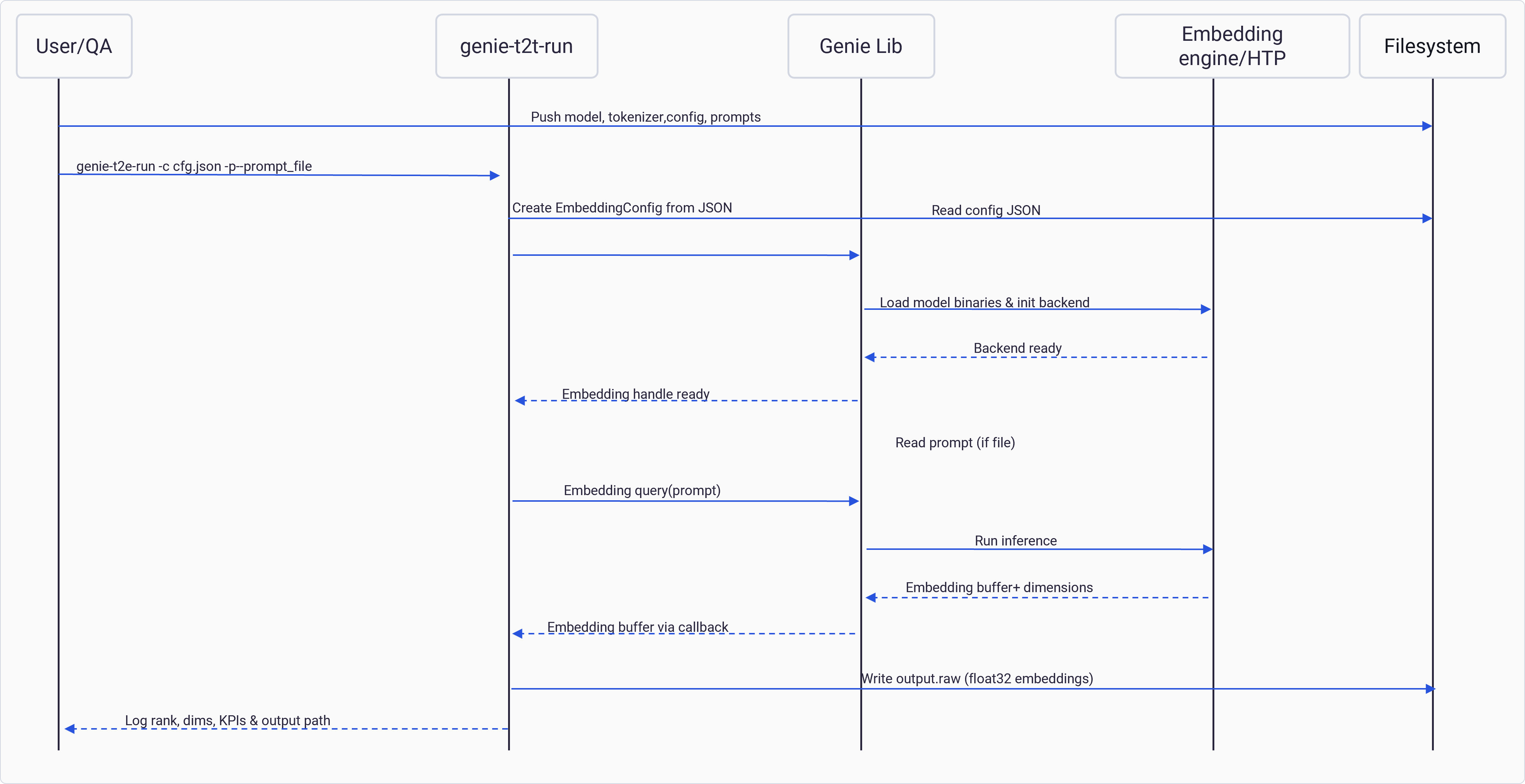
genie-t2t-run you need to copy the genie-bundle generated from the
model preparation step to the target device.
-
From the host computer, connect to the target device using its IP address.
-
On the target device, in the SSH session from the previous step, create a directory to hold the model artifacts:
-
From the host computer, push the libraries and binaries needed to run the model to the target device.
In the following commands, replace
<ARCHITECTURE>with the DSP Hexagon architecture library version. -
From the host computer, push model binaries and configuration files to the target device.
-
From the target device, run the model.
Select the runtime using the
backend::type parameter from the
JSON configuration fileSample Genie configurations for different models are available through
AI Hub.
Run multimodal models with Genie
To run multimodal models with Genie, use the GenAI tutorials (available inQualcomm Package Manager)
to generate the models and run them with Genie tools.
No multimodal models are hosted in AI Hub.
Users must use the Jupyter notebooks to generate and run the models.
-
Genie Node APIs: Used to create individual blocks. Each node creation requires a standalone JSON
configuration, similar to the dialog configuration.
text-encoderimage-encodertext-generator
- Genie Pipeline APIs: Used to connect nodes and streamline execution. The Genie pipeline manages internal data type translations, re-quantization, and concatenation operations.
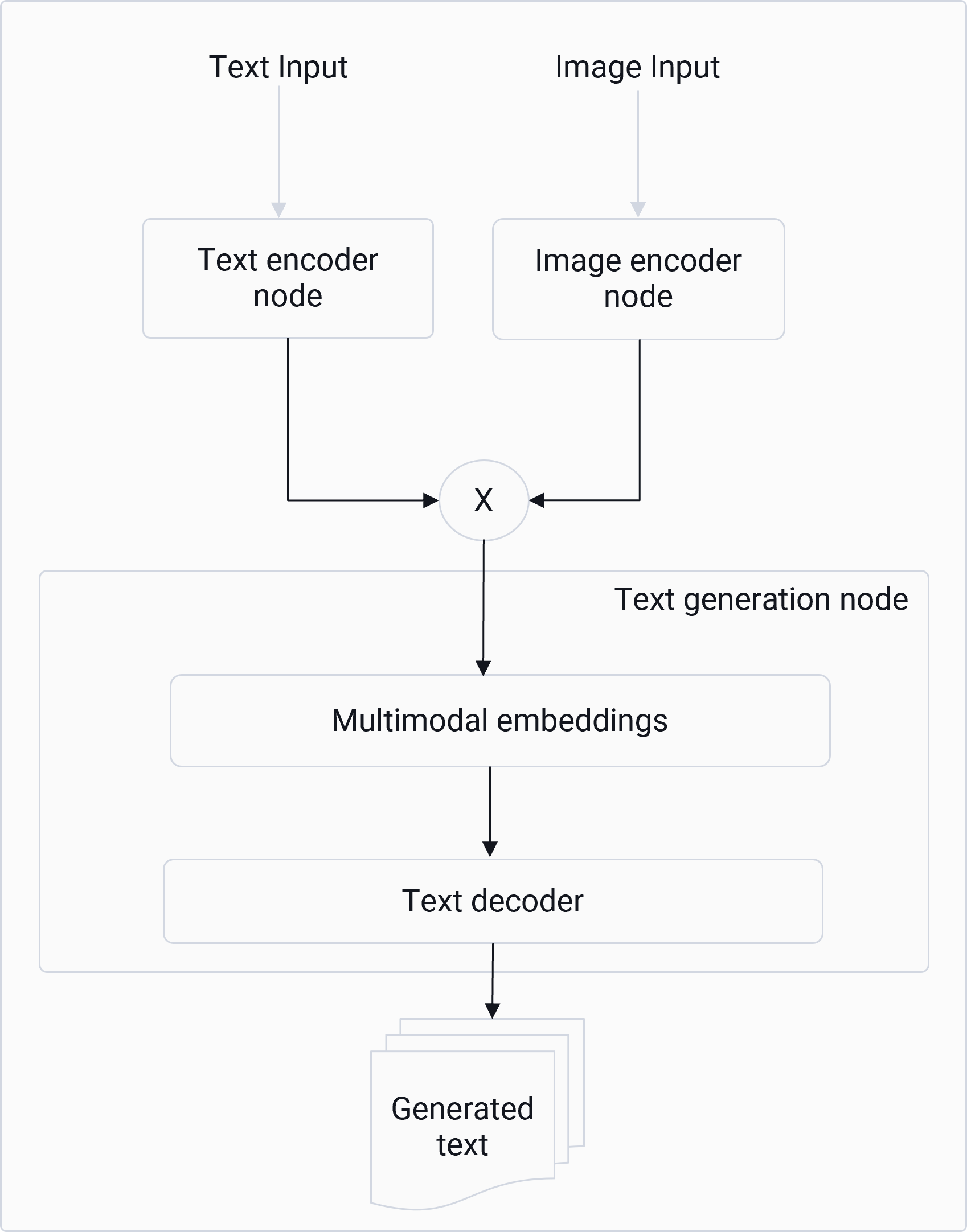
Genie pipeline stages
- Create the nodes. a. Create the node configuration. Node JSON configurations vary based on the node type. For more information, see node JSON
- Create the node.
- Construct the pipeline. a. Create a pipeline from the node configuration.
- Add nodes to the pipeline.
-
Connect the nodes.
-
Each node type has a set of predefined IO names. These are defined in
GenieNode.h. For example, the text generator node has one of the two possible inputs and one output:- Input:
GENIE_NODE_TEXT_GENERATOR_TEXT_INPUT - Input:
GENIE_NODE_TEXT_GENERATOR_EMBEDDING_INPUT - Output:
GENIE_NODE_TEXT_GENERATOR_TEXT_OUTPUT
- Input:
-
Each node type has a set of predefined IO names. These are defined in
- The Genie pipeline connect API defines one connection from one producer node output to one consumer node input. For example:
- Run the pipeline. a. Set data for the input nodes.
- Use the predefined IO name (as in connect API)
- The IO name implicitly defines the data type
- Run the pipeline.
- Callbacks registered to the output node(s) return the output.
Genie API
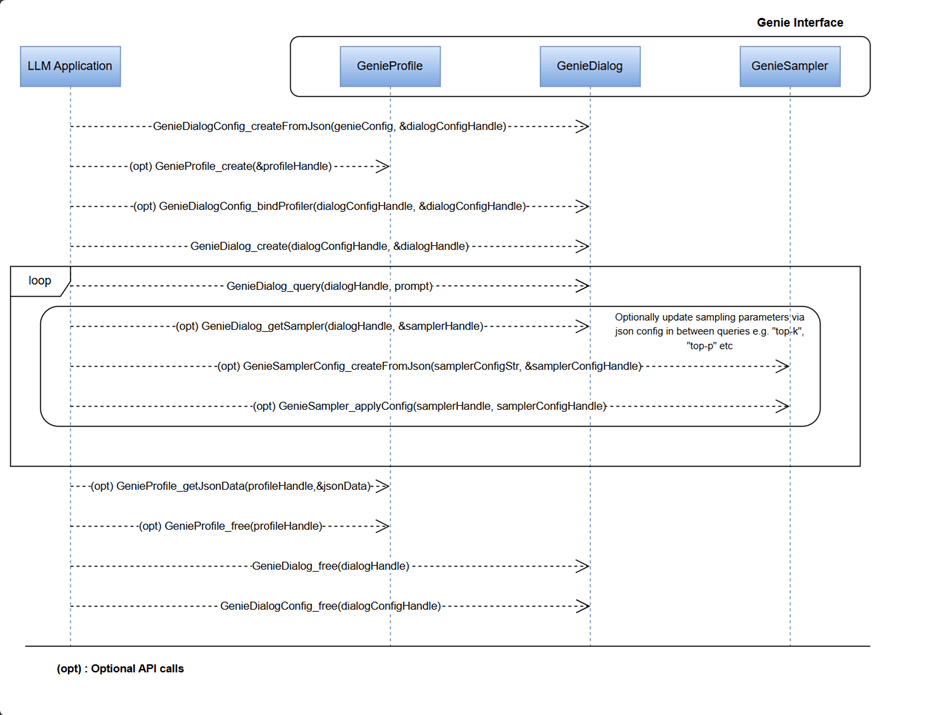
The Genie API is a high-level interface for running LLM pipelines on Qualcomm devices. It wraps the tokenizer, engine (QNN backend), KV-cache management, decoding, and sampling into dialog and token-generation flows, while delegating device execution to QAIRT with HTP/NPU and CPU backends. The following diagram shows the high-level functions handled internally by Genie APIs. You can use the Genie C APIs to configure each component according to your LLM application needs.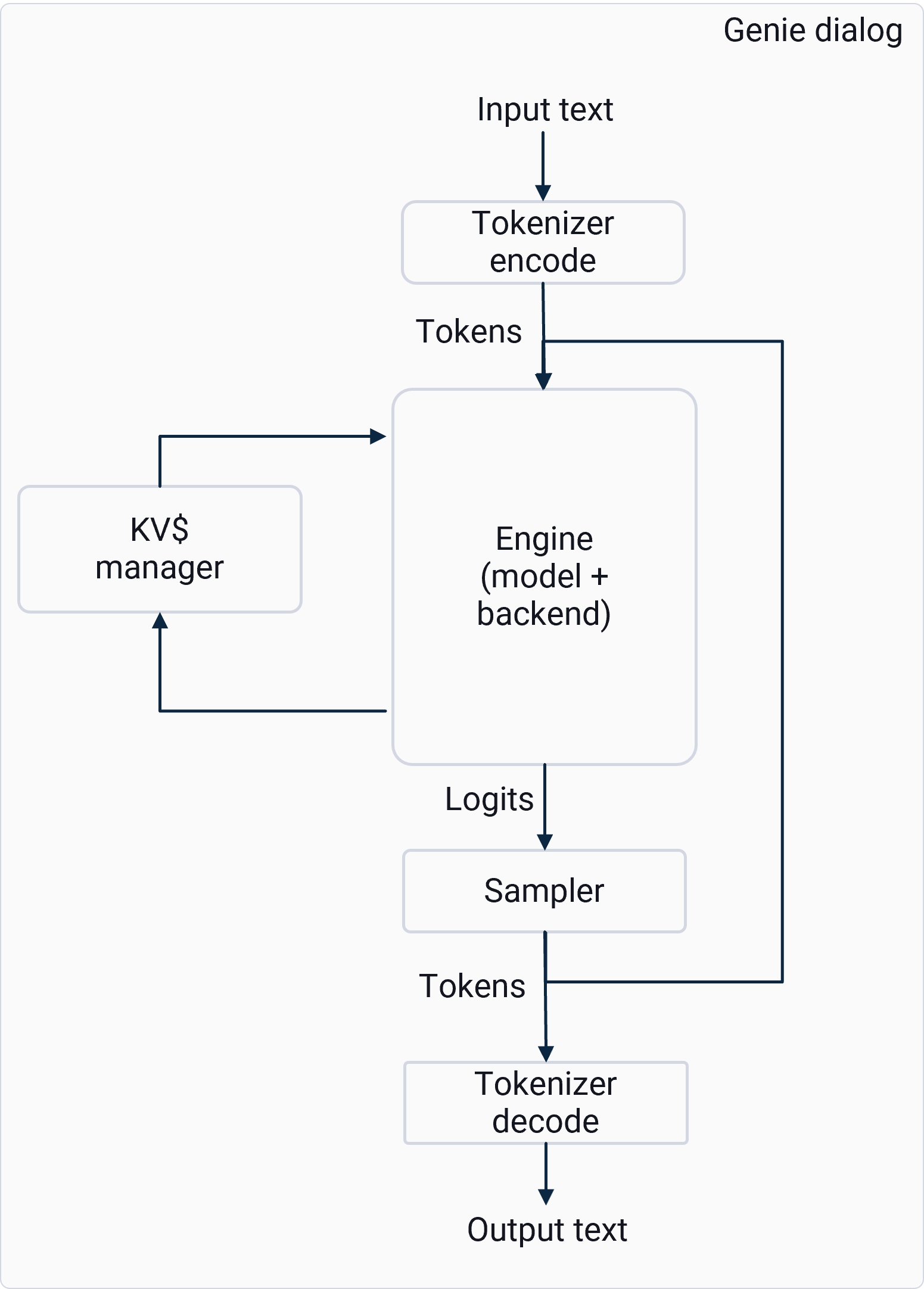
GeniePipeline: Orchestrates the entire inference workflow by chaining tokenizer, engine, sampler, and other nodes into a runnable pipeline. It manages data flow and execution order for text generation or embedding tasks.GenieNode: Represents an individual processing unit (tokenizer, engine) within the pipeline. Nodes encapsulate specific functionality and can be used to build custom inference graphs.GenieDialog: A high-level abstraction for conversational tasks. It wires together tokenizer, model, backend, and sampler using JSON configuration and provides APIs for token generation and embeddings.GenieEmbedding: Handles embedding queries for retrieval-augmented generation (RAG) or semantic search. Converts input text into dense vector representations using the loaded model.GenieProfile: Stores configuration and runtime parameters such as backend selection, sampling strategies, and performance settings. Profiles allow quick switching between different inference setups.GenieSampler: Implements decoding strategies (for example, greedy, top-k, or top-p sampling) to convert model logits into output tokens. Supports advanced speedup techniques like speculative decoding (SPD), self-speculative decoding (SSD), and look ahead decoding (LADE).GenieEngine: Executes the model forward pass on the chosen backend (HTP, GenAI transformer, or CPU). It manages graph execution, memory allocation, and hardware acceleration.GenieTokenizer: Converts text to token IDs and back to text during inference. Works with model-specific vocabularies and supports efficient encoding/decoding for multi-turn dialogs.
Genie API chatbot call flow