| Step | Objective | Details | Artifacts generated | ||
|---|---|---|---|---|---|
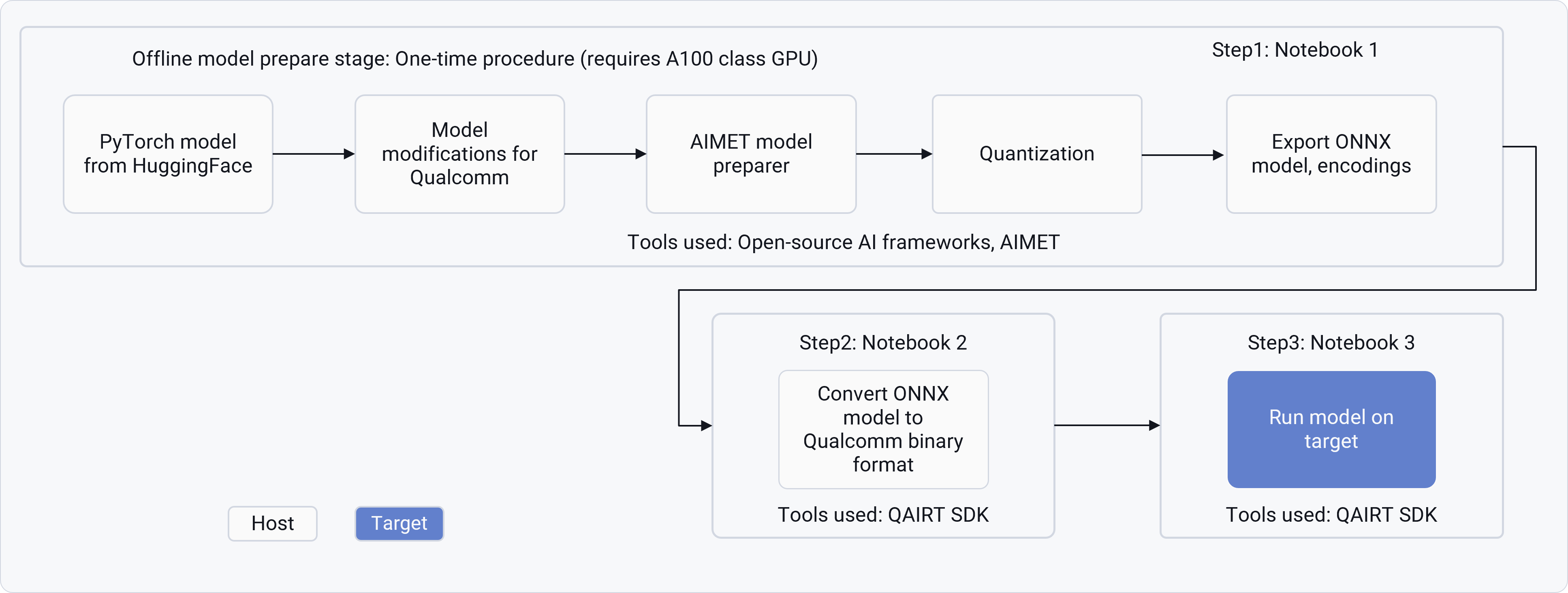
| Notebook 1 | Adapt and optimize the Hugging Face PyTorch model for Qualcomm hardware. | 1. Load base model from HuggingFace. 2. Apply AIMET Transformation for – Graph Optimizations, Computing encodings using techniques like Sequential MSE, and AdaRound. 3. Export optimized model to ONNX format along with AIMET encodings. AI Hub path simplifies the workflow by hosting pre-computed encodings from this step on cloud platforms. | ONNX models | AIMET encodings | Profiling reports |
| Notebook 2 | Convert ONNX models to Qualcomm AI Engine Direct (QNN) binaries | 4. Use Qualcomm AI Runtime SDK tools to generate serialized binaries from ONNX models generated in Notebook 1. 5. Create context binaries for prompt and token generation. 6. Validate model conversion with profiling metrics. | QAIRT binaries for Inference | ||
| Notebook 3 | Run the prepared model on Qualcomm-based devices. | 7. Transfer binaries and configuration files to the target device. 8. Use Genie-CLI or QAIRT runtime APIs for inference. 9. Validate performance (latency, throughput), and accuracy. | On-target model inference |