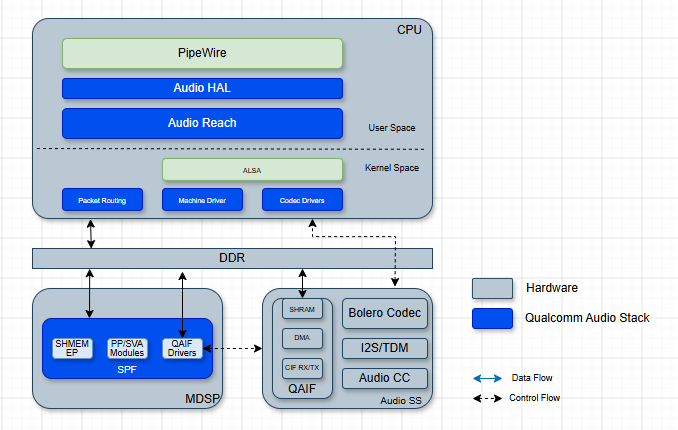
The IQ-9075 audio subsystem is powered by Low Power AI (LPAI) and delivers advanced voice UI and audio experiences via PipeWire.

Key Features

  • Low Power AI (LPAI) subsystem for efficient audio processing
  • PipeWire multimedia server for low-latency audio routing
  • Hardware-accelerated encoding/decoding
  • Fluence ECNS — advanced echo cancellation and noise suppression
  • Multiple audio interfaces — I2S, TDM, SoundWire

Hardware Configuration
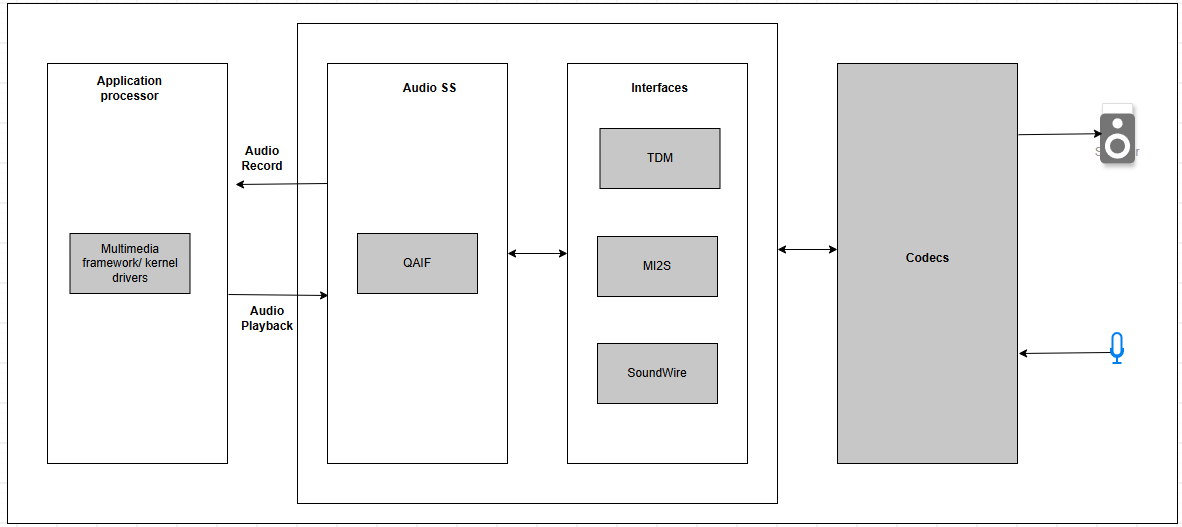
  • Speakers: Onboard speakers with MAX98357 I2S-amps; HS0_MI2S shared between left and right for stereo
  • Microphone: Single onboard microphone (MMICT5848) on HS2_MI2S, configured to left channel by default
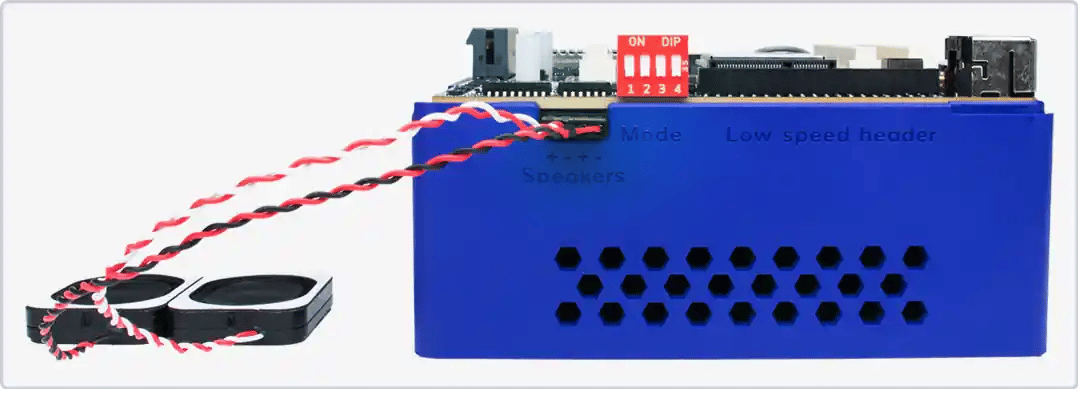
Speaker connection:

Architecture

ComponentDescription
PipeWireMultimedia server; replaces PulseAudio; low-latency, flexible media handling
WirePlumberSession/policy manager; handles default sink/source, auto-connect rules
PALPlatform Abstraction Layer; provides audio-specific APIs and DSP graph operations
AGMAudio Graph Manager; ALSA-based mixer controls and PCM/compressed plug-ins
ARGS/GSLAudioReach Graph Service; handles initialization and creation of audio graphs
SPFSignal Processing Framework; modular framework on LPAI DSP

Configuration Files

ComponentLocation
ALSA card registration/proc/asound/cards
WirePlumber rules & config/usr/share/wireplumber/

Verify Audio Stack

# Confirm ALSA card and devices
cat /proc/asound/cards
aplay -l
arecord -l

# Confirm PipeWire + WirePlumber services
systemctl  status pipewire wireplumber --no-pager

# Validate default sink/source
wpctl status

# Monitor graph
pw-top
pw-cli ls Node

Audio Playback and Capture

PipeWire Playback

1

Push audio file to device

scp test.wav root@<ip-addr>:/opt/
2

Set default sink and volume

wpctl status   # Find sink node marked with *
wpctl set-default <sink-node>   # If not already set
wpctl set-volume @DEFAULT_AUDIO_SINK@ 1.0
3

Play audio

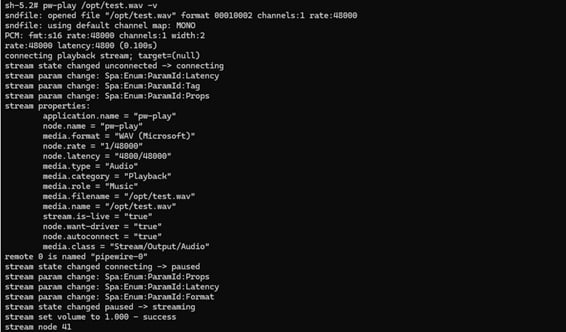
pw-play /opt/test.wav -v
The command shell should resemble the following:Press Ctrl+C to stop.

PipeWire Record

1

Set default source and volume

wpctl status   # Find mic node marked with *
wpctl set-default <mic-node>   # If not already set
wpctl set-volume @DEFAULT_AUDIO_SOURCE@ 1.0
2

Start recording

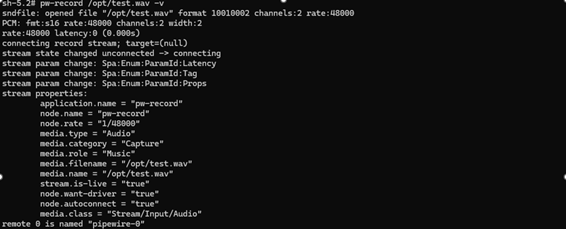
pw-record /opt/record.wav -v
The command shell should resemble the following:Press Ctrl+C to stop.
A value of 1.0 represents 100% volume.

GStreamer Audio

# PCM capture
gst-launch-1.0 -v pulsesrc volume=10 ! audioconvert ! wavenc ! \
  filesink location=/opt/audio.wav

# FLAC capture
gst-launch-1.0 -v pulsesrc volume=10 ! audioconvert ! flacenc ! \
  filesink location=/opt/audio.flac

Log Capture

# PipeWire logs
journalctl -u pipewire
journalctl  -u wireplumber

# Live debugging
journalctl -u pipewire -f

# Kernel audio driver logs
sudo dmesg

Troubleshooting

wpctl status
wpctl set-volume @DEFAULT_AUDIO_SINK@ 1.0
systemctl restart pipewire pipewire-pulse wireplumber


pw-play /opt/test.wav -v


# Check services
systemctl status pipewire pipewire-pulse wireplumber
# Check CPU load
top

# Check PAL media config (expect rate=48000, ch=2, fmt=2)
grep "setDeviceMediaConfig" /var/log/syslog

# Check for underruns
dmesg | grep -i -e underrun -e xrun -e lpass -e audio

# Check PipeWire quantum
pw-metadata -n settings

# Monitor real-time
pw-top
Fix — increase PipeWire buffer:
mkdir -p ~/.config/pipewire/pipewire.conf.d
cat > ~/.config/pipewire/pipewire.conf.d/99-custom-buffer.conf << 'EOF'
context.properties = {
    default.clock.quantum = 1024
    default.clock.min-quantum = 1024
}
EOF
systemctl restart pipewire wireplumber
Fix — convert audio to 48 kHz 16-bit stereo:
ffmpeg -i input.wav -ar 48000 -ac 2 -sample_fmt s16 output.wav
systemctl status pipewire pipewire-pulse wireplumber
journalctl -u pipewire -u wireplumber -b

# Reset configuration
rm -rf ~/.config/pipewire ~/.config/wireplumber
systemctl  daemon-reload
systemctl  restart pipewire pipewire-pulse wireplumber

# Reinstall if needed
sudo apt install --reinstall pipewire wireplumber pipewire-pulse

Advanced Features

Echo Cancellation (ECNS) for VoIP

# VoIP record
pw-record /opt//record_voip.wav -v --target=voip-tx0

# VoIP playback
pw-play /opt/record_voip.wav -v --target=voip-rx0
Features: adaptive echo cancellation, stationary and non-stationary noise suppression, acoustic echo path cancellation.

Resources