A RAM dump is a snapshot of the system memory at the time of device failure and is useful for debugging various crash issues.

Enable RAM dump

By default, the debug build includes the RAM dump, but it’s disabled in perf or non-DEBUG builds through a kernel command-line parameter. To configure the RAM dump, use the qcom_scm.download_mode parameter in the meta-qcom/ci/base.yml file as:
  • 0: Disable
  • 1: Enable
The following is the sample code snippet:
cmdline: |

KERNEL_CMDLINE_EXTRA:append = " qcom_scm.download_mode=1"

Collect RAM dump

After the system crash, the device reboots into RAM dump mode and waits for RAM dump collection through USB in the bootloader. To collect the RAM dump over USB, use the Product Configuration Assistant Tool (PCAT). Download the PCAT tool from the Qualcomm Software Center. After installing PCAT, access the PCAT user guide at the following locations:
  • Windows host computer: C:\Program Files(x86)\Qualcomm\PCAT\Docs
  • Linux host computer: /opt/qcom/PCAT/Docs/
To collect RAM dump using PCAT, do the following:
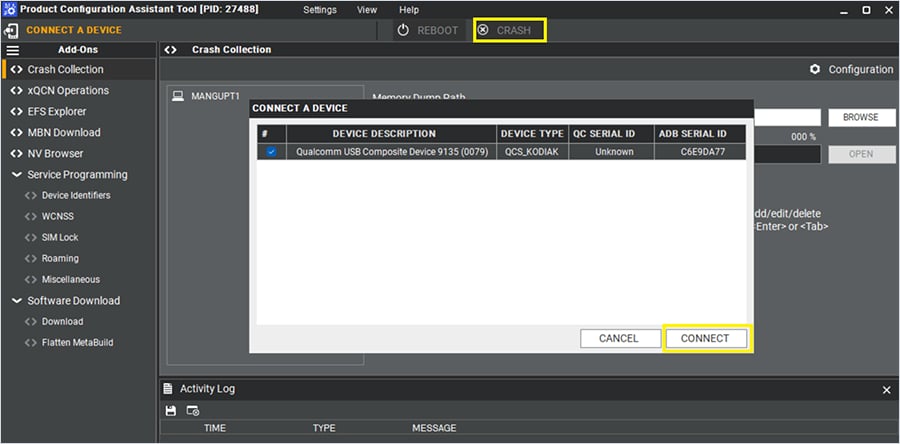
  1. Start PCAT on a Windows host computer and connect the device, which is already in the RAM dump mode. If necessary, to trigger a device crash, select CRASH on the PCAT interface.
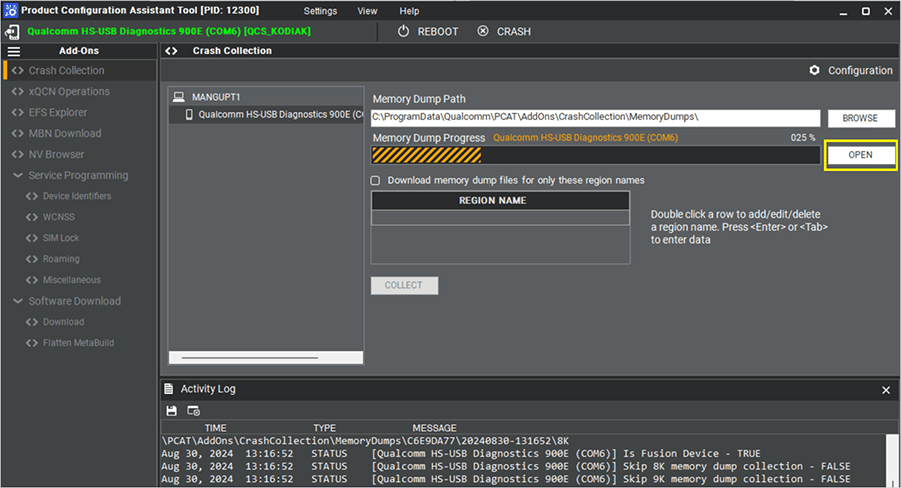
After you connect the device to the Windows host computer, PCAT automatically starts capturing the RAM dump, and the PCAT UI displays the progress of the dump collection.
After you connect the device to the Windows host computer, PCAT automatically starts capturing the RAM dump, and the PCAT UI displays the progress of the dump collection. 2. To view the dump, select OPEN.
After you connect the device to the Windows host computer, PCAT automatically starts capturing the RAM dump, and the PCAT UI displays the progress of the dump collection.
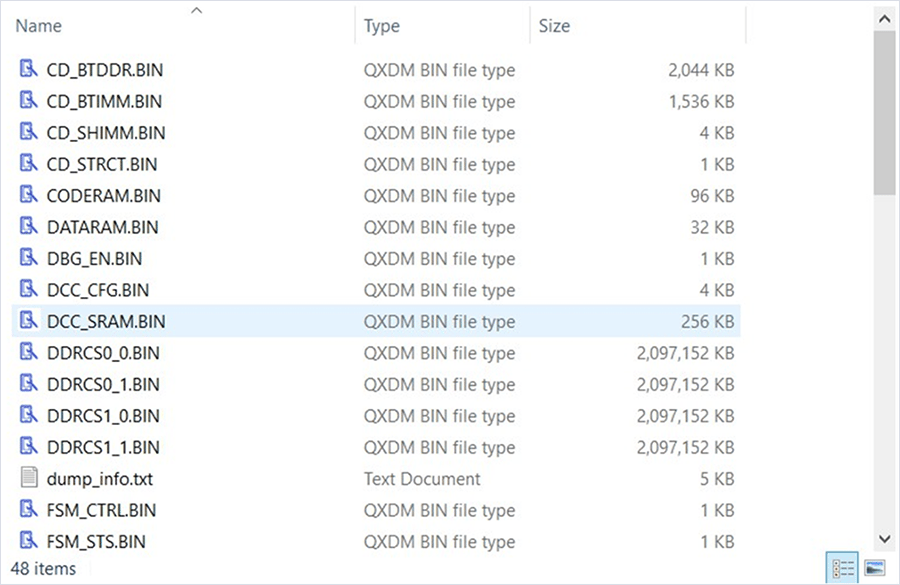
The following example shows the contents of a RAM dump directory:
The Linux host computer uses a command-line interface rather than a GUI for PCAT-based RAM dump capture, such as PCAT -PLUGIN CC -DEVICE <serial-id> -DUMPDIR /tmp -RESET TRUE -UNIQUETS TRUE.

Capture the subsystem dumps

This feature is available to licensed developers with authorized access. For more information about how to enable and capture coredumps of subsystems, see Qualcomm Linux Debug Guide - Addendum.