

Each audio use case is a graph with subgraphs of a specific type. Each subgraph has one or more functional software blocks (referred to as modules) that perform a specific function.

Customize at PAL level

The Platform Abstraction Layer (PAL) provides higher-level audio-specific APIs to access audio hardware and drivers. Customizing at the PAL level allows you to control stream behavior, device routing, buffer configuration, and platform-specific audio settings.

PipeWire PAL plug-in

The PipeWire PAL plug-in (pw-pal-plugin) bridges PipeWire streams directly to the PAL API. It runs as a PipeWire module and handles all audio routing between PipeWire and the AudioReach hardware stack. The plug-in performs the following operations:
  • Opens and manages PAL streams for playback and capture
  • Configures mixer controls to set up hardware codec devices and stream configurations
  • Invokes PAL APIs to open and start audio sessions
  • Routes audio data between PipeWire buffers and PAL DMA buffers
The PAL resource manager tracks all active sessions and devices to enable concurrencies. It parses and loads configuration from the following platform XML files:
  • Resource_manager.xml — Device-to-backend mapping and policy making attributes
  • Card-defs.xml — Virtual PCM and compress nodes and their options
Find the PipeWire PAL plug-in source code at:
build-qcom-wayland/workspace/sources/pipewire
Find the PAL source code at:
build-qcom-wayland/workspace/sources/qcom-pal/opensource/arpal-lx
The following file lists all APIs exposed by the PAL module:
build-qcom-wayland/workspace/sources/qcom-pal/opensource/arpal-lx/inc/PalApi.h

PAL APIs

The following are common PAL APIs. See PalApi.h for a complete description of all APIs.

pal_init

Initializes PAL, parses the related configuration files, and stores them in a local structure for use.
int32_t pal_init()
Parameters None Return value
  • 0 on success
  • Error code on failure

pal_deinit

De-initializes PAL and frees up the resources allocated during initialization.
void pal_deinit()
Parameters None Return value None

pal_stream_open

Opens a stream with the specified configuration such as source/sink devices and media configuration. Returns the stream handle upon success.
int32_t pal_stream_open(
    struct pal_stream_attributes *attributes,
    uint32_t no_of_devices,
    struct pal_device *devices,
    uint32_t no_of_modifiers,
    struct modifier_kv *modifiers,
    pal_stream_callback cb,
    uint64_t cookie,
    pal_stream_handle_t **stream_handle)
Parameters
ParameterDescription
attributesPointer to a pal_stream_attributes structure specifying stream type, direction, and media configuration.
no_of_devicesNumber of audio devices with which to first start the stream.
devicesArray of pal_device. Bases the size of the array on the number of devices specified in no_of_devices.
no_of_modifiersNumber of modifiers.
modifiersArray of modifiers. Modifiers add more key-value pairs.
cbCallback function associated with the stream. This callback function notifies any event.
cookieClient data associated with the stream. The callback function returns this cookie.
stream_handleUpdates with the valid stream handle if the operation is successful.
Return value
  • 0 on success
  • Error code on failure

pal_stream_start

Starts a stream.
int32_t pal_stream_start(
    pal_stream_handle_t *stream_handle)
Parameters
ParameterDescription
stream_handleValid stream handle from pal_stream_open.
Return value
  • 0 on success
  • Error code on failure

pal_stream_read

Reads the audio buffer captured from the audio source device.
ssize_t pal_stream_read(
    pal_stream_handle_t *stream_handle,
    struct pal_buffer *buf)
Parameters
ParameterDescription
stream_handleValid stream handle from pal_stream_open.
bufPointer to pal_buffer that has audio samples and metadata.
Return value
  • Number of bytes read on success
  • Error code on failure

pal_stream_write

Writes the audio buffer for stream rendering over a sink device.
ssize_t pal_stream_write(
    pal_stream_handle_t *stream_handle,
    struct pal_buffer *buf)
Parameters
ParameterDescription
stream_handleValid stream handle from pal_stream_open.
bufPointer to pal_buffer that has audio samples and metadata.
Return value
  • Number of bytes written on success
  • Error code on failure

pal_stream_stop

Stops a stream.
int32_t pal_stream_stop(
    pal_stream_handle_t *stream_handle)
Parameters
ParameterDescription
stream_handleValid stream handle from pal_stream_open.
Return value
  • 0 on success
  • Error code on failure

pal_stream_close

Closes a stream.
int32_t pal_stream_close(
    pal_stream_handle_t *stream_handle)
Parameters
ParameterDescription
stream_handleValid stream handle from pal_stream_open.
Return value
  • 0 on success
  • Error code on failure

Configuration files

Configure audio use cases at the PAL level by using the mixer_paths, resourcemanager, and usecasekvmanager XML files. The following table shows the configuration files for each supported platform: QCS6490 configuration files
VariantSound card nameConf filemixer_paths.xmlResourceManager.xml
Core Kit (Qualcomm RB3 Platform)qcm6490-rb3-snd-cardqcm6490-rb3-snd-card.confmixer_paths_qcm6490_rb3.xmlresourcemanager_qcm6490_rb3.xml
Vision Kitqcm6490-vision-snd-cardqcm6490-vision-snd-card.confmixer_paths_qcm6490_vision.xmlresourcemanager_qcm6490_vision.xml
Video Collab Kitqcm6490-vc-snd-cardqcm6490-vc-snd-card.confmixer_paths_qcm6490_vc.xmlresourcemanager_qcm6490_vc.xml
Qualcomm Dragonwing IQ-9075 configuration files
VariantSound card nameConf filemixer_paths.xmlResourceManager.xml
Core Kit (RB8)qcs9075-rb8-snd-cardqcs9075-rb8-snd-card.confmixer_paths_qcs9075_rb8.xmlresourcemanager_qcs9075_rb8.xml
Qualcomm Dragonwing IQ-8275 configuration files
VariantSound card nameConf filemixer_paths.xmlResourceManager.xml
Dragonwing IQ-8275 Beta Evaluation Kitqcs8300-ridesx-snd-cardqcs8300-ridesx-snd-card.confmixer_paths_qcs8300_ridesx.xmlresourcemanager_qcs8300_ridesx.xml

Customize mixer paths XML file

Mixer control is a control variable exposed from the ALSA mixer to the user space. It allows the user space to access set and get functions and pass parameters to the ALSA mixer. The platform uses the mixer_paths_<sound-card-name>.xml file as the mixer path. This file is in the /etc/ folder on the target. The following is an example entry for enabling the mono speaker device in the mixer_paths.xml file. When playback triggers and the device selected is a speaker, the following mixer controls run with the help of the audio route helper class:
<path name="speaker">
    <!--Mixer controls related to speaker need to be defined here-->
</path>

Customize resource manager XML file

The Resourcemanager.xml file includes all possible devices, use cases, and combinations. It also includes other configurations, module parameters, and global parameters. The following is an example speaker device entry in the resource manager XML file. It has all configurations for the speaker device such as back-end name, channels, sample rate, and bit width:
<out-device>
    <id>PAL_DEVICE_OUT_SPEAKER</id>
    <back_end_name>CODEC_DMA-LPAIF_WSA-RX-0</back_end_name>
    <max_channels>2</max_channels>
    <channels>2</channels>
    <samplerate>48000</samplerate>
    <bit_width>16</bit_width>
    <snd_device_name>speaker</snd_device_name>
</out-device>

Customize usecasekvmanager XML file

The Usecasekvmanager.xml file has the GKV details for each use case. PAL uses this XML file to get the KV configuration for each use case and then uses that configuration to get graph information from the acdb files. This file is in the /etc folder on the device. The following is an example of one stream and device graph key vector configuration: Stream KV
<stream type="PAL_STREAM_LOW_LATENCY">
    <keys_and_values Direction="RX" Instance="1">
        <!-- STREAMRX - PCM_LL_PLAYBACK -->
        <graph_kv key="0xA1000000" value="0xA100000E"/>
        <!-- INSTANCE - INSTANCE_1 -->
        <graph_kv key="0xAB000000" value="0x1"/>
    </keys_and_values>
Device KV
<!-- Speaker Device -->
<device id="PAL_DEVICE_OUT_SPEAKER">
    <keys_and_values>
        <!-- DEVICERX - SPEAKER -->
        <graph_kv key="0xA2000000" value="0xA2000001"/>
    </keys_and_values>
</device>
DevicePP KV
<!-- OUT Speaker DevicePPs -->
<devicepp id="PAL_DEVICE_OUT_SPEAKER">
    <keys_and_values StreamType="PAL_STREAM_COMPRESSED,PAL_STREAM_LOW_LATENCY">
        <!-- DEVICERX - SPEAKER -->
        <graph_kv key="0xA2000000" value="0xA2000001"/>
        <!-- DEVICEPP_RX - DEVICEPP_RX_AUDIO_MBDRC -->
        <graph_kv key="0xAC000000" value="0xAC000002"/>
    </keys_and_values>
</devicepp>

Sync and compile audio components

The audio software uses user space and kernel space modules located in the Linux-enabled audio software directory. The audio user space and kernel module source trees extract to the following path:
<workspace>/build-qcom-wayland/workspace/sources
Use the devtool Linux utility to get, extract, and build the audio module source code.
Go to the workspace (<workspace>/build-qcom-wayland$) to access the source code trees using devtool.

Sync PipeWire

  1. Extract the source tree:
    devtool modify pipewire
    
    The PipeWire source tree extracts to:
    build-qcom-wayland/workspace/sources/pipewire
    
  2. Build the source tree:
    devtool build pipewire
    

Sync PAL

  1. Extract the source tree:
    devtool modify qcom-pal
    
    The PAL source tree extracts to:
    build-qcom-wayland/workspace/sources/qcom-pal/opensource/arpal-lx
    
  2. Build the source tree:
    devtool build qcom-pal
    

Sync TinyALSA

  1. Extract the source tree:
    devtool modify tinyalsa
    
    The TinyALSA source tree extracts to:
    build-qcom-wayland/workspace/sources/tinyalsa
    
  2. Build the source tree:
    devtool build tinyalsa
    

Audio module source code locations

If you have full access to the proprietary software shipped with Qualcomm Linux, view the audio module source code at the following locations:
ModuleSource path
PipeWirebuild-qcom-wayland/workspace/sources/pipewire
PALbuild-qcom-wayland/workspace/sources/qcom-pal/opensource/arpal-lx
TinyALSAbuild-qcom-wayland/workspace/sources/tinyalsa
TinyCompressbuild-qcom-wayland/workspace/sources/tinycompress
ACDB filesbuild-qcom-wayland/workspace/sources/qcom-acdbdata/opensource/audioreachconf/ar-acdb/acdbdata
ARGSbuild-qcom-wayland/workspace/sources/qcom-args/opensource/args

Audio graph terms

Audio graph terms
Use caseA graph of modules from source endpoint(s) to sink endpoint(s) that meets the product defined use case.
GraphA logical interpretation of a group of one or more subgraphs connected together to create a specific use case.
SubgraphA logical abstraction for a group of modules that connect and are manipulated as a single entity.
ContainerObject that allows the system designer to group and run audio processing modules together in a single software thread.
ModuleThe smallest independent processing unit in the signal processing framework.
Key value (KV) pairThe individual key and associated values in a key vector. For example, a key can be a sound device and a value can be headphone, speaker, or some other sound device.
Key vectorUniquely identifies a graph or subgraph through a set of KV pairs.
Graph key vector (GKV)GKV is a unique identifier that gets a graph, which is represented by KV pairs. The graph or system designer associates a set of unique <keys> and <values> when creating a subgraph from the QACT UI canvas.
Calibration key vector (CKV)CKV is a unique identifier that gets calibration data, which is represented by KV pairs. The graph or system designer associates a set of unique <keys> and <values> when storing calibration data.
Tag and tag key vector (TKV)A tag is an identifier that sets runtime parameters for one or more modules. It allows updating module configurations (for example, enabling/disabling features like echo cancellation or equalization) in a graph at runtime.

Graph segments

An audio use case has the following segments. The front-end represents stream and streamPP subgraphs, while the back-end represents the per-stream per-device (PSPD), devicePP, and device subgraphs. Graph segments
StreamGives a data write/read interface and performs decoding and encoding of compressed data.
StreamPPHas stream-based processing modules (for example, equalizer).
PSPDHas a module to convert the stream media format to the device media format.
DevicePPHas processing modules for sound device tuning.
DeviceHardware endpoint such as CodecDMA (SoundWire), I2S, or TDM port.
Once a front-end connects to a back-end using a routing mixer control, the full GKV forms by concatenating the subgraph GKVs and the CKVs assigned using mixer controls. Upon opening the front-end PCM or compress device, AGM invokes GSL APIs with concatenated GKVs and CKVs to set up the graph in SPF and apply calibration. At the same time, AGM opens a kernel PCM device corresponding to the connected back-ends to begin audio peripheral setup.

Sample audio graph

The following figure shows an example audio graph for a playback scenario.

Sample audio graph for playback

Sample audio graph for playback

CONT#1PCM ConverterPCM DecoderWrite SHMEM EPCONT#6Media Format ConverterCONT#2SplitterPP2PP1CONT#8HW EPCONT#7PP6PP5MixerClient PCM DataSGKV: [StreamRx: PCM Low Latency PlaybackInstance: instance 1]SGKV: [StreamRx: PCM Low Latency Playback Device: SpeakerInstance: instance 1]SGKV: [DeviceRx:SpeakerDevicePP rx: Speaker PP]SGKV: [DeviceRx:Speaker] Sample audio graph for playback In this graph:
  1. The stream subgraph has a write shared memory endpoint, PCM decoder, and PCM converter. The client passes PCM samples to write shared memory endpoint.
  2. If conversion is necessary, the PCM converter converts PCM samples to a format supported by the stream-specific postprocessing modules.
  3. Output of the stream subgraph is fed into the stream-device subgraph, which has the media format converter (MFC). MFC converts the stream-subgraph PCM to the device-subgraph PCM format.
  4. After conversion, output of the stream-device subgraph is fed into the device PP subgraph for device-specific postprocessing. A mixer is placed at the beginning of subgraph to mix input streams.
  5. Output of the devicePP subgraph is then fed into the device subgraph, which has a hardware endpoint module such as an I2S driver.
The following is the GKV for this example graph:
GKV1: <StreamRX1 KVs, StreamRX2 PP KVs, StreamRX1DeviceRX KVs, DeviceRX PP KVs, DeviceRX KVs>

GKV2: <StreamRX2 KVs, StreamRX2 PP KVs, StreamRX2DeviceRX KVs, DeviceRX PP KVs, DeviceRX KVs>

Audio graph manager

The audio graph manager (AGM) gives interfaces to allow TinyALSA-based mixer controls and PCM/compress plug-ins to interact and enable audio use cases. AGM runs as part of the PipeWire service that runs in the user space. AGM gives APIs for mixer plug-ins and PCM/compress APIs to set up audio use cases. It maintains many ALSA clients to set up use cases. AGM also manages front-end to back-end connections. The following figure shows the AGM block at a high level.
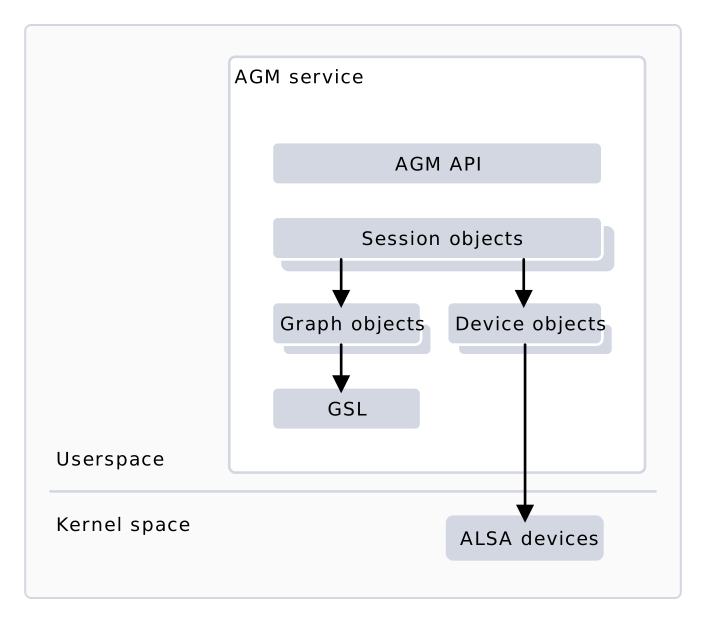
High-level AGM software block

High-level AGM software block

Kernel spaceUserspaceAGM serviceAGM APIPALSession objectsGSLALSA devicesGraph objectsDevice objects High-level AGM software block AGM objects
ObjectDescription
Session
  • A session object is an audio playback or capture session.
  • Invoking session-specific mixer controls or APIs creates sessions.
  • Gives APIs for TinyALSA plug-ins to configure streams and manages state transitions of graph and device objects.
Graph
  • A graph object is an audio use case.
  • Interacts with GSL to open, manage, and close graphs.
  • Gives APIs for graph creation, manages graphs, and configures stream and device endpoints.
Device
  • A device object is an ALSA device from the ALSA sound card.
  • Enumerates available audio interfaces and gives device APIs for transitioning device states.

AudioReach graph services

The AudioReach™ Signal Processing Framework graph services (ARGS) consists of the graph service layer (GSL), generic packet router (GPR), and acdb management layer (AML). It handles initialization and creation of graphs, and creation of packets for sending series of commands to the SPF. ARGS components
ComponentDescription
GSL
  • The graph service layer (GSL) is a software driver for SPF which manages graphs, subgraphs, buffers, and configurations.
  • Loads and initializes graphs using graph key vectors (GKVs).
  • Handles data commands and SPF module calibration.
GPR
  • The generic packet router (GPR) routes audio message packets across SPF and the graph service library.
  • Handles commands for constructing audio graphs and processing audio.
AML
  • The acdb management layer (AML) gives get/set APIs to get and adjust data in acdb files.
  • Gives data abstractions and organization for how the audio driver and its components consume the calibration data.

Audio calibration database

acdb is a static database on the Apps processor. It has all tuning/calibration parameters for the LPAI. The *.acdb file format organizes calibration data for various audio modules for various use cases. Edit this file format using QACT (a PC tool) and place it on the device file system in the /etc/acdbdata/ folder. During use case initialization or device switch, the AML queries the acdb database with a specified GKV and pushes the device calibration data to SPF.

AudioReach Engine (ARE)

AudioReach Engine (ARE) runs in the LPAI subsystem and performs audio data processing. The following figure gives a high-level overview of the functional blocks used in SPF.
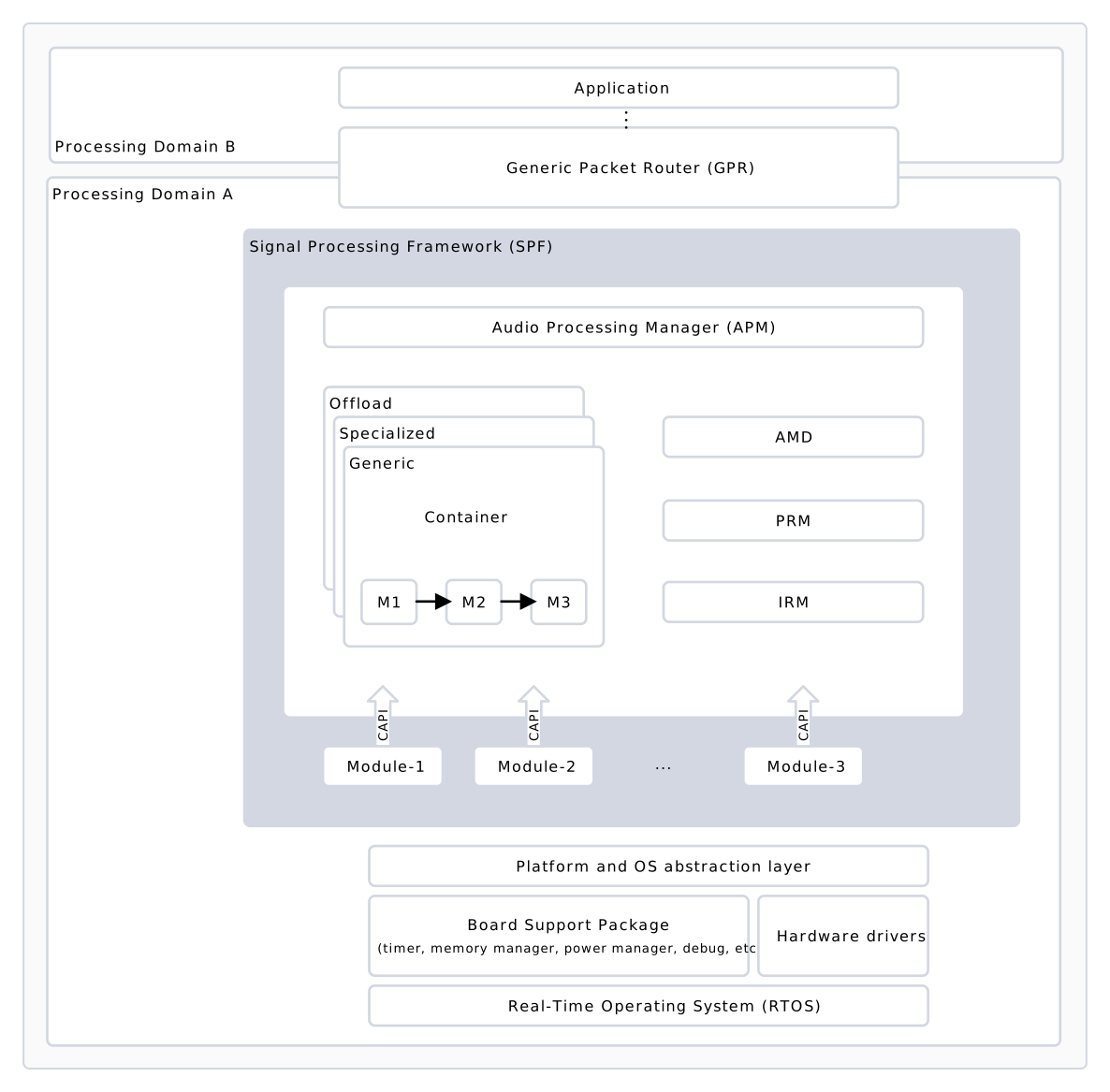
High-level SPF software block

High-level SPF software block

Processing Domain BProcessing Domain ASignal Processing Framework (SPF)Generic Packet Router (GPR)Audio Processing Manager (APM)OffloadSpecializedGenericContainerM1M2M3AMDPRMIRMModule-2Module-3…ApplicationPlatform and OS abstraction layerBoard Support Package(timer, memory manager, power manager, debug, etc.)Hardware driversReal-Time Operating System (RTOS)CAPIModule-1CAPICAPI High-level SPF software block SPF components
ComponentDescription
APMAudio processing manager (APM) sets up and manages the use case graphs in the SPF. It gives the standard APIs to the graph management library and APM client to set up and configure audio use cases.
ModulesA module is a functional block in the SPF. It performs real-time audio processing in the LPAI subsystem.
ContainersA container is a framework implementation that runs a group of data processing modules together in the same software thread. Each container runs in its own software thread.

Next steps