

build-qcom-wayland/workspace/sources/tinyalsa and
build-qcom-wayland/workspace/sources/tinycompress.
The following figure shows the TinyALSA plug-in architecture.
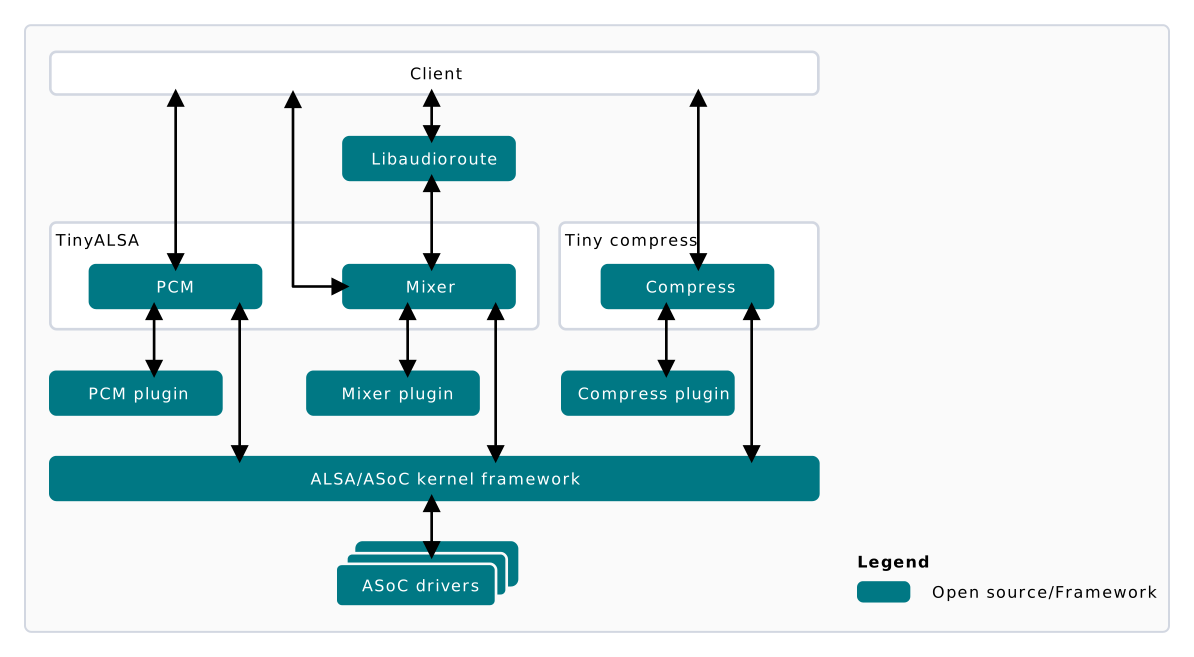
TinyALSA plug-in architecture
.so files (dynamically loadable shared objects).
The virtual sound card configuration is in the card-defs.xml file. This file is in the /etc/ folder on the device.
TinyALSA APIs
The following are common TinyALSA APIs. See the open source TinyALSA documentation for a complete description of all APIs.pcm_open
Opens a PCM audio device for input and output operations. Initializes a PCM device for communication, allowing read/write operations in audio data.
Return value
pcm* handle
pcm_is_ready
Checks if the PCM device is ready for input and output operations.
Return value
- Non-zero if the PCM device is ready
- 0 if the PCM device is not ready
pcm_prepare
Prepares audio device input and output operations.
Return value
- 0 on success
- Error code on failure
pcm_start
Starts the PCM audio device for input and output operations.
Return value
- 0 on success
- Error code on failure
pcm_write
Writes audio data to the audio PCM device. Takes audio data as input and sends it to the PCM device for playback or processing.
Return value
- 0 on success
- Error code on failure
pcm_read
Gets audio data from the PCM device, which allows the application to capture audio data from a microphone.
Return value
- 0 on success
- Error code on failure
pcm_stop
Stops the PCM audio device from further input and output operations.
Return value
- 0 on success
- Error code on failure
pcm_close
Closes the PCM audio device. This releases the resources associated with the PCM device and releases the memory.
Return value
- 0 on success
- Error code on failure
Configure TinyALSA
For audio use cases from TinyALSA, configure the virtual mixer controls. These controls, created by the mixer plug-in, set up audio use case graphs and modules. Most are byte array-based and are configured using themixer_ctl_set_array API. Metadata (referred to as ‘PCM100 metadata’) is set using key-value (KV) pairs. For implementation details, see the set_agm_audio_intf_metadata API in build-qcom-wayland/workspace/sources/qcom-agm/opensource/agm/plugins/tinyalsa/test/agmmixer.c.
build-qcom-wayland/workspace/sources/qcom-agm/opensource/agm/plugins/tinyalsa/test.
To enable and execute audio use cases from TinyALSA:
- Set the audio interface (backend) device configuration, including sample rate, channels, format, and data format.
- Set the metadata, including graph keys, cal keys for the device, and DevicePP.
- Set the control to indicate that follow-on mixer configurations will set the metadata for the stream and StreamPP subgraphs. Zero indicates that subsequent commands are for the stream.
- Set the control to indicate that follow on mixer configurations will set the metadata for the DevicePP and stream-device subgraphs.
CODEC_DMA-LPAIF_WSA-RX-0indicates that the subsequent commands are for stream-device.CODEC_DMA-LPAIF_WSA-RX-0is one of the audio interfaces registered with the ALSA ASOC framework. A list of all audio interfaces can be found at/proc/asound/pcm. - Retrieve all tags, module ID, and instance IDs associated with a given session between the stream and audio interface.
- Set the control to indicate that follow on mixer configurations will set the parameters for modules on the stream subgraph.
- Set the control to indicate that follow on mixer configurations will set the parameters for modules on the StreamDevice and DevicePP subgraphs.
- Connect the frontend (stream) with the backend (codec/audio interface).
- Open the PCM device.
- Prepare the audio device for input and output operations.
- Start the PCM audio device for input and output operations.
- Write and read audio data from the audio PCM device.
- Stop the PCM device.
- Close the PCM audio device.
Next steps
- Customize audio graph — Customize audio use cases at the PAL level
- Troubleshoot audio — Capture and analyze audio logs to resolve issues
- Audio Addendum — Use QACT and QXDM for calibration and diagnostics