

This document explains the camera subsystem that receives data through a MIPI CSI interface.
USB camera data is delivered though a USB interface, and the camera subsystem doesn’t involve USB camera data transaction. See USB camera configuration for USB camera usage.
Network camera data is delivered though a network interface, and the camera subsystem doesn’t involve network camera data transaction. The device can receive network camera data through the GStreamer rtspsrc plugin.
Camera components
The following diagram shows the components of Qualcomm Camera.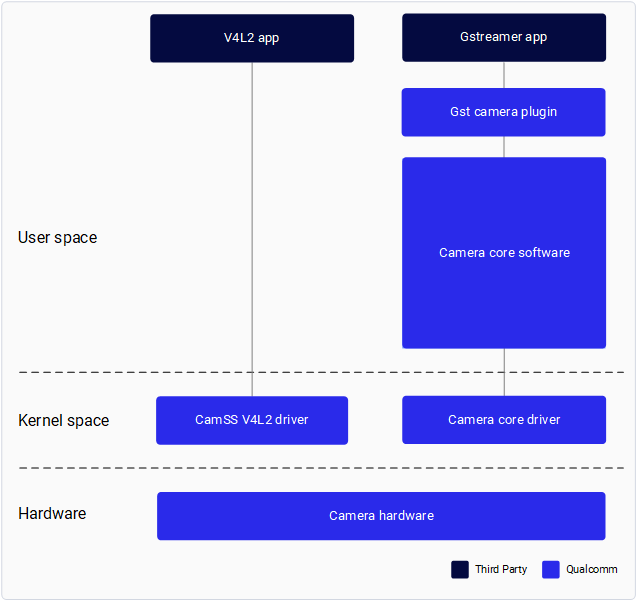
Qualcomm provides a GStreamer plug-in to enable application developers to interface with the Qualcomm camera subsystem. See GStreamer API for application development.
Qualcomm provides an interface for camera sensor driver developers and IQ tuning engineers to develop their own sensor drivers and perform custom IQ tuning. See Camera Sensor Driver Development and Tuning in the Camera Addendum document.
Access to the meta- qcom-extras layer is required for camera sensor driver development and custom IQ tuning. For the access level, refer to Mapping access levels.
Prerequisites
- Set up your infrastructure as described in the Qualcomm Linux Build Guide
- Flash the latest software release to the development board
-
Set up SSH connection:
- Enable SSH in Permissive mode by performing the steps mentioned in Use SSH.
- Connect to the device by running the following command:
For example, if the IP address of the device is 10.92.160.222, run the following command:
-
We recommend using the Qualcomm Launcher tool for build flashing, as it handles all required
configurations internally. Refer to Qualcomm Launcher - Flashing Steps.
If an alternative flashing method is used, please note the following:
- The downstream camera driver is not enabled by default.
- You must explicitly enable it by following the camera overlay configuration steps in the Qualcomm Linux Migration Guide.
Warning:
The upstream and downstream Qualcomm Camera Subsystem Drivers are mutually exclusive. Enable exactly one implementation per system configuration. Simultaneous enablement of both is unsupported and may cause driver conflicts or undefined behavior.