

Deploy a model using Neural Processing Engine
A model DLC (quantized or non-quantized) can be deployed via a SNPE enabled app (an application written using SNPE C/C++ APIs). SNPE offers APIs to load a DLC, select a runtime to run the model, and perform inference, etc.SNPE provides a prebuilt snpe-net-run tool (application written using C APIs) that can load an arbitrary model DLC and run it on provided inputs.
- Model file: DLC model file generated by the SNPE converter tool or
snpe-dlc-graph-prepare tool (if running on HTP).
- Input list: Text file, like the
input_list.txt file used during quantization, except input raw files in this list are used for inference. For simplicity in this example, the same input list used for quantization is used for inference.
- Runtime: User must select a specific runtime to run the model on target. Available runtime options are CPU, GPU, and DSP (HTP).
See snpe-net-run --help for more details.
Run SNPE .dlc: x86 host computer
Converted SNPE .dlc can be run using the snpe-net-run tool which takes a .dlc and input list as arguments. Running SNPE DLC on x86 is purely for debugging purposes.For example, the following command loads the inception_v3.dlc model and runs the model on x86 CPU. It generates output files to /output_x86/.The default runtime in SNPE is CPU. When executing a model using snpe-net-run, there is no need to specify the CPU runtime.
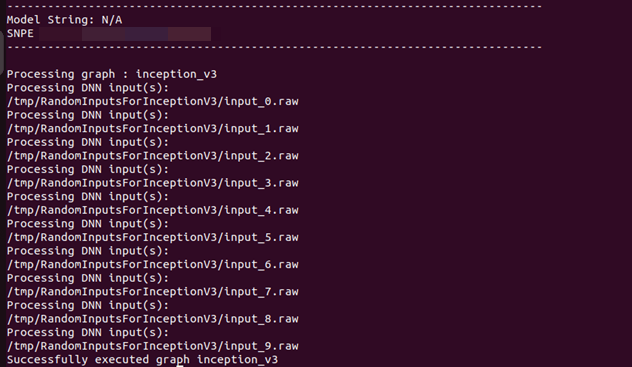
${QAIRT_ROOT}/bin/x86_64-linux-clang/snpe-net-run --container ~/models/inception_v3.dlc --input_list ~/models/input_list.txt --output_dir ~/models/output_x86
Prepare a SNPE model to run on target
To run the model on target, snpe-net-run requires the model .dlc, SNPE runtime libraries, and input list to run inferences to generate outputs.Before running on target, ensure that the SNPE SDK binaries and libraries are pushed to the target.
Use artifacts from ${QAIRT_ROOT}/lib/aarch64-oe-linux-gcc11.2 and ${QAIRT_ROOT}/bin/aarch64-oe-linux-gcc11.2Use the correct DSP Hexagon architecture libraries for Qualcomm evaluation kits:
- IQ-8275: Use v75 libraries
- IQ-9075: Use v73 libraries
- Qualcomm Dragonwing™ RB3 Gen 2: Use v68 libraries
| File | Source location |
|---|
| snpe-net-run | ${QAIRT_ROOT}/bin/aarch64-oe-linux-gcc11.2 |
| libSNPE.so | ${QAIRT_ROOT}/lib/aarch64-oe-linux-gcc11.2/ |
| libSnpeHtpPrepare.so | ${QAIRT_ROOT}/lib/aarch64-oe-linux-gcc11.2 |
| libSnpeHtpV68Stub.so | ${QAIRT_ROOT}/lib/aarch64-oe-linux-gcc11.2 |
| libSnpeHtpV68Skel.so | ${QAIRT_ROOT}/lib/hexagon-<dsp-arch>/unsigned |
| Inception_v3_quantized_with_htp_cache.dlc | ~/models |
| Inception_v3.dlc | ~/models |
| input_list.txt | ~/models |
| Inception V3 sample input images | /tmp/RandomInputsForInceptionV3 |
The following scp commands need to be executed on the host computer to copy SNPE SDK libraries and binaries to the device.Replace <dsp-arch> with 75 for IQ-8275, 73 for IQ-9075, and 68 for Qualcomm Dragonwing™ RB3 Gen 2.
scp ${QAIRT_ROOT}/bin/aarch64-oe-linux-gcc11.2/snpe-net-run \
${QAIRT_ROOT}/lib/aarch64-oe-linux-gcc11.2/libSNPE.so \
${QAIRT_ROOT}/lib/aarch64-oe-linux-gcc11.2/libSnpeHtpV<dsp-arch>Stub.so \
${QAIRT_ROOT}/lib/aarch64-oe-linux-gcc11.2/libSnpeHtpPrepare.so \
${QAIRT_ROOT}/lib/hexagon-v<dsp-arch>/unsigned/libSnpeHtpV<dsp-arch>Skel.so \
root@[ip-addr]:/opt/
scp ~/models/inception_v3.dlc \
~/models/inception_v3_quantized_with_htp_cache.dlc \
~/models/input_list.txt \
root@[ip-addr]:/opt/
scp -r /tmp/RandomInputsForInceptionV3 root@[ip-addr]:/tmp/
The above steps prepared the device for model execution. The following sections provide details on running the model on the available runtimes.Run SNPE .dlc: Arm-based CPU
Setup environment variables before executing the model to ensure SNPE binaries and libraries are accessible to run the model.The default runtime in SNPE is CPU. When executing a model using snpe-net-run, there is no need to specify the CPU runtime.
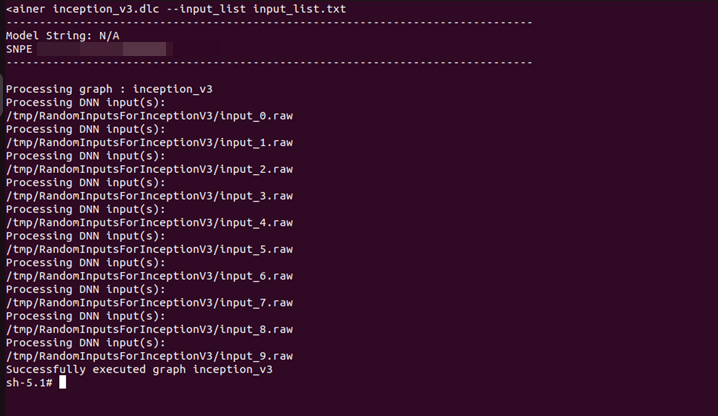
export LD_LIBRARY_PATH=/opt:$LD_LIBRARY_PATH
snpe-net-run --container inception_v3.dlc --input_list input_list.txt --output_dir output_cpu
Run SNPE DLC: GPU
To run a model on the GPU runtime, use inception_v3.dlc and save outputs in output_gpu.In the terminal of the target device, run the following command to enable the GPU delegate and backend:ln -sf /usr/lib/libOpenCL.so.1 /usr/lib/libOpenCL.so
export OCL_ICD_FILENAMES=/usr/lib/libOpenCL_adreno.so.1
To run on GPU, specify the runtime with the --use_gpu command line argument.
export LD_LIBRARY_PATH=/opt:$LD_LIBRARY_PATH
snpe-net-run --container inception_v3.dlc --input_list input_list.txt --output_dir output_gpu --use_gpu
Run SNPE DLC: HTP
To run a model on the HTP backend, use inception_v3_quantized_with_htp_cache.dlc and save outputs in output_htp.To run on HTP, specify the runtime with the --use_dsp command line argument.
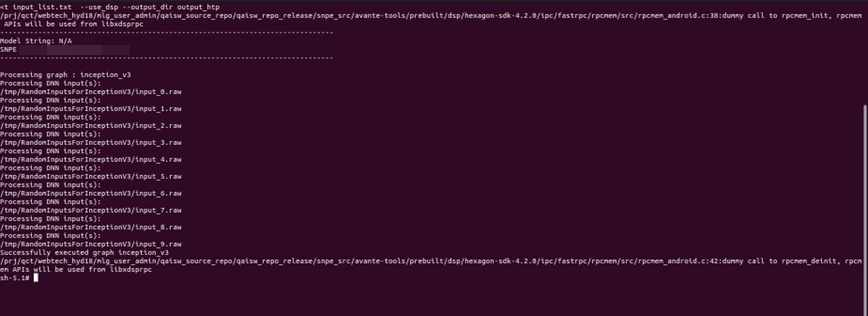
export LD_LIBRARY_PATH=/opt:$LD_LIBRARY_PATH
export ADSP_LIBRARY_PATH="/opt;/usr/lib/rfsa/adsp;/dsp"
snpe-net-run --container inception_v3_quantized_with_htp_cache.dlc --input_list input_list.txt --output_dir output_htp --use_dsp
Validate output
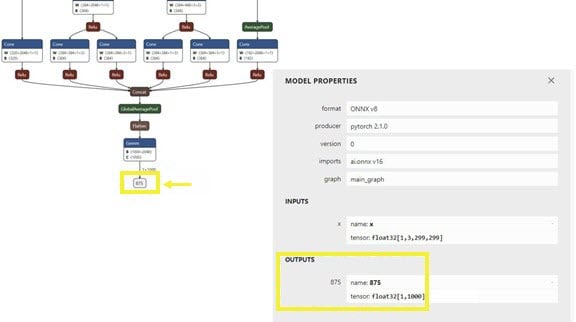
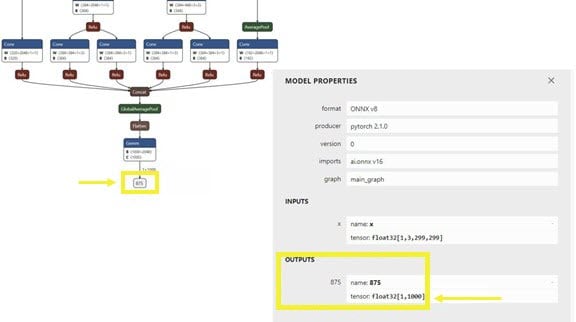
For each input raw file fed to snpe-net-run (via the input_list file), an output folder is generated that contains output tensor saved as raw file(s) whose size will match the model’s output layer as shown in the image below.The Netron tool was used to visualize the model. In the inception_v3 example, the output raw file is a binary file that contains probabilities for 1000 classification classes.We use a Python script to read the file as a NumPy array to perform postprocessing and output validation. The example below checks whether HTP prediction is the same as CPU prediction.
-
Copy the output files from the target device to the host computer so the outputs can be validated.
scp -r root@<ip-addr of the target device>:/opt/output_cpu <path>
scp -r root@<ip-addr of the target device>:/opt/output_htp <path>
Use <path> from the above commands in the following (compare.py) python script.
-
Once outputs from on-device inference are copied to the host computer, prepare a script to load the output tensors saved in
output_htp and output_cpu to compare.
In this example, both output_htp and output_cpu are copied to the ~/models directory.
The following is an example script to compare output from one of the example inputs used. Outputs from snpe-net-run can be loaded into NumPy ndarrays using the numpy.fromfile(…) API.
By default, snpe-net-run saves the output tensors to NumPy files in float32 format.
# python postprocessing script (compare.py)
import numpy as np
htp_output_file_path = "<path>/output_htp/Result_1/875.raw"
cpu_output_file_path = "<path>/output_cpu/Result_1/875.raw"
htp_output = np.fromfile(htp_output_file_path, dtype=np.float32)
htp_output = htp_output.reshape(1,1000)
cpu_output = np.fromfile(cpu_output_file_path, dtype=np.float32)
cpu_output = cpu_output.reshape(1,1000)
# np.argmax gives the cls_id with highest probability from tensor.
cls_id_htp = np.argmax(htp_output)
cls_id_cpu = np.argmax(cpu_output)
# Let's compare CPU output vs HTP output
print("Cpu prediction {} \n Htp Prediction {}".format(cls_id_cpu, cls_id_htp))
Output:(qairt) ██████████: ~$ python compare.py
CPU prediction 879
HTP prediction 21
Deployment using SNPE APIs
SNPE SDK provides C/C++ APIs to create/develop applications that run a model on chosen hardware (CPU, GPU, or HTP) with acceleration. See the sample application that demonstrates SNPE C/C++ APIs.To improve the developer experience when building entire use case pipelines (stream from camera, preprocess images, perform inference, etc.), SNPE has been integrated into the Qualcomm IM SDK as a plugin (qtimlsnpe).The plugin has been developed on top of the SNPE C APIs and provides SNPE capabilities (load and run models). With the qtimlsnpe plugin, you can use your converted model DLC in a Qualcomm IM SDK pipeline to realize the use case.See the Qualcomm IM SDK overview for instructions on how to deploy SNPE DLC using the Qualcomm IM SDK.Deploy a model using AI Engine Direct
A model .so (quantized or non-quantized) can be deployed through a QNN enabled app (an application written using QNN C/C++ APIs). QNN offers APIs to load a model .so dynamically and run the model on hardware with the selected backend.QNN provides a prebuilt tool (qnn-net-run) that can dynamically load this model .so and perform inference on a selected backend using provided inputs.For CPU, GPU, or HTP execution, qnn-net-run requires the following arguments:
- Model file: .so file generated by
qnn-model-lib-generator
- Backend file: .so file for the targeted backend
libQnnCpu.so for the CPU backend.
libQnnGpu.so for the GPU backend.
libQnnHtp.so for the HTP backend.
- Input list: Text file like the input_list.txt file used during quantization, except input raw files in this list are used for inference. For simplicity, this example uses the same input list used for quantization for inference.
Run QNN .so: x86 host computer
Converted QNN .so can be run using the qnn-net-run tool which takes a model .so, backend library .so, and input list as arguments.For example, the following command loads the libinception_v3.so model and runs the model on x86 CPU. It generates output files to ~/models/output_x86/.${QAIRT_ROOT}/bin/x86_64-linux-clang/qnn-net-run --model ~/models/libs/x86_64-linux-clang/libinception_v3.so --backend ${QAIRT_ROOT}/lib/x86_64-linux-clang/libQnnCpu.so --input_list ~/models/input_list.txt --output_dir ~/models/output_qnn_x86
Prepare a QNN model to run on target
To run the model on target, qnn-net-run requires the model .so, QNN binaries and runtime libraries, and input list to run inferences to generate outputs.Before running on target, ensure that the QNN SDK binaries and runtime libraries are pushed to the target.
Use artifacts from ${QAIRT_ROOT}/bin/aarch64-oe-linux-gcc11.2 and ${QAIRT_ROOT}/lib/aarch64-oe-linux-gcc11.2Use the correct DSP Hexagon architecture libraries for Qualcomm evaluation kits:
- IQ-8275: Use v75 libraries
- IQ-9075: Use v73 libraries
- Qualcomm Dragonwing™ RB3 Gen 2: Use v68 libraries
| File | Source location |
|---|
| qnn-net-run | ${QAIRT_ROOT}/bin/aarch64-oe-linux-gcc11.2 |
| libQnnHtp.so | ${QAIRT_ROOT}/lib/aarch64-oe-linux-gcc11.2/libQnnHtp.so |
| libQnnCpu.so | ${QAIRT_ROOT}/lib/aarch64-oe-linux-gcc11.2/libQnnCpu.so |
| libQnnGpu.so | ${QAIRT_ROOT}/lib/aarch64-oe-linux-gcc11.2/libQnnGpu.so |
| libQnnHtpPrepare.so | ${QAIRT_ROOT}/lib/aarch64-oe-linux-gcc11.2 |
| libQnnHtpV68Stub.so | ${QAIRT_ROOT}/lib/aarch64-oe-linux-gcc11.2 |
| libinception_v3_quantized.so | ~/models/libs/aarch64-oe-linux-gcc11.2 |
| libinception_v3.so | ~/models/libs/aarch64-oe-linux-gcc11.2 |
| libQnnHtpV68Skel.so | ${QAIRT_ROOT}/lib/hexagon-<dsp-arch>/unsigned |
| libqnnhtpv68.cat | ${QAIRT_ROOT}/lib/hexagon-<dsp-arch>/unsigned |
| libQnnSaver.so | ${QAIRT_ROOT}/lib/hexagon-<dsp-arch>/unsigned |
| libQnnSystem.so | ${QAIRT_ROOT}/lib/hexagon-<dsp-arch>/unsigned |
Run the following scp commands on the host computer to copy QNN SDK libraries and binaries to the device.Replace <dsp-arch> with 75 for IQ-8275, 73 for IQ-9075, and 68 for Qualcomm Dragonwing™ RB3 Gen 2.
scp ${QAIRT_ROOT}/bin/aarch64-oe-linux-gcc11.2/qnn-* \
${QAIRT_ROOT}/lib/aarch64-oe-linux-gcc11.2/libQnn*.so \
${QAIRT_ROOT}/lib/hexagon-v<dsp-arch>/unsigned/* \
root@[ip-addr]:/opt/
scp ~/models/libs/aarch64-oe-linux-gcc11.2/* ~/models/input_list.txt root@[ip-addr]:/opt/
scp -r /tmp/RandomInputsForInceptionV3 root@[ip-addr]:/tmp/
The above steps prepared the device for model execution. The following sections provide details on running the model on the available runtimes.Run QNN .so: Arm-based CPU
When running a model on an Arm-based CPU, qnn-net-run requires the model .so, backend .so library, and input list to run inference to generate outputs.For RB3Gen2 targets, the .so must be cross-compiled with the aarch64-oe-linux-gcc11.2 toolchain.For example, the following commands write output files to /opt/output_cpu/.export LD_LIBRARY_PATH=/opt/:$LD_LIBRARY_PATH
qnn-net-run --model libinception_v3.so --backend libQnnCpu.so --input_list input_list.txt --output_dir output_cpu
Run a QNN model on GPU
In the terminal of the target device, run the following command to enable the GPU delegate and backend:ln -sf /usr/lib/libOpenCL.so.1 /usr/lib/libOpenCL.so
export OCL_ICD_FILENAMES=/usr/lib/libOpenCL_adreno.so.1
When executing a model on Adreno GPU, qnn-net-run requires the model .so, backend .so library (libQnnGpu.so), and input list to run inference to generate outputs.For example, the following commands write output files to /opt/output_gpu/.export LD_LIBRARY_PATH=/opt/:$LD_LIBRARY_PATH
qnn-net-run --model libinception_v3.so --backend libQnnGpu.so --input_list input_list.txt --output_dir output_gpu
Run QNN model on HTP backend
To run a model on HTP backend, use the libquantized_inception_v3.so library and libQnnHtp.so backend library and save outputs in the output_htp directory.export LD_LIBRARY_PATH=/opt/:$LD_LIBRARY_PATH
export ADSP_LIBRARY_PATH="/opt/;/usr/lib/rfsa/adsp;/dsp"
qnn-net-run --model libinception_v3_quantized.so --backend libQnnHtp.so --input_list input_list.txt --output_dir output_htp
Validate output
For each raw input file fed to qnn-net-run (through the input_list file), an output folder is generated that contains raw output file(s) whose size matches the model’s output layer as shown in the image below.In this inception_v3 example, the raw output file is a binary file that contains probability for 1000 classification classes.You can use a Python script to read the file as a NumPy array to perform postprocessing and validation of the output. The example script below checks whether HTP prediction is the same as CPU prediction.scp -r root@<ip-addr of the target device>:/opt/output_cpu <path>
scp -r root@<ip-addr of the target device>:/opt/output_htp <path>
Use the <path> from the above commands in the following Python script.
Once the outputs from the qnn-net-run tool are copied from the device to the host computer, create a simple Python script to load outputs from CPU and HTP execution and compare them using NumPy.#python postprocessing script (compare.py)
import numpy as np
htp_output_file_path = "<path>/output_htp/Result_1/_875.raw"
cpu_output_file_path = "<path>/output_cpu/Result_1/_875.raw"
htp_output = np.fromfile(htp_output_file_path, dtype=np.float32)
htp_output = htp_output.reshape(1,1000)
cpu_output = np.fromfile(cpu_output_file_path, dtype=np.float32)
cpu_output = cpu_output.reshape(1,1000)
cls_id_htp = np.argmax(htp_output)
cls_id_cpu = np.argmax(cpu_output)
# Let's compare CPU output vs HTP output
print("CPU prediction {} \n HTP prediction {}".format(cls_id_cpu, cls_id_htp))
Output:(qairt) ██████████: ~$ python compare.py
CPU prediction 879
HTP prediction 892
Deployment using QNN APIs
The Qualcomm AI Engine Direct SDK provides C/C++ APIs to create/develop applications that can load a compiled .so model and run it on a chosen backend (CPU, GPU, or HTP) with acceleration. See the sample application that demonstrates QNN C/C++ APIs.Deployment using Qualcomm IM SDK
To improve the developer experience when building entire use case pipelines (stream from camera, preprocess images, perform inference, etc.), QNN has been integrated into the Qualcomm IM SDK as the qtimlqnn plugin.The plugin has been developed on top of QNN C APIs and provides capabilities to dynamically load and run models. With the qtimlqnn plugin, developers can use their converted and compiled model library in the Qualcomm IM SDK pipeline to realize their use case.See the Qualcomm IM SDK overview for instructions on how to deploy QNN models using Qualcomm IM SDK.