

CONFIG_EFI_STUB. The systemd-boot supports two configurations:
For more details, see systemd-boot. Note To use a secure boot enabled device, signing is required.
- Type1: The Type1 configuration uses boot loader specification (BLS) description files. You can find these files in the
/loader/entries/directory on the EFI.- Type2: The Type2 configuration uses unified kernel images (UKI). These images combine the kernel, initrd, and kernel command-line into a single EFI executable. Type2 offers better security because the UKI contains all the necessary information for the device to boot. Signing a UKI image secures all included entities. If UEFI secure boot is enabled, the system only loads signed images, making signing a requirement.
UKI
UKI is a combination of a UEFI boot stub program, a Qualcomm Linux kernel image, an initrd, and other resources in a single UEFI portable executable (PE) file. The UEFI boot stub looks for various resources for the kernel invocation inside the UEFI PE binary. This allows combining various resources inside a single UKI image, which may then be signed using sbsign. Qualcomm Linux uses sbsign to sign PE files, while non-PE files such as DTB are signed using OpenSSL. For more details about UKI, see Unified Kernel Image. The following table shows theuki.efi content:
Image recipes
meta-qcom/recipes-kernel/images contains the following recipes:
esp-qcom-image.bbgenerates a VFAT image,efi.bin, which containsuki.efiandsystemd-boot.
meta-qcom/classes-recipe/image_types_qcom.bbclass class invokes the esp-qcom-image.
EFI image
The EFI image,efi.bin, is a VFAT file system image stored in the EFI partition of the flash. This VFAT file system contains the images necessary for the UEFI to load and transfer execution control to systemd-boot. To transfer execution control to the systemd-boot manager, UEFI mounts efi.bin, loads bootaa64.efi, and executes it. The systemd-boot manager parses the loader.conf, loads the kernel image, and transfers the control to it.
For more information about the structure of EFI, see EFI system partition.
The following is the sample structure of efi.bin from Qualcomm Linux. It contains systemd-boot bootaa64.efi and Qualcomm Linux kernel vmlinuz-<version> under the /ostree/poky-<sha256-sum>directory.
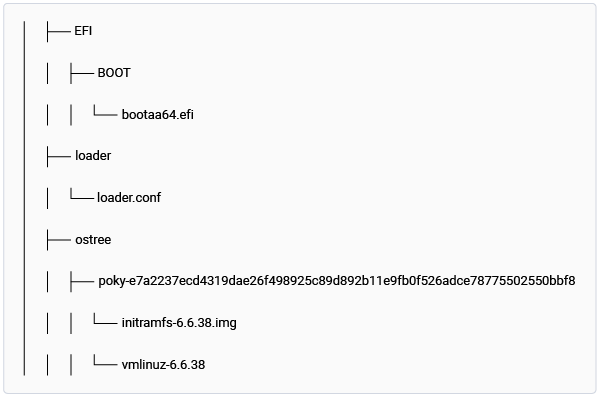
Figure: efi.bin file generated with OSTree support
Signing
Secure boot is a feature in the UEFI standard, but it’s not enabled by default in Qualcomm Linux. When enabled, secure boot adds a layer of protection to the preboot process by maintaining a cryptographically signed list of binaries that are run at device bootup, if successfully authenticated. This ensures that the device’s boot firmware and Linux OS boot components, such as the boot manager, kernel, and initramfs, haven’t been tampered with. UEFI secure boot uses a digital signature to validate the authenticity and integrity of the binary code that it loads. The UEFI secure variables store all the keys. Achieving UEFI secure boot involves using the platform key (PK), key exchange key (KEK), database (DB), and forbidden signatures database (DBX). Using secure boot requires the keys PK, KEK, and DB. While multiple KEK, DB, and DBX are allowed, only one PK is allowed. Enabling UEFI secure boot requires registering the PK in the system. Qualcomm recommends provisioning PK at the last step of the secure boot enabling process. For more information about how Qualcomm has implemented the UEFI secure boot feature, see Secure boot.Host tool signing_tool.py to sign Linux OS images generated by Qualcomm Linux builds
Enabling UEFI secure boot requires signing the EFI and DTB images. Use the signing_tool.py host signing tool to streamline this process. This command-line Python script runs on a Linux host computer (Ubuntu 20.04 or later versions). It automates the signing of EFI and DTB images in two separate operations.
The host signing tool is available for download on GitHub.
The host signing tool runs on a Linux machine with Python3 installed. It can sign either the EFI image or the DTB image in a single operation. To sign both the EFI and DTB images, you must invoke the tool twice with different inputs.
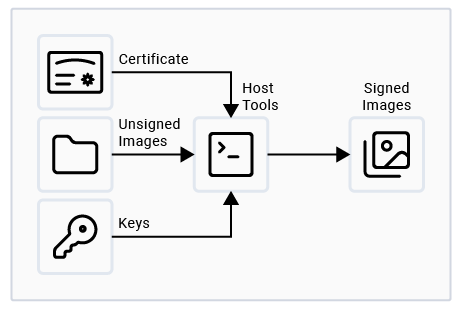
Figure: Linux machine with OpenSSL and sbsign
Prerequisites
To run this tool, install the following on the Linux host computer:- OpenSSL, sbsign, and mtools utilities
- Python3, including the
pippackage manager - The
subprocess,shlex,socket,glob, andshutilmodules used by the tool are part of the Python3 standard library and require no separate installation.
Configure the host signing tool
You must configure the host signing tool before starting the operation. The host tool requires providing the necessary information in aconfig.ini configuration file. The tool reads this file and signs the image accordingly. The following code snippet shows the variables in the configuration file:
config.ini file
To configure the host signing tool using the
config.ini file, do the following:
- Set the
operationvariable to specify which operation must be performed. The option issign_image. - If you select
operation == sign_image, specify which image to sign by setting theimage_typevariable. The options are eitherefiordtb. - Indicate the location of the unsigned EFI and DTB image, keys, and certificates using the
file_pathvariable.- If you select
localin the configuration file, copy the EFI and DTB image, keys, and certificate files manually to the local working directory:- Create an
unsigned_binariesdirectory in the same path as the script, and then copy theefi.binanddtb.binimage into that directory. - Create a
keysdirectory in the same path as the script and then copy thedb.auth,db.crt,db.key,KEK.auth, andPK.authfiles into that directory.
- Create an
- If you want the script to copy the required files automatically from a remote Linux machine on the same network, select
remotein the configuration file. In the configuration file, provide information for the following variables:local_machine_private_key_path(mandatory)[efi_config]section (ifoperationissign_imageand ifimage_typeisefi)[keys_config]section (ifoperationissign_image)[dtb_config]section (ifoperationissign_imageand ifimage_typeisdtb) Note The script supports copying from another Linux machine over SCP within the same network.
- If you select
- When
image_typeis set to efi in the configuration file, update theloader_conf_timeoutvariable. - If you missed any configuration information, the script runs and prompts you for the missing details through the command line.
Run host signing tool
- After completing the code build process and obtaining the unsigned
efi.binanddtb.binimages, run the host signing tool. - Store the host signing tool files (
signing_tool.pyandconfig.ini) on a Linux machine. Ensure that both the files are in the same working directory. - Set up the host signing tool according to the configuration instructions.
- Run the following command to launch the host tool from the command line:
$python3 signing_tool.pyThe host signing tool displays your selections and operational commands on the screen. It also displays errors in the command line. After the tool completes its process, it creates a directory calledsigned_binariesin the same working directory. The signedefi.binordtb.binimage is stored in the directory. The tool deletes other user-created directories after signing. - Follow this process twice, once for
efi.binand once fordtb.bin. After each signing operation, delete thesigned_binariesdirectory before starting a new operation.
Host signing tool workflow
The following figure shows the workflow of the host signing tool: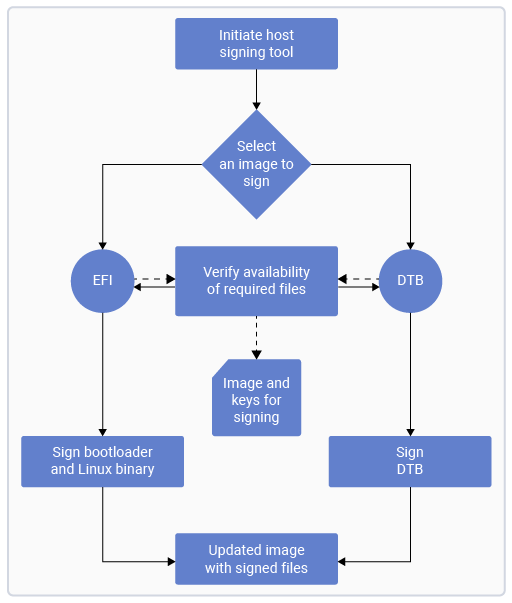
Figure: Host signing tool workflow
-
The host tool requires the
efi.binanddtb.binpaths (absolute path or network path).efi.binwith OSTree support containsvmlinuz-x.y.z(Qualcomm Linux kernel image) andbootaa64.efi(boot loader image).dtb.bincontainsqclinux_fit.img.
-
The host tool requires the path of
certificateandkey(absolute path or network path) to sign the images. -
The host tool mounts
efi.binanddtb.binon the FAT partition, which provides the following directory structure and follows its separate signing process: The directory structure ofefi.bin:Figure: efi.bin The directory structure of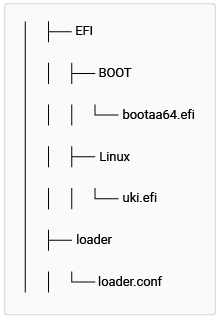
Figure: efi.bin
efi.binwith OSTree support:Figure: efi.bin with OSTree support The directory structure ofFigure: efi.bin with OSTree support
dtb.bin: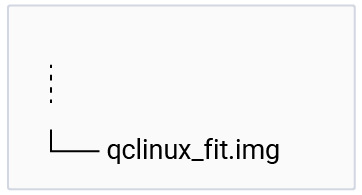
Figure: dtb.bin
-
After signing the images, the host tool copies the .auth files to the
/loader/keys/authkeysdirectory for bothefi.binanddtb.bin. -
The host tool configures the wait time in the
systemd-bootloader configuration. This wait time stops the kernel loading and allows you to review and select thesystemd-bootmenu options. Theloader.conffile must be available in an updatedefi.binfile. Note The signing process isn’t followed for thedtb.binfile.- The host tool configures
/loader/loader.conf. - The syntax for
loader.confistimeout x, where x = timeout in seconds.
- The host tool configures
-
After the image is signed, the host tool unmounts the
efi.bin/dtb.binfrom the FAT partition. Store the signedefi.binanddtb.binon the host computer on the similar path as the host tool in thesigned_binariesdirectory. -
The following is the directory structure for signed
efi.binanddtb.bin: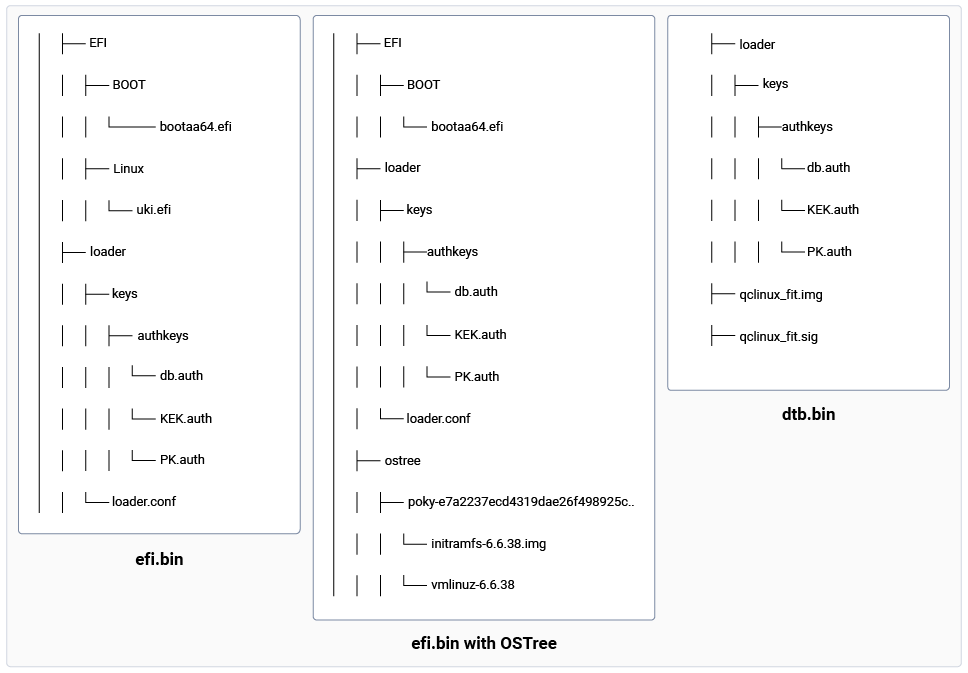
Figure: Directory structures of efi.bin and dtb.bin files
efi.bin signing process
- The host tool uses the
sbsignutility to sign theuki.efior vmlinuz.x.y.z andbootaa64.efiimages separately. sbsignrequirescertificateandkeyfor the signing process. Verify the following syntax wheredsk1.keyis key,dsk1.crtis certificate, and the output filename is the same as the input file:Examples:
dtb.bin signing process
- The host tool requires the path of the
dtb.binfile. - The host tool requires the path of
keyandcertificate(absolute path or network path) to sign the images. - UEFI secure boot requires PE format files for verification. Non-PE files, such as
dtb, can’t be signed usingsbsignas this signing tool requires PE format files as input. - The host tool uses the
opensslutility to sign thedtbfile. Verify the following syntax, wheredsk1.keyis key anddsk1.crtis certificate:Example:This command adds the signature for the DTB file in a separate file (foo.sig) and doesn’t modify the original file (foo.img). Hence, the host tool must keep both the files where the*.sigfile is used during the UEFI secure boot verification.
Multi-DTB support
Qualcomm supports multiple Qualcomm development kits based on the same hardware SoC. For example, the QCS6490 development kit variants include the RB3 Gen 2 Core development kit and the RB3 Gen 2 Vision development kit. Each Qualcomm development kit variant has its own DTB in the kernel. During bootup, UEFI selects the appropriate DTB based on the specific Qualcomm development kit variant. To facilitate this, use multi-DTB flattened image tree (FIT) image as follows:Generate a multi-DTB FIT image
Qualcomm Linux supports generating a FIT‑based multi‑DTB image for platforms where multiple DTBs are required for a single hardware SoC. This allows UEFI to select the appropriate DTB at boot time based on the detected hardware variant. For platforms that support FIT images, multiple DTBs are listed using theKERNEL_DEVICETREE variable in the machine configuration file. For example, the following snippet from meta-qcom/conf/machine/rb3gen2-core-kit.conf defines two DTBs for the RB3 Gen 2 Core development kit:
- Add DTB compatible strings: Each DTB included in a FIT image must have an associated compatible string. These compatible strings are used by UEFI to select the correct DTB at boot time.
- The compatible strings are defined in
meta-qcom/conf/machine/include/fit-dtb-compatible.inc.- The values must be derived by referencing the DTB metadata available at: https://github.com/qualcomm-linux/qcom-dtb-metadata For the RB3 Gen 2 Core Kit example, add the following entries:
- Enable multi-DTB packaging: To package the generated FIT image as a VFAT image (
dtb.bin), set the following variable inmeta-qcom/classes-recipe/image_types_qcom.bbclass:When this variable is set to multi-dtb, the build system packages the combined FIT image containing all DTBs listed inKERNEL_DEVICETREEintodtb.bin.
Development kits without FIT image support
Some platforms do not support FIT‑based DTB selection. This includes certain ride development kits, such as:qcs9100-ride-sxqcs8300-ride-sx
dtb.bin. For example, the following snippet from meta-qcom/conf/machine/qcs9100-ride-sx.conf lists multiple DTBs:
QCOM_DTB_DEFAULT variable in the same machine configuration file as follows:
qcs9100-ride-r3.dtb is packaged into the VFAT image (dtb.bin) and used during boot.
DTB partition
- The generated VFAT image named
dtb.bincontains the combined DTB image. A dedicated partition nameddtbis present on the Qualcomm development kits. Flash thedtb.binon this partition. - UEFI parses the combined DTB present in the
dtbpartition and selects a matching DTB for the hardware.
Next steps
- For more information about UEFI secure boot implementation, see Secure boot.
- For UEFI variable management, see Manage UEFI environment variables using the efivar tool.
- For OTA firmware updates using capsule, see Update firmware and OS on Qualcomm Linux using capsule and OSTree mechanisms.