

partitions.conf configuration files. These files are available at https://github.com/qualcomm-linux/qcom-ptool/tree/main/platforms. For more information, see: Ptool workflow figure.
You can modify the partition configuration files to add, delete, modify, or rename partitions. For example, to work with UFS partition files for IQ-9075 EVK, use the following file: https://github.com/qualcomm-linux/qcom-ptool/tree/main/platforms/iq-9075-evk/ufs
By modifying these configuration files and integrating these in the build, you can generate a custom partition layout. When a configuration file from https://github.com/qualcomm-linux/qcom-ptool/tree/main/platforms is used in Qualcomm Linux builds, the workflow spans all the steps from the Ptool workflow figure.
The following tables list the files and tools used for partitioning workflow:
Partition layout file
The partitions on the universal flash storage (UFS) and embedded multimedia card (eMMC) store various images of the bootchain and the Linux operating system. The configuration file details the partitions configured for a specific Qualcomm development kit. The following configuration files define the UFS partitions for the RB3 Gen 2 development kit and the partitions for IQ-9075 EVK:- RB3 Gen 2 development kit UFS partitions: https://github.com/qualcomm-linux/qcom-ptool/tree/main/platforms/qcs6490-rb3gen2/ufs
- IQ-9075 EVK UFS partitions: https://github.com/qualcomm-linux/qcom-ptool/tree/main/platforms/iq-9075-evk/ufs
Partition layout file syntax
The following examples from thepartitions.conf from qcs6490-rb3gen2 show the syntax of the partition layout file.
The first entry in the configuration file defines the disk type, disk size, logical block addressing (LBA) size (sector size), and whether the last partition should grow till the last usable LBA.
- The following is an example for the UFS:
- The following is an example for the eMMC:
qcs6490-rb3gen2/ufs file specifies the following examples of partitions. A few partitions are defined in LUN0, with each line representing an individual partition.
UFS
Note In the following examples, the file names mentioned in LUN1 to LUN5 entries by the--filename=parameter of partitions.conf are downloaded by the recipe firmware-qcom-boot-qcs6490.incfrom Qualcomm software center
- Example 1: The
efipartition of 524288 KB is defined in LUN0. Theefi.binfile is generated during the BitBake build.
- Example 2: The
xbl_apartition of 3604 KB is defined for LUN1. Flash thexbl.elffile to this partition. - Example 3: The
xbl_config_apartition of 512 KB is defined for LUN1. Flash thexbl_config.elffile to this partition.
- Example 4: The
aop_apartition of 512 KB is defined for LUN4. Flash theaop.mbnfile to this partition.
eMMC
- Example 1: The
xbl_apartition of 3584 KB is defined for LUN0. Flash the xbl.elf file to this partition. - Example 2: The
xbl_config_apartition of 128 KB is defined for LUN0. Flash thexbl_config.elffile to this partition.
- Mandatory options:
--lun(mandatory for UFS, not required for eMMC. Expressed as number)--name(name for the partition, a string)--size(size of the partition, generally expressed in KB)--type-guid(GUID for the partition)
- Optional options:
--attributes(Optional 64 bit attribute, for example, 1000000000000004)--filename(Name of the file that is flashed to the partition)--readonly(whether the partition should be read-only, values true or false)--sparse(whether the partition is for a sparse image, values true or false)
Linux operating system partitions
Partition tool (Ptool)
Ptool generates a GUID partition table binary that the QDL tool uses to partition the storage. The following figure shows the Ptool workflow: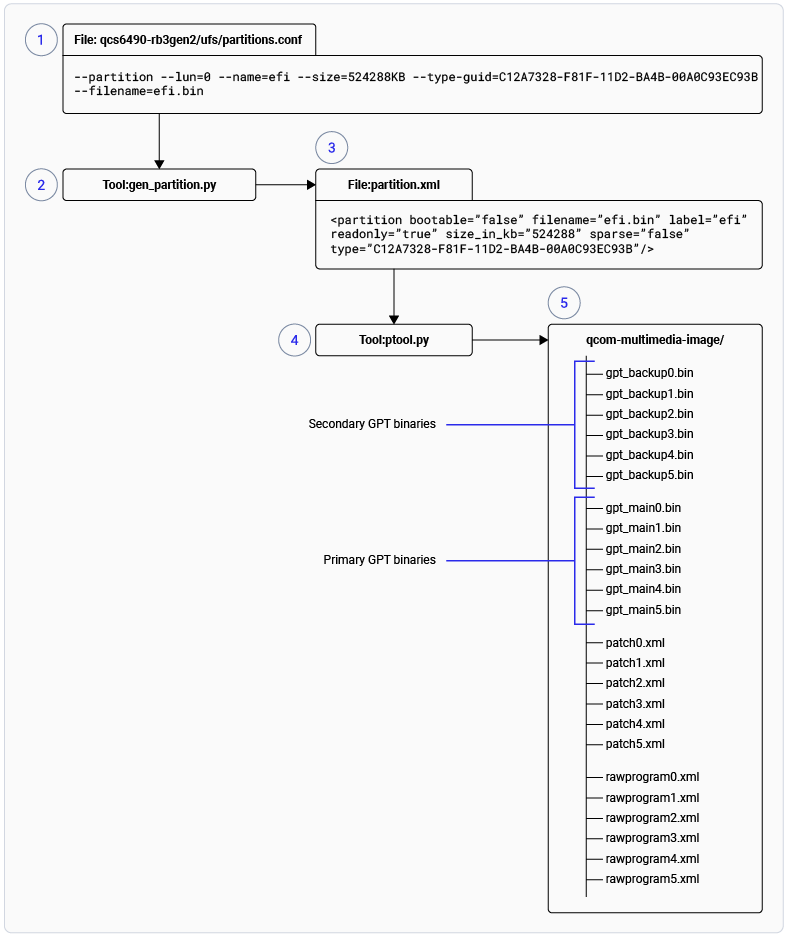
Figure: Ptool workflow
build/tmp/deploy/images/rb3gen2-core-kit/qcomflash directory.
Modify partition
Thepartitions.conf file available at https://github.com/qualcomm-linux/qcom-ptool/tree/main/platforms/qcs6490-rb3gen2/ufs, defines the partitions for QCS6490 RB3 Gen 2 Core development kit. The gen_partition.py tool processes and generates partition.xml, which is a mandatory input for ptool.py. As a final step, Ptool generates the rawprogram.xml, patch.xml, gpt_main*.bin, and gpt_backup*.bin files, which are required by the QDL tool to flash the system image to the device.
- To add a partition, make a partition entry in the configuration file:
partitions.conffor a particular device. - Run the BitBake command to generate all necessary files:
- After the image build completes, if MACHINE is
rb3gen2-core-kitand the image recipe selected isqcom-multimedia-image, run the following command to flash the image:
Best practices
- Many partitions are crucial for functionality. Before removing or resizing partitions, review the partition layout documentation carefully.
- To reflect changes in
partitions.conf, update theQCOM_PARTITION_CONFvariable in the machine configuration. - For UFS devices, always specify the
--lunoption for each partition entry.
Next steps
- To add, delete, or rename partitions using the Yocto build, see Modify partition layout.
- For the persist partition, see Persist partition.
- For storage type configuration, see How to configure the storage type for a Yocto BSP build.