

- How will you prepare your model? Convert, quantize, compile, or fine-tune it for the target hardware.
- How will you run inference? The runtime or integration path that executes the model on the device.
Choose your journey
Use the flowchart below to find the path that fits your application. It walks you through whether you already have a model, how to prepare it (purple), and how to run inference (blue), then links you to the right guide. Every highlighted box is clickable.On-device generative AI availability depends on your Qualcomm Linux release. See the GenAI workflow page for the current support status.
AI architecture
The following diagram illustrates the AI application development architecture on Qualcomm platforms.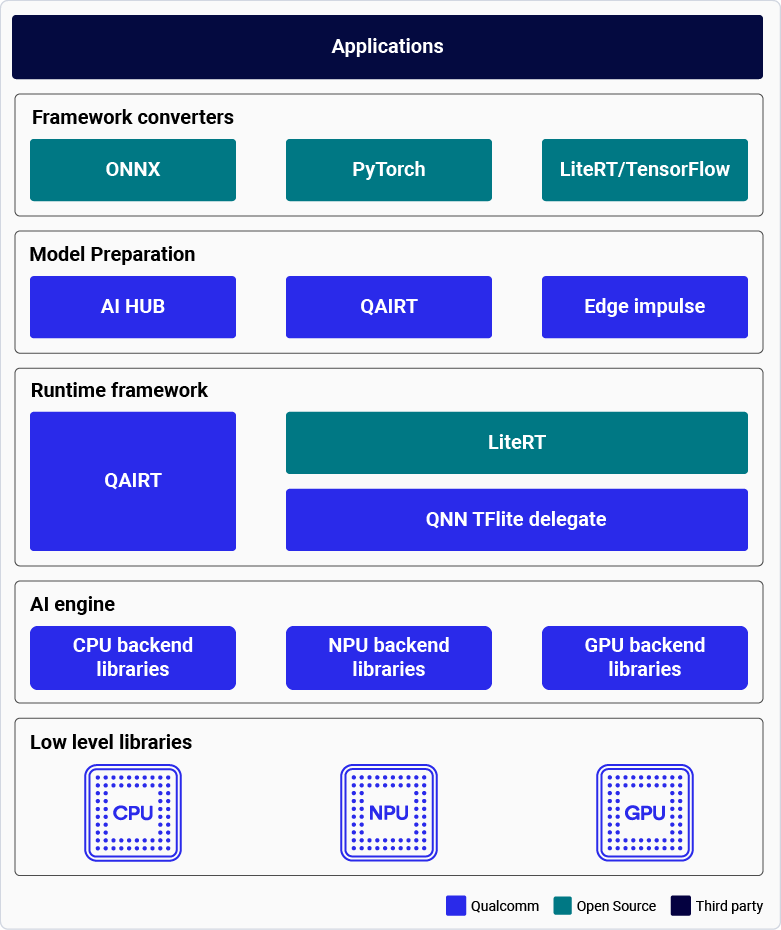
Prepare your model
Before a model runs efficiently on Qualcomm hardware, it is converted to an executable format and, for the Hexagon NPU (HTP), quantized to a supported precision. (LiteRT models are an exception: they run directly through the AI Engine Direct delegate.) Choose the preparation tool that matches your starting point.Run inference
After your model is prepared, choose how to execute it on the device. The runtime you pick depends on your language, model format, and whether you are building a full camera/video pipeline.Building a robotics application? The Qualcomm® Intelligent Robotics (QIR) SDK adds ROS-based modules and hardware-accelerated nodes on top of these runtimes.
AI hardware
Qualcomm platforms include the following hardware accelerators for AI inference:- Qualcomm Kryo™ CPU — High-performance CPU with best-in-class power efficiency.
- Qualcomm Adreno™ GPU: Balanced power and performance for AI workloads, accelerated with OpenCL kernels. Also used for model pre- and post-processing (for example, the IM SDK runs resize, color conversion, and overlay on the GPU).
- Qualcomm Hexagon™ Tensor Processor (HTP): Also known as NPU/DSP/HMX. Optimized for low-power, high-performance AI inference. For best performance, quantize pretrained models to a supported precision.