This feature isn’t enabled in the current release.
You can upgrade the QCS5430 soft stock keeping unit (SKU) feature packs using the Qualcomm® wireless edge services (WES) license. For more information about the feature packs, see QCS5430: Feature packs.ImportantThis feature is applicable to QCS5430.
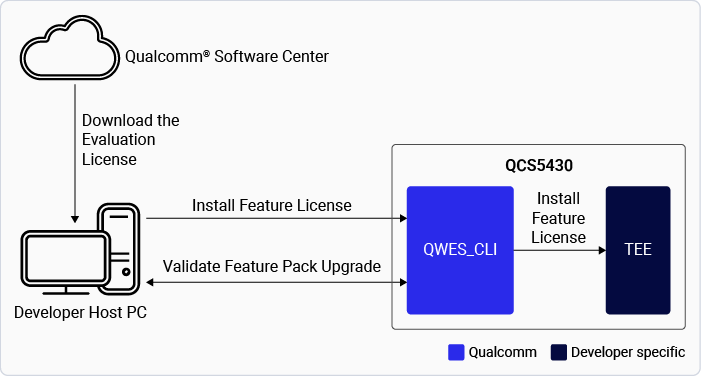
The figure shows the process of downloading and upgrading the QCS5430 SoftSKU feature packs.Figure : Upgrade QCS5430 SoftSKU feature packsThe table lists the feature packs along with the corresponding links to download their evaluation licenses.Table : Download evaluation license
qwes_cli list
| # qwes_cli listRunning GetAllSerialNumber test with multithread DisabledSuccess. Len = 25Parsing 2 serial numbersSerial Number: 15b3Serial Number: 3e52b512f2f47851a40fa5b30000018c86261aa1 |
| :— |
Ensure you restart the device for the license to take effect.
You can perform the following operations to manage your device licenses:
Upgrade the feature pack or apply a new license.
You can upgrade or downgrade the feature pack license as needed.
To apply a new license (whether upgrading or downgrading), the existing license must be removed first.
After the old license is removed, apply the license for the required feature pack.
This process ensures that the correct feature pack is enforced.
Remove the evaluation license.
Get the license serial number:
qwes_cli listRunning GetAllSerialNumber test with multithread DisabledSuccess. Len = 25Parsing 2 serial numbersSerial Number: 15b3Serial Number: 3e52b512f2f47851a40fa5b30000018c86261aa1
Remove the license:
ssh root@device-ip-addressqwes_cli -s 3e52b512f2f47851a40fa5b30000018c86261aa1 removeSerial number length 20Remove License is successful.
Verify if the removed license serial number doesn’t appear in the license list:
qwes_cli listRunning GetAllSerialNumber test with multithread DisabledSuccess. Len = 4Parsing 1 serial numbersSerial Number: 15b3
Ensure you restart the device for the removal of the license to take effect.
Feature pack license - Persistence over software upgrades
The license is installed in persistent secure storage, RPMB.
When the license is installed successfully, its metadata is stored in RPMB, and a copy is maintained in the data partition.
Even if user data is erased, the license remains preserved in RPMB, ensuring that the device functionality isn’t impacted.
NoteThis feature is available to licensed users with authorized access to manage feature pack licenses. If you have access, see Qualcomm Linux Wireless Edge Services Guide.
To develop applications that offer hardware-based attestation, zero-touch device provisioning, and chipset feature management, see: Qualcomm Linux Wireless Edge Services Guide. This feature is available to licensed users with authorized access.