

Qualcomm® Linux® provides Wi-Fi functionality, features, and configurable parameters for developing applications. Wireless Fidelity (Wi-Fi) is a wireless networking technology that uses the IEEE 802.11 protocol. It lets electronic devices like smartphones, wearables, laptops, desktops, and other consumer electronics to connect to the Internet without physical cables. In Qualcomm Linux, Wi-Fi functionality is enabled through the ath10k, ath11k and ath12k drivers. The system-on-chip (SoC), Wi-Fi chipset, and driver support for the development kits are as follows.
Development kitHardware SoCsWi-Fi chipsetDriver support
• Qualcomm Dragonwing™ RB3 Gen 2 Vision Development Kit
• Qualcomm Dragonwing RB3 Gen 2 Core Development Kit
• QCS6490• WCN6750
• WCN6856
• ath11k
• Qualcomm Dragonwing RB3 Gen 2 Lite Vision Development Kit
• Qualcomm Dragonwing RB3 Gen 2 Lite Core Development Kit
• QCS5430• WCN6750
• WCN6856
• ath11k
• Qualcomm Dragonwing IQ-9075 Evaluation Kit (EVK)• IQ-9075• WCN6855
• WCN7850
• ath11k
• ath12k
• Qualcomm Dragonwing IQ-8275 EVK• IQ-8275• WCN6855
• WCN7850
• ath11k
• ath12k
• Qualcomm Dragonwing IQ-615 EVK• IQ-615• QCA6698AQ• ath11k
• Qualcomm Dragonwing IQ-x7181 EVK• IQ-x7181• WCN6855
• WCN7850
• ath11k
• ath12k
• Qualcomm Dragonwing IQ-x5121 EVK• IQ-x5121• WCN6855
• WCN7850
• ath11k
• ath12k
• Qualcomm Dragonwing Shikra EVK• Shikra CQM
• Shikra CQS
• Shikra IQS
• WCN3980• ath10k
The following figure shows the various components of the Qualcomm connectivity chipset, including the Wi-Fi subsystem and its interaction with the application processor.
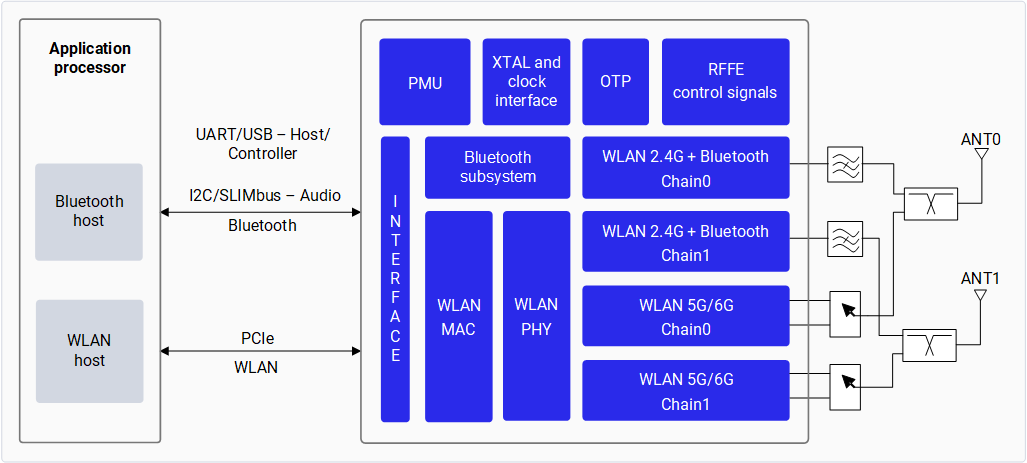
Figure : Qualcomm connectivity chipset block diagram

Figure : Qualcomm connectivity chipset block diagram

Wi-Fi features

The Qualcomm Linux Wi-Fi software provides support for various Wi-Fi features through the ath10k, ath11k and ath12k drivers. These drivers use the mac80211 API and support the 802.11ac, 802.11ax and 802.11be protocols.

ath10k supports the following features:

  • 2.4 GHz, 5 GHz Wi-Fi bands
  • Peak PHY data rate of 433 Mbps (1x1), 256 QAM
  • Station (STA) mode and Access Point (AP) mode

ath11k supports the following features:

  • 2.4 GHz, 5 GHz, and 6 GHz Wi-Fi bands
  • Peak PHY data rate of 2.9 Gbps, 1K QAM
  • 802.11ax (Wi-Fi 6/6E) standard support, including:
    • Uplink/Downlink MU-MIMO
    • Uplink/Downlink OFDMA
  • Station (STA) mode and Access Point (AP) mode

ath12k supports the following features:

  • 2.4 GHz, 5 GHz, and 6 GHz Wi-Fi bands
  • Peak PHY data rate of 5.8 Gbps, 4K QAM
  • 802.11be (Wi-Fi 7) standard support, including:
    • Multi-Link Operation (MLO)
    • EHT 20 MHz/40 MHz/80 MHz/160 MHz/320 MHz channel bandwidth
    • MU-MIMO STA, UL/DL OFDMA
  • Station (STA) mode, Access Point (AP) mode and P2P mode

Wi-Fi capabilities

The following table provides a feature matrix of the Wi-Fi capabilities that WCN6750, WCN6856, QCA6698AQ, WCN7850, and WCN3980 support. Table : Wi-Fi software feature matrix
FeatureDescriptionWCN6750WCN6856QCA6698AQWCN7850WCN3980
Wi-Fi band• 2.4 GHz
• 5 GHz
• 6 GHz
• 2.4 GHz
• 5 GHz
Operational mode• Wi-Fi STA
• Wi-Fi SoftAP
• P2P
• Wi-Fi STA
• Wi-Fi SoftAP
• Wi-Fi STA
• Wi-Fi SoftAP
• Wi-Fi STA
• Wi-Fi SoftAP
• Wi-Fi STA
• Wi-Fi SoftAP
• P2P
• Wi-Fi STA
• Wi-Fi SoftAP
Maximum bandwidth• Up to 40 MHz channel bandwidth for 2.4 GHz
• Up to 160 MHz channel bandwidth for 5 GHz and 6 GHz
• Up to 320 MHz channel bandwidth for 6 GHz
• Up to 40 MHz channel bandwidth for 2.4 GHz
• Up to 160 MHz channel bandwidth for 5 GHz and 6 GHz
• Up to 40 MHz channel bandwidth for 2.4 GHz
• Up to 160 MHz channel bandwidth for 5 GHz and 6 GHz
• Up to 40 MHz channel bandwidth for 2.4 GHz
• Up to 160 MHz channel bandwidth for 5 GHz and 6 GHz
• Up to 40 MHz channel bandwidth for 2.4 GHz
• Up to 160 MHz channel bandwidth for 5 GHz and 6 GHz
• Up to 320 MHz channel bandwidth for 6 GHz
• Up to 40 MHz channel bandwidth for 2.4 GHz
• Up to 80 MHz channel bandwidth for 5 GHz
Dual Band Simultaneous (DBS)• DBS/Non-DBS
• Maximum stream and bandwidth supported
• Non-DBS
• 2-stream (2 x 2) 2.4 GHz 40 MHz + (2 x 2) 5 GHz/6 GHz 160 MHz
• DBS
• 4-stream (2 x 2) 2.4 GHz 40 MHz + (2 x 2) 5 GHz/6 GHz 160 MHz
• DBS
• 4-stream (2 x 2) 2.4 GHz 40 MHz + (2 x 2) 5 GHz/6 GHz 160 MHz
• DBS
• 4-stream (2 x 2) 2.4 GHz 40 MHz + (2 x 2) 5 GHz/6 GHz 160 MHz
Unrestricted 160 MHz channels supportedSeven channels
Peak PHY data rate• 2.9 Gbps, 1 K QAM
• 5.8 Gbps, 4 K QAM
2.9 Gbps, 1 K QAM2.9 Gbps, 1 K QAM2.9 Gbps, 1 K QAM5.8 Gbps, 4 K QAM433 Mbps 256 QAM
802.11ax• Uplink/downlink (UL/DL) Multi-User Multiple-Input and Multiple-Output (MU-MIMO)
• Uplink Orthogonal Frequency Division Multiple Access (UL/DL OFDMA), Uplink Orthogonal Frequency Division Multiple Access Random Access (UL-OFDMA UORA)
• Multiple-Basic Service Set Identifier (BSSID) and Multiple-Traffic Identifier (TID)
• Spatial reuse
• 8-stream sounding
• Target Wake Time (TWT)
Non-TWT
802.11beMulti-Link Operation (MLO)
SecurityWi-Fi Protected Access 3 (WPA3)
WFA mandatory certifications [1]• STA mode
• AP mode
[1]

Operating bands

The WCN6750, WCN6856, QCA6698AQ, and WCN7850 Wi-Fi chipsets support 2.4 GHz, 5 GHz, and 6 GHz bands, while the WCN3980 supports 2.4 GHz and 5 GHz only.

Operating modes

The Wi-Fi software operates in the following modes. Table : Supported Wi-Fi operating modes
ModeDescription
STA modeIn STA mode, a device connects to an AP within a Wi-Fi network and communicates with other devices in the network. This mode is standard for wireless devices in a Wi-Fi connection.
Hotspot modeHotspot mode enables a device to provide backhaul (Internet) connectivity to Wi-Fi clients using a cellular link (LTE). The device establishes this connection through its lightweight hotspot interface. In hotspot mode, the device can:
P2P modeP2P mode (also known as Wi‑Fi Direct) allows two or more Wi‑Fi devices to connect directly to each other without a traditional Access Point (AP).
  • Communicate with other Wi-Fi clients connected to the same hotspot.
  • Communicate with the hotspot device.
  • Share the WAN connection of the device.

Scan

A Wi-Fi scan compiles a list of nearby Access Points (APs) for a device. There are two primary scan modes: active and passive. Additionally, WLAN chipsets can trigger other scan policies. The following table provides the types of scans and their descriptions. Table : Supported scan modes
ScanDescription
Active scanThe Wi-Fi initiates a broadcast probe request (Tx) and listens for probe responses from APs. All APs, except for those with a hidden Service Set Identifier (SSID), respond to the broadcast probe request. Active scans are used on all channels for 2.4 GHz, non-Dynamic Frequency Selection (DFS) channels for 5 GHz, and Preferred Scanning Channel (PSC) for 6 GHz.
Passive scanThe client conserves power by not transmitting packets actively. The STA waits on each channel for approximately 100 ms (plus an additional ±10 ms for channel change) to listen to beacons broadcasted by APs. During this dwell time, the STA receives all beacons, and scans SSIDs from the APs on that channel.
Legacy scanScans one channel at a time.
Split scanAlternates scanning between the home channel and foreign channel.
Burst scanScans multiple channels in a burst.
Agile scanSimultaneously scans two passive channels reducing DFS channel scan time by half.
Roaming scanInitiates the move of the STA from a congested channel of the currently connected AP to a better AP. Triggers include Received Signal Strength Indicator (RSSI), missed beacons, channel traffic conditions, and AP conditions.

DBS operation

WLAN uses multiple MAC addresses available within the chipset for DBS. The WCN6856, QCA6698AQ, and WCN7850 chips support DBS, allowing simultaneous scanning at both 2.4 GHz and 5 GHz frequencies. Additionally, a scan channel can run in parallel with other Wi-Fi operations on different bands. This concurrent operation involves two 802.11 MAC/Physical (PHY)/radio pipes functioning on separate radio bands: 5 GHz, 6 GHz (PHY A), and 2.4 GHz (PHY B).

Coexistence

The 2.4 GHz Industrial, Scientific, and Medical (ISM) band is shared by Bluetooth®, Wi-Fi, and Mobile Wireless Standards (MWS) Long Term Evolution (LTE). Coexistence software monitors the states of Wi-Fi, Bluetooth, and LTE to determine the coordination methodology that best aligns with expectations for each link. For example, it considers quality of service (QoS) for Bluetooth links and throughput for Wi-Fi.