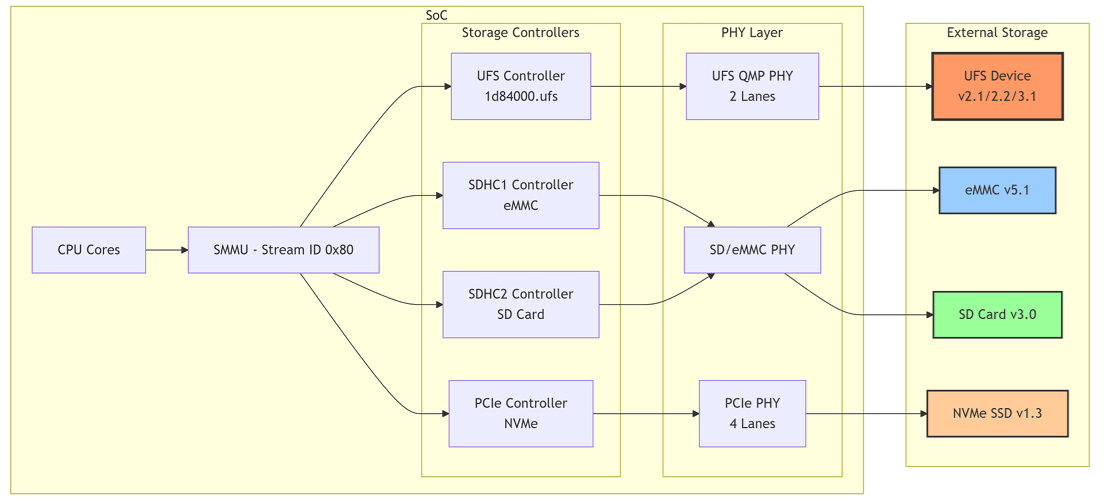
The Qualcomm Linux platform supports four primary storage types.
Storage TypeVersions
Universal Flash Storage (UFS)v2.1, v2.2, v3.1
Embedded Multi-Media Card (eMMC)v5.1
Non-Volatile Memory Express (NVMe)v1.3
Secure Digital (SD) Cardv3.0
Configure the device to boot from only one storage source. Using both sources for bootable files may cause system crashes or unpredictable behavior.

UFS Storage

Features

FeatureDescription
Lanes2 lanes supported
GearHS Gear 1, 2, 3, and 4
Low-Power ModeLink hibernate and device sleep
Hot-PlugNot supported (embedded only)

Power Management States

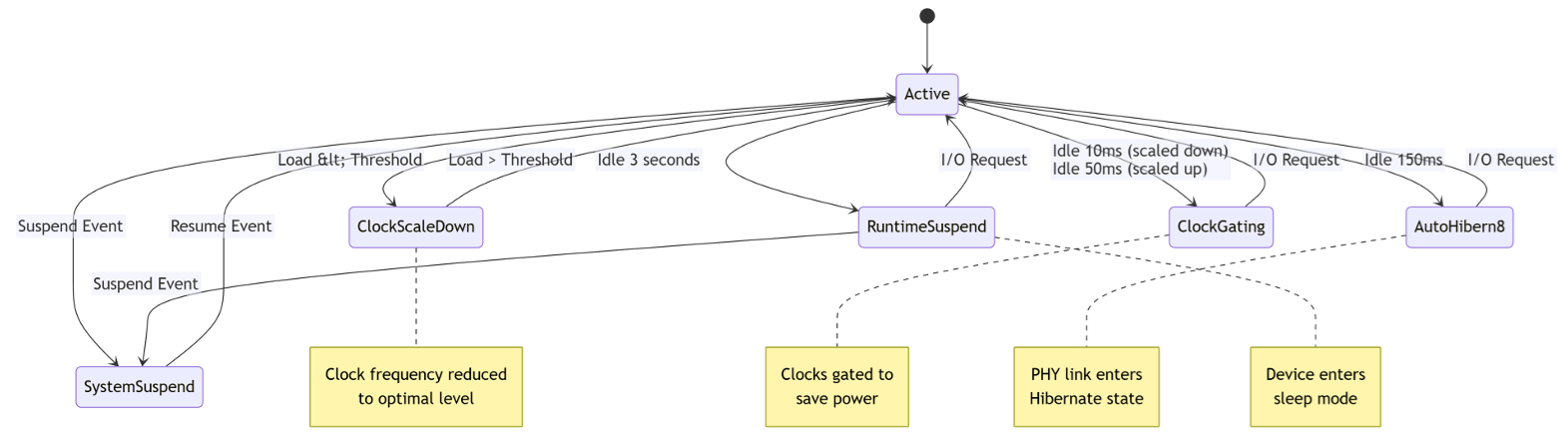
Auto-Hibern8 (AH8) — Transitions PHY link to Hibernate after 150 ms of idle time (adjustable).
cat /sys/devices/platform/soc@0/1d84000.ufs/auto_hibern8
Clock Gating — Enabled by default.
cat /sys/devices/platform/soc@0/1d84000.ufs/clkgate_enable
echo 0 > /sys/devices/platform/soc@0/1d84000.ufs/clkgate_enable  # Disable for debugging
Clock Scaling — Enabled by default; disabling increases power consumption.
cat /sys/devices/platform/soc@0/1d84000.ufs/clkscale_enable

UFS Provisioning

Set bConfigDescrLock="0" during development. Set to "1" after finalization to prevent reprovisioning.
Default Partition Layout:
  • LUN0 — Linux data and filesystem images
  • LUN1 & LUN2 — Boot WLUN (0xB0) alternates for fail-safe XBL backup
  • LUN4 — Rest of boot chain
  • LUN6 & LUN7 — Unused by default

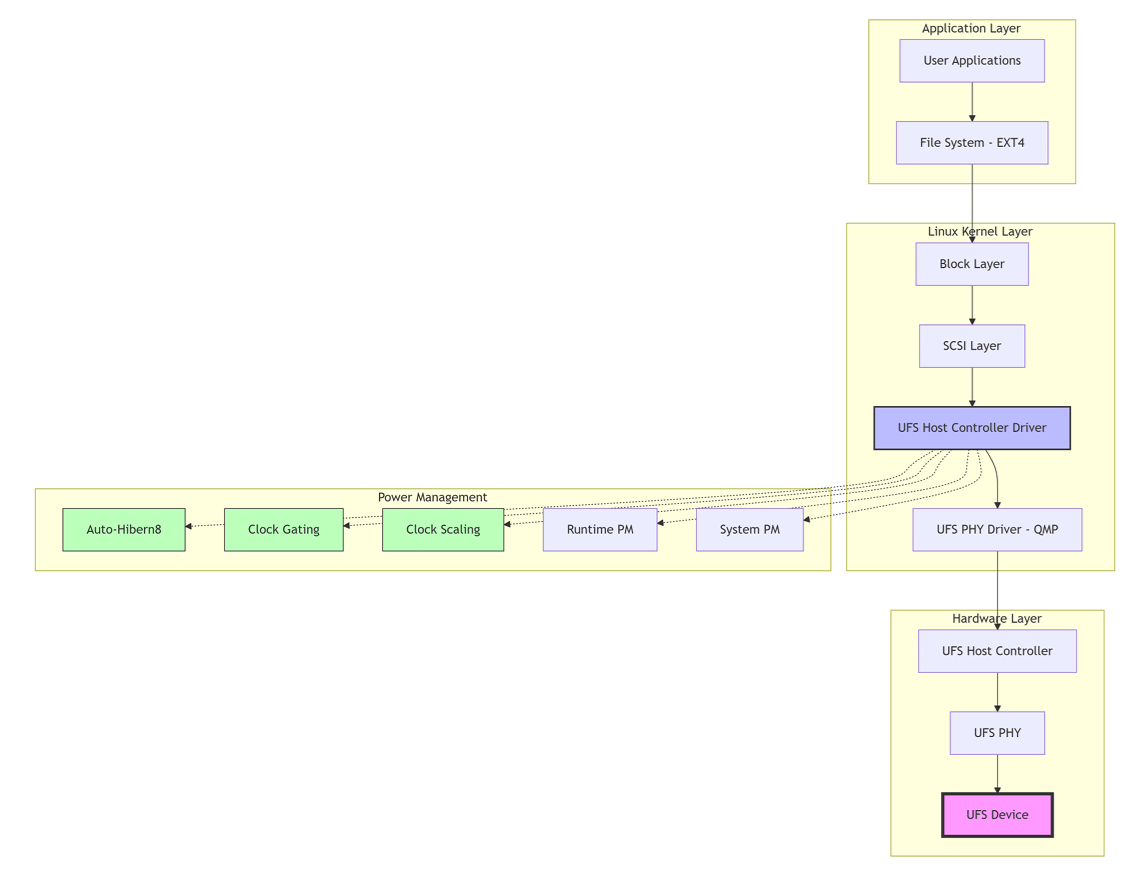
Architecture Diagrams
eMMC Storage

Features

FeatureDescription
SpeedDDR50, HS200, HS400, HS400 Enhanced
Sleep ModeClock gating and auto suspend
Command QueuingMultiple simultaneous commands

Device Tree Configuration

&sdhc_1 {
    status = "okay";
    pinctrl-names = "default", "sleep";
    pinctrl-0 = <&sdc1_on>;
    pinctrl-1 = <&sdc1_off>;
    vmmc-supply = <&vreg_l19a_2p9>;
    vqmmc-supply = <&vreg_l12a_1p8>;
};

SD Card Storage

FeatureDescription
Bus Width4-bit mode
SpeedSDR50, SDR104, DDR50
Hot-PlugSupported

NVMe Storage

FeatureDescription
Lanes4 lanes over PCIe port (PCIe1)
InterfaceHigh-speed serial

Configuration Guide

Mount File Systems

mkdir /tmp/data
mount -t ext4 /dev/sda3 /tmp/data
df -a

Power Management Control

mount -t debugfs none /sys/kernel/debug

# UFS Auto-Hibern8
echo <value_in_us> > /sys/devices/platform/soc@0/1d84000.ufs/auto_hibern8

# UFS Clock Gating
echo 0 > /sys/devices/platform/soc@0/1d84000.ufs/clkgate_enable  # Disable
echo 1 > /sys/devices/platform/soc@0/1d84000.ufs/clkgate_enable  # Enable

Troubleshooting

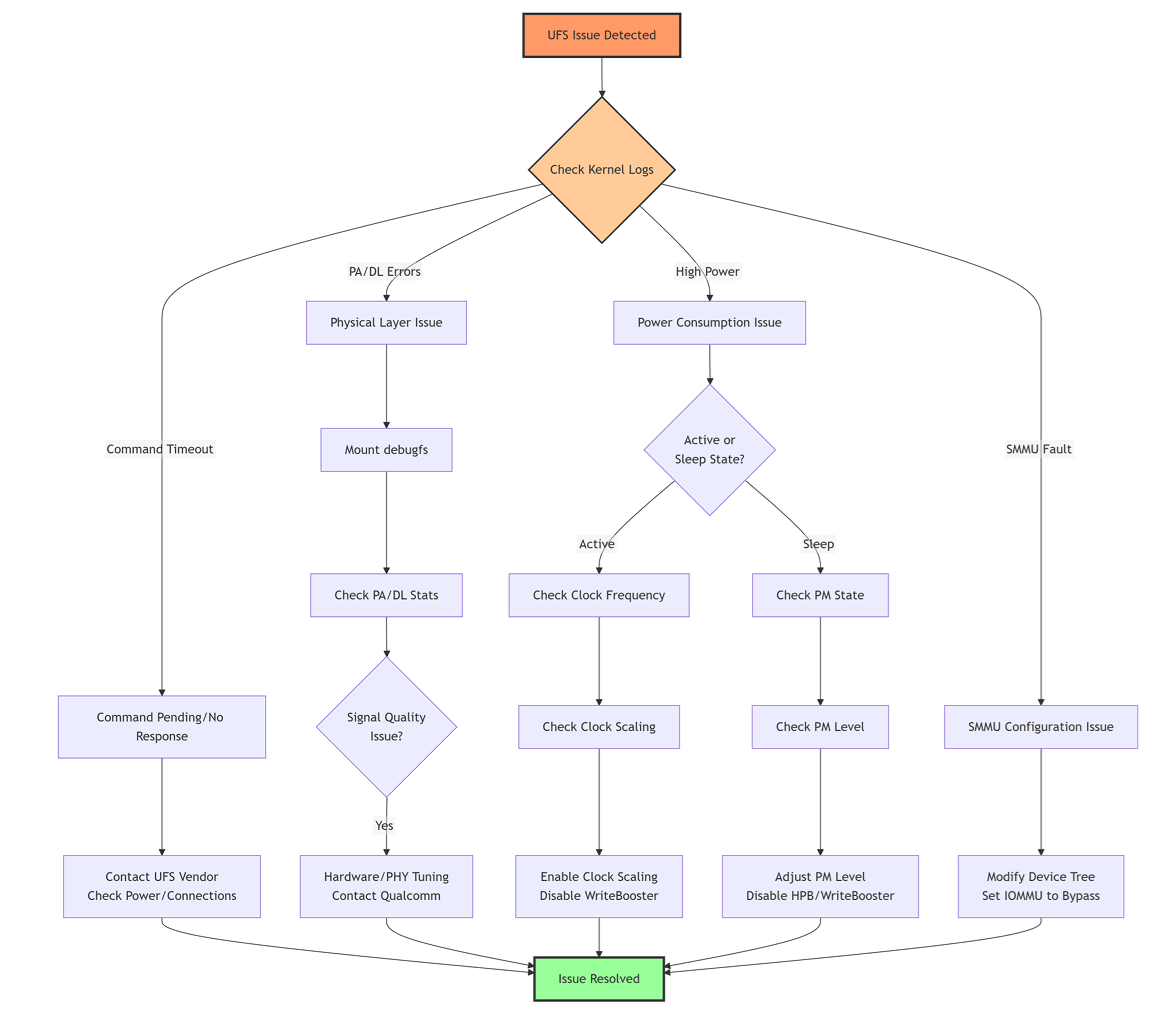
Symptoms: ufshcd_abort: cmd pending in the deviceContact UFS device vendor; check device compatibility and power supply stability.
Symptoms: ufshcd_abort: no response from device, err -110Check physical connections, verify power rails, check PHY initialization.
In the ufshc_mem node in the SoC DTSI file, change:
qcom,iommu-dma = "fastmap";
to:
qcom,iommu-dma = "bypass";

Command Reference

UFS Commands

PurposeCommand
Check PA/DL error countcat /sys/kernel/debug/ufshcd/1d84000.ufs/stats
Read current clock frequencycat /sys/devices/platform/soc@0/1d84000.ufs/devfreq/1d84000.ufs/cur_freq
Read device statecat /sys/devices/platform/soc@0/1d84000.ufs/power_info/dev_pm
Read link statecat /sys/devices/platform/soc@0/1d84000.ufs/power_info/link_state
Read runtime statuscat /sys/devices/platform/soc@0/1d84000.ufs/power/runtime_status

eMMC Commands

PurposeCommand
Error statscat /sys/kernel/debug/mmc0/err_stats
Current clockcat /sys/kernel/debug/mmc0/clock
Runtime statuscat /sys/devices/platform/soc@0/87c4000/power/runtime_status
For IQ-8275, the eMMC address is 87c4000.

References