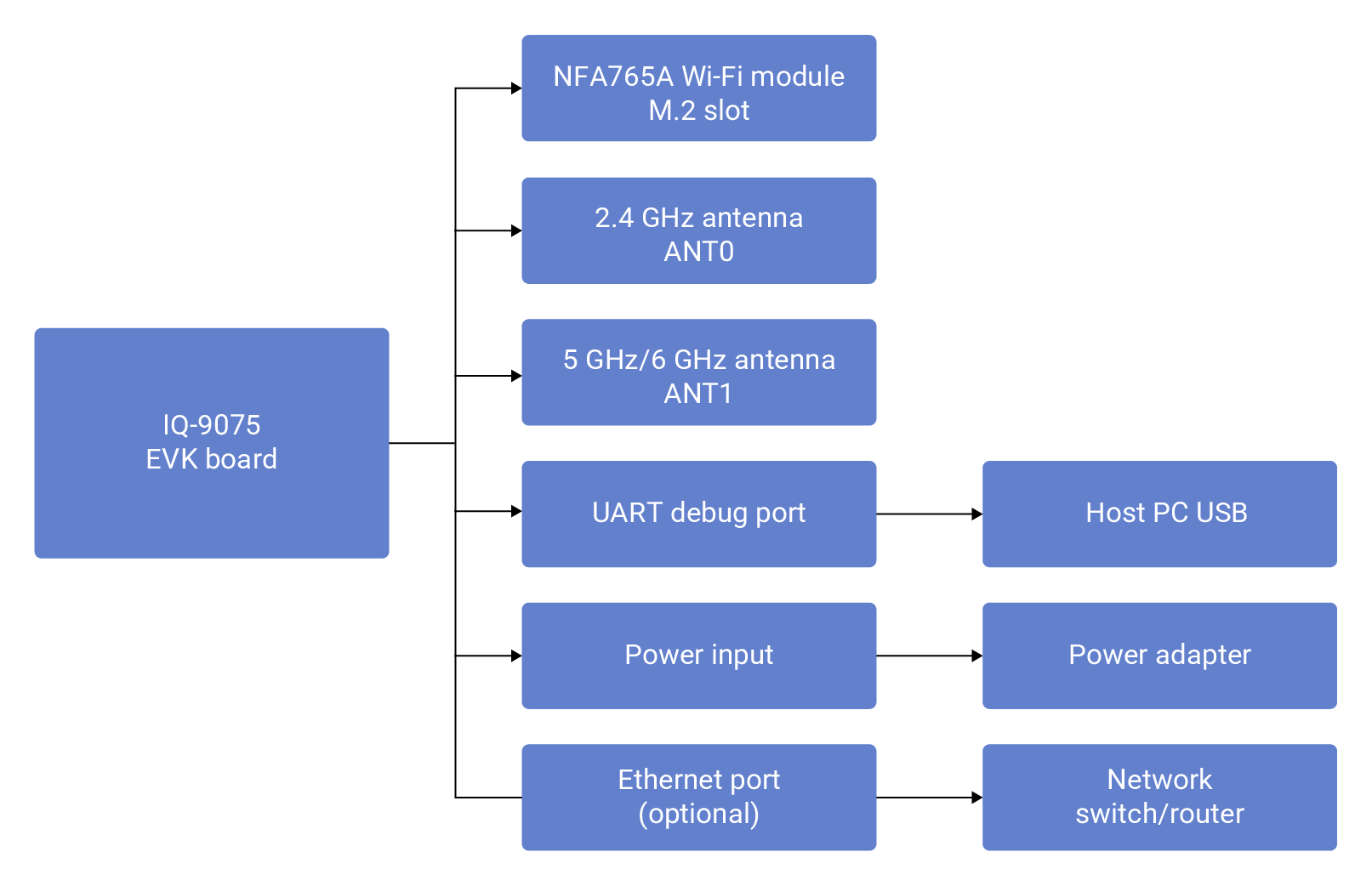
The Qualcomm Dragonwing IQ-8275 EVK features integrated Wi-Fi and Bluetooth connectivity via the NFA765A module (WCN6856 NSP288 chip) over an M.2 interface.

Specifications

Wi-Fi

FeatureSpecification
StandardWi-Fi 6E (802.11ax)
Bands2.4 GHz, 5 GHz, 6 GHz (tri-band)
Peak PHY Rate2.9 Gbps with 1K QAM
OperationDual Band Simultaneous (DBS), STA and AP modes
Driverath11k

Bluetooth

FeatureSpecification
StandardBluetooth Core Specification v5.2
BLE SpeedUp to 2 Mbps
Long Range500 Kbps and 125 Kbps
StackBlueZ

Hardware Setup

1

Install Wi-Fi Module

Insert the NFA765A module into the M.2 slot at a 30-degree angle, press flat, and secure with the provided screw.
2

Connect Antennas

  • ANT0 (2.4G) — shared between Wi-Fi and Bluetooth
  • ANT1 (5G/6G) — Wi-Fi 5 GHz and 6 GHz only
3

Connect UART Debug Cable

Connect the UART cable to the debug port and note the assigned COM port or /dev/ttyUSB device.
4

Connect Power and Boot

Power on and observe the boot sequence via UART console. Default login: ubuntu / ubuntu.

Architecture

Wi-Fi Software Architecture
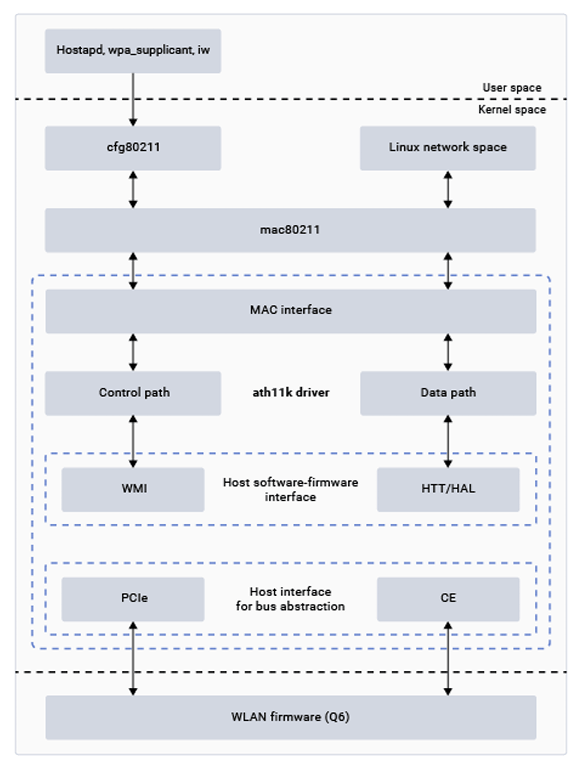
ComponentDescription
hostapdAccess point and authentication server (WPA/WPA2/WPA3)
cfg80211Wireless device configuration management
mac80211Open-source WLAN protocol implementation
ath11k MAC InterfaceInterface between mac80211 and lower ath11k layers
ath11k Control/Data PathScan, auth, association; data traffic management
WMI/HTTHigh-level protocols between host driver and firmware

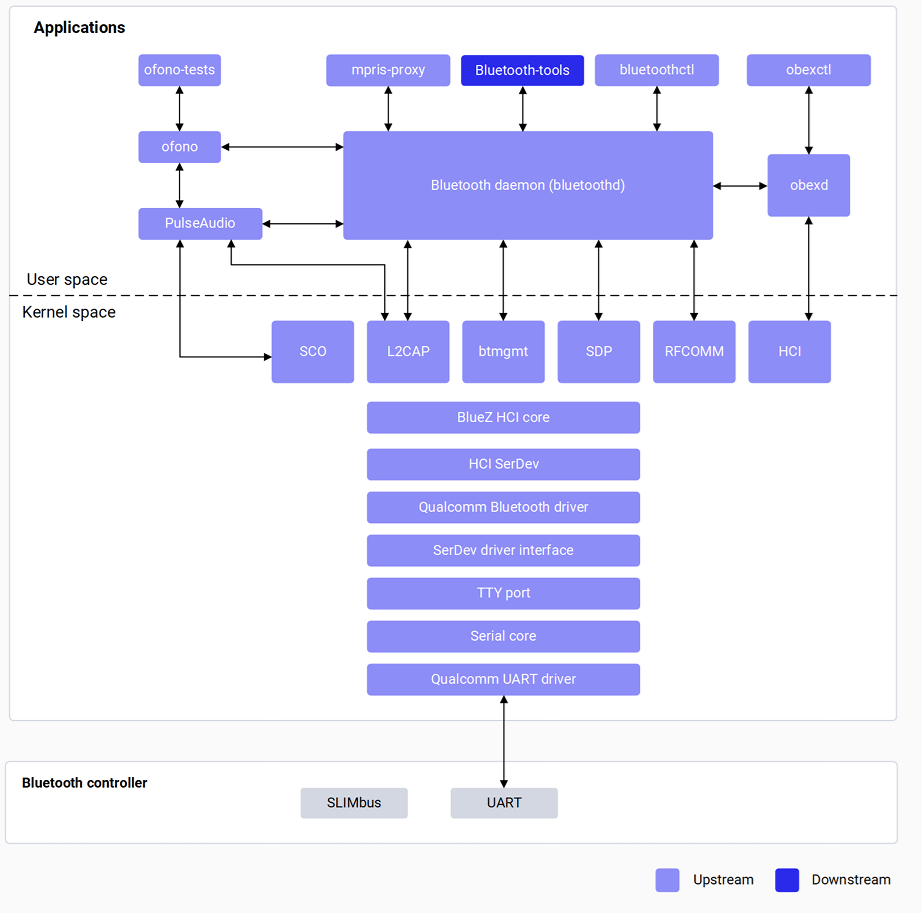
Bluetooth Software Architecture

ComponentDescription
bluetoothdCentral Bluetooth daemon with D-Bus interfaces
bluetoothctlCLI tool for Bluetooth functionality testing
HCI CoreSends/receives HCI commands between user space and driver
L2CAPBreaks large packets into frames; handles QoS
Qualcomm BT DriverGPIO config, regulators, patch and NV data download

Verify Components

Wi-Fi

# Check driver
lsmod | grep ath11k

# Check interface
iw dev

# Check firmware
ls -la /lib/firmware/ath11k/

Bluetooth

# Check driver
lsmod | grep bt

# Check HCI device
hciconfig

# Check firmware
ls -la /lib/firmware/qca/

# Check BlueZ daemon
systemctl status bluetooth

Wi-Fi Configuration

Station Mode

# Scan for networks
nmcli dev wifi list

# Connect
nmcli dev wifi connect <SSID> password <password>

# Verify connection
nmcli general status
nmcli dev status
ip addr show wlp1s0
ping 8.8.8.8

Set MAC Address (Optional)

The manually set MAC address persists only until the next reboot, then reverts to the factory OTP address.
ip link set wlp1s0 down
ip link set wlp1s0 hw ether XX:XX:XX:XX:XX:XX
ip link set wlp1s0 up

Hotspot Mode

1

Add SoftAP interface

iw dev wlp1s0 interface add wlan1 type managed
2

Configure and start hostapd

# Pull default config (optional)
scp -r ubuntu@<IP>:/etc/hostapd.conf .

#Update the hostapd.conf file with the SSID, password, 
#Interface name and relevant configurations & push the file.
scp -r hostapd.conf root@<IP_address>:/etc

# Start the hostapd process:
hostapd -B /etc/hostapd.conf
3

Start DHCP server

#Create bridge interface
brctl addbr br0

#Add wlan1 to bridge
brctl addif br0 wlan1

#Assign IP address to bridge
ip addr add 192.168.225.1/24 dev br0

#Restart dnsmasq
killall dnsmasq

#Start dnsmasq with DHCP configuration
dnsmasq --conf-file=/etc/dnsmasq.conf --dhcp-leasefile=/var/run/dnsmasq.leases \
  --addn-hosts=/data/hosts --pid-file=/var/run/dnsmasq.pid -i br0 -I lo -z \
  --dhcp-range=br0,192.168.225.20,192.168.225.60,255.255.255.0,43200 --dhcp-hostsfile=/data/dhcp_hosts \
  --dhcp-option-force=6,192.168.225.1 --dhcp-script=/bin/dnsmasq_script.sh 
4

Monitor connections

#To establish a connection with the *hostapd_cli*
hostapd_cli -i wlan1 -p /var/run/hostapd
Stop hotspot:
#To stop the hostapd process
killall hostapd

#To disable the interface
ip link set wlan1 down

#To delete *ctrl_interface*
rm -rf /var/run/hostapd/wlan1

Bluetooth Configuration

Set Bluetooth MAC Address (Optional)

A manually set Bluetooth MAC address does not persist across reboots.
hciconfig hci0 down
btmgmt public-addr 22:22:9B:2C:79:1E
hciconfig

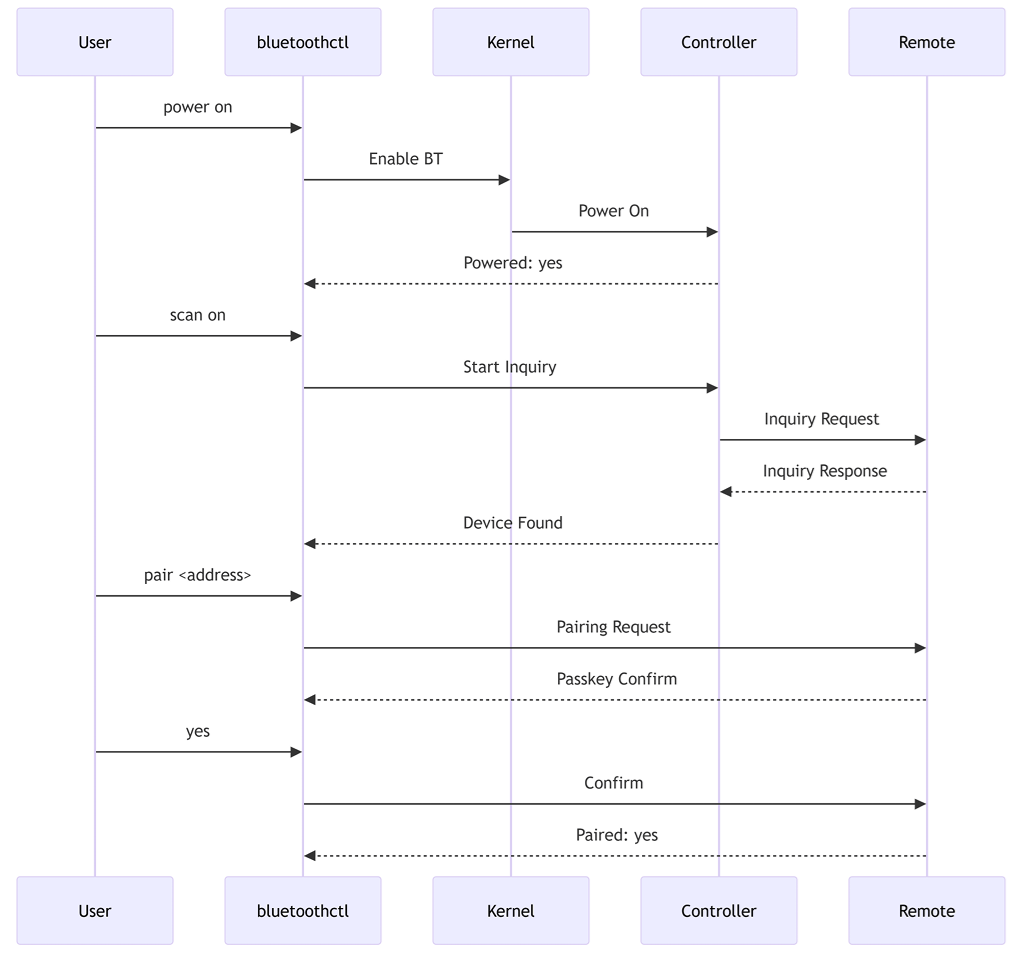
GAP Operations

# Launch bluetoothctl
bluetoothctl

# Enable Bluetooth
power on

# Enable discoverable mode
discoverable on

# Scan for devices
scan on

# Pair with device
pair F8:7D:76:9D:9B:6B

# List paired devices
devices

# Disable Bluetooth
power off

Supported Bluetooth Profiles

ProfileRoleVersion
GAPCentral and Peripheral
SPPClient and Serverv1.2
GATTCentral and Peripheral
OPPClient and Serverv1.2
FTPClient and Serverv1.2
PBAPClient and Serverv1.1
MAPClient and Serverv1.2
A2DP, AVRCP, and HFP are supported on WCN6750/WCN6856.

Debugging

# Wi-Fi
echo "module ath11k +p" > /sys/kernel/debug/dynamic_debug/control
dmesg > /tmp/dmesg.txt

# Bluetooth
#Enable BlueZ logs
vi /lib/systemd/system/bluetooth.service

#Append -d option to the following line in the file and save 
ExecStart=/usr/libexec/bluetooth/bluetoothd -d

#Restart Bluetooth
systemctl daemon-reload
systemctl restart bluetooth

# Collect HCI snoop log 
hcidump --save-dump=/var/log/snoop.log 

Troubleshooting

dmesg | grep ath11k
ls /lib/firmware/ath11k/
Verify SSID and password; check AP security settings.
dmesg | grep -i bluetooth
ls /lib/firmware/qca/
Ensure both devices confirm the same passkey; retry pairing.
A2DP and HFP require WCN6750/WCN6856 — verify profile support.

Resources