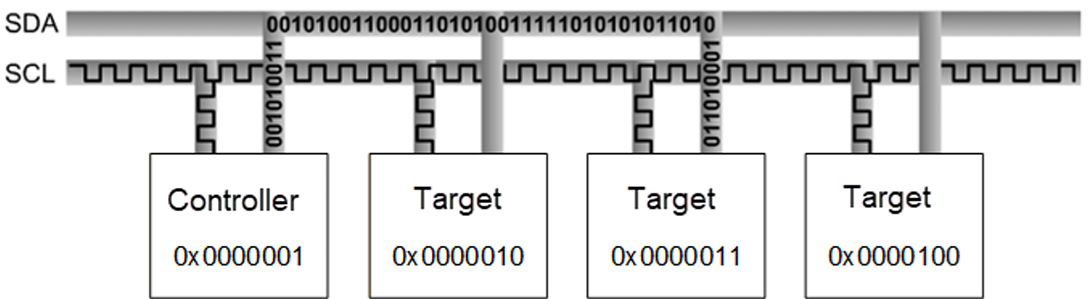
Inter-Integrated Circuit (I²C) is a bidirectional, two-wire serial bus for short-distance communication between integrated circuits, where devices communicate using assigned bus addresses.

Overview

Key Characteristics

  • Bidirectional 2-wire serial bus (SDA + SCL)
  • 7-bit or 10-bit target addressing
  • Multi-controller mode support

Operating Modes

ModeSpeed
Standard mode100 kbps
Fast mode400 kbps
Fast mode plus1 Mbps (maximum supported)
High-speed mode3.4 MHz (not supported)

Communication Sequence

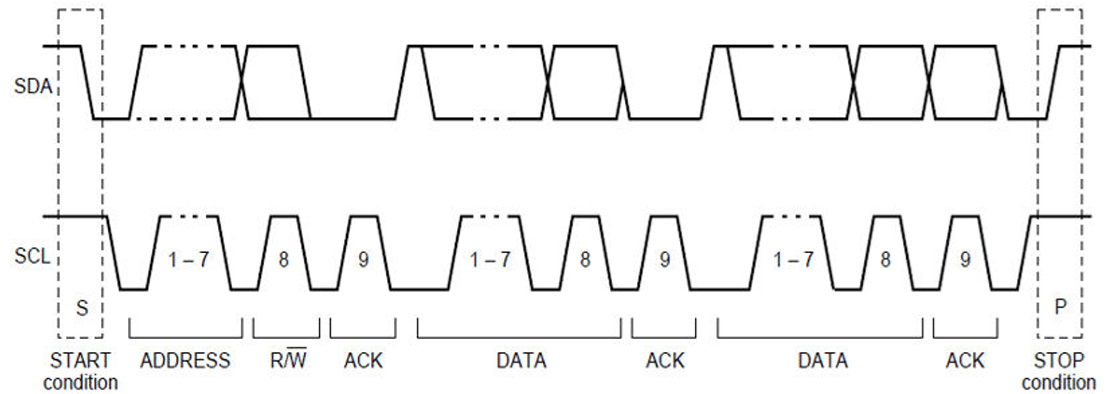
Packet structure: Start → Address frame (7/10-bit) → R/W bit → ACK/NACK → Data frames (8-bit) → Stop Signal rules:
  • SCL HIGH: SDA must remain stable
  • SCL LOW: SDA may change
  • Exception: START and STOP sequences may change SDA when SCL is HIGH

Transfer Modes by Subsystem

SubsystemTransfer ModeBus Speeds
LinuxFIFO, CPU DMA, GSI100 kHz, 400 kHz, 1000 kHz
BootFIFO100 kHz, 400 kHz, 1000 kHz
aDSP / Qualcomm TEE / SDCFIFOStandard

Interface Components

Device Tree Sources

PlatformDevice Tree File
Dragonwing IQ-9075arch/arm64/boot/dts/qcom/lemans.dtsi

APIs

SubsystemHeader
Linuxinclude/linux/i2c.h, include/linux/i2c-dev.h
Bootboot_images/boot/QcomPkg/Include/i2c_api.h
aDSPadsp_proc/core/api/buses/i2c_api.h
Qualcomm TEEtrustzone_images/core/buses/api/i2c/qupv3/i2c_api.h

Software Device Tree Configuration

Linux Device Tree Example

i2c21: i2c@b80000 {
   compatible = "qcom,geni-i2c";
   reg = <0x0 0xb80000 0x0 0x4000>;
   #address-cells = <1>;
   #size-cells = <0>;
   interrupts = <GIC_SPI 831 IRQ_TYPE_LEVEL_HIGH>;
   clocks = <&gcc GCC_QUPV3_WRAP3_S0_CLK>;
   clock-names = "se";
   pinctrl-0 = <&qup_i2c21_default>;
   pinctrl-names = "default";
   interconnects = <&clk_virt MASTER_QUP_CORE_3 QCOM_ICC_TAG_ALWAYS
         &clk_virt SLAVE_QUP_CORE_3 QCOM_ICC_TAG_ALWAYS>,
         <&gem_noc MASTER_APPSS_PROC QCOM_ICC_TAG_ALWAYS
         &config_noc SLAVE_QUP_3 QCOM_ICC_TAG_ALWAYS>,
         <&aggre1_noc MASTER_QUP_3 QCOM_ICC_TAG_ALWAYS
         &mc_virt SLAVE_EBI1 QCOM_ICC_TAG_ALWAYS>;
   interconnect-names = "qup-core", "qup-config", "qup-memory";
   power-domains = <&rpmhpd SA8775P_CX>;
   dmas = <&gpi_dma3 0 0 QCOM_GPI_I2C>,
          <&gpi_dma3 1 0 QCOM_GPI_I2C>;
   dma-names = "tx", "rx";
   status = "disabled";
};
GPIO pinctrl:
qup_i2c21_default: qup-i2c21-state {
   pins = "gpio13", "gpio14";
   function = "qup3_se0";
};

QUPAC Access Control

Ensure the correct protocol is set in QUPAC_Access.c:
{ QUPV3_0_SE0, QUPV3_PROTOCOL_I2C, QUPV3_MODE_FIFO, AC_HLOS, TRUE, TRUE, FALSE },
{ QUPV3_1_SE5, QUPV3_PROTOCOL_I2C, QUPV3_MODE_GSI,  AC_HLOS, FALSE, TRUE, FALSE },

Configuration Steps

1

Enable kernel configurations

Edit kernel_platform/kernel/arch/arm64/configs/qcom_defconfig:
CONFIG_QCOM_GENI_SE=y
CONFIG_I2C_QCOM_GENI=m
CONFIG_I2C_CHARDEV=m
CONFIG_QCOM_GPI_DMA=m
2

Enable I2C node in device tree

+&i2c1 {
+    status = "okay";
+};
3

Compile and flash

Compile the kernel and device tree changes, then load images to the device.

Verification

Check Device Nodes

ls /dev/i2c*
# Expected: /dev/i2c-0  /dev/i2c-1  /dev/i2c-16

Use i2c-tools

# push tools using SCP or similar tools.
scp i2cdetect root@<IP address>:/usr

#Assign permission to execute
chmod 777 i2cdetect

# Scan bus
i2cdetect -y -r 0

# Dump device registers
i2cdump -r 0-0xff 0 0x2b b

# Read register
i2cget -y 0 0x2b 0x04

# Write register
i2cset -y 0 0x2b 0x04 0xFF

Debugging

Enable Debug Logs

mount -t debugfs none /sys/kernel/debug

echo -n "file i2c-qcom-geni.c +p" > /sys/kernel/debug/dynamic_debug/control
echo -n "file i2c-core-base.c +p" > /sys/kernel/debug/dynamic_debug/control
echo -n "file gpi.c +p" > /sys/kernel/debug/dynamic_debug/control

dmesg | grep i2c

Enable I2C Tracing

echo 1 > /sys/kernel/debug/tracing/events/i2c/enable
cat /sys/kernel/debug/tracing/trace
echo 0 > /sys/kernel/debug/tracing/events/i2c/enable

Check Clock and GPIO

# Clock status
cat /sys/kernel/debug/clk/clk_summary | grep -i qup

# GPIO pinmux
cat /sys/kernel/debug/pinctrl/*/pinmux-pins | grep -i i2c

Troubleshooting

Symptoms: i2cdetect shows no devices; /dev/i2c-X not present.Check device tree status:
cat /proc/device-tree/soc@0/geniqup@*/i2c*/status
# Should show "okay"
Check kernel module:
lsmod | grep i2c_qcom_geni
modprobe i2c_qcom_geni  # Load if missing
Check clock:
cat /sys/kernel/debug/clk/gcc_qupv3_wrap0_s1_clk/clk_enable_count
Check GPIO pinmux:
cat /sys/kernel/debug/pinctrl/*/pinmux-pins | grep -i i2c
Symptoms:
i2c_qcom_geni 984000.i2c: i2c error :-110
i2c_qcom_geni 984000.i2c: timeout: CMD:0x08000000
Causes and fixes:
  • No pull-up resistors — Add 4.7 kΩ pull-ups on SDA/SCL
  • Slave not responding — Verify slave power and reset; check initialization sequence
  • Wrong clock frequency — Adjust clock-frequency in device tree
  • Bus stuck low — Power cycle devices or send clock pulses to release bus
Symptoms:
geni_i2c a94000.i2c: Invalid proto 1
Steps:
  1. Identify board type: dmesg | grep "CDT Version"
  2. Locate platform ID in QUPAC_Access.xml
  3. Verify QUPAC_Access.c sets QUPV3_PROTOCOL_I2C, AC_HLOS, bAllowFifo=TRUE, bLoad=TRUE
  4. Rebuild TEE firmware if changes were made
Symptoms: Incorrect data read; intermittent failures.Fixes:
  • Reduce bus speed
  • Shorten wire length; add 22–100 Ω series resistors
  • Add decoupling capacitors near devices
  • Verify setup and hold times with oscilloscope
Symptoms:
qcom-gpi-dma a00000.dma-controller: gpi_process_xfer_compl_event: error:0x4
Fixes: Verify CONFIG_QCOM_GPI_DMA=m; check DMA channel assignment; ensure DMA-safe memory alignment.To test without DMA:
&i2c1 {
    /delete-property/ dmas;
    /delete-property/ dma-names;
};
&i2c1 {
    clock-frequency = <100000>;
    timeout-ms = <1000>;
};
Check runtime PM configuration, verify power domain dependencies, and add proper suspend/resume handlers.

Quick Diagnostic Commands

ls -l /dev/i2c*                                          # List I2C devices
i2cdetect -y -r 0                                        # Scan bus 0
i2cget -y 0 0x2b 0x04                                    # Read register
dmesg | grep -i i2c                                      # Kernel logs
cat /sys/kernel/debug/clk/clk_summary | grep -i qup     # Clock status
cat /sys/kernel/debug/gpio                               # GPIO config
lsmod | grep i2c                                         # Module status
ls -l /sys/firmware/devicetree/base/soc/i2c*            # Device tree nodes

Resources