

Overview

qtimldemux is a GStreamer plugin designed for batch-oriented AI inference pipelines, where multiple independent inputs are processed together in a single inference execution. Its primary role is to demultiplex batched output tensors and restore them as per-input results, so downstream elements can continue processing each input independently. This is essential in multi-stream and batched AI workflows, where batched execution improves hardware utilization, but downstream stages must continue to operate on a per-stream or per-sample basis. qtimldemux commonly operates in conjunction with qtibatch. In such pipelines, qtibatch performs input aggregation before inference, and qtimldemux performs output demultiplexing after inference. This pairing allows pipelines to benefit from batched model execution without losing per-input result alignment.
  • qtibatch aggregates multiple input streams or buffers into a single batched input
  • qtimldemux splits the resulting batched output back into per-input tensors or results
Together, these elements enable efficient batched inference while preserving the association between each inference result and its originating input.

Hierarchy

GObject
   GstObject
      GstElement
         qtimldemux

Pad Templates

sink

Capabilities
neural-network/tensorsformat: { INT8, UINT8, INT32, UINT32, FLOAT16, FLOAT32 }
Availability: Always
Direction: sink

src

Capabilities
neural-network/tensorsformat: { INT8, UINT8, INT32, UINT32, FLOAT16, FLOAT32 }
Availability: On request
Direction: source

Why Batch Inference Requires Output Demultiplexing

Many machine learning models are designed to process multiple inputs in a single inference execution. This execution model is commonly referred to as batch inference. In batch-based models, the input tensor includes an explicit batch dimension, allowing the model to process a fixed number of independent inputs together rather than one input at a time. Batch inference is widely used because it:
  • improves hardware utilization
  • reduces per-input inference overhead
  • increases accelerator efficiency through better scheduling
  • matches the fixed input shape requirements of many deployed models
For these models, the batch size is typically defined by the model itself. It is not treated as a dynamic runtime parameter. As a result, the runtime must provide input data in a form that exactly matches the model’s expected batch shape.

Constructing Batched Input

Before inference can be executed, multiple independent inputs must be collected and combined into a single batched input. In a streaming pipeline, this usually involves:
  • receiving data from multiple logical input sources, such as separate streams or sensors
  • selecting one input unit from each source, such as a video frame or audio buffer
  • assembling those inputs into a single batched representation that matches the model input shape
The inputs grouped into a batch do not need to originate from a single source. They may come from different streams and may arrive at slightly different times. As a result, batch construction is a pipeline-level operation that groups multiple logical inputs into one inference unit.

Batched Output Representation

When inference is executed on a batched input, the model produces batched output tensors. These output tensors contain the inference results for all inputs in the batch, organized according to the same batch structure used at the input. At this stage:
  • the inference results for all inputs are grouped into a single output
  • each result is identified only by its position in the batch
  • the original stream-level or input-level separation is no longer explicit
This output form is efficient for model execution, but it is not ideal for most downstream pipeline stages.

Why Demultiplexing Is Needed

Most downstream elements do not operate on batched results. Post-processing, metadata generation, visualization, tracking, and application logic typically expect results on a per-input basis. These stages usually require:
  • inference output corresponding to a single logical input
  • correct association between each result and its originating stream or sample
  • independent downstream processing for each input
Because batched output does not preserve this separation in a directly consumable form, it must be split back into individual per-input results before further processing.

Role of Demultiplexing

The demultiplexing stage restores the logical separation that existed before batch inference. It:
  • extracts the result corresponding to each batch element
  • re-establishes the mapping between inference results and their original inputs
  • allows downstream elements to continue operating in a per-stream or per-sample manner
This step is essential in batch-based inference pipelines whenever downstream processing is not designed to operate on batched tensors directly.

Usage

Multi stream batched mode AI Inference

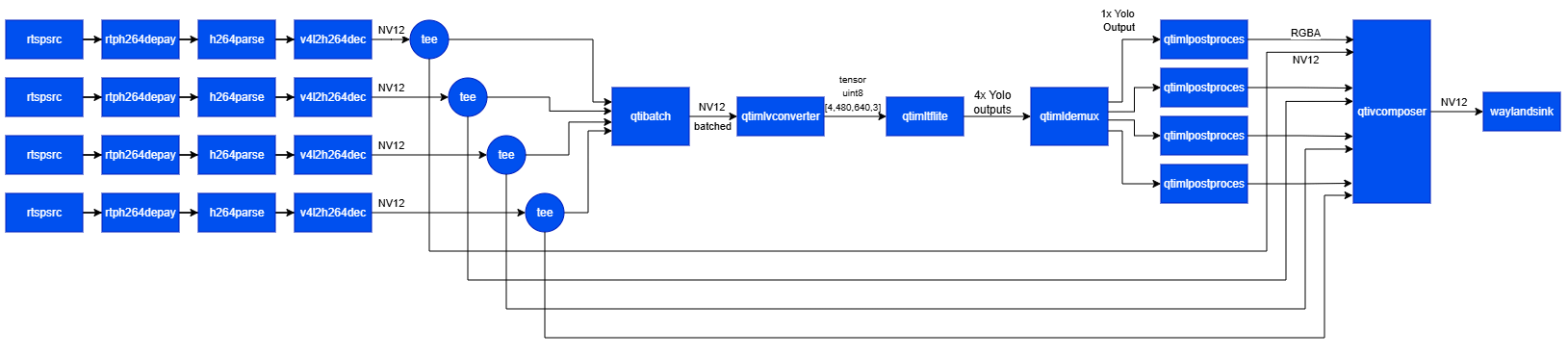
This example demonstrates a four-stream batched inference pipeline using video files as input. Four file sources feed the same video into qtibatch, which aggregates frames into a single batched input. qtimlvconverter prepares the batched tensors, and qtimltflite performs batched inference. qtimldemux then restores per-stream outputs so that post-processing can run independently on each stream. The resulting metadata is combined with the corresponding video streams by qtivcomposer, and the final 2×2 composition is displayed using waylandsink.
1

Download Required Files

FileDownloadSave as
Yolov8 Detection W8A8 Batch 4 modelExport from Qualcomm AI Hubyolov8_det_w8a8_batch_4.tflite
Detection labelsyolov8.jsonyolov8.json
Sample videoInput videoDraw_1080p_180s_30FPS.mp4
2

Copy files to device

# Run from your host machine — replace <user> and <device-ip>
ssh <user>@<device-ip> "mkdir -p $HOME/{models,labels,media}"
scp yolov8_det_quantized_batch_4.tflite  <user>@<device-ip>:$HOME/models/
scp yolov8.json                           <user>@<device-ip>:$HOME/labels/
scp Draw_1080p_180s_30FPS.mp4             <user>@<device-ip>:$HOME/media/
3

Connect to device

# Run from your host machine — replace <user> and <device-ip>
ssh <user>@<device-ip>
4

Set environment variables

Run below command on your device
export MODEL_NAME=yolov8_det_w8a8_batch_4.tflite
export LABELS_NAME=yolov8.json
export SRC_VIDEO_NAME=Draw_1080p_180s_30FPS.mp4
5

Run the pipeline

gst-launch-1.0 -e --gst-debug=2 \
qtimltflite name=inference delegate=external external-delegate-path=libQnnTFLiteDelegate.so external-delegate-options="QNNExternalDelegate,backend_type=htp,htp_performance_mode=(string)2;" model=$HOME/models/$MODEL_NAME \
qtibatch name=batch ! queue ! qtimlvconverter ! queue ! inference. inference. ! queue ! qtimldemux name=mldemux_1 \
qtivcomposer name=mixer \
sink_0::position="<0, 0>" sink_0::dimensions="<960, 540>" \
sink_1::position="<960,  0>" sink_1::dimensions="<960, 540>" \
sink_2::position="<0, 540>" sink_2::dimensions="<960, 540>" \
sink_3::position="<960, 540>" sink_3::dimensions="<960, 540>" \
sink_4::position="<0, 0>" sink_4::dimensions="<960, 540>" \
sink_5::position="<960, 0>" sink_5::dimensions="<960, 540>" \
sink_6::position="<0, 540>" sink_6::dimensions="<960, 540>" \
sink_7::position="<960, 540>" sink_7::dimensions="<960, 540>" \
mixer. ! video/x-raw,format=NV12 ! queue ! waylandsink sync=false fullscreen=true \
filesrc location=$HOME/media/$SRC_VIDEO_NAME ! qtdemux ! queue ! h264parse ! v4l2h264dec capture-io-mode=4 output-io-mode=4 ! video/x-raw,format=NV12 ! queue ! tee name=split_1 ! queue ! batch. split_1. ! queue ! mixer. \
filesrc location=$HOME/media/$SRC_VIDEO_NAME ! qtdemux ! queue ! h264parse ! v4l2h264dec capture-io-mode=4 output-io-mode=4 ! video/x-raw,format=NV12 ! queue ! tee name=split_2 ! queue ! batch. split_2. ! queue ! mixer. \
filesrc location=$HOME/media/$SRC_VIDEO_NAME ! qtdemux ! queue ! h264parse ! v4l2h264dec capture-io-mode=4 output-io-mode=4 ! video/x-raw,format=NV12 ! queue ! tee name=split_3 ! queue ! batch. split_3. ! queue ! mixer. \
filesrc location=$HOME/media/$SRC_VIDEO_NAME ! qtdemux ! queue ! h264parse ! v4l2h264dec capture-io-mode=4 output-io-mode=4 ! video/x-raw,format=NV12 ! queue ! tee name=split_4 ! queue ! batch. split_4. ! queue ! mixer. \
mldemux_1. ! queue ! qtimlpostprocess results=10 module=yolov8 labels=$HOME/labels/$LABELS_NAME settings="{\"confidence\": 70.0}" ! video/x-raw,width=640,height=360 ! queue ! mixer. \
mldemux_1. ! queue ! qtimlpostprocess results=10 module=yolov8 labels=$HOME/labels/$LABELS_NAME settings="{\"confidence\": 70.0}" ! video/x-raw,width=640,height=360 ! queue ! mixer.