

CPU sleep states
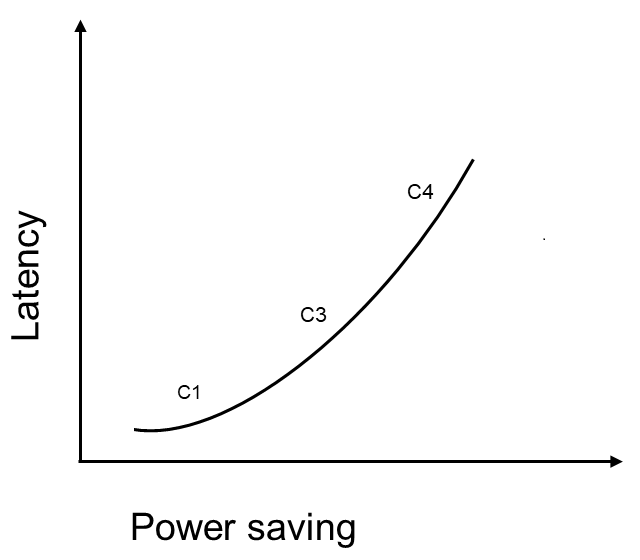
A CPU core supports several sleep states. Each sleep state has associated entry and exit latencies and different levels of power consumption. The selection of a core’s sleep state depends on how soon that core is required again for another execution. A C-state number represents each CPU sleep state. Two key parameters are associated with each C-state:- Power saving: The power saving of the CPU increases as you select higher C-states, but it results in increased wake-up latency.
- Wake-up latency: This is the time taken to transition a CPU core from sleep state to running state.
Use the following command to view the latencies of CPU sleep state:
<X> represents the core ID, which varies from 0 to 7, and <Y> is the index of the Linux power state (0, 1, 2). The following table defines the Linux power states.
You can study and configure sleep states to tune applications for balanced power and performance.
The following table lists the supported CPU sleep states and their associated C-state numbers:
Note
The CPU sleep states are enabled by default.
- QCS6490/QCS5430
- IQ-9075
- IQ-8275
- IQ-615
- IQ-X7181
- IQ-X5121
- CQ-2390
- IQ-X10
Table : Supported core power states for QCS6490/QCS5430
Enable and disable low power management state
The following table lists how to configure CPU sleep states: Note If you change the configuration of a sleep state, you should check the power impact on the device. Table : Commands to enable/disable CPU power states| CPU sleep state | Description | Linux power state |
|---|---|---|
| S0 | Disable | echo 0 > /sys/devices/system/cpu/cpuX/cpuidle/state0/disable |
| Enable | echo 1 > /sys/devices/system/cpu/cpuX/cpuidle/state0/disable | |
| S1 | Disable | echo 0 > /sys/devices/system/cpu/cpuX/cpuidle/state1/disable |
| Enable | echo 1 > /sys/devices/system/cpu/cpuX/cpuidle/state1/disable | |
| S2 | Disable | echo 0 > /sys/devices/system/cpu/cpuX/cpuidle/state2/disable |
| Enable | echo 1 > /sys/devices/system/cpu/cpuX/cpuidle/state2/disable |
<X> denotes the core ID, which can vary from 0 to 11.
Verify CPU idle statistics
To check the statistics of CPU core sleep states, run the following command:<X> is the core ID, which varies from 0 to 7, and <Y> is the index of the Linux power state (0, 1, and 2).
The following is an example of the output:
usage count represents the number of times cpu<X> enters a Linux power state.