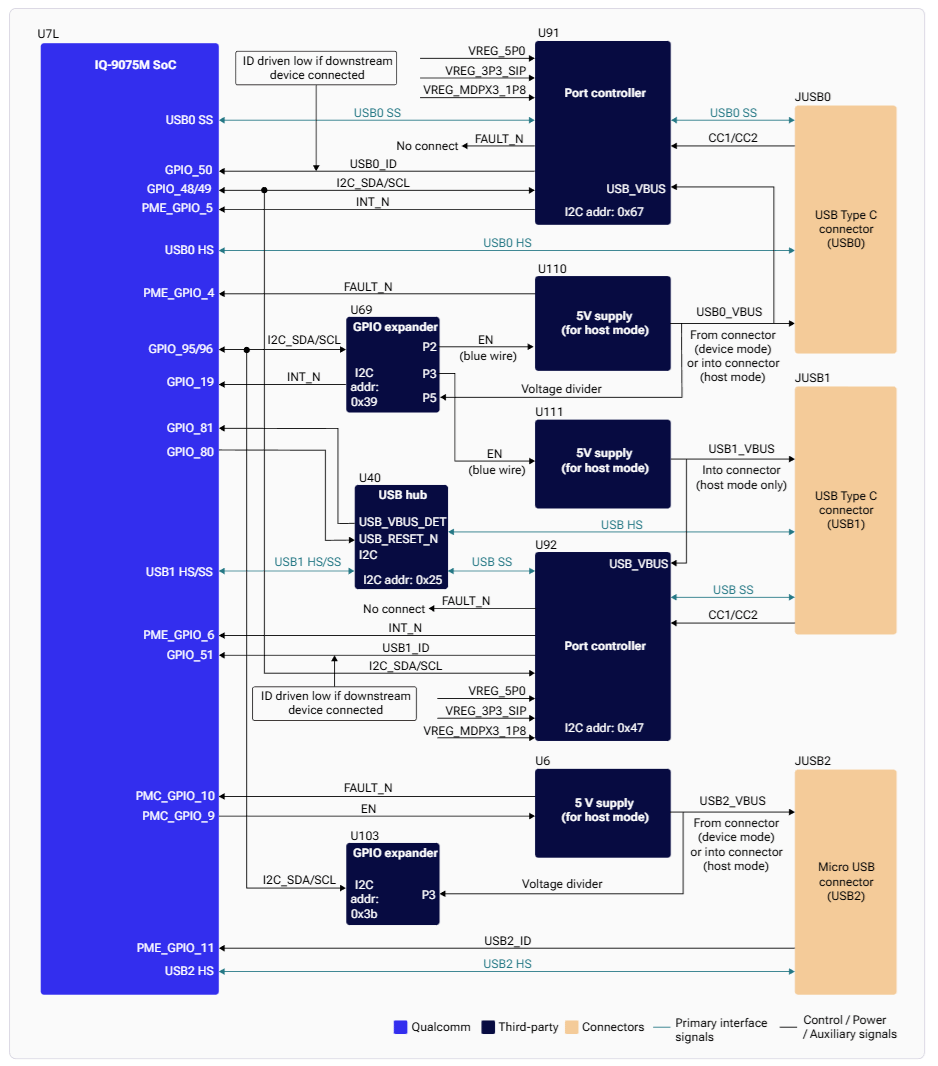
The Universal Serial Bus (USB) supports data exchange and power supply between electronic devices at speeds from 1.5 Mbps (low speed) up to 10 Gbps (SuperSpeed Plus). The IQ-9075 uses the Synopsys DesignWare Core SuperSpeed USB 3.x controller connected to USB2 PHY (UTMI) and USB3 PHY (PIPE) interfaces.
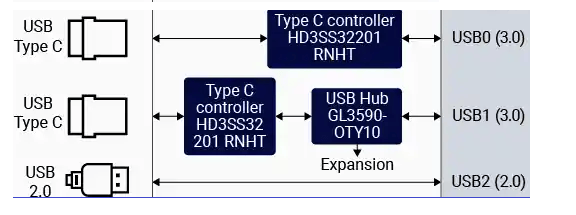
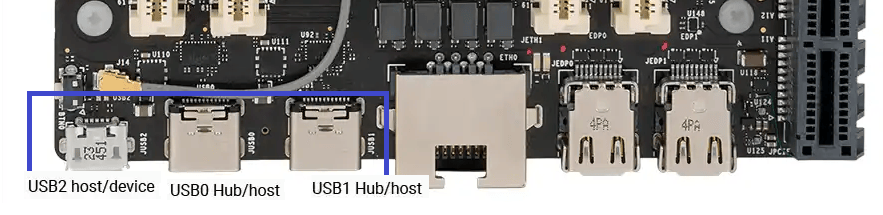
The board features three USB connectors: two Type-C (USB0, USB1) and one micro-USB (USB2).
Controllers
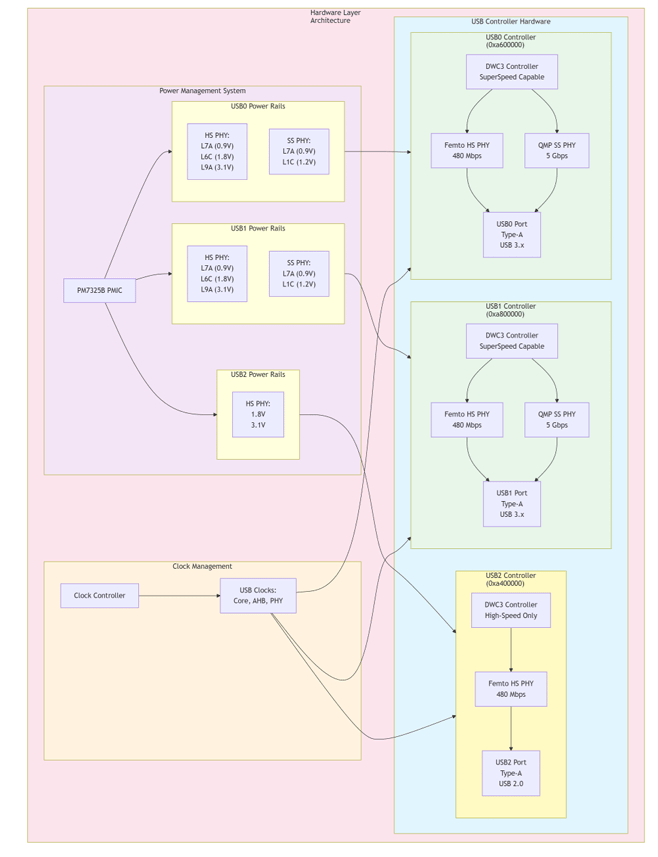
Controller Address Max Speed HS PHY Rails SS PHY Rails USB0 0xa600000 USB 3.x SuperSpeed L7A (0.88V), L6C (1.8V), L9A (3.3V) L1C, L7A USB1 0xa800000 USB 3.x SuperSpeed L7A (0.88V), L6C (1.8V), L9A (3.3V) L1C, L7A USB2 0xa400000 USB 2.0 High Speed VDD_A_USBHS_2_1P8, VDD_A_USBHS_2_3P1 —
Features
Hardware Features
Feature Description Dual-Role Device (DRD) Host and device modes with dynamic role detection USB 3.1 Gen1 SuperSpeed 5 Gbps on USB0 and USB1 USB 2.0 High Speed 480 Mbps on all controllers xHCI eXtensible Host Controller Interface compliance Transfer types Control, bulk, interrupt, isochronous Link Power Management ASPM-style LPM for power savings
Software Features
Peripheral mode: Mass Storage, Diagnostics (FunctionFS), RNDIS, NCM
Host mode: xHCI, HID/MS/Hub class drivers, UVC (USB camera), Link Power Management
Architecture
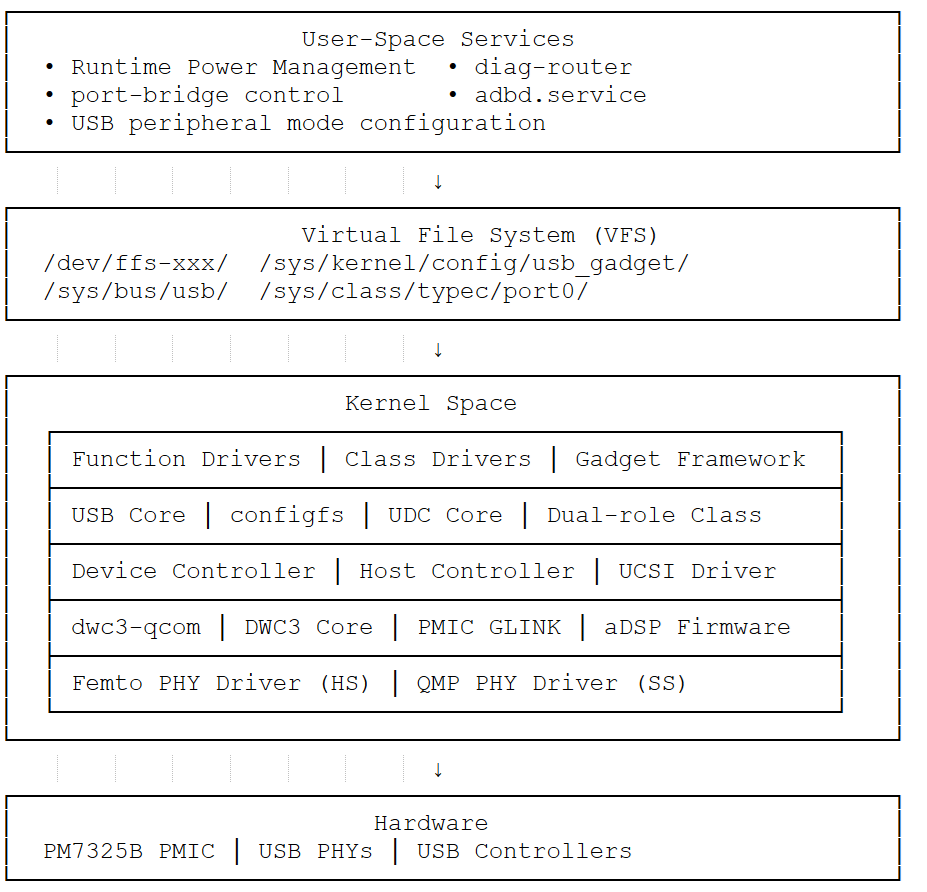
Layer Key Components User Space diag-router, qusb — service management, composition switchingVFS /dev/ffs-*, /sys/kernel/config — dynamic config, endpoint accessKernel dwc3-qcom, xHCI, Gadget Framework — dual-role, power managementHardware DWC3 Controllers, Femto/QMP PHYs
Configuration
Runtime Power Management
# Enable autosuspend
echo auto > /sys/bus/platform/devices/a600000.usb/power/control
echo 2000 > /sys/bus/platform/devices/a600000.usb/power/autosuspend_delay_ms
# Check status
cat /sys/bus/platform/devices/a600000.usb/power/runtime_status
Runtime PM is not supported for Type-C ports on IQ-9075.
Enable Remote Wake-up (Host Mode)
# Enable wake-up for xHCI
echo enabled > /sys/bus/platform/devices/xhci-hcd.X.auto/power/wakeup
# Enable wake-up for root hubs
echo enabled > /sys/bus/usb/devices/usb1/power/wakeup
echo enabled > /sys/bus/usb/devices/usb2/power/wakeup
Prevent Suspend During Composition Switch
echo on > /sys/bus/platform/devices/a600000.usb/power/control
# Perform composition switch
echo auto > /sys/bus/platform/devices/a600000.usb/power/control
USB Camera
The IQ-9075 supports USB cameras that comply with the USB Video Class (UVC) standard via the uvcvideo kernel driver, exposing devices as /dev/videoX.
Detect the camera
lsusb
v4l2-ctl --list-devices
ls -l /dev/v4l/by-id/
Check supported formats
yavta /dev/video2 --enum-formats
Capture or stream video
# MJPEG capture
yavta -f MJPEG -s 1280x720 -t 1/30 -c10 -F/home/ubuntu/test.jpeg /dev/video2
# YUYV capture
yavta -f YUYV -s 1280x720 -t 1/5 -c10 -F/tmp/test.yuv /dev/video2
ffplay -f v4l2 -framerate 30 -input_format mjpeg -video_size 1920x1080 -i /dev/video2
ffplay -f v4l2 -framerate 30 -input_format yuyv422 -video_size 1920x1080 -i /dev/video2
export XDG_RUNTIME_DIR = / run / user /$( id -u ubuntu )
export WAYLAND_DISPLAY = wayland-1
# 720p stream (YUYV = YUY2 in GStreamer)
gst-launch-1.0 -e v4l2src device=/dev/video2 ! \
video/x-raw,format=YUY2,width=1280,height=720,framerate=30/1 ! \
videoconvert ! waylandsink fullscreen= true
For multi-stream inference with USB cameras, see the Qualcomm IM SDK and the gst-usb-single-camera-app .
Verification
Host Mode
lsusb # List connected USB devices
cat /sys/kernel/debug/usb/devices # Detailed device info
ls /sys/bus/usb/devices/ # USB device tree
Device Mode
cat /sys/kernel/debug/usb/a600000.usb/mode # Check USB mode
cat /sys/kernel/debug/usb/a600000.usb/link_state # Check link state
qusb showpid # List compositions
Debugging
Enable USB Tracing
mount -t debugfs none /sys/kernel/debug
# Enable traces
echo 1 > /sys/kernel/debug/tracing/events/dwc3/enable
echo 1 > /sys/kernel/debug/tracing/events/xhci-hcd/enable
echo 1 > /sys/kernel/debug/tracing/events/gadget/enable
cat /sys/kernel/debug/tracing/trace
Collect Register Dumps
mkdir -p /tmp/usb_debug
cat /sys/kernel/debug/usb/a600000.usb/regdump > /tmp/usb_debug/regdump.txt
cat /sys/kernel/debug/usb/a600000.usb/lsp_dump > /tmp/usb_debug/lsp_dump.txt
cat /sys/kernel/debug/usb/a600000.usb/mode > /tmp/usb_debug/mode.txt
cat /sys/kernel/debug/usb/a600000.usb/link_state > /tmp/usb_debug/link_state.txt
dmesg > /tmp/usb_debug/dmesg.txt
lsusb -v > /tmp/usb_debug/lsusb.txt
Troubleshooting
USB Device Not Enumerated
cat /sys/kernel/debug/usb/a600000.usb/mode
cat /sys/kernel/debug/usb/a600000.usb/link_state
dmesg | grep -i usb
Rebind gadget: qusb unbind && qusb bind
Change composition: qusb setpid <PID>
Check cable connection and power rails
lsusb
ls /dev/video *
dmesg | grep -i uvc
lsmod | grep uvcvideo
Ensure uvcvideo driver is loaded
Try a different USB port
Verify camera is UVC-compliant
Low Power Mode Not Working
cat /sys/bus/platform/devices/a600000.usb/power/runtime_status
cat /sys/bus/platform/devices/a600000.usb/power/control
Enable autosuspend: echo auto > /sys/bus/platform/devices/a600000.usb/power/control
echo 2000 > /sys/bus/platform/devices/a600000.usb/power/autosuspend_delay_ms
Prevent suspend during the switch: echo on > /sys/bus/platform/devices/a600000.usb/power/control
qusb setpid < PI D >
echo auto > /sys/bus/platform/devices/a600000.usb/power/control
Resources