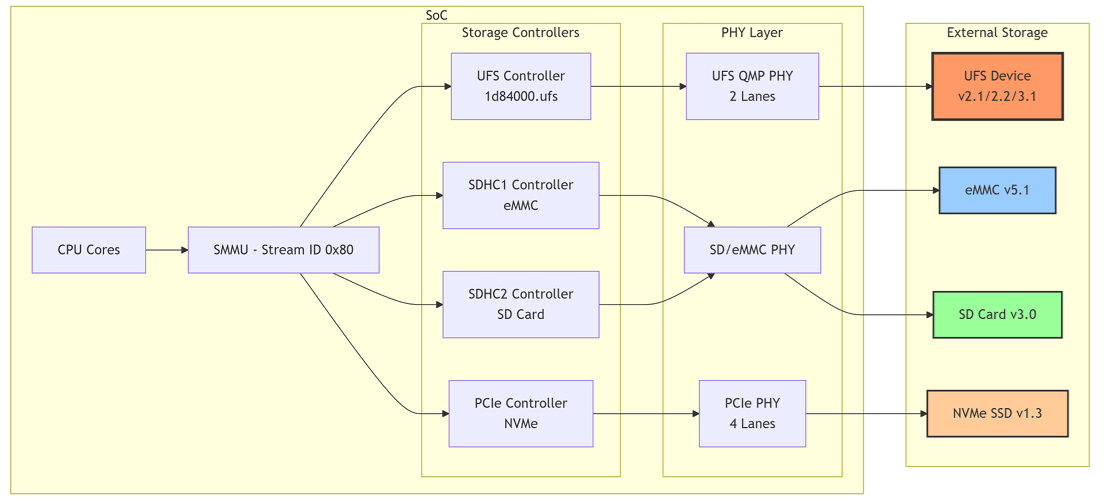
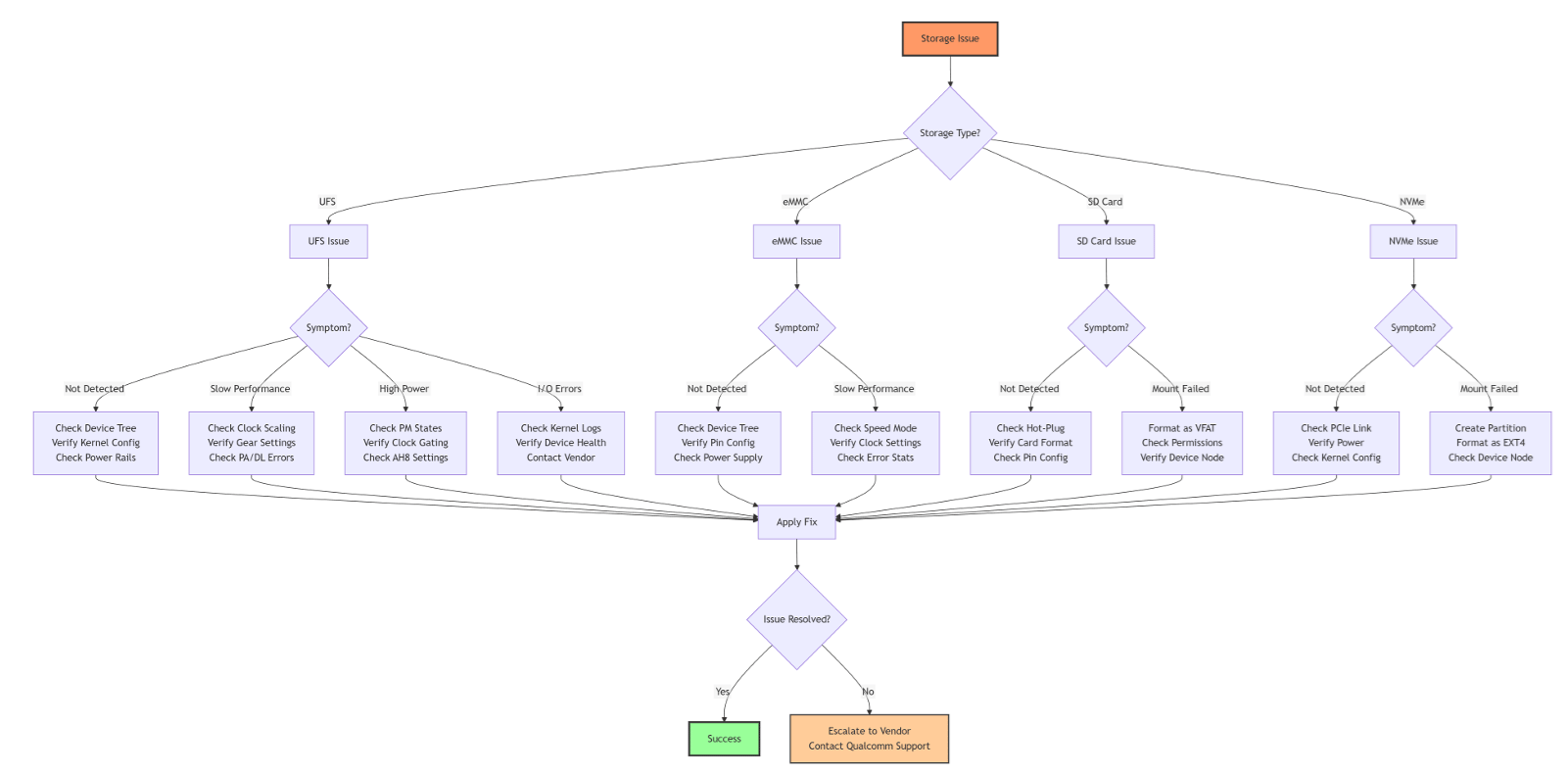
The Qualcomm Linux platform supports four primary storage types.
Storage TypeVersions
Universal Flash Storage (UFS)v2.1, v2.2, v3.1
Embedded Multi-Media Card (eMMC)v5.1
Non-Volatile Memory Express (NVMe)v1.3
Secure Digital (SD) Cardv3.0
Configure the device to boot from only one storage source. Using both sources for bootable files may cause system crashes or unpredictable behavior.

UFS Storage

Features

FeatureDescription
Lanes2 lanes supported
GearHS Gear 1, 2, 3, and 4
Low-Power ModeLink hibernate and device sleep
Hot-PlugNot supported (embedded only)

Kernel Configuration

ConfigurationDefaultDescription
CONFIG_UFS_FAULT_INJECTIONNoInjects failure commands for debugging
CONFIG_SCSI_UFSHCDYesUFS host control driver
CONFIG_SCSI_UFSHCD_PLATFORMYesUFS controller from platform bus
CONFIG_SCSI_UFS_QCOMYesQualcomm-specific PHY and vendor registers
CONFIG_PHY_QCOM_QMPYesUFS QMP PHY driver
CONFIG_SCSI_UFS_BSGYesUFS BSG device node
CONFIG_SCSI_UFS_CRYPTOYesUFS crypto engine

Power Management States

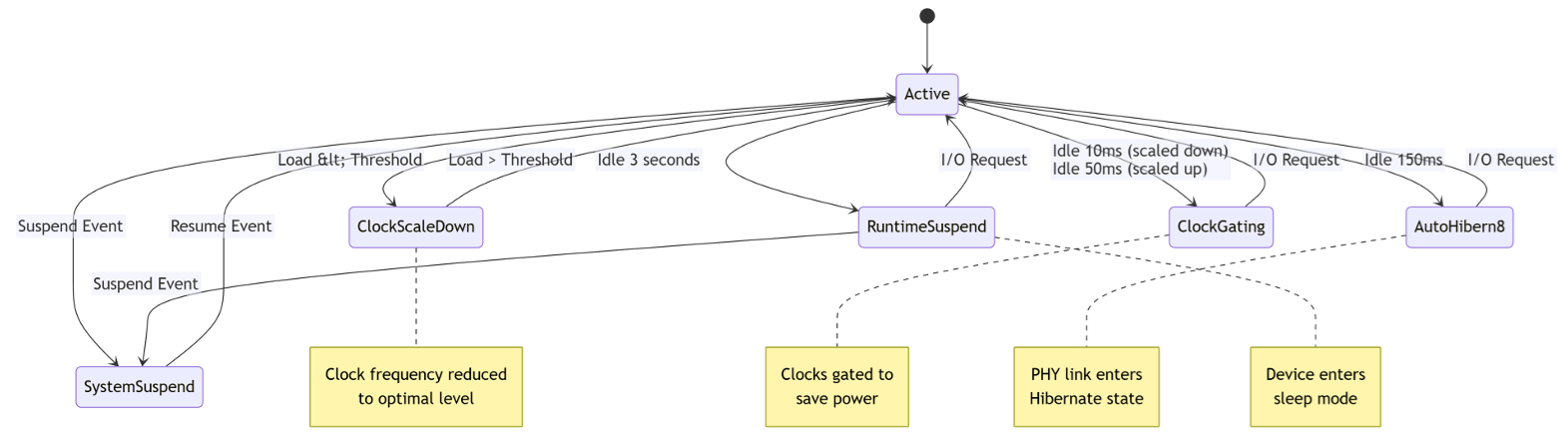
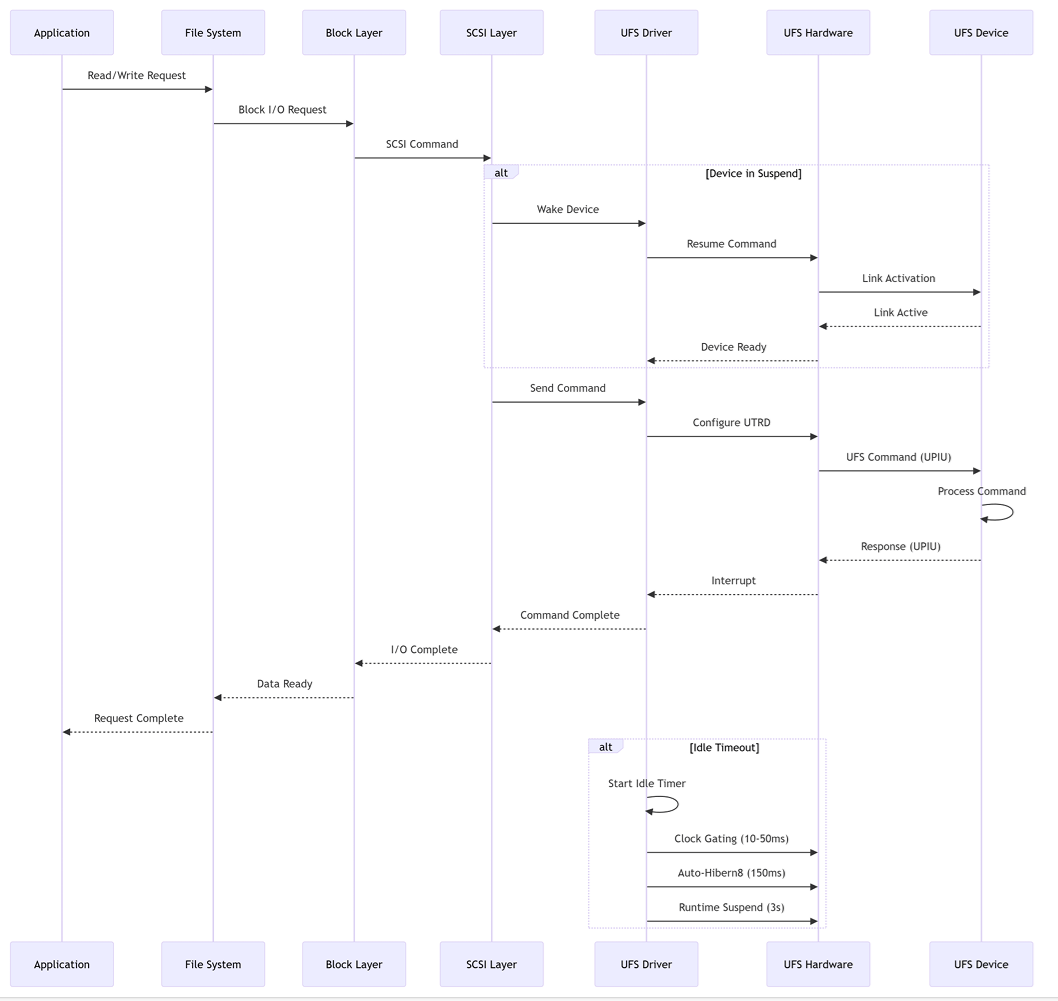
Auto-Hibern8 (AH8) — Transitions PHY link to Hibernate after 150 ms of idle time (adjustable).
cat /sys/devices/platform/soc@0/1d84000.ufs/auto_hibern8
Clock Gating — Gated after 50 ms (max freq) or 10 ms (scaled freq) of idle time. Enabled by default.
cat /sys/devices/platform/soc@0/1d84000.ufs/clkgate_enable
# Disable for debugging:
echo 0 > /sys/devices/platform/soc@0/1d84000.ufs/clkgate_enable
Clock Scaling — Scales up/down based on load threshold. Enabled by default; disabling increases power consumption.
cat /sys/devices/platform/soc@0/1d84000.ufs/clkscale_enable
Runtime Suspend/Resume — Enters suspend after 3 seconds of inactivity. Always enabled, not configurable. System Suspend/Resume — Follows system suspend/resume events. Always enabled, not configurable.

Device Parameters

ParameterSubnodeValueDescription
init_speed_paramsEnableHighSpeed1Enables high speed mode
NumGears4Maximum gear (3 for UFS 2.x, 4 for UFS 3.1)
NumLanes2Number of lanes
Rate21=Rate A, 2=Rate B
perf_speed_paramsEnableHighSpeed1High speed in perf mode
NumGears4Maximum gear in perf mode
NumLanes2Lanes in perf mode
Rate2Series in perf mode
timeout_valuesfDeviceInitTimeout2500000 μsDevice init timeout
UTRDPollTimeout30000000 μsUTRD timeout
BatteryThresholdMv3600Battery threshold (mV) to move to Gear 1
LinkStartupRetryCount5Link startup retry count
RefClock19200000Reference clock (19.2 MHz)

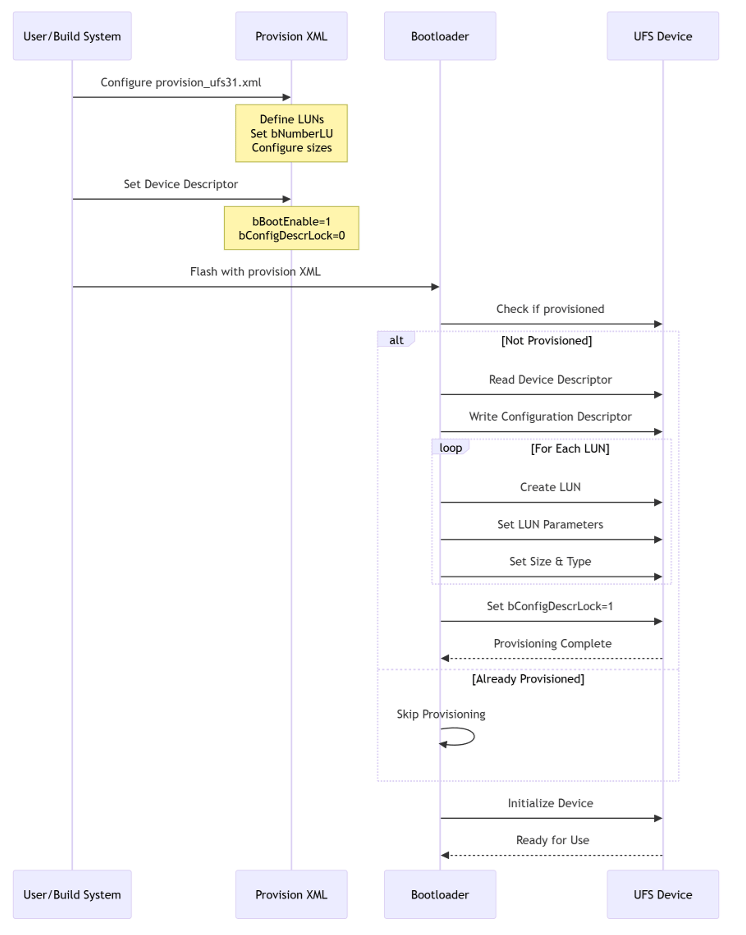
UFS Provisioning

UFS provisioning creates Logical Unit Numbers (LUNs) on a new UFS device. Device Descriptor Parameters:
ParameterDescription
bNumberLUNumber of Logical Units
bBootEnable00h: Boot disabled, 01h: Boot enabled
bConfigDescrLock0h: Unlocked, 1h: Locked (prevents reprovisioning)
Set bConfigDescrLock="0" during development. Set to "1" after finalization to prevent reprovisioning.
LUN Parameters:
ParameterDescription
LUNumLogical Unit Number
bLUEnable00h: Disabled, 01h: Enabled
bBootLunID00h: Not bootable, 01h: Boot LU A, 02h: Boot LU B
size_in_kbLUN size in KB
bMemoryType00h: Normal, 01h: System code, 02h: Non-Persistent
bProvisioningType00h: Thin provisioning disabled, 02h: Enabled (TPRZ=0)
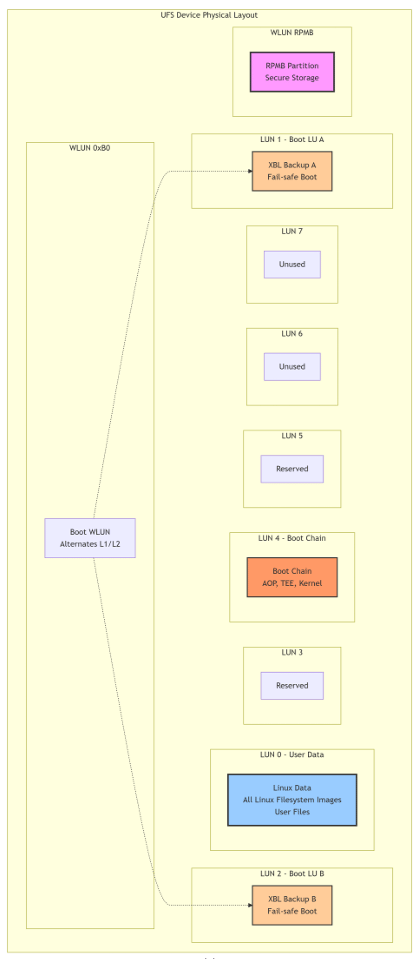
Default Partition Layout:
  • LUN0 — Linux data and filesystem images
  • LUN1 & LUN2 — Boot WLUN (0xB0) alternates for fail-safe XBL backup
  • LUN4 — Rest of boot chain
  • LUN6 & LUN7 — Unused by default

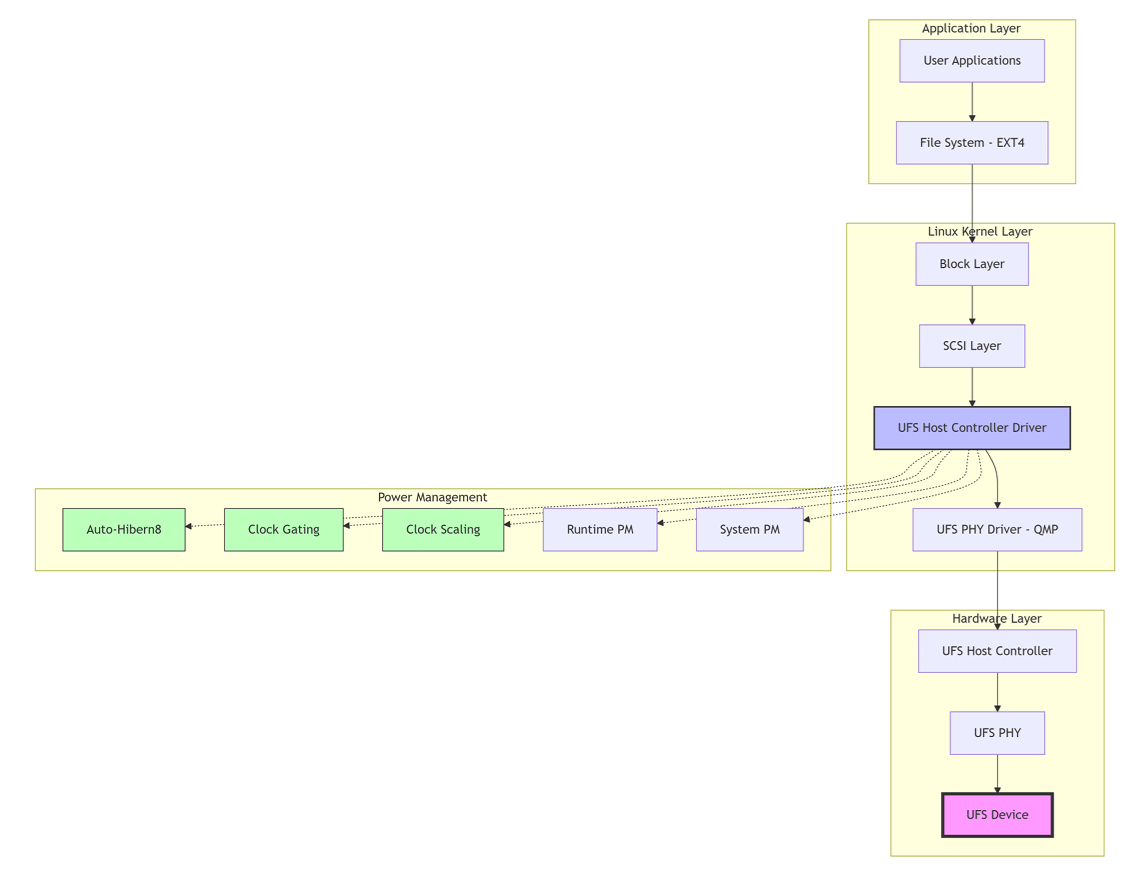
Architecture Diagrams
eMMC Storage

Features

FeatureDescription
SpeedDDR50, HS200, HS400, HS400 Enhanced
Sleep ModeClock gating and auto suspend
Command QueuingMultiple simultaneous commands

Device Tree Configuration

Add the following to the &sdhc_1 node in the SoC-specific DTSI file:
&sdhc_1 {
    status = "okay";
    pinctrl-names = "default", "sleep";
    pinctrl-0 = <&sdc1_on>;
    pinctrl-1 = <&sdc1_off>;
    vmmc-supply = <&vreg_l19a_2p9>;
    vqmmc-supply = <&vreg_l12a_1p8>;
};

Power Management

  • Runtime Suspend — After 50 ms of inactivity; always enabled
  • System Suspend — Follows system suspend/resume events; always enabled

SD Card Storage

Features

FeatureDescription
Bus Width4-bit mode
SpeedSDR50, SDR104, DDR50
Hot-PlugSupported

Kernel Configuration

ConfigurationDefaultDescription
CONFIG_MMCYesMMC driver
CONFIG_MMC_SDHCIYesSDHCI driver
CONFIG_MMC_CQHCIYesCommand Queue Host Control Interface
CONFIG_MMC_SDHCI_MSMYesMSM SDHCI driver
CONFIG_MMC_BLOCKYesMMC block driver
CONFIG_MMC_CRYPTOYesMMC Crypto Engine

Power Management

  • Runtime Suspend — After 50 ms of inactivity; always enabled
  • System Suspend — Follows system suspend/resume events; always enabled

NVMe Storage

FeatureDescription
Lanes4 lanes over PCIe port (PCIe1)
InterfaceHigh-speed serial
ProtocolOptimized for NAND flash and next-gen SSDs

Configuration Guide

Mount File Systems

mkdir /tmp/data
mount -t ext4 /dev/sda3 /tmp/data
df -a

Power Management Control

# Mount debugfs (required for debug nodes)
mount -t debugfs none /sys/kernel/debug

# UFS Auto-Hibern8
cat /sys/devices/platform/soc@0/1d84000.ufs/auto_hibern8
echo <value_in_us> > /sys/devices/platform/soc@0/1d84000.ufs/auto_hibern8

# UFS Clock Gating
echo 0 > /sys/devices/platform/soc@0/1d84000.ufs/clkgate_enable  # Disable
echo 1 > /sys/devices/platform/soc@0/1d84000.ufs/clkgate_enable  # Enable

# UFS Clock Scaling
echo 0 > /sys/devices/platform/soc@0/1d84000.ufs/clkscale_enable  # Disable
echo 1 > /sys/devices/platform/soc@0/1d84000.ufs/clkscale_enable  # Enable

Troubleshooting

Symptoms:
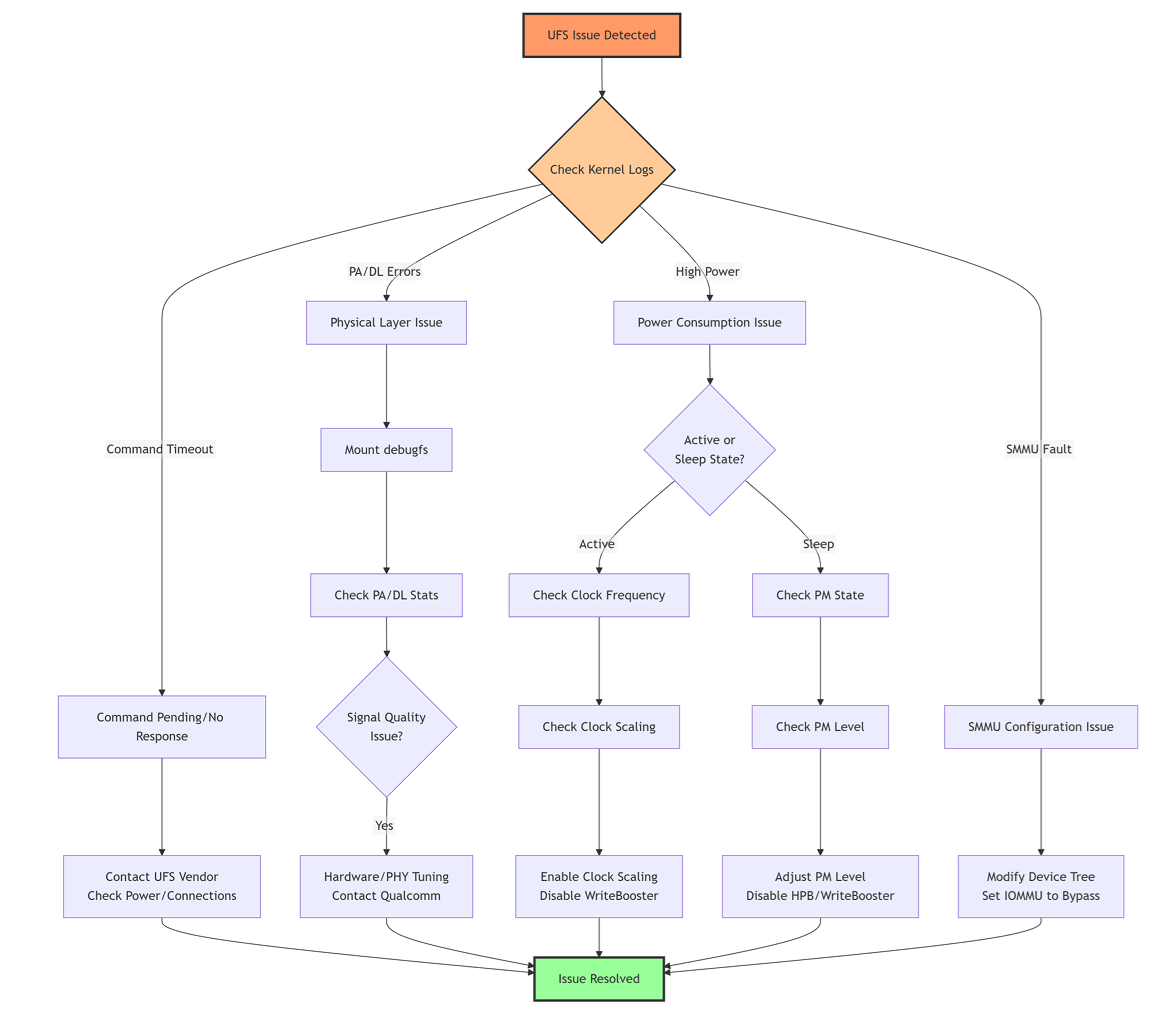
ufshcd-qcom 1d84000.ufshc: ufshcd_abort: cmd pending in the device. tag = 1
Resolution: Contact UFS device vendor; check device compatibility and power supply stability.
Symptoms:
ufshcd-qcom 1d84000.ufshc: ufshcd_abort: no response from device. tag = 2, err -110
Resolution: Check physical connections, verify power rails, check PHY initialization.
Diagnosis:
cat /sys/devices/platform/soc@0/1d84000.ufs/devfreq/1d84000.ufs/cur_freq
cat /sys/devices/platform/soc@0/1d84000.ufs/clkscale_enable
Resolution: Enable clock scaling if disabled; disable WriteBooster if not needed.
Diagnosis:
cat /sys/devices/platform/soc@0/1d84000.ufs/power_info/link_state
cat /sys/devices/platform/soc@0/1d84000.ufs/power_info/dev_pm
cat /sys/devices/platform/soc@0/1d84000.ufs/power/runtime_status
Resolution: Adjust PM level; disable HPB/WriteBooster if causing issues; verify VCC/VCCQ/VCCQ2 timing.
Symptoms:
arm-smmu 15000000.apps-smmu: Unhandled arm-smmu context fault from 1d84000.ufshc!
Resolution: In the ufshc_mem node in the SoC DTSI file, change:
qcom,iommu-dma = "fastmap";
to:
qcom,iommu-dma = "bypass";

Command Reference

UFS Commands

PurposeCommand
Check PA/DL error countcat /sys/kernel/debug/ufshcd/1d84000.ufs/stats
Read current clock frequencycat /sys/devices/platform/soc@0/1d84000.ufs/devfreq/1d84000.ufs/cur_freq
Read device state (active/sleep)cat /sys/devices/platform/soc@0/1d84000.ufs/power_info/dev_pm
Read gear informationcat /sys/devices/platform/soc@0/1d84000.ufs/power_info/gear
Read link state (ACTIVE/HIBERN8)cat /sys/devices/platform/soc@0/1d84000.ufs/power_info/link_state
Read runtime statuscat /sys/devices/platform/soc@0/1d84000.ufs/power/runtime_status
Read RPM/SPM levelcat /sys/devices/platform/soc@0/1d84000.ufs/rpm_lvl

SD Card Commands

PurposeCommand
Read error statscat /sys/kernel/debug/mmc1/err_stats
Check current clockcat /sys/kernel/debug/mmc1/clock
Read runtime statuscat /sys/devices/platform/soc@0/8804000.mmc/power/runtime_status

NVMe Commands

PurposeCommand
View device modelcat /sys/class/nvme/nvme0/model
View firmware versioncat /sys/class/nvme/nvme0/firmware_rev
View namespace sizecat /sys/class/nvme/nvme0/nvme0n1/size

eMMC Commands

PurposeCommand
Error statscat /sys/kernel/debug/mmc0/err_stats
Current clockcat /sys/kernel/debug/mmc0/clock
Runtime statuscat /sys/devices/platform/soc@0/7c4000/power/runtime_status
For eMMC commands, replace the address with the SoC-specific value: IQ-615 and IQ-9075 use 7c4000; IQ-8275 uses 87c4000.

References