

Computer Vision
Build a real-time PPE detection pipeline using Qualcomm IM SDK with daisy-chained ML models for person detection and protective equipment recognition — running entirely on-device with hardware-accelerated inference via Qualcomm HTP.
Introduction
Ensuring worker safety in industrial and construction environments demands continuous, real-time monitoring at scale — a challenge that traditional manual approaches cannot meet efficiently. The QIM SDK addresses this directly by delivering a hardware-accelerated, end-to-end AI pipeline that automates PPE compliance monitoring at the edge, with minimal operational overhead. Leveraging Qualcomm’s dedicated hardware accelerators through the SDK’s GStreamer plugin architecture, compute-intensive tasks — including video decoding, frame preparation (resizing, color format conversion, and pixel normalization), multi-stage AI inference, and encoding — are offloaded entirely from the CPU to purpose-built hardware blocks. This enables low-latency, power-efficient AI execution directly on Qualcomm edge devices, making continuous, real-world safety monitoring both practical and scalable. At the core of this use case is a multi-stage daisy-chain AI pipeline, where models operate sequentially and build upon each other’s outputs. A person detection model first identifies individuals within the full frame; a second model then performs per-person PPE compliance analysis — detecting helmets, vests, gloves, and masks — using dynamically cropped regions derived from the initial detections. This approach enables fine-grained, per-person analysis with high accuracy, while keeping compute focused on regions of interest rather than the full frame. The metadata produced by this pipeline is hierarchically structured: base detections (persons) from the first model serve as parent entries, with PPE detection results from the second model attached as child metadata linked to each individual. This context-aware structure ensures that every detected safety item is explicitly associated with a specific person — enabling precise visualization, tracking, and downstream analytics. The QIM SDK further accelerates visualization through hardware-accelerated overlay rendering and blitting, where bounding boxes, labels, and compliance indicators are composited directly onto video frames using optimized hardware operations — delivering smooth, real-time visualization without additional CPU load or pipeline latency. Beyond visualization, the SDK provides native support for AI metadata streaming, synchronizing structured inference results with the video stream and transmitting them alongside the media pipeline. This transforms raw video into actionable, structured data — enabling external monitoring and alerting systems to consume real-time PPE compliance insights without re-running inference. Integration with Qualcomm AI Hub further accelerates development by providing access to optimized, production-ready models for both person detection and PPE analysis, significantly reducing the effort required to move from prototype to production deployment. The pipeline supports multiple input sources — USB, RTSP, ISP camera, and file-based video — and delivers results through real-time on-screen visualization, RTSP streaming, or WebRTC, with inference metadata transmitted in parallel. The result is a scalable, efficient edge AI system that transforms raw video into actionable safety intelligence — empowering organizations to proactively enforce compliance and mitigate risk in real time. The complete application source code is available here.Use Case Overview
1
Video Input
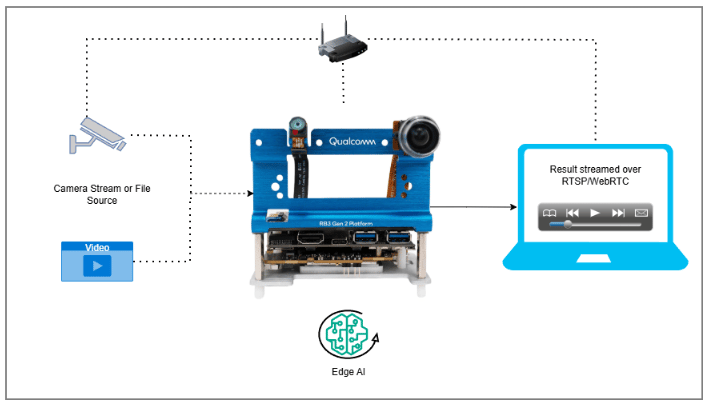
The pipeline accepts continuous video input from multiple source types — RTSP streams, ISP camera feeds, USB cameras, and file-based video.
2
Person Detection
Each frame is submitted to a person detection model that identifies individuals and their locations within the scene.
3
PPE Detection
For each detected person, a dedicated PPE detection model analyzes the dynamically cropped region to identify the presence or absence of safety equipment — including helmets, vests, gloves, and masks.
4
Metadata Generation
Detection results are attached to the video stream as hierarchically structured metadata, explicitly linking each PPE detection to its corresponding individual.
5
Visualization
Bounding boxes and labels are rendered directly onto video frames in real time using hardware-accelerated overlay, providing intuitive interpretation of detection results.
6
Metadata Synchronization
qtimetamux synchronizes all inference results with the original video frames, maintaining per-frame consistency throughout the pipeline.7
Output
The annotated stream is delivered via RTSP or WebRTC. Structured PPE compliance data is transmitted in parallel as a JSON metadata stream — enabling seamless integration with external monitoring, alerting, and analytics systems.
Pipeline diagram
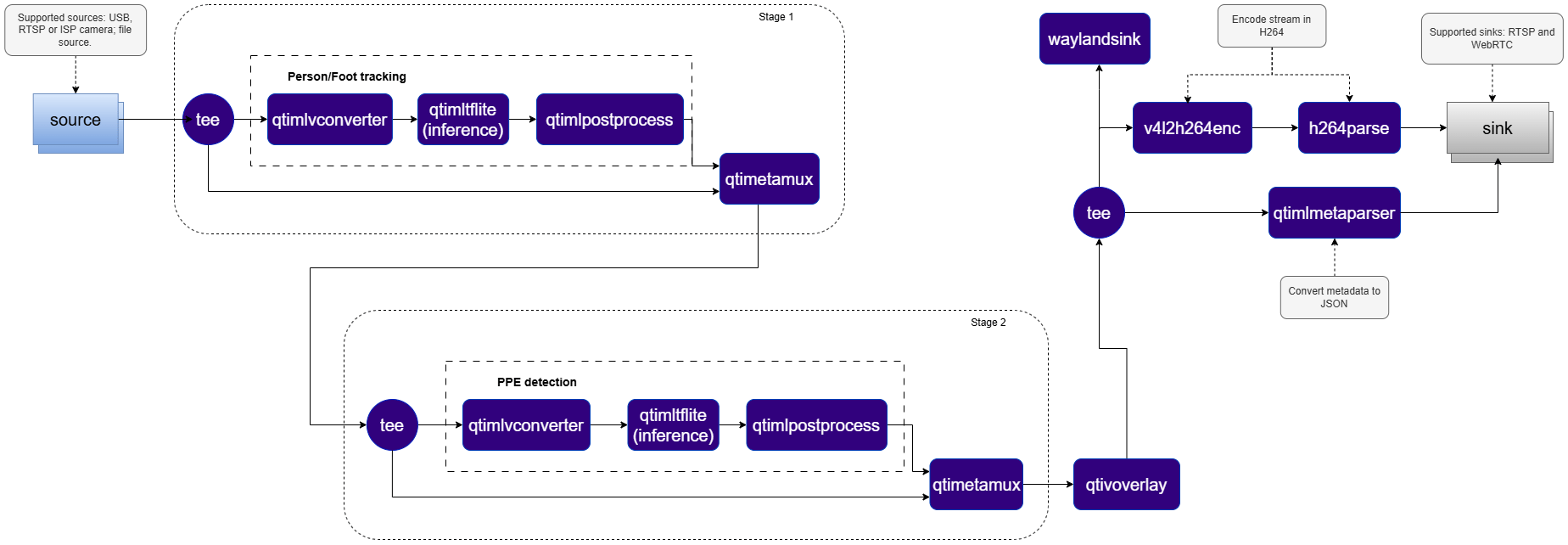
Elements used in pipeline
How it works
The PPE detection pipeline implements a two-stage daisy-chain architecture, where two sequential AI models operate in tandem — the output of the first model directly driving the execution of the second.- Stage 1 — Person Detection: The first AI model processes the full video frame and produces bounding boxes identifying the location of each individual in the scene.
- Crop Generation: Since the second PPE detection model requires image crops — not bounding boxes — as input, a second instance of
qtimlvconverteroperates in crop generation mode, receiving the bounding boxes produced by the first model and dynamically generating a cropped image region from the original frame for each detected person. - Stage 2 — PPE Detection: The PPE detection model is invoked once per detected person, analyzing each cropped region independently to identify the presence or absence of safety equipment — including helmets, vests, gloves, and masks.
- Metadata Re-attachment: A second
qtimetamuxinstance re-attaches the PPE detection results to the original video stream, ensuring all detections are synchronized with the corresponding frame and person. - Hierarchical Metadata: To preserve logical relationships across both model stages, the pipeline employs a hierarchical metadata model based on unique IDs and parent IDs — explicitly linking each PPE detection to its corresponding individual, enabling accurate per-person visualization, tracking, and downstream analytics.
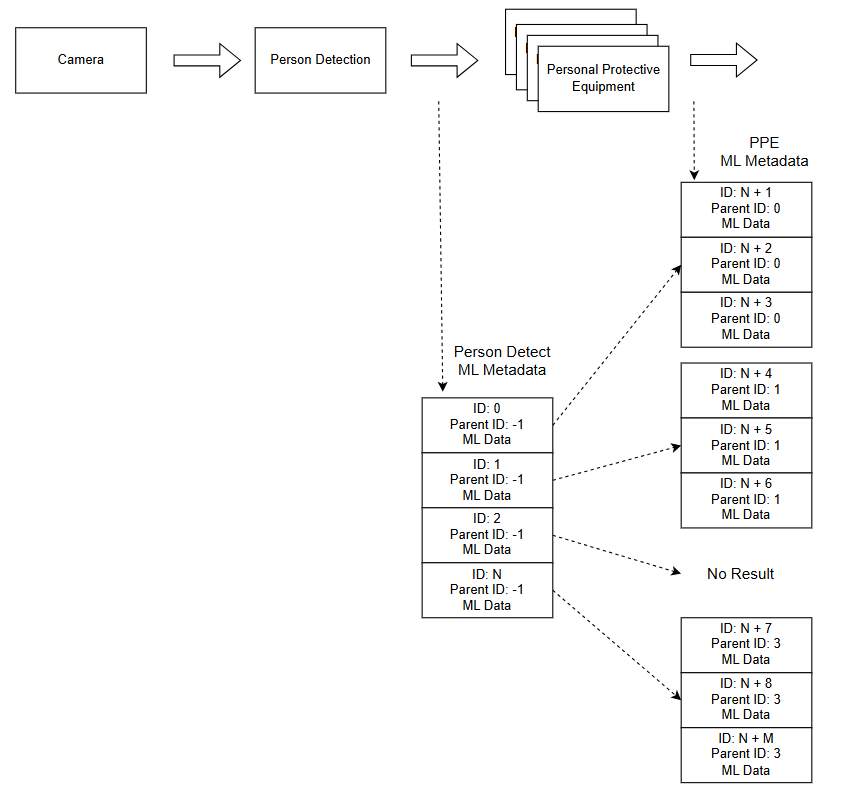
Run application on device
Setup Requirements
Hardware
Software
Flash your Qualcomm Edge device by following the device setup and flashing instructions here Once your device is ready, follow the instructions below to set up the PPE AI Pipeline:AI Model and config files
Copy files to device
Note: A display must be connected to the device. If no display is available, use the --no-display flag to run in headless mode.
Use the following base path for model and label files based on your OS:
RTSP
RTSP
WebRTC
WebRTC
Display only
Display only
Note: This example uses an offline video file as input. To use an IP/RTSP camera or USB camera instead, update the --input-type argument accordingly — refer to the Command-Line Options section below for details.
It produces two key output results: an AI-annotated video stream and a JSON metadata stream. To visualize these results, refer to the Host-Side Visualization section below. To configure alternative input sources or output destinations, refer to the Command-Line Options section.
Visualize the Results - Host-Side Visualization (Windows + WSL)
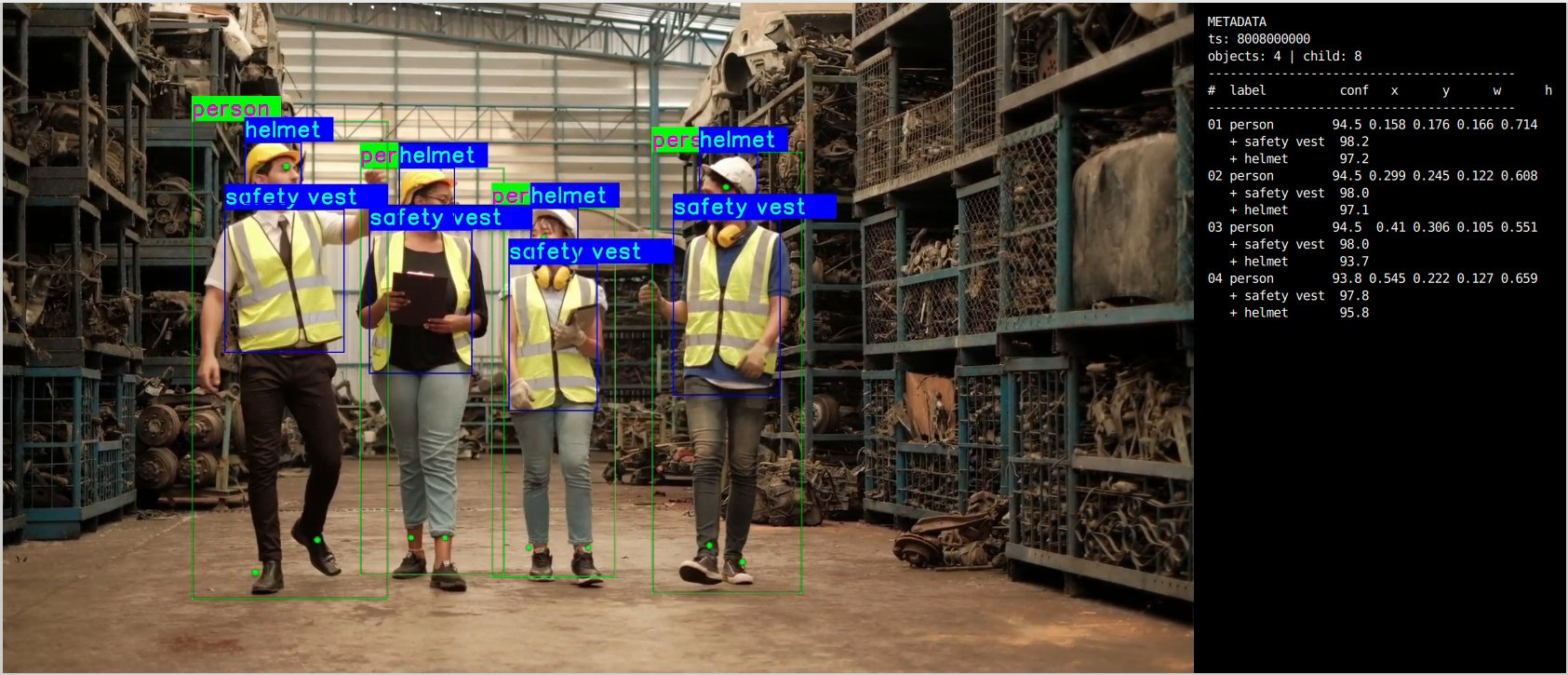
This section describes how to run the visualization client on a Windows host machine using WSL (Windows Subsystem for Linux). The client renders the live video stream alongside a real-time AI metadata panel. 📥 The visualization client script can be downloaded here: rtsp_webrtc_client.py It displays:- Left panel — Live video stream. (Output Video stream with AI overlays)
- Right panel — Real-time AI metadata (JSON): object detections, bounding boxes, and confidence scores.
RTSP
RTSP
WebRTC
WebRTC
After following the steps, the video and metadata streams should be up and running.
Command-Line Options
--input-type
--input-type
Selects the video input source for the pipeline.
--input-config
--input-config
Specifies the input source configuration corresponding to the selected
--input-type.--output-type
--output-type
Defines how the processed output video stream is delivered.
--output-config
--output-config
Specifies the output destination configuration corresponding to the selected
--output-type.--model-base-path
--model-base-path
Root directory where the application looks for AI model, label, and configuration files. Assets are resolved automatically:
--no-display
--no-display
Disables local on-screen rendering of the output video stream. Recommended for:
- Headless deployments
- Remote streaming setups (RTSP/WebRTC)
- Performance optimization where display overhead is undesirable
--width / --height / --framerate
--width / --height / --framerate
Sets the raw input video resolution and frame rate. Applicable only to ISP and USB inputs.
--webrtc-id
--webrtc-id
Specifies the local WebRTC signaling client ID used for peer connection setup with the signaling server.
Implementation Deep-Dive
1. Application Configuration and Runtime Context
1. Application Configuration and Runtime Context
The application cleanly separates user configuration from runtime state — organizing command-line parameters, GStreamer objects, dynamic pad tracking, WebRTC signaling, and shutdown handling into predictable, well-defined locations.
2. Pipeline Assembly
2. Pipeline Assembly
The pipeline is composed of three branches: common input, common output, and application-specific processing. Construction order is deliberate — input first, output second, processing last.
3. Two-Stage Inference Element Creation
3. Two-Stage Inference Element Creation
Dedicated
qtimlvconverter, qtimltflite, qtimlpostprocess, and qtimetamux elements are allocated for each inference stage.4. ROI Batching and Accelerated Inference Configuration
4. ROI Batching and Accelerated Inference Configuration
Stage 2 uses cumulative ROI batching. Both models execute via the QNN external delegate. Each post-processing stage is configured with dedicated labels and settings.
5. Linking Stage 1 into Stage 2
5. Linking Stage 1 into Stage 2
Stage 1 attaches person detection metadata to the stream; Stage 2 consumes the resulting ROIs, runs PPE inference, overlays results, and forwards the annotated stream to the output branch.
6. Metadata over RTSP / WebRTC
6. Metadata over RTSP / WebRTC
Metadata is handled through a dedicated branch and optionally exported.WebRTC metadata callback:Key WebRTC signaling callbacks:
- RTSP — metadata linked via sink pad on
qtirtspbin - WebRTC — metadata sent via a dedicated data channel
Build the Application
- Source code: gst-ppe-detection
- Build instructions: Steps to build custom application