

IQ-9075-EVKIQ-8275-EVKStable
4
Cameras (IQ-9075-EVK)
3
Cameras (IQ-8275-EVK)
1
IFE Hardware Used
SFE
Bus Fetch Engine
Platform Scope:
This feature is applicable for IQ-9075-EVK and IQ-8275-EVK only.
Both platforms have two IFEs that natively support real-time de-bayering of bayer camera images.
This feature is applicable for IQ-9075-EVK and IQ-8275-EVK only.
Both platforms have two IFEs that natively support real-time de-bayering of bayer camera images.
01 · What Is It?
The Offline IFE feature allows a single IFE hardware instance to process bayer images from multiple cameras by running in offline mode. Instead of real-time de-bayering, frames are first stored in DDR via IFE-Lite’s RDI port, then fetched by the IFE using the SFE Lite bus engine for bayer-to-YUV conversion.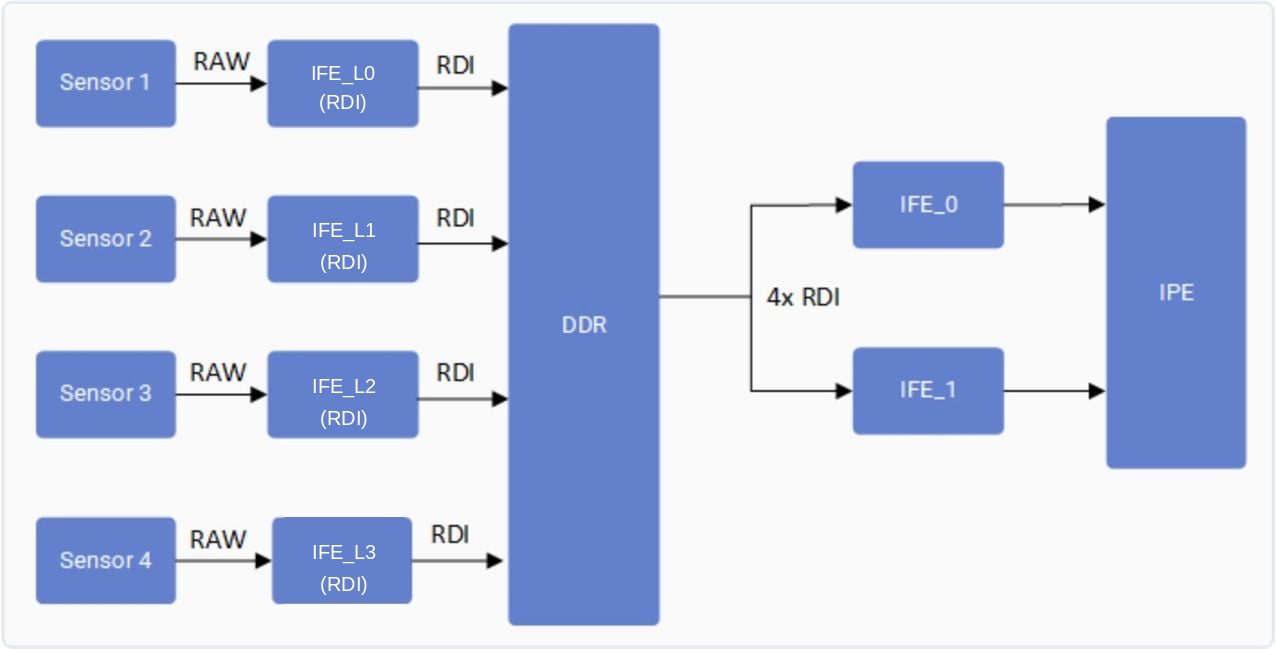
02 · What Does It Control?
Controls how many concurrent bayer cameras can stream simultaneously by reusing a single IFE in offline mode rather than requiring dedicated IFE instances per camera.03 · Feature Validation
Connect to the device console using SSH. See How To SSH? for instructions.
Platform Reference Configurations
Ensure you have connected one of the following camera configurations:- IQ-9075-EVK: Four OV9282 MIPI cameras connected to four MIPI CSI slots (0, 1, 2, and 3).
- IQ-8275-EVK: Three OV9282 MIPI cameras connected to three MIPI CSI slots (0, 1, and 2).
IQ-9075-EVK Config
IQ-8275-EVK Config
1
Collect user log
Collect User Log
2
Collect kernel log
Collect Kernel Log
3
Run GStreamer pipeline with multicamera-hint=true
Run the following for each camera (change
camera=0 to 1, 2, 3 accordingly):GStreamer Pipeline
4
Verify log output
After running the pipeline, confirm the feature is active by checking these exact log entries:User log — CamX pipeline status:Kernel log — IFE acquisition confirmation:
User Log Trace
Kernel Log Trace