

IQ-9075-EVKIQ-8275-EVKGPU Accelerated

GPU

Processing Engine

NV12_Q08C

Input Format

MCTF

Noise Reduction
Platform Scope:
SW TNR / MCTF is enabled only for IQ-9075-EVK and IQ-8275-EVK.

01 · What Is It?

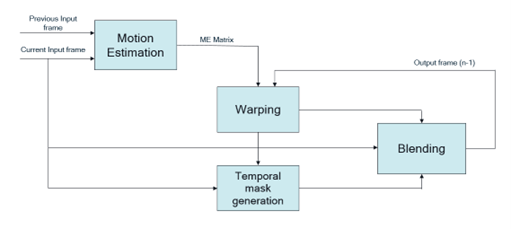
Motion Compensated Temporal Filtering - a software-based video quality filter that reduces noise across frames — runs on the GPU where IPE hardware MCTF is unavailable. MCTF improves preview and video quality by reducing temporal noise and enhancing motion clarity. The SW implementation runs on the GPU, performing inter-frame blending in static regions and applying global motion compensation transforms.
02 · What It Controls

SW MCTF Workflow Pipeline:
Current Frame  →  ME Matrix  →  Warp (prev frame)  →  Alpha Mask  →  Blend  →  Output Frame
Previous Output →  Noise Calc  →  Blend Input  ↗
StageWhat it doesImpact if skipped
Motion Estimation (ME)Calculates transform matrix between current and previous frameNo motion compensation → ghosting artifacts
WarpWarps previous output frame using ME matrixMisaligned blend → smearing
Alpha MaskClassifies background vs. local motion regionsStatic noise not reduced, moving areas over-blended
BlendMerges current + previous frames using alpha mask + noise estimateTemporal noise visible in output video

For high-motion scenarios (robotics, automotive), reducing MCTF blend strength prevents temporal ghosting on fast-moving objects.

03 · Validation

Connect to the device console using SSH. See How To SSH? for instructions.
1

Collect user log

Monitor the CamX core configuration status in real-time.
Log Collection
# On device console
journalctl -f > /opt/user_log.txt
2

Collect kernel log

Capture ISP hardware manager events and acquisition info.
Kernel Logging
dmesg -w > /opt/kernel_log.txt
3

Run GStreamer pipeline with sw-tnr=true

Execute the pipeline using the NV12_Q08C format and enable the software TNR flag.
GStreamer (SW MCTF Enablement)
gst-launch-1.0 -e qtiqmmfsrc name=camsrc video_0::type=preview sw-tnr=true ! \
video/x-raw,format=NV12_Q08C,width=1280,height=720,framerate=30/1 ! \
v4l2h264enc capture-io-mode=4 output-io-mode=5 \
extra-controls="controls,video_bitrate=6000000,video_bitrate_mode=0;" ! \
h264parse ! mp4mux ! filesink location=/opt/cam_prev.mp4
4

Verify log output

Confirm the feature is active by checking these exact log entries in the user log:CamX pipeline status:
User Log Verification
CamX: [CORE_CFG] 3509 3556 [CORE] camxpipeline.h:4222 SetPipelineStatus()
RealTimeFeatureZSLPreviewRawSWMCTF_0_cam_0 status is now PipelineStatus::STREAM_ON
MCTF library initialization:
User Log Verification
CamX: [ INFO] 3509 3556 [CHI ] camxchimoduleswmctf.cpp:328 Initialize()
libmctf Version: 1.0.0
STREAM_ON confirms the CamX pipeline is live with MCTF enabled. The libmctf Version string confirms the software library is initialized on the GPU.

🛠️ Troubleshooting / Known Issues — SW TNR/MCTF

Issue / ObservationDetails / Notes
Ghosting artifacts on fast-moving objectsHigh-motion scenarios (robotics, automotive) can cause temporal ghosting — reduce MCTF blend strength to mitigate
STREAM_ON status not seen in user logCamX pipeline may not be live with MCTF enabled — verify log entry: SetPipelineStatus() ... status is now PipelineStatus::STREAM_ON
libmctf library not initializedIf libmctf Version: 1.0.0 is absent from user log, the SW MCTF library failed to initialize on the GPU — check camxchimoduleswmctf.cpp:328 Initialize()