

IQ-9075-EVKIQ-8275-EVK
4
Sensors per CSI
VC/DT
Multiplexing
RDI
Independent Ports
GMSL
Interface
Platform Scope:
This section is applicable for IQ-9075-EVK and IQ-8275-EVK.
This section is applicable for IQ-9075-EVK and IQ-8275-EVK.
01 · What Is It?
Per Port Grouping enables the connection of up to 4 GMSL sensors through a single deserializer to a shared CSI interface and IFE-Lite instance. Each sensor utilizes a unique Virtual Channel (VC) to transmit image streams. The hardware then routes these streams to individual RDI ports (4 available in IFE-Lite) via VC/DT mapping.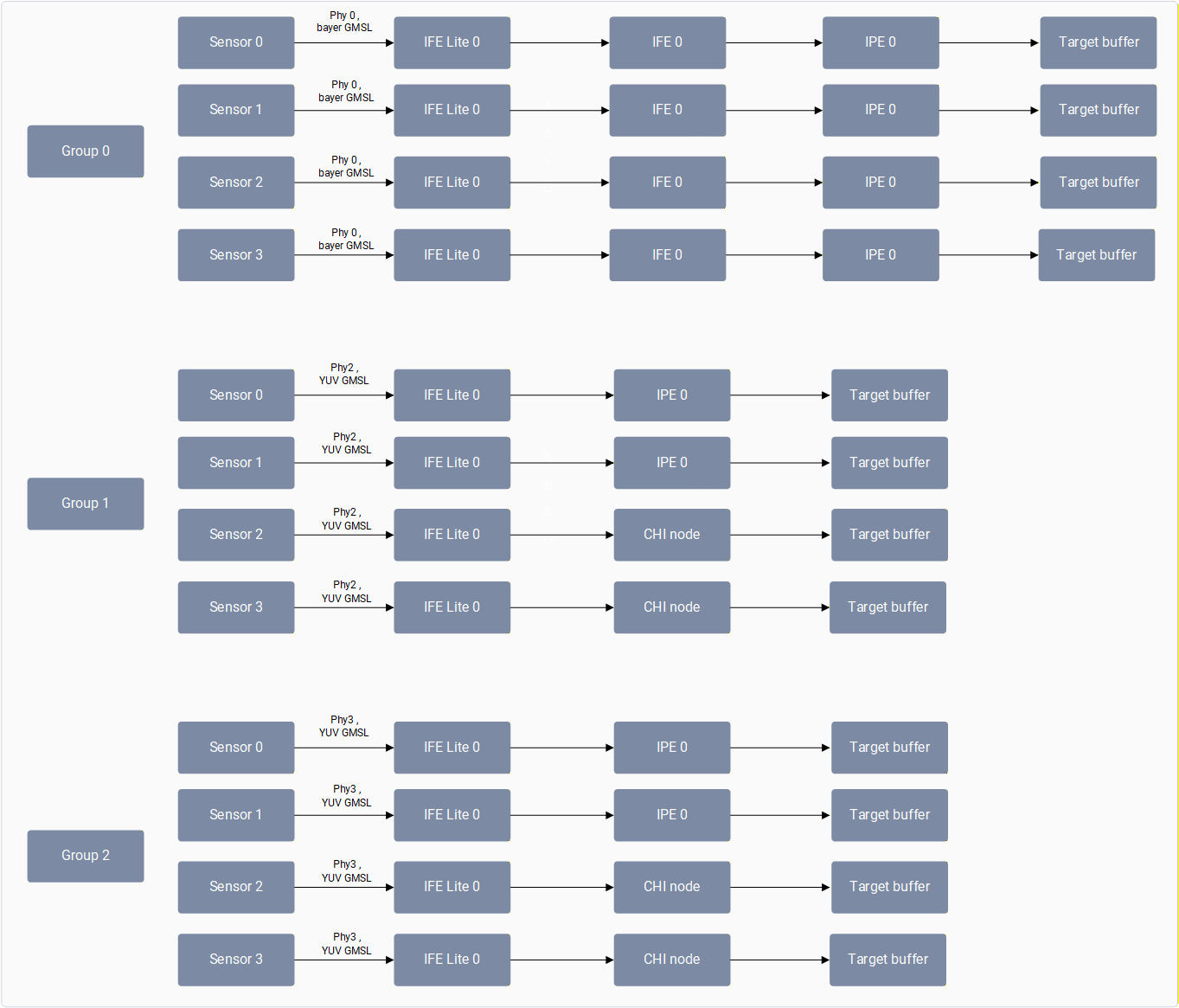
02 · How Does It Work?
As part of boot up, the camera software sends camera group information to the application through a vendor tag (org.codeaurora.qcamera3.AvailableISPGroupsInfoTag). The application then sends additional information for all the cameras it’s going to open in that use case via EnabledISPGroupsConfigTag.
Implementation Logic
- Kernel Management: The kernel space manages different sensors connected to same CSI by mapping the virtual RDI with hardware ports of the same IFE-Lite using port sharing information.
- Configuration: All RDI ports need to be configured before enabling streaming on any port.
- Concurrency: As long as the group configuration isn’t changed, the application can start any camera mentioned in that group at any time and stop at any time.
03 · Hardware Topology
In both IQ-9075-EVK and IQ-8275-EVK architectures, each GMSL deserializer port supports multiplexing up to four cameras into a single CSI group.04 · Validation
- IQ-9075-EVK
- IQ-8275-EVK
Currently on IQ-9075-EVK, the following GMSL concurrency is supported using the gst-camera-per-port-example application, which runs cameras with the per port group feature.To run an eight 3F10 YUV GMSL camera concurrency use case using the gst-camera-per-port-example:To stop camera streaming, select (q). The following logs are shown while exiting the application:
The four YUV GMSL concurrency use case is supported on GMSL Port 2 and Port 3. Four bayer GMSL and eight YUV GMSL camera concurrency is not supported in this release.
1
Connect hardware
Connect four 3F10 YUV GMSLs to Port-2 and four 3F10 YUV GMSLs to Port-3.
2
Run application
Run the gst-camera-per-port-example application.
Application Launch
3
Enter camera IDs
Enter the camera ID’s you want to open (space separated):
0 1 2 3 4 5 6 74
Configure stream details
Enter the following details for all eight cameras:
- Number of streams for camera 0: 1
- Width for stream 1 of camera 0: 1920
- Height for stream 1 of camera 0: 1536
- Framerate for stream 1 of camera 0: 30
- Number of streams for camera 1: 1
- Width for stream 1 of camera 1: 1920
- Height for stream 1 of camera 1: 1536
- Framerate for stream 1 of camera 1: 30
5
Execute GST pipelines
Enter the GST camera pipeline command for all 8 cameras. Use different file names when saving the encoded file of each camera.Camera 0:Camera 1:
The GST command needs to be in a single line without any new line or ‘\’ characters.
GStreamer Pipeline
GStreamer Pipeline
6
Verify log output
Confirm pipelines are started successfully:
Terminal Output
Exit Logs