

The Qualcomm Dragonwing™ RB3 Gen 2 device comes preinstalled with GStreamer-based AI sample applications. Some of these applications support RTSP input (such as from IP cameras) and RTSP output that can be viewed on the host computer.

Run the multistream inference sample application

The gst-ai-multistream-inference application demonstrates AI inference (object detection and classification) on up to 8 combined input streams from a camera, file, or RTSP source. The output can be displayed on an HDMI display, saved as an H.264-encoded MP4 file, or streamed as RTSP output.
  1. Download the YoloX and InceptionV3 quantized models from Qualcomm AI Hub and copy them to the device.
  2. Copy the models and input video files to the device from your host computer terminal:
    scp -P 2222 -o StrictHostKeychecking=no -o UserKnownHostsFile=/dev/null <model file path> root@localhost:/etc/models/
    
    scp -P 2222 -o StrictHostKeychecking=no -o UserKnownHostsFile=/dev/null <video file path> root@localhost:/etc/media/
    
  3. On the QDC device shell, download and extract the labels file:
    wget https://github.com/quic/sample-apps-for-qualcomm-linux/releases/download/labels/labels.zip
    unzip -d /etc/ labels.zip
    
  4. Create the /etc/xdg/weston directory on the device:
    mkdir /etc/xdg/weston
    
  5. Create or edit the /etc/xdg/weston/weston.ini file on the device:
    # configuration file for Weston
    [core]
    idle-time=0
    # backend=sdm-backend.so
    repaint-window=10
    gbm-format=xbgr8888
    require-outputs=none
    
    [output]
    name=DSI-1
    mode=on
    
    [output]
    name=DP-1
    mode=on
    
    [shell]
    clock-format=seconds
    
  6. Edit the /etc/configs/config-multistream-inference.json configuration file. For RTSP input and RTSP output:
    {
      "input-rtsp-path": [
        "rtsp://127.0.0.1:8901/live1.mkv"
      ],
      "model": "/etc/models/yolox_quantized.tflite",
      "labels": "/etc/labels/yolox.json",
      "output-display": 0,
      "output-ip-address": "127.0.0.1",
      "output-port-number": "8900",
      "use-case": 0
    }
    
    The input-rtsp-path field is a JSON array of RTSP input addresses. The output is streamed at rtsp://<output-ip-address>:<output-port-number>/live. For file input and file output:
    {
      "input-file-path": [
        "/etc/media/video1.mp4",
        "/etc/media/video2.mp4",
        "/etc/media/video3.mp4",
        "/etc/media/video4.mp4",
        "/etc/media/video5.mp4",
        "/etc/media/video6.mp4"
      ],
      "model": "/etc/models/yolox_quantized.tflite",
      "labels": "/etc/labels/yolox.json",
      "input-type": "h264",
      "output-display": 0,
      "output-file-path": "<output file path>",
      "use-case": 0
    }
    
    The input-file-path field is a JSON array of input file paths. The output is saved to the path specified in output-file-path.
  7. Run the sample application:
    gst-ai-multistream-inference
    
    For a full list of configuration options, run:
    gst-ai-multistream-inference -h
    
  8. View or copy the output:
    Copy the output file to your host machine:
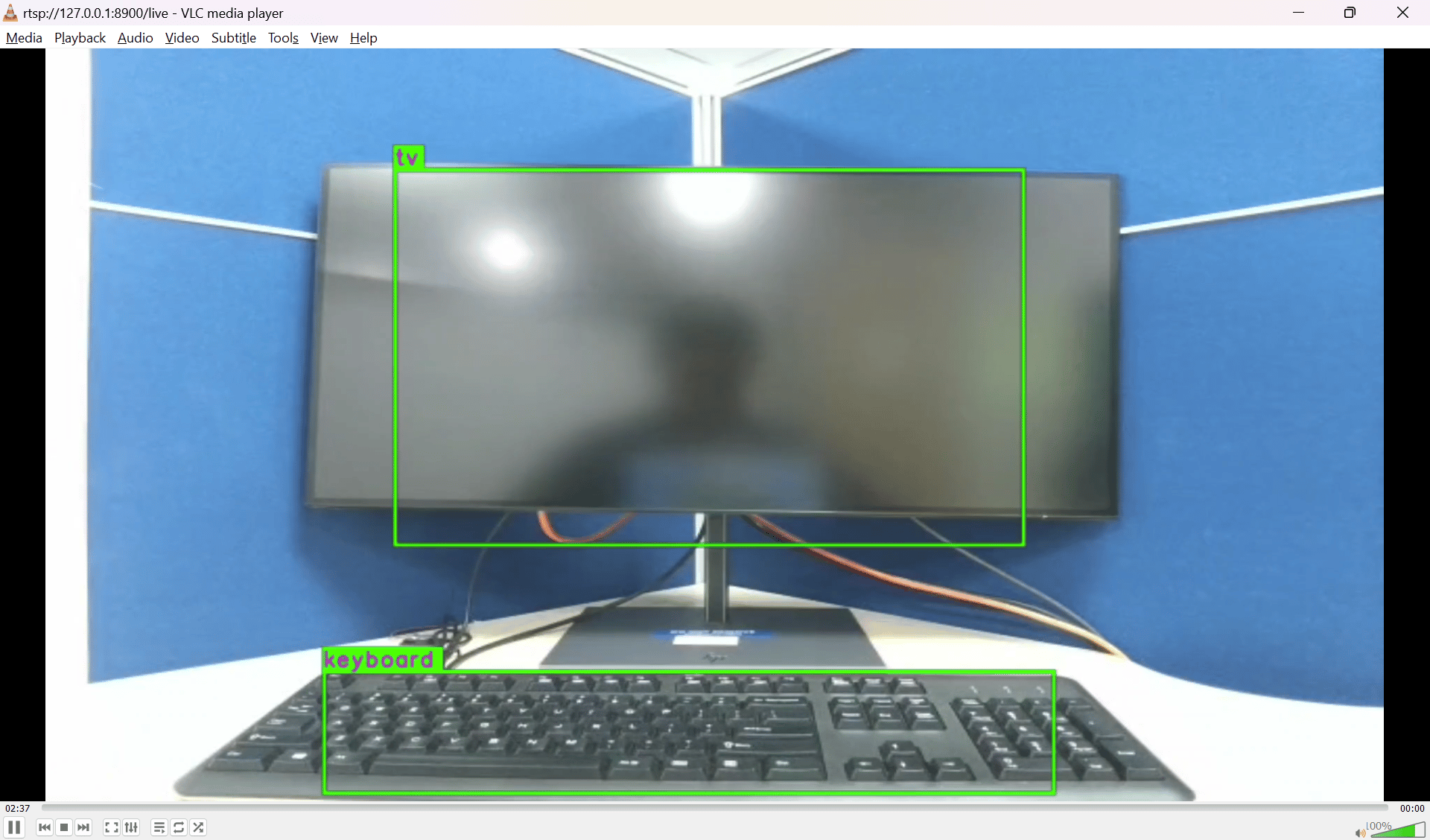
    scp -P 2222 -o StrictHostKeychecking=no -o UserKnownHostsFile=/dev/null root@localhost:<output file path> ./
    
For more information, see multistream inference.

Run the multi-input object detection sample application

The gst-ai-multi-input-output-object-detection application performs object detection on video streams from various sources such as a file or RTSP stream. The output can be displayed on an HDMI display, saved as an H.264-encoded MP4 file, or streamed as RTSP output.
  1. Generate the yolov5.tflite model and download the label files.
  2. Copy the model and input video files to the device:
    scp -P 2222 -o StrictHostKeychecking=no -o UserKnownHostsFile=/dev/null <model file path> root@localhost:/etc/models/
    
    scp -P 2222 -o StrictHostKeychecking=no -o UserKnownHostsFile=/dev/null <video file path> root@localhost:/etc/media/
    
  3. On the QDC device shell, download and extract the labels file:
    wget https://github.com/quic/sample-apps-for-qualcomm-linux/releases/download/labels/labels.zip
    unzip -d /etc/ labels.zip
    
  4. Unless already done, create the /etc/xdg/weston directory on the device:
    mkdir /etc/xdg/weston
    
  5. Unless already done, edit the /etc/xdg/weston/weston.ini file on the device:
    # configuration file for Weston
    [core]
    idle-time=0
    # backend=sdm-backend.so
    repaint-window=10
    gbm-format=xbgr8888
    require-outputs=none
    
    [output]
    name=DSI-1
    mode=on
    
    [output]
    name=DP-1
    mode=on
    
    [shell]
    clock-format=seconds
    
  6. Edit the /etc/configs/config-multi-input-output-object-detection.json configuration file. For file input and file output:
    {
      "input-file-path": [
        "/etc/media/video1.mp4",
        "/etc/media/video2.mp4"
      ],
      "model": "/etc/models/yolov5.tflite",
      "labels": "/etc/labels/yolov5.json",
      "output-file-path": "/etc/media/output.mp4"
    }
    
    For file input and RTSP output:
    {
      "input-file-path": [
        "/etc/media/video1.mp4",
        "/etc/media/video2.mp4"
      ],
      "model": "/etc/models/yolov5.tflite",
      "labels": "/etc/labels/yolov5.json",
      "output-ip-address": "10.92.176.104",
      "output-port-number": "8900"
    }
    
  7. Run the sample application:
    gst-ai-multi-input-output-object-detection --config-file=/etc/configs/config-multi-input-output-object-detection.json
    
  8. View or copy the output:
    Copy the output file to your host machine:
    scp -P 2222 -o StrictHostKeychecking=no -o UserKnownHostsFile=/dev/null root@localhost:<output file path> ./
    
For more information, see multi-input inferencing.