

Overview
Key Characteristics
- Bidirectional 2-wire serial bus (SDA + SCL)
- 7-bit or 10-bit target addressing
- Multi-controller mode support
Operating Modes
Communication Sequence
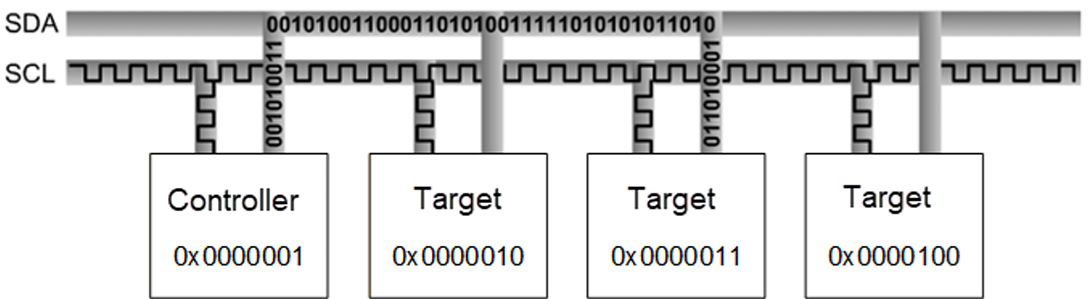
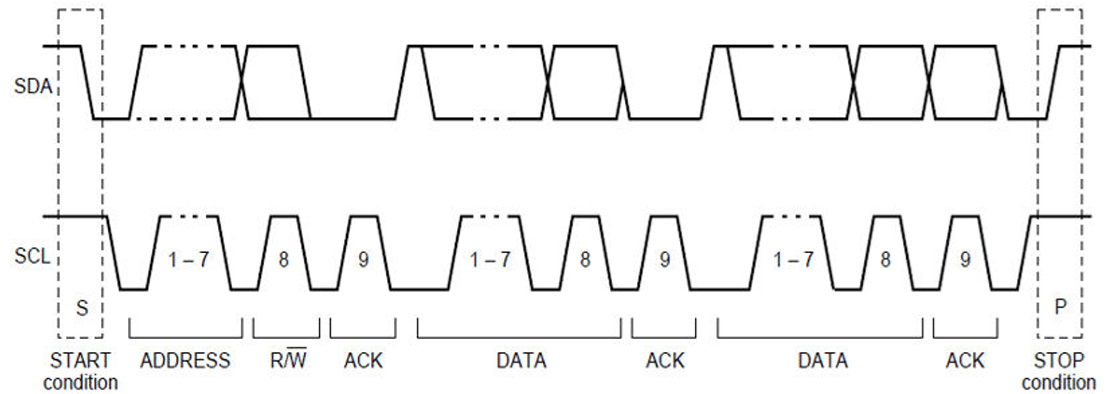
- SCL HIGH: SDA must remain stable
- SCL LOW: SDA may change
- Exception: START and STOP sequences may change SDA when SCL is HIGH
Transfer Modes by Subsystem
Interface Components
Device Tree Sources
APIs
Software Device Tree Configuration
Linux Device Tree Example
QUPAC Access Control
Ensure the correct protocol is set inQUPAC_Access.c:
Configuration Steps
1
Enable kernel configurations
Edit
kernel_platform/kernel/arch/arm64/configs/qcom_defconfig:2
Enable I2C node in device tree
3
Compile and flash
Compile the kernel and device tree changes, then load images to the device.
Verification
Check Device Nodes
Use i2c-tools
Debugging
Enable Debug Logs
Troubleshooting
I2C Device Not Detected
I2C Device Not Detected
I2C Transfer Timeout
I2C Transfer Timeout
Causes: No pull-up resistors, slave not responding, wrong clock frequency, bus stuck low.Add 4.7 kΩ pull-ups on SDA/SCL; adjust
clock-frequency in device tree.Invalid Protocol Error
Invalid Protocol Error
Symptom:
geni_i2c a94000.i2c: Invalid proto 1Verify QUPAC_Access.c sets QUPV3_PROTOCOL_I2C, AC_HLOS, bAllowFifo=TRUE, bLoad=TRUE.DMA Transfer Failures
DMA Transfer Failures
Verify
CONFIG_QCOM_GPI_DMA=m; check dmas and dma-names in device tree.To test without DMA: