

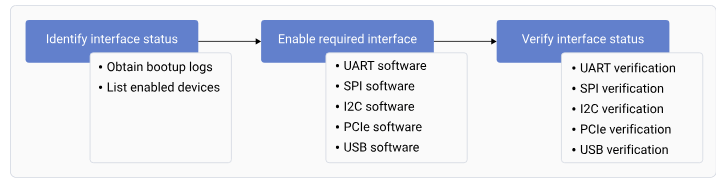
Figure : Interface workflow
Identify the interface status
The default interface status indicates the status of the interfaces during bootup. To identify the interface status, successfully register the interfaces and obtain the list of enabled interfaces.Obtain the bootup logs
To obtain the bootup logs of the device, do the following:- Open the SSH shell in permissive mode or use the ADB shell. For more information about how to run SSH, see the Use SSH section.
- Obtain the logs of the enabled interfaces by running the following command.
Output:
- Connect the UART serial port to log in to the console.
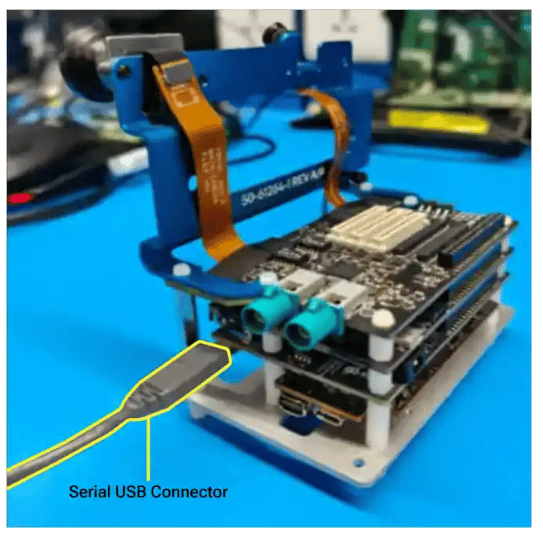
List enabled interfaces on devices
To obtain the list of the enabled interfaces, do the following:- For UART, run the following command.
Output:
- For I2C, run the following command.
The following output is displayed.
- By default, SPI isn’t enabled. To enable SPI, see SPI software device tree configuration. To verify if SPI is enabled, run the following command.
The following output is displayed.
- For PCIe, obtain the enumeration log. For more information about PCIe probe logs, see PCIe-related configurations and QPS615 switch support.
Load QUP v3 serial engine firmware using Linux kernel
This document explains the QUP v3 serial engine firmware loading mechanism using the Linux kernel. It describes the transition from a TrustZone-based architecture—which had fixed protocol assignments and limited flexibility—to a Linux-based approach that enables dynamic protocol assignment, easier debugging, and simplified development through device tree configuration. QUP v3 contains multiple serial engines that can be configured as follows:- I2C
- SPI
- UART
Default configuration
The default configuration for each serial engine, including the selected mode of data transmission and ownership, is in the_/TZ.XF.5.0/core.tz/2.0/settings/buses/qup\_accesscontrol/qupv3/config/lemans/QUPAC\_Access.c_ file.
In the default configuration, Linux owns all the serial engines.
Load firmware
The firmware files are at /lib/firmware/qcom/<target-name>/qupv3fw.elf.-
Identify available serial engines by checking the platform device tree for serial engine nodes. Serial engine names and numbering vary by platform. Use the node labels defined by the platform; for example:
NoteYou can choose the required protocol based on your interface requirements.
- I2C: Sensors, EEPROMs, PMICs
- SPI: Displays, flash memory, ADCs
- UART: Console, GPS, Bluetooth
-
Configure device tree by adding or modifying serial engine nodes to the device tree file.
- Sample I2C configuration:
- Sample SPI configuration:
- Sample UART configuration:
Optional: Enable GSI DMA for high-throughput devices.
- Sample I2C configuration:
-
Switch the serial engine protocol. For example, I2C to SPI.
-
Original I2C configuration:
-
New configuration (SPI)
Disable the original I2C node before enabling SPI because a serial engine can use only one protocol at a time.
NoteRebuild and deploy the software image with the updated device tree, then boot the device with the updated image. -
Original I2C configuration:
- Main patch series for driver implementation:
- https://lore.kernel.org/all/20250911043256.3523057-1-viken.dadhaniya@oss.qualcomm.com/
- Key changes: Firmware loading infrastructure, GSI DMA support, protocol initialization, error handling improvements
- Device tree bindings and examples:
- https://lore.kernel.org/all/20250923161107.3541698-1-viken.dadhaniya@oss.qualcomm.com/
- https://lore.kernel.org/all/20250925042605.1388951-1-viken.dadhaniya@oss.qualcomm.com/
- https://lore.kernel.org/all/20250924035409.3976652-1-viken.dadhaniya@oss.qualcomm.com/
- Includes: Device tree binding documentation, Platform-specific examples, migration guides
| Property | Type | Description | Required |
|---|---|---|---|
status | string | Enable/disable SE (okay/disabled) | Yes |
qcom,enable-gsi-dma | boolean | Enable GSI DMA mode | No |
clock-frequency | u32 | I2C clock frequency (Hz) | No |
spi-max-frequency | u32 | SPI max frequency (Hz) | No |
pinctrl-names | string array | Pin control state names | Recommended |
pinctrl-0 | phandle | Default pin configuration | Recommended |
- I2C
- Standard mode: 100 kHz
- Fast mode: 400 kHz
- Fast mode plus: 1 MHz
- SPI
- Low speed: 1–10 MHz
- Medium speed: 10–50 MHz
- High speed: 50–100 MHz
Data transfer modes
QUP v3 serial engines support two main data transfer modes: FIFO mode and GSI DMA mode. FIFO mode is the default and is best suited for small, frequent transfers with minimal configuration. Generic software interface (GSI) DMA mode leverages DMA channels for bulk data transfers with additional configuration. The table below summarizes the key features and conditions for each mode. Table : FIFO and GSI DMA mode features| Attribute | FIFO mode | GSI DMA mode |
|---|---|---|
| Data path | Uses internal FIFO buffers | Uses GSI DMA mode |
| Best for | Small, frequent transfers; simple device communication | Large or bulk transfers; high-throughput devices (touchscreen, display) |
| Overhead | Lower overhead | Higher setup overhead, but offloads CPU for large transfers |
| Configuration | Default mode; no special configuration needed | Requires qcom,enable-gsi-dma; property in device tree |
| DMA channel use | Not required | Requires available DMA channels; limited by platform |
| Performance | Lower throughput for large data; low latency | Higher throughput for large data; CPU efficient |
| When to use | When DMA channels are limited, or for low-latency/small transfers | For transfer size > 32 bytes, or for bulk/high-speed data |
| Limitations | Not optimal for large or high-speed transfers | Limited by number of DMA channels; not all SEs may support GSI DMA |
| Device tree example | Omit qcom,enable-gsi-dma; property | Add qcom,enable-gsi-dma; property |
| Debugging | Standard Linux debugging tools; kernel logs | Similar to FIFO, but also includes DMA allocation logs |
- I2C with GSI DMA mode
- SPI with GSI DMA mode
Use cases
-
Multiple serial engines with different protocols
-
Multiple QUP instances:
QUP instance names and serial engine assignments vary by platform. Refer to the platform device tree for the correct node labels.
-
Pin Multiplexing Ensure correct pin configuration:
-
Performance optimization
Table : Mode selection
Mode When to use GSI DMA mode ( qcom,enable-gsi-dma;)Transfer sizes > 32 bytes regularly, High-throughput devices (touchscreens, displays), Bulk data transfers, CPU efficiency is critical FIFO mode Small, frequent transfers, Low-latency requirements, Limited DMA channels available, Simple device communication
Troubleshooting
- Debug commands
- Kernel logs
- Device tree verification
| Issue | Symptoms | Solutions |
|---|---|---|
| Firmware loading failed |
|
|
| Serial engine not probing |
|
|
| Protocol conflict |
| Ensure that only one protocol is enabled for each serial engine. |
| DMA allocation failed |
|
|
| Pin multiplexing conflict |
|
|
Enable required interfaces
To enable an interface, do the following:- For UART, see the UART software device tree configuration section.
- For SPI, see the SPI software device tree configuration section.
- For I2C, see the I2C software device tree configuration section.
- For PCIe, see the PCIe software driver configuration section.
- For USB, see the Configure USB boot loader section.
Verify interface status
To verify the functioning of the different interfaces, do the following:- For UART, see the Verify UART interface section.
- For SPI, see the SPI verification section.
- For I2C, see the Verify I2C interface section.
-
For PCIe, verify the connected endpoint with the following command.
The following output is displayed.NoteThe output may vary depending on the underlying hardware.
-
For USB, load the USB firmware to detect the device connection, and verify the device and host as follows:
- Device: Connect the USB Type-C port and verify the enumerated log with the host PC.
The following output is displayed.
- Host: Connect a USB device such as a mouse, or a pen drive, and verify device detection with the following command.
The following output is displayed.
- Device: Connect the USB Type-C port and verify the enumerated log with the host PC.