

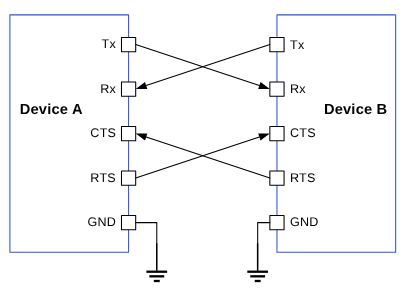
Figure : Data transfer between two UART devices
The parameters that determine successful transmission are as follows:- Baud rate
- Start bit
- Stop bit
- Parity bit
- Data bits
- Flow control
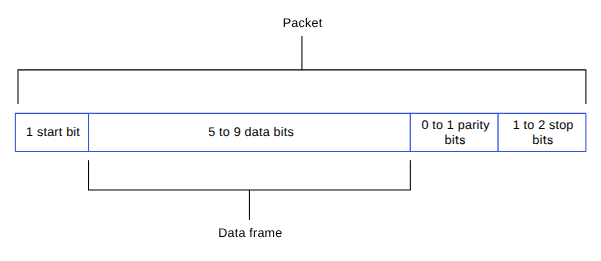
Figure : UART data packet
UART features
The following table describes the UART transfer modes for applications.Table : UART transfer modes
| Subsystem | Transfer mode | Description |
|---|---|---|
| Linux |
|
|
| Boot | FIFO |
|
| ADSP | FIFO |
|
UART interface components
The following table provides the paths of UART driver configurations for the different subsystems.NoteFor paths on this page, replace <chipset> with the firmware directory for your platform: sc7280 (QCS6490 and QCS5430), sa8775p (Dragonwing IQ-9075), or qcs615 (Dragonwing IQ-615).
| File type | Description |
|---|---|
| Device tree source |
|
| Pinctrl settings |
|
| Qualcomm TEE settings |
|
| File type | Description |
|---|---|
| QUP v3 serial engine configuration |
|
| Qualcomm TEE settings |
|
| File type | Description |
|---|---|
| QUP v3 serial engine configuration |
|
| Firmware configuration settings |
|
UART APIs
UART APIs for the following subsystems are listed in this section.- Linux: https://github.com/torvalds/linux/blob/master/include/linux/tty.h
- Boot: QcomPkg/Include/HSUart.h
- ADSP: adsp_proc/core/api/buses/uart.h
UART software device tree configuration
This section provides information on the UART device tree configuration, and documentation for the device nodes.Linux
For information about Kernel device instances, see https://github.com/torvalds/linux/blob/master/Documentation/devicetree/bindings/serial/qcom%2Cserial-geni-qcom.yaml. For information about the UART driver files, see https://github.com/torvalds/linux/blob/master/drivers/tty/serial/qcom_geni_serial.c- QCS6490 and QCS5430: https://github.com/torvalds/linux/blob/master/arch/arm64/boot/dts/qcom/kodiak.dtsi
- Dragonwing IQ-9075: https://github.com/torvalds/linux/blob/master/arch/arm64/boot/dts/qcom/lemans.dtsi
- Dragonwing IQ-615: https://github.com/torvalds/linux/blob/master/arch/arm64/boot/dts/qcom/talos.dtsi
NoteThe Qualcomm TEE configurations must be aligned in the
QUPAC_Access.c file to ensure that the GPIO/QUP v3 can be used. You can access the Qualcomm TEE images at /firmware/qualcomm-linux-spf-1-0_ap_standard_oem_nomodem/TZ.XF.5.0/trustzone_images/core/settings/buses/qup_accesscontrol/qupv3/config/<chipset>/QUPAC_Access.c. Modify the required settings or see the default settings assigned for particular instances of the QUP v3 serial engine.- Default configuration enabled for SE7 as HS UART
- 2-wire UART configuration for SE5
Boot
The QUP v3 serial engine can be configured to UART in boot using the/firmware/qualcomm-linux-spf-1-0_ap_standard_oem_nomodem/BOOT.MXF.1.0.c1/boot_images/boot/QcomPkg/SocPkg/<chipset>/Settings/UART/UartSettings.c file.
| Bits | Parameters |
|---|---|
| [0:3] | GPIO function |
| [4:13] | GPIO number |
| [14] | Direction |
| [15:17] | Pull type |
| [18:21] | Drive strength |
ADSP
The firmware loads SSC QUP during the bootup sequence of the ADSP subsystem. Hence, the configuration file is present in the ADSP build at/firmware/qualcomm-linux-spf-1-0_ap_standard_oem_nomodem/ADSP.HT.5.5.c8/adsp_proc/core/settings/buses/qup_fw/config/<chipset>/fw_devcfg.c.
The following configuration is a sample of SSC QUP SE5/6 loaded with the UART firmware in the FIFO mode.
/firmware/qualcomm-linux-spf-1-0_ap_standard_oem_nomodem/ADSP.HT.5.5.c8/adsp_proc/core/settings/buses/qup_common/config/<chipset>/adsp/ssc/qup_instance_mapping.c.
The default GPIO configuration can be overwritten as follows.
UART tools
This section provides information on various test tools and methods for the UART serial interface driver to confirm the UART data transfers.Linux
For more details, see https://docs.kernel.org/admin-guide/serial-console.html.Enable UART in kernel
This section provides information on how to enable UART in the kernel.Linux
The following driver kernel configurations are required to support the UART interface.- UART driver: https://github.com/torvalds/linux/blob/master/drivers/tty/serial/qcom_geni_serial.c
- Kernel
defconfigfile path:<workspace_path_of_LINUX_kernel_image>/sources/kernel/kernel_platform/kernel/arch/arm64/configs/qcom_defconfig
CONFIG_QCOM_GENI_SE=yCONFIG_SERIAL_QCOM_GENI=y
/arch/arm64/boot/dts/qcom/<chipset>.dtsi file.
NoteYou should compile the kernel configuration and device tree changes. After compilation, you can load the images to the device to verify the interface. For information about interface verification, see the Verify UART interface section.
Boot/ADSP
For customizations, see the UART software device tree configuration section.UART customization
For information about customizing UART software, see QUP v3 access control customization.Verify UART interface
This section describes the validation procedure for the UART drivers, and the test results for the Qualcomm drivers.Linux
To enable the UART nodes, do the following and compile the kernel configuration.-
To change the UART status to OK and aliases to the specific UART node, edit the following DTSI files.
- QCS6490 and QCS5430: https://github.com/torvalds/linux/blob/master/arch/arm64/boot/dts/qcom/kodiak.dtsi
- Dragonwing IQ-9075: https://github.com/torvalds/linux/blob/master/arch/arm64/boot/dts/qcom/lemans.dtsi
- Dragonwing IQ-615: https://github.com/torvalds/linux/blob/master/arch/arm64/boot/dts/qcom/talos.dtsi
NoteEnable the SSH shell or use the ADB shell to run the commands and display the output in the SSH shell (console) window. For more information about how to run SSH, see the Use SSH section. -
Disable the
ifcondition in theqcom_geni_serial.cat https://github.com/torvalds/linux/blob/master/drivers/tty/serial/qcom_geni_serial.c file for the loopback test.
- Disable the UART default use case in the following DTSI files.
- QCS6490 and QCS5430: https://github.com/torvalds/linux/blob/master/arch/arm64/boot/dts/qcom/kodiak.dtsi
- Dragonwing IQ-9075: https://github.com/torvalds/linux/blob/master/arch/arm64/boot/dts/qcom/lemans.dtsi
- Dragonwing IQ-615: https://github.com/torvalds/linux/blob/master/arch/arm64/boot/dts/qcom/talos.dtsi
The following output is displayed. - To verify the UART driver, do the following:
- Open the SSH shell in permissive mode or use the ADB shell.
- Register the UART.
The following is a sample output.Map the
ttyHS1port according to the aliases added for theserial1 = &uart7and enable the serial engine.
NoteOpen two SSH shells or use the ADB shell to write and read the data for the UART loopback. For more information about how to run SSH, see the Use SSH section.
- Open the SSH shell in permissive mode or use the ADB shell.
- Transfer data with the
echocommand. - Read data in the UART device node.
Debug UART issues
This section provides information about enabling the debug logs in the UART software driver.Linux
UART driver logging is enabled through the dynamic debugging method. EnableCONFIG_DYNAMIC_DEBUG in <workspace_path_of_LINUX_kernel_image>/sources/kernel/kernel_platform/kernel/arch/arm64/configs/qcom_defconfig to support the dynamic debugging for kernel drivers.
To enable and view the UART driver logs in the kernel logs (dmesg), run the following command.
UART examples
For information about the upstream device tree reference, see the following DTSI files.- QCS6490 and QCS5430: https://github.com/torvalds/linux/blob/master/arch/arm64/boot/dts/qcom/kodiak.dtsi
- Dragonwing IQ-9075: https://github.com/torvalds/linux/blob/master/arch/arm64/boot/dts/qcom/lemans.dtsi
- Dragonwing IQ-615: https://github.com/torvalds/linux/blob/master/arch/arm64/boot/dts/qcom/talos.dtsi
- QCS6490 and QCS5430: https://github.com/torvalds/linux/blob/master/arch/arm64/boot/dts/qcom/qcs6490-rb3gen2.dts
- Dragonwing IQ-9075: https://github.com/torvalds/linux/blob/master/arch/arm64/boot/dts/qcom/lemans.dtsi
- Dragonwing IQ-615: https://github.com/torvalds/linux/blob/master/arch/arm64/boot/dts/qcom/talos.dtsi