

- CQ2390
- IQ2390
For supported interfaces and capabilities, see CQ2390 display specifications.
Set up the DSI display
The display subsystem uses the Weston Wayland compositor andlibdrm to interact with the DPU driver and render Wayland client applications. On the CQ2390 evaluation kit (EVK), connect the DSI panel to the display daughtercard before powering on the board.
Figure: CQ2390 DSI display setup workflow
- CQ2390 EVK with the capacitive touch panel (CTP) display daughtercard installed
- DSI panel and a compatible cable for the daughtercard’s 50-pin flexible printed circuit (FPC) connector
- The EVK power supply
- A Qualcomm Linux image for the CQ2390 EVK installed on the device
Connect and verify the DSI display
- Power off the EVK and disconnect its power supply before connecting the panel or changing the dual inline package (DIP) switches.
-
Verify that the display routing switches are in their default positions for the CTP display daughtercard.
Table: Default CQ2390 display switch states
-
Check that the display daughtercard is seated on the EVK’s B2B connector. Connect the DSI panel cable to the daughtercard’s 50-pin FPC connector and check that the cable is fully seated. The following figure shows the panel beside the EVK board, with the display card highlighted:
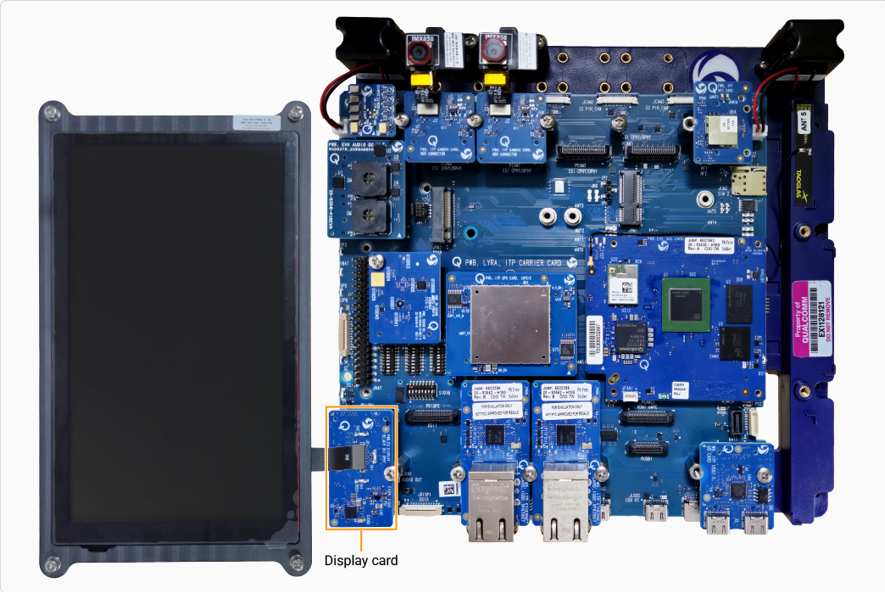
Figure: CQ2390 DSI panel setup
- Connect the EVK power supply and power on the board. Weston launches automatically during boot.
-
Verify the display.
The following Weston flower pattern displays on the DSI panel, indicating successful setup.

Figure: Weston flower pattern
If you are experiencing a no-display issue, see Debug the CQ2390 DSI display.
Verify the display functionality
After you have set up the display, run the following test applications to verify the display functionality. Use the expected mode from the CQ2390 display specifications.Run Weston simple EGL
Verify composition and rendering of frames on your display.
Run DRM modetest
Verify the display driver topology and DPU paths.