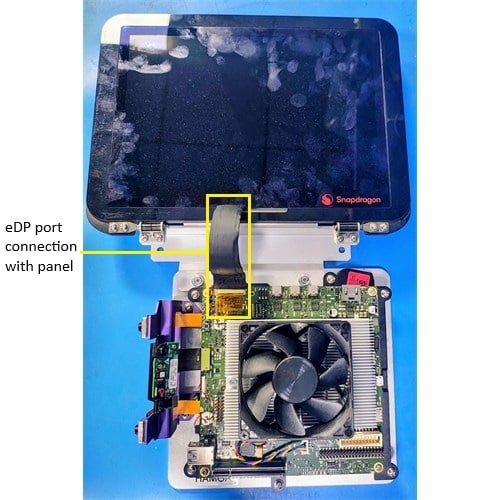
The eDP panel connects to the IQ-X7181 evaluation kit (EVK) through a standard eDP cable. The panel is powered directly through the eDP connector — no additional power supply is required.
Always power OFF the IQ-X7181 EVK before making any connections.
Verify the eDP display setup
Locate the eDP connector on the board as shown in the following figure.
Figure: IQ-X7181 eDP connector
Connect one end of the eDP cable to the eDP connector on the board.
Connect the other end to the Sharp LQ133T1JW02 panel. Ensure the cable is firmly seated on both ends.
Power on the device. Weston launches automatically during boot.
Verify the display.The following Weston flower pattern displays on the eDP panel, indicating a successful setup.
After you have set up the eDP display, run the following test applications to verify the display functionality:
Run Weston simple EGL
Verify composition and rendering of frames on your display.
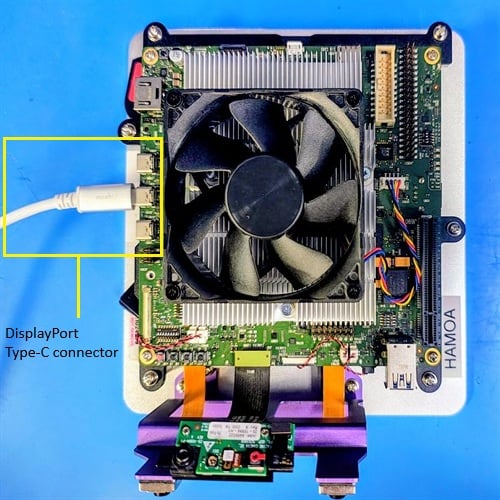
The IQ-X7181 evaluation kit (EVK) has three USB Type-C ports, all of which support DisplayPort output. Connect any standard DisplayPort monitor using a USB Type-C to DisplayPort cable or adapter.
Always power OFF the IQ-X7181 EVK before making any connections.
Verify the DisplayPort setup
Locate any of the three USB Type-C ports on the board as shown in the following figure.
Figure: IQ-X7181 USB Type-C DisplayPort connection
Connect a USB Type-C to DisplayPort cable from the USB Type-C port to the external monitor.
Power on the device and the external monitor. Weston launches automatically during boot.
Verify the display.The following Weston flower pattern displays on the external monitor, indicating a successful setup.
After you have set up the DisplayPort, run the following test applications to verify the display functionality:
Run Weston simple EGL
Verify composition and rendering of frames on your display.