

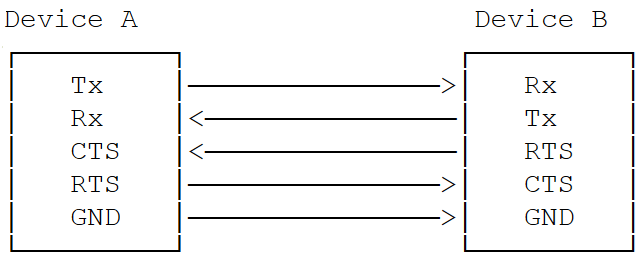
UART (Universal Asynchronous Receiver-Transmitter) transmits data asynchronously using start and stop bits instead of a clock signal. The receiving UART reads bits at a specific frequency known as the baud rate.

Key Parameters

  • Baud rate — Communication speed (bits per second)
  • Start/Stop bits — Frame delimiters
  • Parity bit — Optional error checking
  • Data bits — 5–9 bits per frame
  • Flow control — Hardware handshaking via CTS/RTS

Transfer Modes by Subsystem

SubsystemTransfer ModeBaud RatesNotes
LinuxFIFO, CPU DMA300 bps – 4 MbpsDMA ideal for Bluetooth modules
Boot (UEFI)FIFO onlyUp to 1152005–8 bits per character
aDSPFIFO only115200, 230400, 460800, 921600, 1M, 3M, 6M5–8 bits per character

Interface Components

Device Tree Sources

PlatformFile
Dragonwing IQ-8275arch/arm64/boot/dts/qcom/sa8295p.dtsi

APIs

SubsystemHeader
Linuxinclude/linux/tty.h
BootQcomPkg/Include/HSUart.h
aDSPadsp_proc/core/api/buses/uart.h

Software Configuration

Linux Device Tree Example

4-wire UART (with flow control):
uart7: serial@99c000 {
    compatible = "qcom,geni-uart";
    reg = <0 0x0099c000 0 0x4000>;
    clocks = <&gcc GCC_QUPV3_WRAP0_S7_CLK>;
    clock-names = "se";
    pinctrl-names = "default";
    pinctrl-0 = <&qup_uart7_cts>, <&qup_uart7_rts>,
                <&qup_uart7_tx>, <&qup_uart7_rx>;
    interrupts = <GIC_SPI 608 IRQ_TYPE_LEVEL_HIGH>;
    power-domains = <&rpmhpd SA8295P_CX>;
    interconnect-names = "qup-core", "qup-config";
    status = "disabled";
};
QUPAC access control:
// 4-wire HS UART
{ QUPV3_0_SE7, QUPV3_PROTOCOL_UART_4W, QUPV3_MODE_FIFO, AC_HLOS, TRUE, TRUE, FALSE }

// 2-wire UART (no flow control)
{ QUPV3_0_SE5, QUPV3_PROTOCOL_UART_2W, QUPV3_MODE_FIFO, AC_HLOS, TRUE, FALSE, FALSE }

Kernel Configuration

CONFIG_QCOM_GENI_SE=y
CONFIG_SERIAL_QCOM_GENI=y
Enable the UART node in the device tree:
+serial1 = &uart7;

+&uart7 {
+    status = "ok";
+};

Verification

1

Verify UART device registration

ls /dev/ttyHS*
# Expected: /dev/ttyHS1

dmesg | grep ttyH
2

Configure UART settings

stty -F /dev/ttyHS1 115200
3

Run loopback test

Open two SSH terminals.Terminal 1 (write):
echo "Hello UART" > /dev/ttyHS1
Terminal 2 (read):
cat /dev/ttyHS1

Debugging

mount -t debugfs none /sys/kernel/debug
echo -n "file qcom_geni_serial.c +p" > /sys/kernel/debug/dynamic_debug/control
echo -n "file serial_core.c +p" > /sys/kernel/debug/dynamic_debug/control
dmesg | grep -i uart
dmesg | grep ttyHS

Troubleshooting

lsmod | grep qcom_geni
cat /proc/device-tree/soc/serial@*/status
ls -la /dev/tty*
  • Verify device tree status is "ok"
  • Confirm CONFIG_SERIAL_QCOM_GENI=y
stty -F /dev/ttyHS1 -a
stty -F /dev/ttyHS1 115200
stty -F /dev/ttyHS1 crtscts    # enable flow control
stty -F /dev/ttyHS1 -crtscts   # disable flow control
ls -la /dev/ttyHS*
usermod -a -G dialout $USER

Resources