

Qualcomm Linux · Edge Impulse · Computer Vision
Train a paddle detector on Edge Impulse’s platform, deploy it to the IQ-8275 EVK, and get 2 ms NPU inference without writing a line of training code.
This is the fastest path from “I have images” to “it runs on the NPU.” No QAIRT SDK (Software Development Kit), no cross-compile toolchain, no C++ daemon. The expected time is under two hours, most of which is training on Edge Impulse’s servers. What you’ll have at the end: a native aarch64 binary running on your IQ-8275 EVK, detecting ping-pong paddles on the HTP (Hexagon Tensor Processor) NPU at 2 ms per inference. This tutorial assumes a freshly flashed IQ-8275 EVK running Qualcomm Linux. If you haven’t set up the board yet, follow the IQ-8275 EVK device setup guide first.
What you need
Step 1: Create the project
Log in to Edge Impulse Studio, click Create new project, name it (e.g.pingpong-paddle). Leave everything else as default. The project type is set when you add the learning block.
Step 2: Build your dataset
This is the most important step. The model is only as good as the photos it learns from. Go to Data acquisition in the left menu. Use Upload data or the Edge Impulse mobile app to collect images directly from your phone. Aim for at least 150–200 images across two categories: Photos with the paddle (paddles label):
- Different distances: close-up, arm’s length, across the table
- Different lighting: bright room, dim room, window light, lamp light
- Different backgrounds: desk, floor, wall, outdoors
- Different angles: straight on, tilted, partially hidden
- With and without a hand holding it
- The same environments without the paddle — roughly 20–30% of your total images
- These teach the model what “nothing here” looks like, which is half the job for a detector
paddles for all boxes.
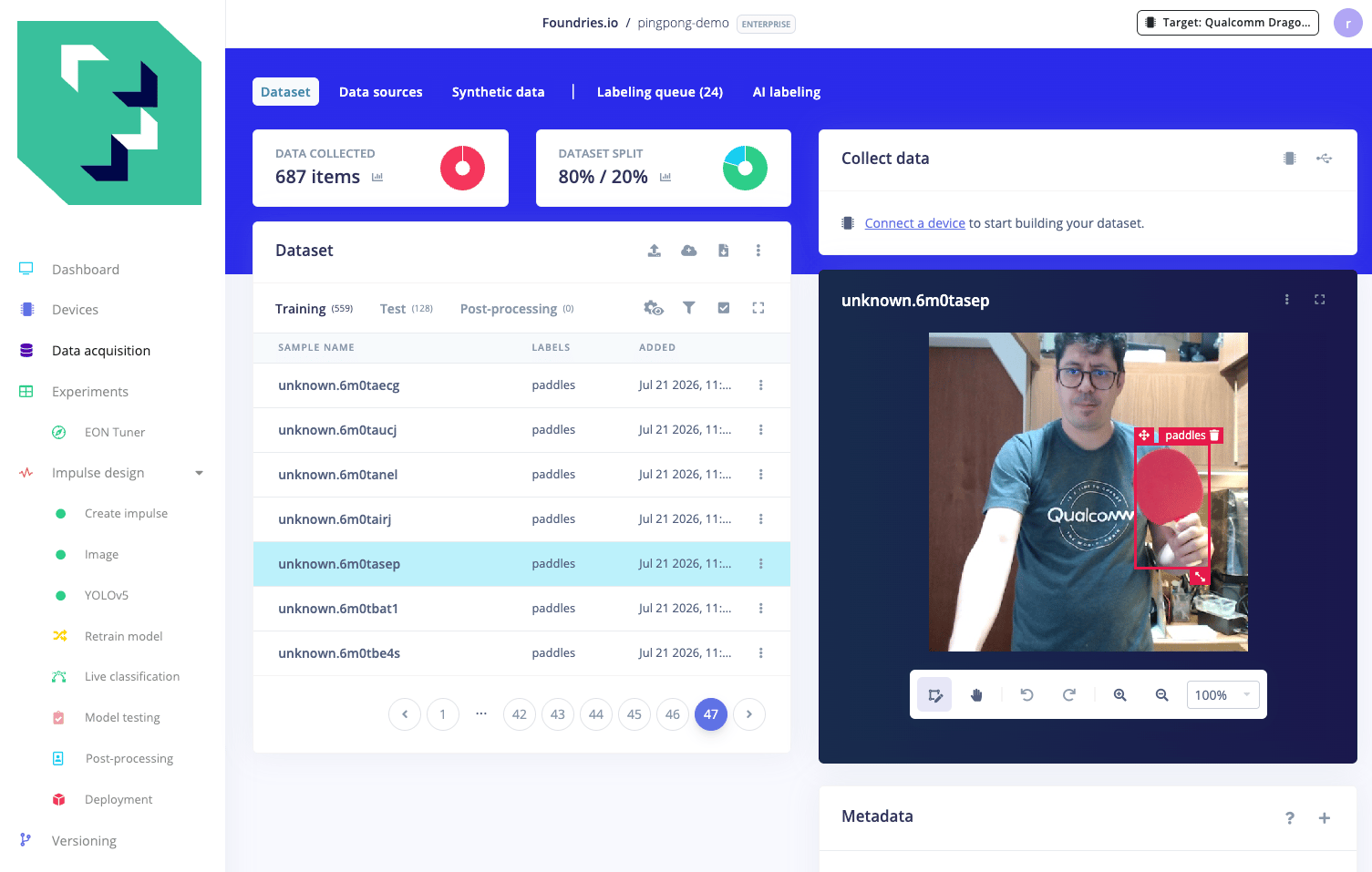
Variety beats quantity. 200 images across many scenes generalizes far better than 500 photos all taken from the same spot in the same room. If the model later fails on a specific scene (dim light, close-up, unusual angle), add more photos of that scene.
Step 3: Build the impulse
- Left menu: Impulse design → Create impulse.
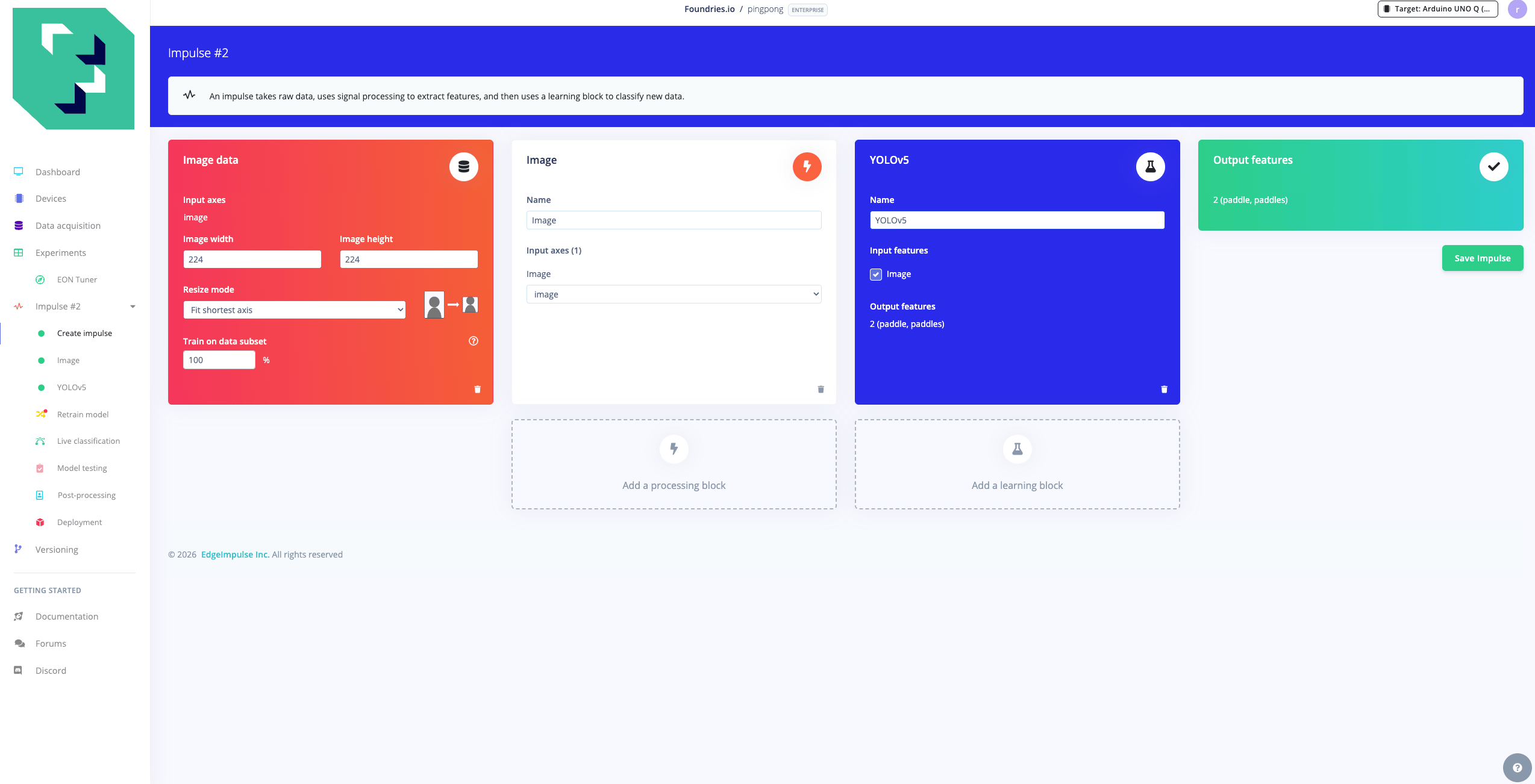
- Input block: Image, 320 × 320, Resize mode: Squash.
- Processing block: Image (Color depth: RGB).
- Learning block: Object Detection → YOLOv5 (Foundries.io).
- Click Save impulse.
YOLOv5 availability. YOLOv5 is no longer a built-in block in Edge Impulse Studio (removed February 2025). To add it to your project, push it as a custom block from edgeimpulse/ml-block-yolov5:After pushing, refresh Studio and YOLOv5 appears under Add learning block. Alternatively, YOLO-Pro (the built-in block, marked Developer Preview) works fine and produces equivalent results.
Step 4: Generate features
Left menu: Image → Generate features → click Generate features. Wait about 1–2 minutes. Confirm the summary shows your training items and 1 class (paddles).Step 5: Train
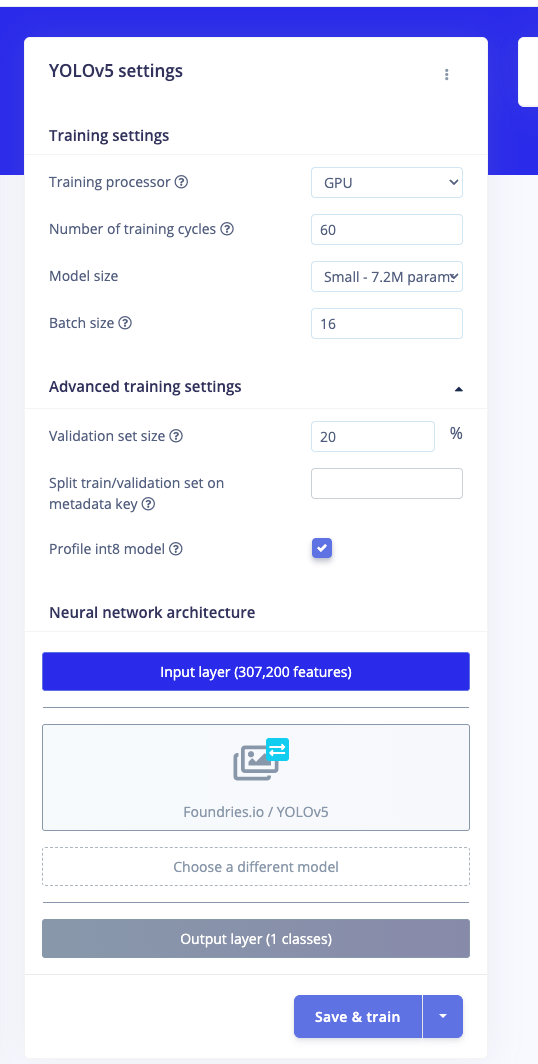
Left menu: YOLOv5, then configure:
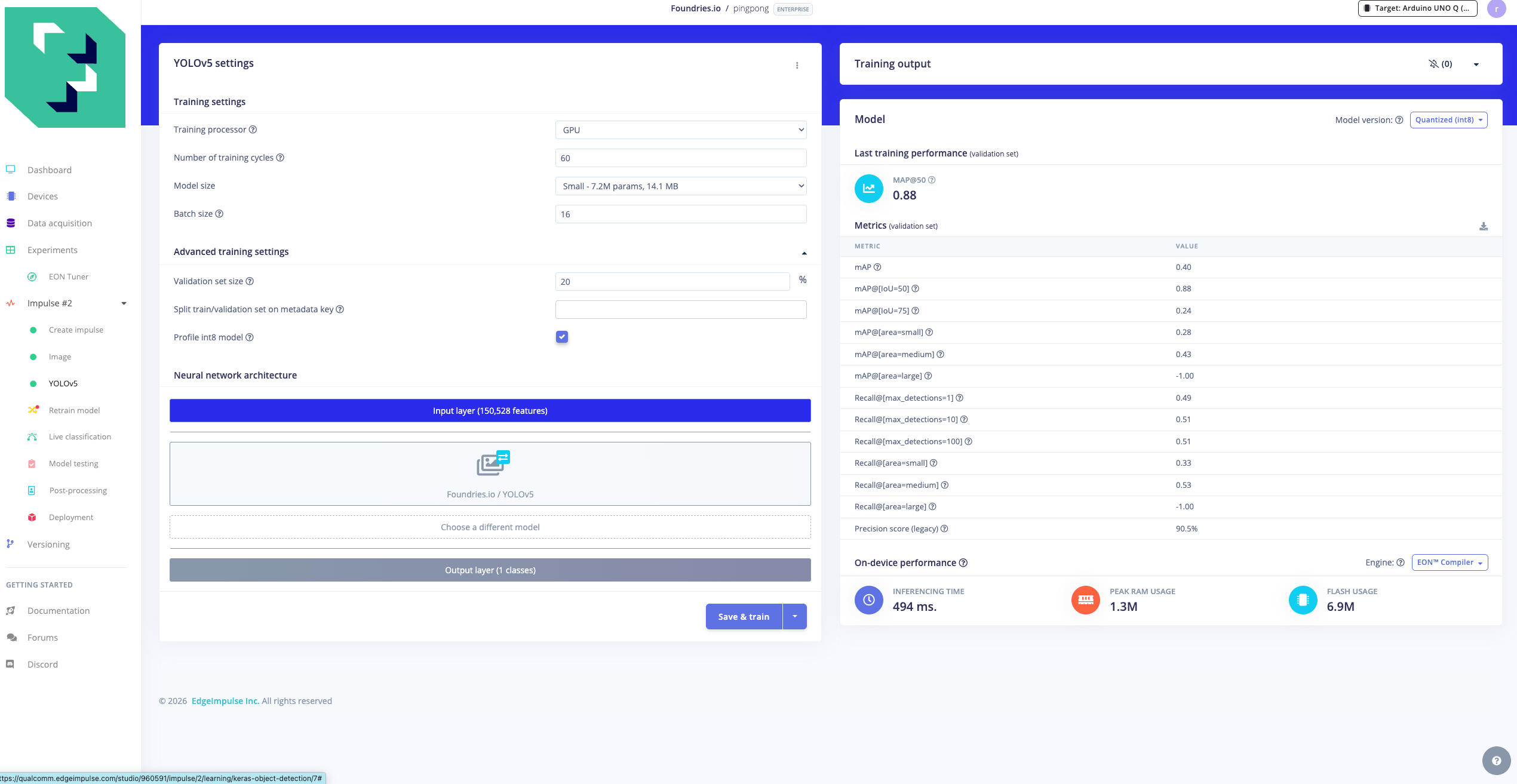
Click Save & train. Training runs on Edge Impulse’s GPU workers, about 10 to 15 minutes.
Step 6: Download the deployment binary
- Left menu: Deployment.
- Search for “Qualcomm Dragonwing IQ 8275 EVK (AARCH64 with Qualcomm QNN)”.
- Click Build.
- Download the
.eimfile (~20 MB).
.eim is a self-contained native aarch64 executable that embeds the model, the Edge Impulse Linux runtime, and the Qualcomm QNN (Qualcomm Neural Network) TFLite delegate. No separate runtime installation is needed on the board.
Step 7: Copy to the board and run
root / oelinux123. /home/weston is the home directory of the weston user — the Wayland compositor user pre-created on every stock Qualcomm Linux image. It is not specific to this tutorial; if your image uses a different user, replace weston with your username throughout.
On startup the binary prints a JSON handshake confirming it’s on the NPU:
engine_type: 4 with qnn_delegates means the graph is running on the HTP NPU via the QNN TFLite delegate.
After confirming the handshake, stop the .eim process with Ctrl-C before proceeding to Step 8 — the runner below will launch the model file for live detection.
Step 8: Run live detection
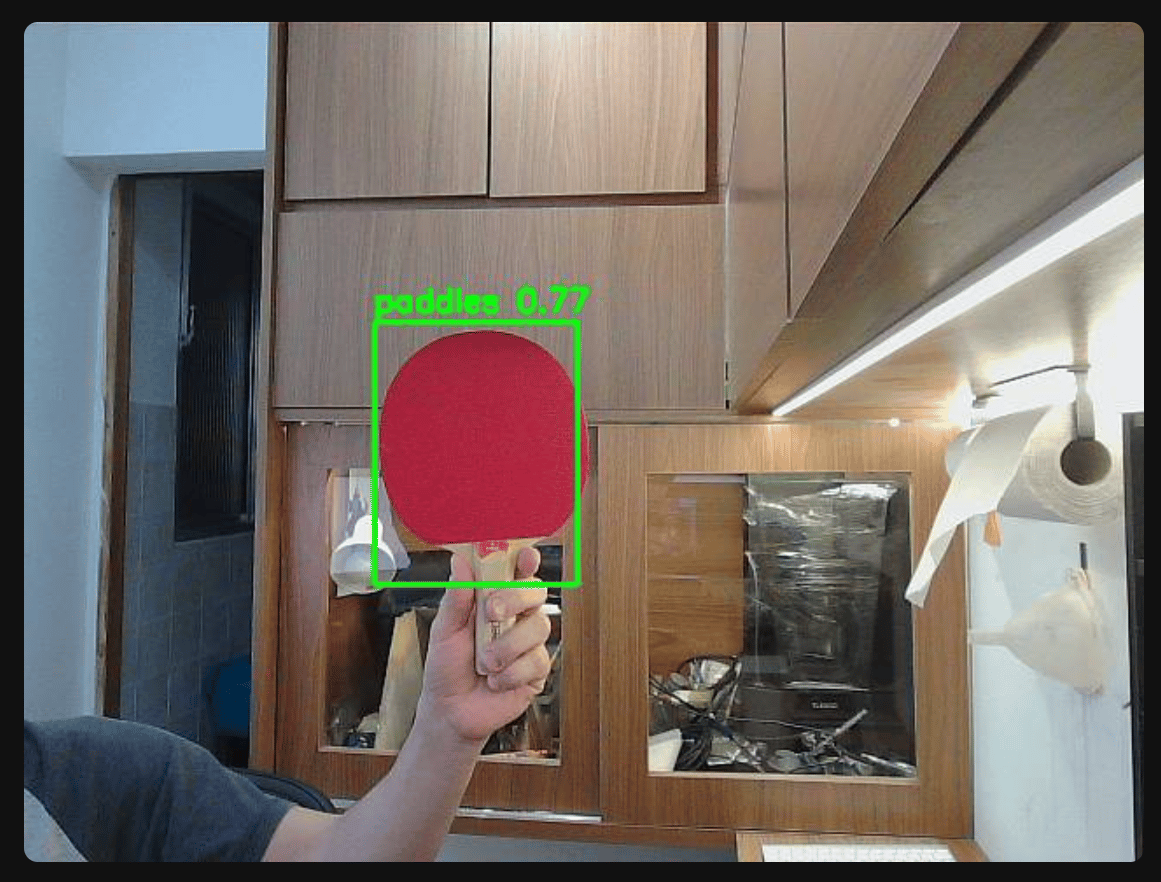
The.eim is a socket service: once started, it waits for frames and returns detections. To actually send it images and see results, use the edge-impulse-linux-runner CLI, it opens the board’s camera, streams frames to the .eim, and prints detections in real time.
.eim, and prints detection results with latency per frame. On the IQ-8275 EVK over 10 runs:
The 3 ms warm-up is a one-time cost on the first call while the QNN delegate compiles the graph for the HTP. Every call after that is 2 ms, resident in NPU memory.
Protocol detail. The
.eim speaks a JSON protocol over a UNIX socket. The correct message key for inference is classify_shm with features passed via POSIX shared memory, the more obvious classify key returns an error. The edge-impulse-linux-runner handles this correctly; if you build a custom client, use classify_shm.What’s happening under the hood
The.eim is the JIT deployment path: the model is stored as an INT8 TFLite graph and compiled for the HTP on the first inference call. This trades a small first-call cost (3 ms) for portability. The same binary runs on any QNN-capable board without recompilation.
The alternative is AOT (Ahead-Of-Time): compile the model offline with the QAIRT toolchain and ship a chip-specific context binary (.bin) that has zero warm-up but only runs on the exact HTP hardware version it was built for. Both paths reach 2 ms steady-state. The full QAIRT pipeline is documented in Paddle detection step by step with Qualcomm tools.
Next steps
- The full story: every design decision, failure, and benchmark: Teaching a Qualcomm chip to spot a ping-pong paddle
- Every command, every script, end to end: Paddle detection step by step with Qualcomm tools
- All source files inline (env.sh, conversion scripts, requirements): Companion files