

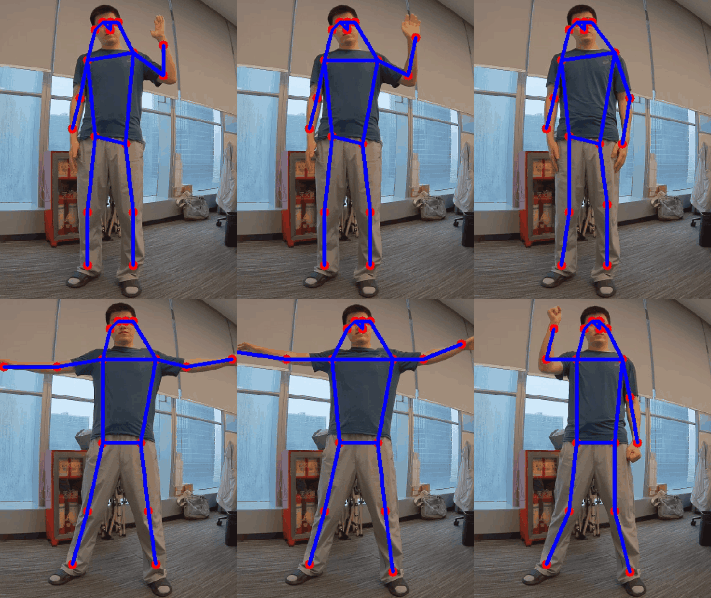
sample_hrnet_pose_estimation sample application provides high-precision human pose estimation. It processes input images and publishes the following ROS2 topics:
-
/pose_estimation_results: Output images with visualized pose keypoints. -
/pose_estimation_points: Raw keypoint coordinates in a structured message format.
For model information, see HRNetPose - Qualcomm AI Hub.
sample_hrnet_pose_estimation pipeline flow
The following figure shows the pipeline flow for sample_hrnet_pose_estimation.

sample_hrnet_pose_estimation pipeline.
ROS nodes used in the sample_hrnet_pose_estimation pipeline
The following table lists the ROS nodes used in the sample_hrnet_pose_estimation pipeline.
ROS topics used in the sample_hrnet_pose_estimation pipeline
The following table lists the ROS topics used in the sample_hrnet_pose_estimation pipeline.
/pose_estimation_points has the coordinates of 17 key points on the original image. You can subscribe to this topic for secondary development.The key points include: nose, left eye, and right eye. The following diagram lists the specific correspondence between each key point ID and body part.Prerequisites
You have set up the device, installed ROS2 Jazzy and Qualcomm Intelligent Robotics (QIR) SDK on the device according to Install the QIR SDK.Build from the source of sample_hrnet_pose_estimation
Build sample_hrnet_pose_estimation from source when you need to change the sample code. The device steps install the dependencies, clone the source repository, and build the package.
Device steps
1
Install dependency Debian packages from the qcom personal package archive (PPA)
Add the PPAs
2
Install QRB ROS packages
Install the packages
3
Download source code from qrb-ros-sample repository
Download the source code
4
Download model
Download the model
5
Build sample from source code
Build the sample application
6
Run the sample on device
Run the sample application